VMware 3V0-42-23 Exam Questions
Questions for the 3V0-42-23 were updated on : Feb 10 ,2026
Page 1 out of 4. Viewing questions 1-15 out of 51
Question 1
Refer to the exhibit.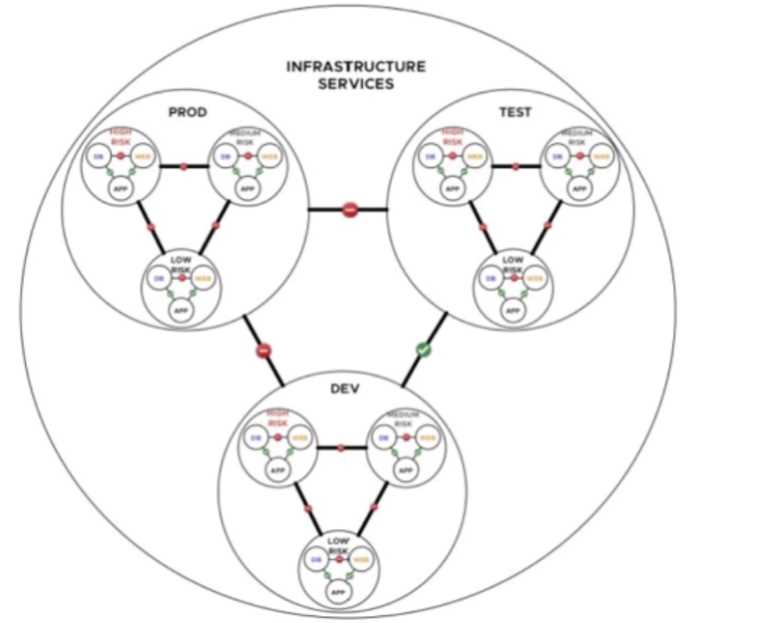
A financial company is adopting micro-services with the intent of simplifying network security. An
NSX architect is proposing a NSX segmentation logical design. The architect
has created a diagram to share with the customer.
Which design choice provides less management overhead?
- A. Create one firewall rule per application tier.
- B. Create one security policy per level of security.
- C. Create one firewall rule per level of security.
- D. Create a security policy based on IP groups.
Answer:
B
Explanation:
1. Understanding the Exhibit and NSX Security Segmentation
The diagram represents NSX-T logical segmentation for a microservices-based financial company.
It categorizes workloads into three distinct risk levels:
High Risk (Red)
Medium Risk (Yellow)
Low Risk (Blue)
The objective is to enforce security policies with minimal management overhead while maintaining
isolation between risk levels.
2. Why "One Security Policy Per Level of Security" is the Best Choice (B)
Grouping workloads based on security levels (High, Medium, Low) simplifies firewall rule
management.
By defining a single security policy per level of security, it reduces the need to create multiple firewall
rules for each microservice individually.
Advantages of this approach:
Scalability: New workloads can inherit existing security policies without manual rule creation.
Simplification: Instead of hundreds of firewall rules, a few policies handle traffic isolation effectively.
Automation-Friendly: Security policies can be applied dynamically using NSX-T security groups.
3. Why Other Options are Incorrect
(A - Create One Firewall Rule Per Application Tier)
High overhead and complexity: Each application has its own rule, making it harder to scale as the
number of applications grows.
Requires continuous manual rule creation, increasing administrative burden.
Better suited for small, static environments but not scalable for microservices.
(C - Create One Firewall Rule Per Level of Security)
Firewall rules alone do not provide granular segmentation.
A single firewall rule is insufficient to define security controls across multiple application tiers.
Security policies provide a more structured approach, including Layer 7-based controls and dynamic
membership.
(D - Create a Security Policy Based on IP Groups)
IP-based security policies are outdated and not scalable in a dynamic microservices environment.
NSX-T supports workload-based security policies instead of traditional IP-based segmentation.
Microservices often use dynamic IP addresses, making IP-based groups ineffective for security
enforcement.
4. NSX Security Best Practices for Microservices-Based Designs
Use NSX Distributed Firewall (DFW) for Micro-Segmentation
Apply security at the workload (vNIC) level to prevent lateral movement of threats.
Enforce Zero Trust security model by restricting traffic between risk zones.
Group Workloads by Security Posture Instead of Static IPs
Leverage dynamic security groups (tags, VM attributes) instead of static IPs.
Assign security rules based on business logic (e.g., production vs. development, PCI-compliant
workloads).
Use Security Policies Instead of Individual Firewall Rules
Policies provide abstraction, reducing the number of firewall rules.
Easier to manage and apply to multiple workloads dynamically.
Monitor and Automate Security Policies Using NSX Intelligence
Continuously analyze workload communication patterns using VMware Aria Operations for Networks
(formerly vRealize Network Insight).
Automate rule updates based on detected traffic flows.
Question 2
What is the function of the control plane in NSX?
- A. It provides the NSX APIs for automation and integration.
- B. It configures the data plane within the NSX environment.
- C. It handles access control within the NSX environment.
- D. It forwards traffic in the NSX environment.
Answer:
B
Explanation:
1. NSX Control Plane Responsibilities
The control plane is responsible for programming and distributing network configurations to the data
plane.
It ensures that forwarding decisions are precomputed and pushed to transport nodes (ESXi/KVM
hosts).
It does not forward traffic itself but instructs the data plane on how to do so.
2. Why "Configures the Data Plane" is the Correct Answer (B)
NSX Control Plane manages configuration and route distribution.
Uses Central Control Plane (CCP) to compute forwarding decisions.
Uses Local Control Plane (LCP) to communicate with Transport Nodes.
3. Why Other Options are Incorrect
(A - Provides APIs):
NSX APIs belong to the management plane, not the control plane.
(C - Handles Access Control):
Security policies are enforced in the data plane, not the control plane.
(D - Forwards Traffic):
The data plane is responsible for forwarding packets, not the control plane.
4. NSX Control Plane Design Considerations
Ensure NSX Managers (which include the control plane) are deployed in a 3-node cluster for high
availability.
BGP and OSPF routes should be dynamically distributed to transport nodes via the control plane.
Monitor NSX Manager performance to ensure routing convergence times are optimal.
VMware NSX 4.x Reference:
NSX-T Control Plane Architecture and Best Practices
NSX-T Routing and Forwarding Table Optimization
Question 3
A customer is planning to migrate their current legacy networking infrastructure to a virtual
environment, aiming to increase network flexibility and agility.
The customer is particularly interested in:
Multi-tenancy
Segmentation
Disaster recovery
The customer's current data center is split across three geographical locations, and they want a
solution that offers cross-site management and ensures seamless network connectivity.
Which of the following would be part of the optimal recommended design?
- A. Deploy NSX Multi-Site, Distributed Firewall for segmentation, and Tier-0 Gateway for multi- tenancy.
- B. Deploy NSX Federation, Distributed Firewall for segmentation, and Tier-0 Gateway for multi- tenancy.
- C. Deploy NSX Multi-Site, Gateway Firewall for segmentation, and Tier-1 Gateway for multi-tenancy.
- D. Deploy NSX Federation, Gateway Firewall for segmentation, and Tier-1 Gateway for multi-tenancy.
Answer:
B
Explanation:
1. Why NSX Federation is the Best Choice (Correct Answer - B)
NSX Federation enables centralized management of multiple NSX deployments across different sites.
Distributed Firewall (DFW) ensures security segmentation per tenant, even across data centers.
Tier-0 Gateway provides global routing for multi-tenancy, ensuring efficient traffic flow between
sites.
2. Why Other Options are Incorrect
(A - NSX Multi-Site Instead of Federation):
NSX Multi-Site only provides disaster recovery capabilities, not global policy enforcement.
(C - Gateway Firewall Instead of Distributed Firewall):
Gateway Firewalls secure North-South traffic but do not provide per-tenant segmentation at the
workload level.
(D - Tier-1 Instead of Tier-0 for Multi-Tenancy):
Multi-tenancy is best implemented at the Tier-0 level to handle global routing efficiently.
3. NSX Federation Best Practices for Multi-Tenancy and DR
Deploy a Global Manager (GM) for centralized security policy enforcement.
Ensure Tier-0 Gateway is configured in Active-Active mode for scalability.
Use BGP for dynamic routing between data centers.
VMware NSX 4.x Reference:
NSX Federation Architecture and Multi-Tenancy Guide
Disaster Recovery and Multi-Site Network Extension in NSX-T
Question 4
Which of the following would be an example of an assumption that a solutions architect needs to
consider in the design of an NSX solution?
- A. The customer thinks that NSX will be able to integrate with their existing infrastructure.
- B. The customer requires support for virtualized workloads across multiple hypervisors.
- C. The customer wants to be able to scale the NSX solution as their business grows.
- D. The customer has limited resources available for the implementation, such as personnel or hardware.
Answer:
A
Explanation:
1. Understanding Assumptions in NSX Design
Assumptions are conditions that are expected to be true but have not been verified.
A good NSX design requires assumptions to be validated before deployment to avoid unexpected
issues.
2. Why "Customer Assumes NSX Will Integrate with Existing Infrastructure" is Correct (A)
Integration with existing infrastructure (e.g., physical networks, firewalls, cloud providers) must be
validated.
Assuming compatibility without testing can cause deployment failures or feature limitations.
Common integration challenges include: VLAN scalability, MTU size mismatch, or unsupported
physical networking hardware.
3. Why Other Options are Incorrect
(B - Requirement for Multi-Hypervisor Support):
This is a defined requirement, not an assumption.
(C - Scalability Needs):
This is a business requirement, not an assumption.
(D - Limited Resources):
This is a constraint that affects the deployment, not an assumption.
4. NSX Design Considerations for Infrastructure Integration
Perform a thorough assessment of existing hardware and network compatibility.
Validate the interoperability of NSX with third-party services (firewalls, storage, monitoring tools).
Plan for phased integration testing to reduce risks.
VMware NSX 4.x Reference:
NSX-T Interoperability and Integration Guide
VMware Validated Design (VVD) for NSX Integration
Question 5
A Solutions Architect is helping an organization with the Physical Design of an NSX solution.
This information was gathered during the Assessment Phase:
There is a critical application used by the Finance Team.
The critical application has an availability and recoverability SLA of 99.999%.
The critical application is sensitive to network changes.
Which two selections should an architect include in their design? (Choose two.)
- A. Configure Tier-0 gateway for eBGP and ECMP.
- B. Enable BFD on Tier-0 gateway.
- C. Install and configure hosts with 100Gbps physical NICs.
- D. Configure multiple static routes on Tier-1 gateway.
- E. Configure Tier-1 gateway for eBGP and ECMP.
Answer:
A, B
Explanation:
1. Ensuring High Availability for Critical Applications
For a 99.999% SLA, the NSX solution must ensure high availability (HA), redundancy, and failover
mechanisms.
BGP with ECMP (Equal-Cost Multi-Path) enables multiple active paths for traffic forwarding,
improving resiliency.
BFD (Bidirectional Forwarding Detection) ensures sub-second failure detection, minimizing
downtime.
2. Why "BGP with ECMP and BFD" is Correct (A, B)
(A - Configure Tier-0 for eBGP and ECMP)
ECMP allows multiple Tier-0 edges to be active, improving fault tolerance.
BGP dynamically advertises routes, ensuring efficient path selection.
(B - Enable BFD on Tier-0 Gateway)
BFD allows rapid failure detection (sub-second convergence) between NSX Edges and upstream
routers.
Reduces packet loss and optimizes failover for North-South traffic.
3. Why Other Options are Incorrect
(C - Install Hosts with 100Gbps NICs):
While high-speed NICs improve performance, they do not ensure application availability.
(D - Configure Multiple Static Routes on Tier-1):
Static routes do not provide dynamic failover, making them unsuitable for high-availability designs.
(E - Configure eBGP on Tier-1):
BGP is typically used on Tier-0 for external routing, not Tier-1.
4. NSX Best Practices for High-Availability Applications
Use Active-Active Tier-0 Gateways with ECMP for redundancy.
Ensure BFD is enabled to provide real-time failure detection.
Implement distributed load balancing and failover testing.
VMware NSX 4.x Reference:
NSX-T BGP and ECMP Deployment Guide
NSX High Availability Design Best Practices
Question 6
A Network Architect has been tasked with recommending a solution for traffic management to a
client. The client has asked about the differences between IP hash and LACP for link integration.
Which of the following is an accurate description of the differences?
- A. IP hash uses a control protocol to negotiate link aggregation, while LACP uses a hash function to distribute traffic based on the source and destination IP addresses.
- B. LACP uses a hash function to distribute traffic based on the source and destination IP addresses, while IP hash uses a control protocol to negotiate link aggregation.
- C. IP hash uses a hash function to distribute traffic based on the source and destination IP addresses, while LACP uses a control protocol to negotiate link aggregation.
- D. LACP uses a control protocol to negotiate link aggregation, while IP hash uses a hash function to distribute traffic based on the source and destination MAC addresses.
Answer:
C
Explanation:
1. Understanding Link Aggregation in NSX
IP Hash and LACP (Link Aggregation Control Protocol) are methods for link aggregation used in NSX-T
networking.
Both techniques allow multiple physical links to be combined into a logical interface for higher
bandwidth and redundancy.
2. Why "IP Hash Uses a Hash Function, LACP Uses a Control Protocol" is Correct (C)
IP Hash:
Uses a hashing function to distribute traffic based on source and destination IP addresses.
It does not negotiate link aggregation dynamically.
LACP:
Uses a control protocol to dynamically negotiate and maintain aggregated links.
Automatically detects and manages failures in aggregated links.
3. Why Other Options are Incorrect
(A - IP Hash Uses Control Protocol):
IP Hash does not use a control protocol; it only applies a hash function.
(B - LACP Uses Hashing Instead of Control Protocol):
LACP does not use a hash function for traffic distribution; it uses a negotiation protocol.
(D - LACP Hashes MAC Instead of IP):
LACP does not perform hashing; it manages link aggregation dynamically.
4. NSX Best Practices for Link Aggregation
LACP is recommended for environments where dynamic link negotiation is required.
IP Hash is used in environments where static load balancing is preferred.
Ensure the correct uplink profile is assigned to NSX Transport Nodes for link aggregation.
VMware NSX 4.x Reference:
NSX-T Link Aggregation and NIC Teaming Best Practices
NSX-T Uplink Profile Design Guide
Question 7
Which is a requirement in the design of an NSX Edge VM that is manually deployed?
- A. NSX Edge VM must be installed on Host 1.
- B. NSX Edge VM must join with the management plane.
- C. NSX Edge VM must be registered to a vCenter Server.
- D. NSX Edge VM must be connected to a VLAN segment.
Answer:
B
Explanation:
1. Understanding NSX Edge VM Deployment
NSX Edge VMs provide services like NAT, firewalling, VPN, and load balancing.
Manually deployed NSX Edge nodes must be configured to join the management plane before they
can function properly.
2. Why "Joining the Management Plane" is Correct (B)
NSX Edge must register with NSX Manager, which operates in the management plane.
This allows Edge VMs to receive configurations, participate in Edge Clusters, and provide network
services.
Without registration, the Edge VM will not receive the required control plane updates.
3. Why Other Options are Incorrect
(A - Installed on Host 1):
NSX Edge can be installed on any ESXi/KVM host. There is no restriction to a specific host.
(C - Registered to vCenter):
NSX Edge does not require vCenter Server registration to function in an NSX-T environment.
(D - Connected to a VLAN Segment):
Edges can use either VLAN-backed or overlay-backed transport zones, but VLAN connectivity is not a
strict requirement.
4. NSX Edge Deployment Best Practices
Ensure Edge nodes are properly connected to the management plane before configuring services.
Use Edge Clusters for high availability (HA) and load balancing of services.
Verify the correct Uplink Profile is used for external connectivity.
VMware NSX 4.x Reference:
NSX-T Edge Node Deployment Guide
NSX-T Management Plane and Control Plane Integration
Question 8
What is the function of the data plane in NSX?
- A. It controls the behavior of the NSX environment.
- B. It manages the data traffic in the NSX environment.
- C. It provides the NSX APIs for automation and integration.
- D. It handles the configuration of the NSX environment.
Answer:
B
Explanation:
1. Understanding NSX-T Data Plane Functionality
The data plane is responsible for forwarding packets between workloads within the NSX
environment.
It operates at the host level (ESXi/KVM transport nodes), using the N-VDS or vSphere VDS for
network traffic forwarding.
2. Why "Manages Data Traffic" is the Correct Answer (B)
The data plane moves packets based on the forwarding decisions made by the control plane.
NSX uses the Geneve encapsulation protocol for overlay traffic.
Distributed Firewall (DFW) operates in the data plane to enforce security policies.
3. Why Other Options are Incorrect
(A - Controls Behavior):
This is the role of the Control Plane, not the Data Plane.
(C - Provides APIs):
APIs are part of the Management Plane.
(D - Handles Configuration):
Configuration is managed at the Control and Management Planes.
4. NSX-T Data Plane Design Considerations
Ensure that Transport Zones and TEPs (Tunnel Endpoints) are correctly configured.
Use DPDK-based acceleration for high-performance workloads.
Monitor data plane performance metrics using NSX Manager.
VMware NSX 4.x Reference:
NSX-T Data Plane Architecture and Design Guide
NSX-T Performance Optimization for Data Plane Traffic
Question 9
A rapidly growing e-commerce company, with a global customer base, is seeking to enhance their
current network infrastructure to ensure a seamless and secure user experience. They have opted for
VMware NSX to leverage software-defined networking (SDN) capabilities, and are particularly
interested in employing NSX Edge to maximize their network performance.
A solutions architect is tasked with designing an effective and efficient solution using NSX Edge that
meets the customer's requirements. The design should incorporate North-South routing to handle
traffic to and from the internet.
To meet the company's requirements, what optimal solution should the solutions architect
recommend, utilizing NSX Edge?
- A. Deploy a single NSX Edge node for North-South routing services.
- B. Deploy a single NSX Edge node and use a separate physical router for East-West routing.
- C. Deploy multiple NSX Edge nodes and configure a Tier-0 Gateway in Active-Standby mode for North-South routing services.
- D. Deploy multiple NSX Edge nodes and configure a Tier-0 Gateway in Active-Active mode for North- South routing services.
Answer:
D
Explanation:
1. Importance of NSX Edge for North-South Traffic
NSX Edge nodes provide routing, NAT, firewall, and load balancing services for North-South traffic
(external connectivity).
Active-Active Tier-0 Gateway provides maximum performance and resiliency for high traffic volume.
2. Why Active-Active Tier-0 with Multiple Edge Nodes is the Best Choice (D)
Supports Equal-Cost Multi-Path (ECMP) routing, distributing North-South traffic across multiple
paths.
Provides better scalability and performance than Active-Standby mode.
Ideal for high-volume applications like e-commerce sites that require low-latency, high-throughput
connections.
3. Why Other Options are Incorrect
(A - Single NSX Edge Node):
Single Edge Nodes introduce a single point of failure.
(B - Using a Physical Router for East-West Routing):
NSX handles East-West traffic internally using Distributed Routing.
(C - Active-Standby Tier-0 Gateway):
Active-Standby mode does not provide load balancing across multiple nodes.
4. NSX Edge and Tier-0 Gateway Design Considerations
Ensure sufficient bandwidth allocation for North-South traffic.
Use BGP or OSPF for dynamic route advertisement.
Configure ECMP for efficient multi-path forwarding.
VMware NSX 4.x Reference:
NSX-T Edge Node Scaling and Performance Best Practices
Tier-0 Gateway Active-Active vs. Active-Standby Deployment Guide
Question 10
Which of the following would be an example of a customer requirement that a solutions architect
must consider in the design of an NSX solution?
- A. A customer wants to implement segmentation to improve network security.
- B. A customer has a limited budget for the NSX implementation.
- C. A customer assumes that NSX will be able to integrate with their existing infrastructure.
- D. A customer has limited resources available for the implementation, such as personnel or hardware.
Answer:
A
Explanation:
1. Understanding Customer Requirements vs. Constraints
Customer requirements are business or technical needs that must be met within the NSX solution
design.
Constraints are limitations (e.g., budget, hardware, personnel) that must be worked around but do
not define the primary objective.
2. Why "Implementing Segmentation for Security" is the Correct Answer (A)
Segmentation improves security posture and compliance (e.g., PCI-DSS, GDPR, HIPAA).
Micro-segmentation with NSX Distributed Firewall (DFW) prevents lateral movement of threats.
It is a functional requirement, meaning the NSX solution must be designed to meet this security goal.
3. Why Other Options are Incorrect
(B - Budget Limitation):
Budget is a constraint, not a functional requirement.
(C - Assumption of NSX Integration):
Assumptions are not requirements; proper validation is needed.
(D - Limited Personnel or Hardware):
This is a deployment constraint, not a requirement.
4. NSX Design Considerations for Network Segmentation
Use NSX Distributed Firewall for micro-segmentation.
Define security groups based on workloads, users, or application tiers.
Ensure policies are aligned with compliance frameworks.
VMware NSX 4.x Reference:
NSX-T Security and Micro-Segmentation Best Practices
NSX Design Considerations for Network Segmentation
Question 11
A digital marketing agency is planning to modernize its IT infrastructure to accommodate a growing
number of applications and services. The agency's current physical network infrastructure is complex
and difficult to manage due to the high number of VLANs. They have chosen VMware NSX as their
preferred network virtualization platform, aiming to simplify the network design and increase
flexibility. The agency is particularly interested in creating isolated networks for each application and
optimizing East-West traffic.
Which of the following would be part of the optimal recommended design?
- A. Deploy NSX and create VLAN-backed segments for each application, connected via Tier-1 Gateways.
- B. Deploy NSX and create VLAN-backed segments for each application, connected via NSX Edge nodes.
- C. Deploy NSX and create Overlay Networks using segments for each application, connected via Tier- 1 Gateways.
- D. Deploy NSX and create Overlay Networks using segments for each application, connected via NSX Edge nodes.
Answer:
C
Explanation:
1. Why Overlay Networks & Tier-1 Gateways are the Best Choice (Correct Answer - C)
Using NSX Overlay Networks eliminates the complexity of VLAN-based segmentation, providing
greater scalability and automation.
Each application gets its own NSX segment, ensuring strong isolation and improved East-West traffic
flow.
Tier-1 Gateways handle intra-application traffic efficiently, reducing overhead on Tier-0 Gateways.
2. Why Other Options are Incorrect
(A & B - VLAN-Backed Segments):
VLANs limit scalability and increase network management complexity.
(D - NSX Edge Nodes Instead of Tier-1 Gateways):
NSX Edge nodes are used for North-South traffic. East-West traffic should be handled at the Tier-1
level for efficiency.
3. NSX-T Network Design Best Practices
Use Overlay Networks to eliminate VLAN scaling limitations.
Implement micro-segmentation via NSX Distributed Firewall for application security.
Leverage Tier-1/Tier-0 hierarchy to separate East-West and North-South traffic.
VMware NSX 4.x Reference:
NSX-T Overlay Networking and Transport Zone Design Guide
NSX-T Tier-1 vs. Tier-0 Gateway Best Practices
Question 12
A customer has an application running on multiple VMs and requires a high-performance network
with low latency.
Which NSX feature can provide the desired performance boost for this use case?
- A. DPU-Based Acceleration
- B. Distributed Firewall
- C. L7 Application Load Balancer
- D. Edge Firewall
Answer:
A
Explanation:
1. What is DPU-Based Acceleration?
DPU (Data Processing Unit) acceleration enables offloading networking, security, and storage
functions from the CPU to a dedicated hardware accelerator (DPU).
Reduces CPU overhead for packet processing, enabling low-latency and high-throughput networking
for demanding applications.
Best suited for high-performance workloads, including NFV, Telco, and HPC environments.
2. Why DPU-Based Acceleration is the Correct Answer (A)
Bypassing the hypervisor’s CPU for packet forwarding significantly improves networking efficiency
and reduces jitter.
Improves East-West traffic performance, allowing ultra-fast VM-to-VM communication.
Ideal for financial services, AI/ML workloads, and large-scale enterprise applications.
3. Why Other Options are Incorrect
(B - Distributed Firewall):
DFW is used for micro-segmentation, not performance enhancement.
(C - L7 Load Balancer):
L7 Load Balancers optimize application traffic, but they do not improve raw networking performance.
(D - Edge Firewall):
Edge Firewalls control North-South traffic but do not enhance low-latency intra-cluster traffic.
4. NSX Performance Optimization Strategies Using DPU
Ensure DPU-enabled NICs are properly installed and configured on NSX Transport Nodes.
Leverage Multi-TEP configurations for optimal traffic balancing.
Use NSX Bare-Metal Edge Nodes with DPDK-enabled acceleration for high-throughput workloads.
VMware NSX 4.x Reference:
VMware NSX Performance Optimization Guide
DPU-Based Acceleration and SmartNIC Deployment Best Practices
Question 13
A Solutions Architect is helping an organization with the Conceptual Design of an NSX solution.
This information was gathered by the architect during the Discover Task of the Engagement Lifecycle:
There are applications which use IPv6 addressing.
Network administrators are not familiar with NSX solutions.
Hosts can only be configured with two physical NICs.
There is an existing management cluster to deploy the NSX components.
Dynamic routing should be configured between the physical and virtual network.
There is a storage array available to deploy NSX components.
Which constraint was documented by the architect?
- A. Dynamic routing should be configured between the physical and virtual network.
- B. There are enough CPU and memory resources in the existing management cluster.
- C. Hosts can only be configured with two physical NICs.
- D. There are applications which use IPv6 addressing.
Answer:
C
Explanation:
1. Understanding Constraints in NSX Design
A constraint is a limiting factor in a design that cannot be changed and must be worked around.
In this case, the organization’s hosts are restricted to only two physical NICs, which can impact:
Overlay network design (Geneve traffic, TEPs allocation).
Traffic segmentation between management, storage, and data plane traffic.
High availability and redundancy configurations for NSX Edge and ESXi hosts.
2. Why "Hosts can only be configured with two physical NICs" is the Correct Answer (C)
NIC limitations can impact NSX-T Transport Node Profiles, as best practices recommend at least 4
NICs (2 for management and vSAN, 2 for overlay transport).
With only two NICs, careful consideration must be given to:
Uplink Profile design (Active/Active vs. Active/Standby).
Physical redundancy using NIC teaming and VLAN segmentation.
Possible impact on performance if multiple types of traffic share the same NIC.
3. Why Other Options are Incorrect
(A - Dynamic Routing as a Constraint):
Dynamic routing (e.g., BGP, OSPF) is a design choice, not a hard constraint.
(B - CPU & Memory Availability in Management Cluster):
Having resources available is an enabler, not a constraint.
(D - IPv6 Applications):
IPv6 support is an NSX capability, not a constraint.
4. NSX Design Considerations for NIC-Constrained Hosts
Leverage VLAN-backed segments for underlay traffic.
Configure NIC teaming to optimize failover strategies.
Utilize Multi-TEP configurations to balance overlay traffic effectively.
Ensure NSX Edge nodes use DPDK-enabled NICs for high performance.
VMware NSX 4.x Reference:
NSX-T Transport Node Profile Design Guide
VMware Best Practices for NIC Teaming and Traffic Segmentation
NSX-T BGP and OSPF Routing Design Considerations
Question 14
A global media organization is planning to deploy VMware NSX to manage their network
infrastructure. The organization needs a unified networking and security platform that can handle
their geographically dispersed data centers while providing high availability, seamless workload
mobility, and efficient disaster recovery. A Solutions Architect is tasked with designing a multi-
location NSX deployment that addresses requirements.
Given the organization's needs, how should the Solutions Architect design the multi-location NSX
deployment?
- A. Deploy NSX in a single location and use VPNs to connect the other locations to the primary site.
- B. Deploy NSX independently in each location and manage each location separately.
- C. Deploy NSX Federation to manage local NSX Managers in each location.
Answer:
C
Explanation:
1. Why NSX Federation is the Right Solution (Correct Answer - C)
NSX Federation allows centralized management of multiple NSX environments across locations.
Enables seamless workload mobility and security policy enforcement across data centers.
Supports disaster recovery by ensuring consistent network and security policies are applied globally.
Key Benefits Include:
Global Security and Networking Policy Management.
Centralized Administration for all NSX deployments.
Automated failover and disaster recovery across sites.
2. Why Other Options are Incorrect
(A - VPNs Only):
VPNs alone do not provide unified management; they only secure site-to-site communication.
(B - Independent NSX Instances):
Managing separate NSX instances per site is complex and does not support global policy
synchronization.
3. Key Considerations for NSX Federation Deployment
Each NSX site must be running the same NSX version and build.
A Global Manager (GM) is required for centralized management.
Inter-site connectivity must support high-performance and low-latency communication for real-time
policy enforcement.
VMware NSX 4.x Reference:
NSX Federation Architecture and Deployment Guide
VMware NSX Federation for Multi-Data Center Management Best Practices
Question 15
A company is planning to use NSX to provide network services for a highly distributed application
that spans multiple data centers and cloud environments. A Solutions Architect is responsible for
designing the network services to ensure that the application is highly available and performs well.
Which of the following NSX features should the Solutions Architect use to achieve this goal?
- A. Network Address Translation (NAT)
- B. Virtual Private Networks (VPNs)
- C. Distributed Firewall
- D. Advanced Load Balancer
Answer:
D
Explanation:
1. NSX and Multi-Data Center/Cloud Applications
When designing an NSX architecture for highly distributed applications, key concerns include:
High availability (HA) across multiple locations.
Load balancing traffic efficiently to prevent bottlenecks.
Optimized North-South and East-West traffic flow to minimize latency.
2. Why Advanced Load Balancer (Avi) is the Best Choice (Correct Answer - D)
NSX Advanced Load Balancer (Avi) is designed for multi-cloud environments, enabling global
application delivery across data centers and public clouds.
It provides intelligent traffic distribution across different locations, ensuring optimal application
performance and resilience.
Supports active-active, active-passive, and disaster recovery failover scenarios.
Key Features Include:
Global Load Balancing (GSLB) for cross-data center traffic management.
L7 Application Load Balancing with WAF for security and optimization.
Auto-scaling capabilities to adjust based on demand.
3. Why Other Options are Incorrect
(A - NAT):
NAT translates IP addresses, but it does not optimize performance or manage traffic loads across data
centers.
(B - VPNs):
VPNs provide secure connectivity, but they do not distribute application traffic intelligently.
(C - Distributed Firewall):
DFW is critical for security and segmentation but does not balance application traffic.
4. Key Design Considerations for NSX Advanced Load Balancer
Ensure Edge nodes are sized properly to handle high volumes of traffic.
Configure GSLB if using multi-cloud applications to route users to the closest available data center.
Monitor performance metrics such as latency, requests per second (RPS), and failover handling.
VMware NSX 4.x Reference:
NSX Advanced Load Balancer (Avi) Architecture Guide
Global Server Load Balancing (GSLB) Deployment Best Practices
NSX Multi-Cloud Networking and Application Delivery Guide