VMware 2V0-62-23 Exam Questions
Questions for the 2V0-62-23 were updated on : Feb 10 ,2026
Page 1 out of 5. Viewing questions 1-15 out of 70
Question 1
HOTSPOT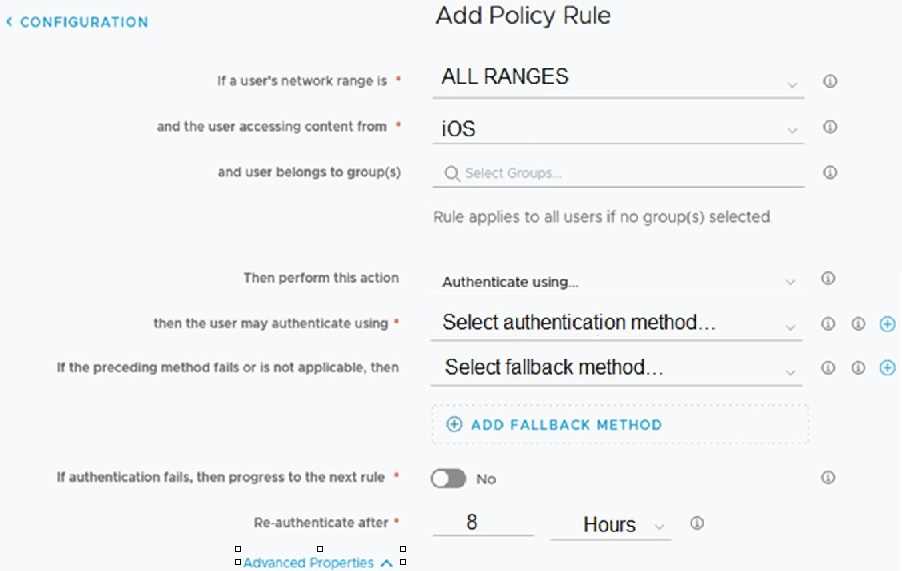
Refer to the exhibit.
An administrator is creating a new iOS Access Policy.
Where does the administrator click to add a Custom Error Message? Mark your answer by clicking on
the image.
Answer:
None
Explanation: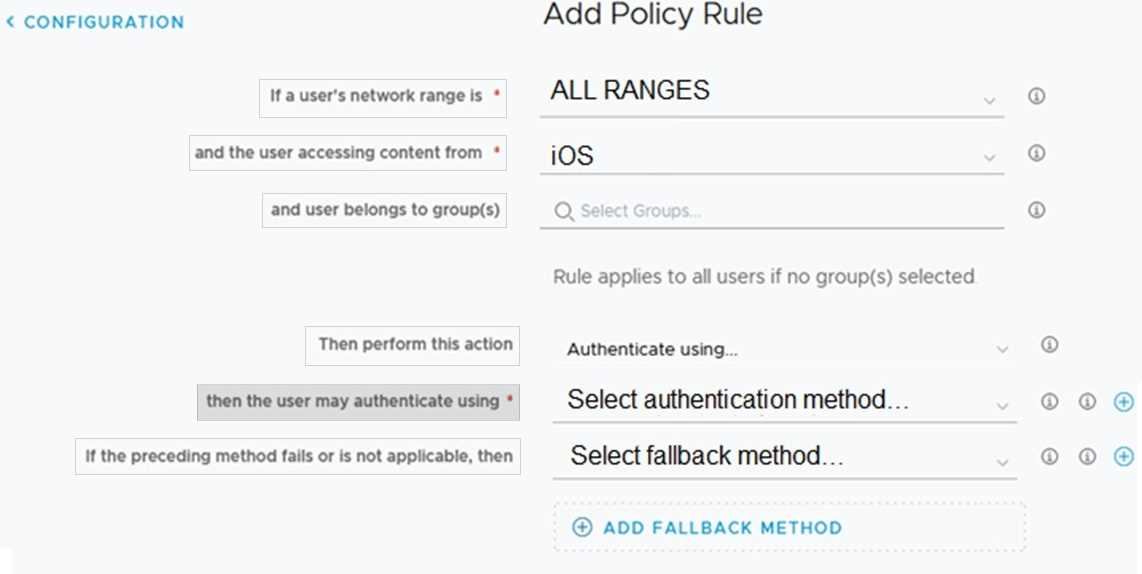
Question 2
A Workspace ONE UEM administrator is working on a special project where they have to grant access
to their environment for a limited time.
What is the best method for achieving this goal?
- A. Create an Admin Group with custom group assignments.
- B. Create an Admin Account and remove permissions.
- C. Create a limited Admin Account.
- D. Create a Temporary Admin Account.
Answer:
D
Explanation:
For granting access to a Workspace ONE UEM environment for a limited time, creating a Temporary
Admin Account is the best method. This account can have time-bound permissions suitable for the
duration
of
the
special
project.
Reference: VMware Workspace ONE UEM documentation on admin account management.
Question 3
Which is required to deploy managed content to an end user’s device?
- A. File application
- B. Web application
- C. Content application
- D. Tunnel application
Answer:
C
Explanation:
To deploy managed content to an end user's device, a Content application is required. This type of
application specializes in securely managing and distributing content to devices managed by
Workspace
ONE
UEM.
Reference: VMware documentation on content management and deployment.
Question 4
What are three triggers that can be used in Workspace ONE Intelligence Workflows? (Choose three.)
- A. Automatic
- B. Device Check-in
- C. Schedule
- D. Manual
- E. User Defined
- F. Administrator Defined
Answer:
A, C, D
Explanation:
https://docs.vmware.com/en/VMware-Workspace-ONE-Intelligence/services/intelligence-documentation/GUID-IntelFreestyle.html
Automatic - Automatically execute the workflow when incoming events match the trigger rule. Select
whether this trigger should execute on existing data upon save or only on new incoming data. This
menu item is supported for all integration types. Automatic triggers act on real time event data as it
is received from the selected data source.
Schedule - Define when the workflow runs. The data from the reports data warehouse provides
snapshot and historical data for Freestyle when setting up scheduled workflows.
Manual - Execute the workflow on-demand (good for one-time actions). The data from the reports
data warehouse provides snapshot and historical data for Freestyle when setting up manual, one-
time workflows.
Question 5
Which three LDA directories are supported by Workspace ONE Access? (Choose three.)
- A. IBM Tivoli Directory
- B. Oracle LDAP
- C. OpenLDAP
- D. FreelPA Directory
- E. NetlQ eDirectory
Answer:
A, B, C
Explanation:
Supported LDAP Directories You can integrate the following types of LDAP directories: n OpenLDAP -
2.4.42 n Oracle LDAP - Directory Server Enterprise Edition 11g, Release 1 (11.1.1.7.0) n IBM Tivoli
Directory Server 6.3.1
Question 6
When creating Workspace ONE Intelligence Dashboards, what helps visualize collected data?
- A. IGizmos
- B. Snapshots
- C. Widgets
- D. Elements
Answer:
C
Explanation:
Widgets in Workspace ONE Intelligence Dashboards are used to visualize the collected data. They
provide a way to display data insights in a user-friendly and customizable manner.
Reference: VMware Workspace ONE Intelligence documentation on dashboards.
Question 7
A Workspace ONE UEM administrator is concerned about the security of their organization's mobile
devices. The concern is with jail-broken or rooted devices accessing company resources or navigating
within the company network. The company's CIO wants a no-tolerance policy for devices in this
state, requesting that they be removed immediately if detected.
How can the administrator enforce the policy using Workspace ONE UEM?
- A. Configure a compliance policy to check for Compromised Status = Compromised. Configure the compliance action to send an email to the user asking them to unenroll.
- B. Configure an application blacklist policy for one of the apps that is used to jail-break or root devices.
- C. Configure a compliance policy to check for Compromised Status = Compromised. Configure the compliance action to enterprise wipe the device immediately.
- D. Configure a daily report checking for compromised devices. Manually send enterprise wipe commands to each device based on the devices listed in the report.
Answer:
C
Explanation:
To enforce a no-tolerance policy for jailbroken or rooted devices, an administrator should configure a
compliance policy in Workspace ONE UEM that checks for a compromised status. If a device is
compromised, the configured action should be to enterprise wipe the device immediately.
Reference: VMware Workspace ONE UEM documentation on compliance policies.
Question 8
Which three are benefits of a Workspace ONE Content productivity application? (Choose three.)
- A. Promote Content Disaster Recovery.
- B. Secure Document distribution and mobile access.
- C. Secure application distribution and mobile access.
- D. Protect sensitive content in a corporate container.
- E. Protect certificate keychain from third party access.
- F. Promote secure collaboration.
Answer:
B, D, F
Explanation:
Workspace ONE Content offers benefits such as secure document distribution and mobile access,
protecting sensitive content within a corporate container, and promoting secure collaboration among
users.
These
features
enhance
both
security
and
productivity.
Reference: VMware Workspace ONE Content documentation.
Question 9
HOTSPOT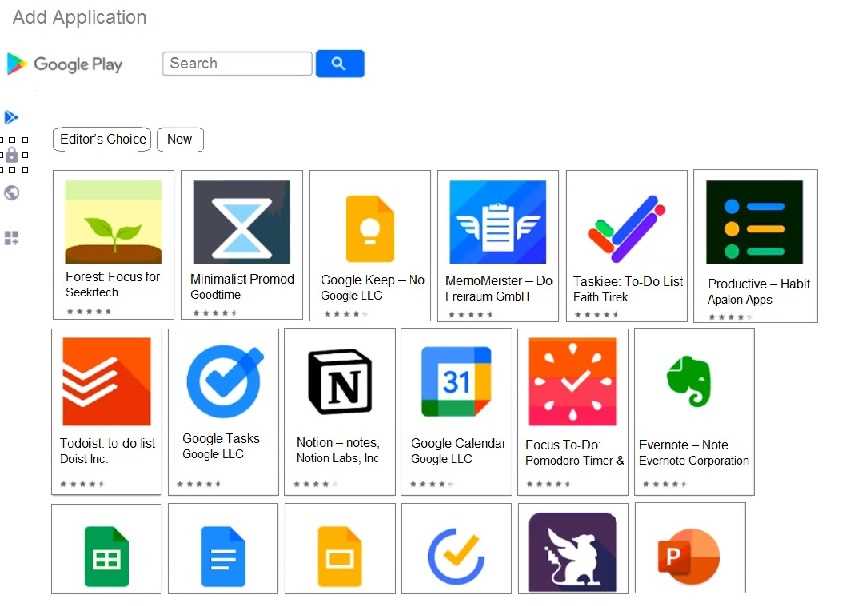
Refer to the Exhibit.
Where would an administrator click in the Managed Play Store to add Private Apps that are
developed for their organization? Mark your answer by clicking on the image.
Answer:
None
Explanation: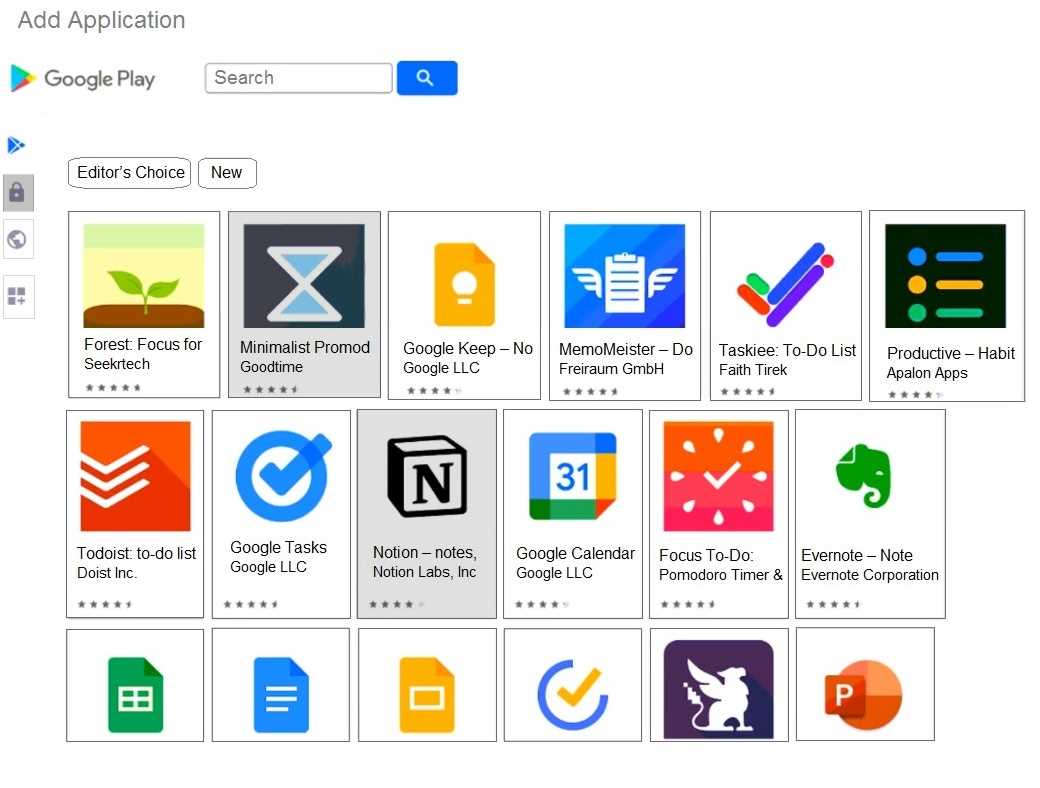
Question 10
Which security solution can be integrated with the Workspace ONE Intelligent Hub?
- A. Advanced Threat Prevention
- B. Carbon Black
- C. Symantec Endpoint Protection Mobile
- D. Mobile Threat Defense
Answer:
B
Explanation:
Carbon Black, a comprehensive security solution, can be integrated with the Workspace ONE
Intelligent Hub. This integration provides advanced threat detection and response capabilities to
protect
mobile
devices
managed
by
Workspace
ONE.
Reference: VMware Workspace ONE and Carbon Black integration documentation.
Question 11
Which two are prerequisites to activate Hub Services? (Choose two.)
- A. Workspace ONE Access admin credential
- B. Workspace ONE Intelligence URL
- C. Workspace ONE Access tenant URL
- D. Workspace ONE UEM DS URL
- E. Workspace ONE UEM enrollment user credential
Answer:
A, C
Explanation:
To activate Hub Services, you need the Workspace ONE Access admin credentials for authentication
and the Workspace ONE Access tenant URL to connect to the correct Access environment. These are
essential
for
setting
up
and
configuring
Hub
Services.
Reference: VMware documentation on Workspace ONE Hub Services activation.
Question 12
DRAG DROP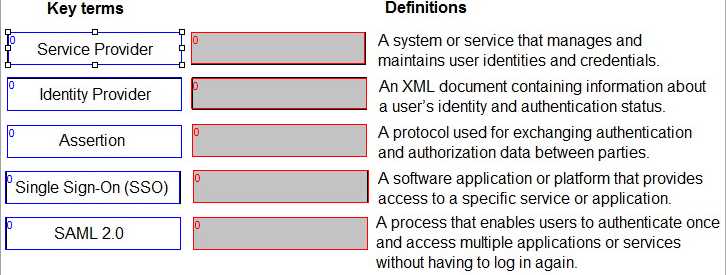
Match the terms related to Workspace ONE Access SAML 2.0 authentication on the left with their
corresponding definitions on the right.
Answer:
None
Explanation: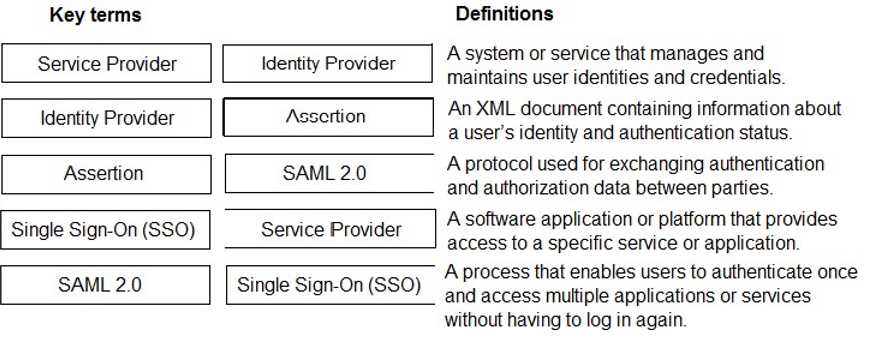
Question 13
HOTSPOT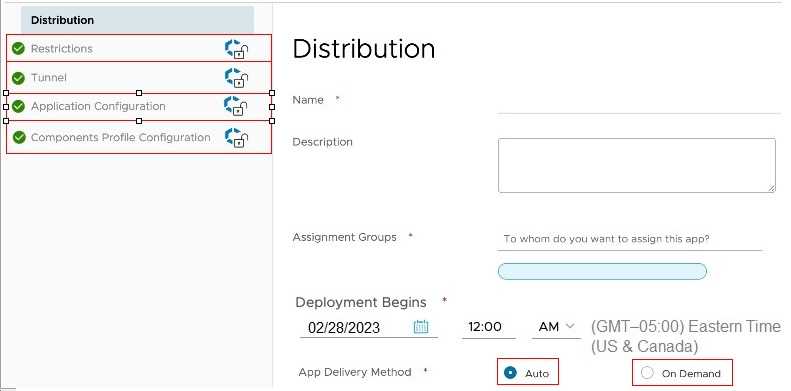
Refer to the Exhibit.
Where would an administrator click to add and send configuration settings as part of the Application
Assignment? Mark your answer by clicking on it in the image.
Answer:
None
Explanation: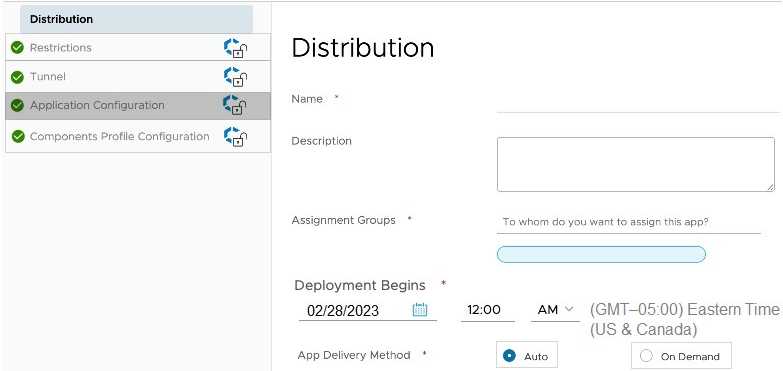
Question 14
DRAG DROP
Match each Content Gateway error message to its potential resolution.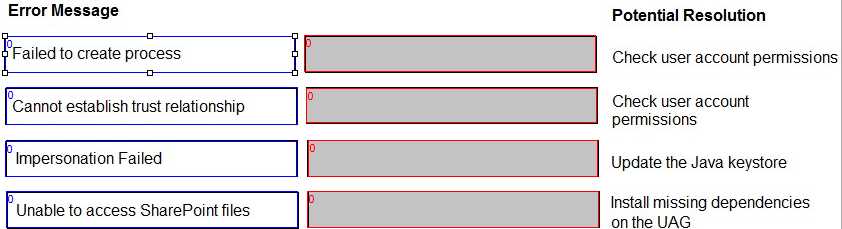
Answer:
None
Explanation: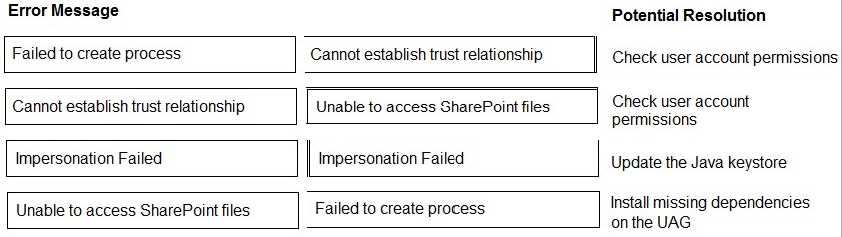
Question 15
A local Workspace ONE Administrator needs to onboard some remote mobile devices from all
operating systems very quickly.
Which URL should the administrator forward to their remote users so they can manually enroll their
devices?
- A. https://qetwsone.com/
- B. https://<portalname.com>/enrollment/
- C. https://whatisworkspaceone.com/
- D. https://my.workspace.com/enroll/
Answer:
B
Explanation:
To onboard remote mobile devices from all operating systems quickly, the administrator should
forward the URL in the format https://<portalname.com>/enrollment/ to their remote users. This
URL
leads
to
the
manual
enrollment
page
for
Workspace
ONE
UEM.
Reference: VMware Workspace ONE UEM documentation on device enrollment methods.