VMware 2V0-41-24 Exam Questions
Questions for the 2V0-41-24 were updated on : Feb 10 ,2026
Page 1 out of 8. Viewing questions 1-15 out of 115
Question 1
An NSX administrator would like to create an L2 segment with the following requirements:
• L2 domain should not exist on the physical switches.
• East/West communication must be maximized as much as possible.
Which type of segment must the administrator choose?
- A. VLAN
- B. Overlay
- C. Bridge
- D. Hybrid
Answer:
B
Explanation:
An overlay segment is a layer 2 broadcast domain that is implemented as a logical construct in the
NSX-T Data Center software. Overlay segments do not require any configuration on the physical
switches, and they allow for optimal east/west communication between workloads on different ESXi
hosts. Overlay segments use the Geneve protocol to encapsulate and decapsulate traffic between
the hosts. Overlay segments are created and managed by the NSX Manager.
https://docs.vmware.com/en/VMware-NSX-T-Data-Center/3.2/administration/GUID-316E5027-E588-455C-88AD-A7DA930A4F0B.html
Question 2
An architect receives a request to apply distributed firewall in a customer environment without
making changes to the network and vSphere environment. The architect decides to use Distributed
Firewall on VDS.
Which two of the following requirements must be met in the environment? (Choose two.)
- A. vCenter 8.0 and later
- B. NSX version must be 3.2 and later
- C. NSX version must be 3.0 and later
- D. VDS version 6.6.0 and later
Answer:
BD
Explanation:
Distributed Firewall on VDS is a feature of NSX-T Data Center that allows users to install Distributed
Security for vSphere Distributed Switch (VDS) without the need to deploy an NSX Virtual Distributed
Switch (N-VDS). This feature provides NSX security capabilities such as Distributed Firewall (DFW),
Distributed IDS/IPS, Identity Firewall, L7 App ID, FQDN Filtering, NSX Intelligence, and NSX Malware
Prevention. To enable this feature, the following requirements must be met in the environment:
The NSX version must be 3.2 and later1
. This is the minimum version that supports Distributed
Security for VDS.
The VDS version must be 6.6.0 and later1
. This is the minimum version that supports the NSX host
preparation operation that activates the DFW with the default rule set to allow.
Reference:
Overview of NSX IDS/IPS and NSX Malware Prevention
Question 3
What are two functions of the Service Engines in NSX Advanced Load Balancer? (Choose two.)
- A. It collects real-time analytics from application traffic flows.
- B. It stores the configuration and policies related to load-balancing services.
- C. It performs application load-balancing operations.
- D. It deploys web servers to perform load-balancing operations.
- E. It provides a user interface to perform configuration and management tasks.
Answer:
AC
Explanation:
Reference:
https://docs.vmware.com/en/VMware-NSX-Advanced-Load-Balancer/22.1/Administration_Guide/GUID-84139C37-0129-40A7-A7AB-5A93E1F65B6D.html
Question 4
A security administrator needs to configure a firewall rule based on the domain name of a specific
application.
Which field in a distributed firewall rule does the administrator configure?
- A. Profile
- B. Service
- C. Policy
- D. Source
Answer:
A
Explanation:
To configure a firewall rule based on the domain name of a specific application, the administrator
needs to use the Profile field in a distributed firewall rule. The Profile field allows the administrator
to select a context profile that contains one or more attributes for filtering traffic. One of the
attributes that can be used is Domain (FQDN) Name, which specifies the fully qualified domain name
of the application. For example, if the administrator wants to filter traffic to *.office365.com, they
can create a context profile with the Domain (FQDN) Name attribute set to *.office365.com and use
it in the Profile field of the firewall rule.
Reference:
Filtering Specific Domains (FQDN/URLs)
FQDN Filtering
Question 5
Which two statements are correct about East-West Malware Prevention? (Choose two.)
- A. A SVM is deployed on every ESXi host.
- B. NSX Application Platform must have Internet access.
- C. An agent must be installed on every ESXi host.
- D. An agent must be installed on every NSX Edge node.
- E. NSX Edge nodes must have Internet access.
Answer:
AB
Explanation:
Reference: https://docs.vmware.com/en/VMware-NSX-T-Data-Center/3.2/administration/GUID-0A8BF7D8-9C2E-48A5-8219-17C00F1EC13A.html
https://www.wwt.com/blog/primer-series-napp-
malware-prevention
Question 6
When running nsxcli on an ESXi host, which command will show the Replication mode?
- A. get logical-switch <Local-Switch-UUID> status
- B. get logical-switch <Logical-Switch-UUID>
- C. get logical-switches
- D. get logical-switch status
Answer:
C
Explanation:
https://vdc-download.vmware.com/vmwb-repository/dcr-public/c3fd9cef-6b2b-4772-93be-3fe60ce064a1/1f67b9e1-b111-4de7-9ea1-39931d28f560/NSX-T%20Command-Line%20Interface%20Reference.html#get%20logical-switch%20%3Clogical-switch-id%3E
Question 7
Which field in a Tier-1 Gateway Firewall would be used to allow access for a collection of trustworthy
web sites?
- A. Source
- B. Profiles -> Context Profiles
- C. Destination
- D. Profiles -> L7 Access Profile
Answer:
D
Explanation:
The field in a Tier-1 Gateway Firewall that would be used to allow access for a collection of
trustworthy web sites is Profiles -> L7 Access Profile.
This field allows the user to create a Layer 7
access profile that defines a list of allowed or blocked URLs based on categories, reputation, or
custom entries1
.
The user can then apply the L7 access profile to a firewall rule to control the traffic
based on the URL filtering criteria1
. The other options are incorrect because they are not related to
URL filtering.
The Source field specifies the source IP address or group of the firewall rule1
.
The
Destination field specifies the destination IP address or group of the firewall rule1
.
The Profiles ->
Context Profiles field allows the user to create a context profile that defines a list of application
signatures or attributes that can be used to identify and classify network traffic1
. Reference:
Gateway
Firewall
Question 8
Which steps are required to activate Malware Prevention on the NSX Application Platform?
- A. Select Cloud Region and Deploy Network Detection and Response.
- B. Activate NSX Network Detection and Response and run Pre-checks.
- C. Activate NSX Network Detection and Response and Deploy Malware Prevention.
- D. Select Cloud Region and run Pre-checks.
Answer:
D
Explanation:
To activate Malware Prevention on the NSX Application Platform, the steps are:
In the NSX Manager UI, select System and in the Configuration section, select NSX Application
Platform.
Navigate to the Features section, locate the NSX Malware Prevention feature card, and click Activate
or anywhere in the card.
In the NSX Malware Prevention activation window, select one of the available cloud regions from
which you can access the NSX Advanced Threat Prevention cloud service.
Click Run Prechecks. This precheck process can take some time as the system validates that the
minimum license requirement is met and that it is eligible for use with the NSX Advanced Threat
Prevention cloud service. The system also validates that the selected cloud region is reachable.
Click Activate.
This step can take some time1
. Therefore, the correct answer is D. The other options
are incorrect because they involve activating or deploying NSX Network Detection and Response,
which is a different feature from Malware Prevention. Reference:
Activate NSX Malware Prevention
Question 9
Which NSX feature can be leveraged to achieve consistent policy configuration and simplicity across
sites?
- A. VRF Lite
- B. Ethernet VPN
- C. NSX MTML5 UI
- D. NSX Federation
Answer:
D
Explanation:
According to the VMware NSX Documentation, this is the NSX feature that can be leveraged to
achieve consistent policy configuration and simplicity across sites:
NSX Federation: This feature allows you to create and manage a global network infrastructure that
spans across multiple sites using a single pane of glass. You can use this feature to synchronize
policies, segments, gateways, firewalls, VPNs, load balancers, and other network services across
sites.
Question 10
Which three security features are dependent on the NSX Application Platform? (Choose three.)
- A. NSX Intelligence
- B. NSX Firewall
- C. NSX Network Detection and Response
- D. NSX TLS Inspection
- E. NSX Distributed IDS/IPS
- F. NSX Malware Prevention
Answer:
ACF
Explanation:
https://docs.vmware.com/en/VMware-NSX-T-Data-Center/3.2/nsx-application-platform/GUID-42EDE0AD-CD65-41AC-9694-AD0CCEC35969.html
Question 11
Which two of the following are used to configure Distributed Firewall on VDS? (Choose two.)
- A. vSphere API
- B. NSX API
- C. NSX CU
- D. vCenter API
- E. NSX UI
Answer:
BE
Explanation:
According to the VMware NSX Documentation, these are two of the ways that you can use to
configure Distributed Firewall on VDS:
NSX API: This is a RESTful API that allows you to programmatically configure and manage Distributed
Firewall on VDS using HTTP methods and JSON payloads. You can use tools such as Postman or curl to
send API requests to the NSX Manager node.
NSX UI: This is a graphical user interface that allows you to configure and manage Distributed
Firewall on VDS using menus, tabs, buttons, and forms. You can access the NSX UI by logging in to the
NSX Manager node using a web browser.
https://docs.vmware.com/en/VMware-NSX/4.1/administration/GUID-0DEF9F18-608D-4B5C-9175-5514750E901B.html
Question 12
HOTSPOT
Refer to the exhibit.
An administrator configured NSX Advanced Load Balancer to redistribute the traffic between the web
servers. However, requests are sent to only one server
Which of the following pool configuration settings needs to be adjusted to resolve the problem?
Mark the correct answer by clicking on the image.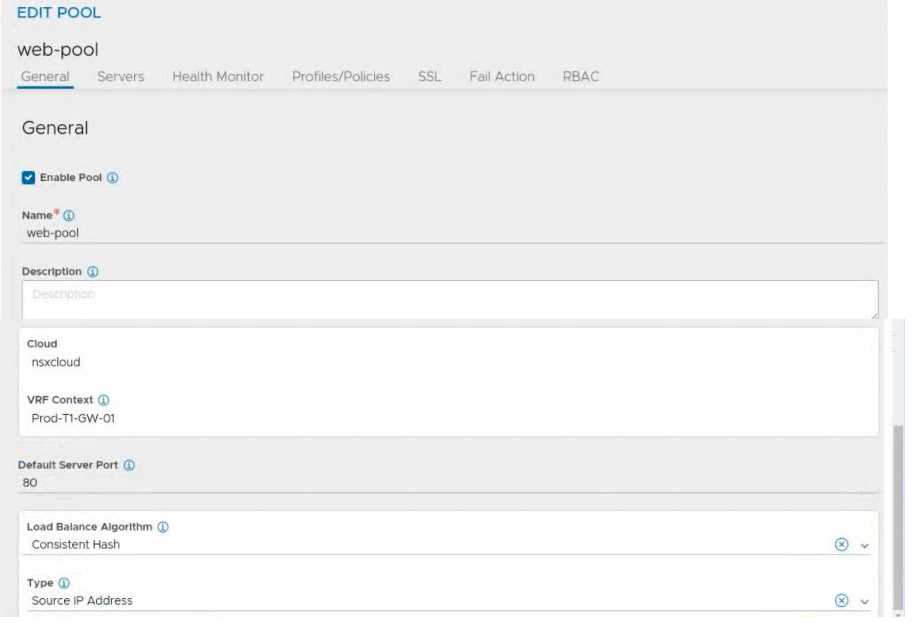
Answer:
None
Explanation:
Load Balancing Algorithm
You specify the following parameters during the creation of a server pool:
• Name: A unique name for the server pool.
• Cloud: The cloud connector details for the NSX environment.
• VRF Context: Virtual Routing Framework (VRF) is a method to isolate traffic in a system. VRF is also
called a route domain in the load balancer community. A global VRF context is created by default.
Network administrators might create custom VRF contexts to isolate traffic between different
tenants or subsets.
• Default Server Port: New connections to servers will use this destination service port. The default
port is 80.
• Load-balancing algorithm: The selected load-balancing algorithm controls how the incoming
connections are distributed among the servers in the pool.
• Tier-1 gateway (logical router): Specify the Tier-1 gateway that you want to attach the server pool
to. This value matches the Tier-1 gateway specified for the virtual service and VIP.
Question 13
What are two valid BGP Attributes that can be used to influence the route path traffic will take?
(Choose two.)
- A. AS-Path Prepend
- B. BFD
- C. Cost
- D. MED
Answer:
AD
Explanation:
AS-Path Prepend: This attribute allows you to prepend one or more AS numbers to the AS path of a
route, making it appear longer and less preferable to other BGP routers. You can use this attribute to
manipulate the inbound traffic from your BGP peers by advertising a longer AS path for some routes
and a shorter AS path for others.
MED: This attribute stands for Multi-Exit Discriminator and allows you to specify a preference value
for a route among multiple exit points from an AS. You can use this attribute to manipulate the
outbound traffic to your BGP peers by advertising a lower MED value for some routes and a higher
MED value for others.
Question 14
Which of the two following characteristics about NAT64 are true? (Choose two.)
- A. NAT64 is stateless and requires gateways to be deployed in active-standby mode.
- B. NAT64 is supported on Tier-1 gateways only.
- C. NAT64 is supported on Tier-0 and Tier-1 gateways.
- D. NAT64 requires the Tier-1 gateway to be configured in active-standby mode.
- E. NAT64 requires the Tier-1 gateway to be configured in active-active mode.
Answer:
CD
Explanation:
https://docs.vmware.com/en/VMware-NSX/4.1/administration/GUID-69604E49-BC8B-4777-BFD8-B98F8D1FF064.html
Question 15
Which two are requirements for FQDN Analysis? (Choose two.)
- A. The NSX Edge nodes require access to the Internet to download category and reputation definitions.
- B. ESXi control panel requires access to the Internet to download category and reputation definitions.
- C. The NSX Manager requires access to the Internet to download category and reputation definitions.
- D. A layer 7 gateway firewall rule must be configured on the Tier-1 gateway uplink.
- E. A layer 7 gateway firewall rule must be configured on the Tier-0 gateway uplink.
Answer:
AD
Explanation:
https://docs.vmware.com/en/VMware-NSX/4.1/administration/GUID-C5CD87FD-8095-49F3-97CE-E606AB89162E.html?hWord=N4IghgNiBcIGYEcAmA7ABGFkCeBnAlriAL5A