VEEAM VMCE-V12 Exam Questions
Questions for the VMCE-V12 were updated on : Feb 18 ,2026
Page 1 out of 8. Viewing questions 1-15 out of 109
Question 1
A company wants to ensure that, during a replication failover, database servers boot before the
application servers. How can this be accomplished?
- A. Create a failover plan
- B. Create a disaster recovery template
- C. Create a replica mapping
- D. Create a planned failover
Answer:
A
Explanation:
Veeam Backup & Replication allows you to set up failover plans to control the order in which VMs are
started during a failover. By creating a failover plan, you can specify that the database servers boot
before the application servers. This is achieved by setting up VM dependencies within the failover
plan, ensuring that the database servers (which are critical for the application servers to function) are
operational before the application servers start. Creating a disaster recovery template (B), creating a
replica mapping (C), or initiating a planned failover (D) does not directly address the boot order of
the servers during failover.
Question 2
To be able to increase backup retention, the company has bought a Data Domain deduplication
appliance.
After setting up the jobs to use it, the backup administrator observes an increase of resource
consumption on the backup server. The proxy configuration has not been modified.
What is causing the issue?
- A. The backup appliance does not have enough resources to process the data.
- B. The SSL certificate on the backup appliance needs to be updated.
- C. The backup server has to fulfill the gateway role.
- D. The backup server needs additional resources to use a deduplication appliance.
Answer:
C
Explanation:
When integrating a Data Domain deduplication appliance with Veeam Backup & Replication, it is
typically used as a backup repository. The backup server may need to take on the gateway role,
especially if the Data Domain is integrated over NFS or CIFS. This means that the backup server will
be responsible for processing the data flow between the Veeam proxies and the deduplication
appliance. If the gateway server (backup server) is not well-resourced, this additional workload can
cause an increase in resource consumption on the backup server. The appliance's resources and the
SSL certificate are not related to increased resource consumption on the backup server, and simply
needing additional resources for deduplication (D) is not specific enough without indicating the
gateway role.
Question 3
A physical Windows server protected by a centrally managed Veeam agent is physically damaged. A
Hyper-V infrastructure is available, and the physical server is eligible for virtualization.
Which recovery step provides the lowest possible RTO?
- A. Use Instant VM Recovery to Hyper-V.
- B. Use Instant Disk Recovery to Hyper-V.
- C. Use Bare Metal Restore to Hyper-VVMs.
- D. Use Export Disk Content as Virtual Disk to create a new VM.
Answer:
A
Explanation:
Instant VM Recovery is a feature in Veeam that allows you to start a virtual machine directly from a
backup file without waiting for the full restore. Using Instant VM Recovery to Hyper-V is the best
option for achieving the lowest possible Recovery Time Objective (RTO) because it allows the
damaged physical server's backup to be run as a VM in the Hyper-V environment almost
immediately. The Veeam Agent for Microsoft Windows supports Instant Recovery to a Hyper-V VM,
which will enable you to restore service quickly while you can plan for a more permanent recovery
solution.
Question 4
Why is it recommended to have at least one backup proxy server in each site when defining a replica
job?
- A. The proxies allow replication automatic restart after failure.
- B. The proxies allow for no VM snapshots during transit.
- C. lt allows deduplication during data transit across the WAN
- D. The proxies allow automatic WAN acceleration.
- E. The proxies enable a stable connection for VM data transfer across sites.
- F. It allows for no VM snapshots
Answer:
E
Explanation:
Having at least one backup proxy server in each site when defining a replica job is recommended
because the backup proxy servers are responsible for data processing and transfer. Having proxies in
both sites enables a stable connection for VM data transfer across sites, as they handle the data
compression, deduplication, and transfer processes. This setup ensures that data is efficiently moved
from one site to another, thereby making replication more resilient and reliable. Proxies do not
automatically restart replication after failure (A), remove the need for VM snapshots during transit (B
and F), or enable automatic WAN acceleration (D), although they can work in conjunction with WAN
accelerators if configured to do so. They also don't directly deduplicate data during transit across the
WAN (C), although they do compress and optimize it for transfer.
Question 5
A planned failover of three VMs has just completed successfully, starting the VMs at the disaster
recovery location. What next actions are available for the failover plan?
- A. Undo, Start, Edit, Delete
- B. Undo, Start, Copy, Delete
- C. Cancel. Start, Edit, Delete
- D. Cancel, Start, Copy, Delete
Answer:
A
Explanation:
After completing a planned failover for VMs to the disaster recovery site, the typical actions available
in Veeam Backup & Replication for a failover plan are:
Undo: This allows you to reverse the failover and return the VMs to the original location.
Start: This would be used to initiate the failover plan if it needs to be executed again.
Edit: This option permits modifications to the failover plan.
Delete: This allows the removal of the failover plan if it is no longer needed. There are no options for
Copy in the context of a failover plan, and the Cancel option is typically available before and during
the failover process, not after completion.
Question 6
Backup jobs are configured to local repositories. Backups must be sent from Site B to the repository
on Site
- A. A backup copy job and components 6 ? 4 ? 3 ? 2
- B. A backup job and components 5 ? 4 ? 3 ? 2
- C. A backup copy job and components 6?5?4?3?1?2
- D. A backup copy job and components 6 ? 4 ? 2
Answer:
A
Explanation:
In a scenario where backups need to be sent from Site B to a repository at Site A and the direct
backup cannot complete within the backup window due to connection limitations, a Backup Copy Job
is the most suitable type of job. The Backup Copy Job can transfer data efficiently and with reduced
impact on the production environment. The components involved would be:
6 (Repository at Site B): Where the initial backups are stored.
4 (WAN Accelerator at Site A): To optimize the data transfer over the WAN.
3 (WAN Accelerator at Site B): To prepare the backup data for transfer.
2 (Repository at Site A): The target repository for the backup copies. This configuration leverages the
WAN Accelerators to reduce the amount of data that needs to travel over the WAN, thus allowing the
backup copy job to complete within the available window.
Question 7
A backup administrator is called in to review a new Veeam deployment created by a coworker. The
backup administrator takes the following notes:
• 12 backup jobs
• 1 SOBR configured with AWS S3 Performance Tier
• 1 Repository configured on Hardened Immutable Repository
The administrator also notes that six jobs are configured to use the SOBR and six jobs are configured
to use the Hardened Immutable Repository.
What should the backup administrator report to the other coworker regarding the 3-2-1 backup
strategy?
- A. This will save costs with the Archive Tier in the SOBR.
- B. This needs the Hardened Immutable Repository added to the capacity tier.
- C. This only has 1 copy of the backup data.
- D. This meets the 3-2-1 best practices requirements.
Answer:
C
Explanation:
The 3-2-1 backup strategy is a best practice that suggests having three total copies of your data, two
of which are local but on different devices or media, and one copy offsite. In the described scenario,
although there is an offsite component (SOBR with AWS S3 Performance Tier), and a local hardened
immutable repository, there is no indication of a second local copy on a different device or media.
This means that there is only one local copy of the backup data and one offsite copy. Therefore, the
setup does not meet the 3-2-1 best practices requirement, which would involve having at least one
more local copy on different media or device.
Question 8
For general data protection regulation (GDPR) compliance, Veeam can add a location tag to which
component?
- A. File copy job
- B. Proxy server
- C. Scale-out Backup Repositories
- D. WAN accelerator
Answer:
C
Explanation:
For GDPR compliance, Veeam provides the capability to add location tags to Scale-out Backup
Repositories. Location tags in Veeam Backup & Replication are used to identify the location of data,
which is essential for adhering to data sovereignty laws like GDPR. Location tagging helps ensure that
data residency requirements are met by keeping data in a defined geographical area. In the context
of GDPR, it's important to manage and control where personal data is stored and processed. Proxy
servers, file copy jobs, and WAN accelerators do not have the functionality to be tagged for GDPR
compliance in the same manner as repositories within Veeam Backup & Replication.
Question 9
Hourly backup jobs are configured to local repositories. Daily backups must be sent from Site B to the
repository on Site
- A. A backup copy job and components 6 ? 4 ? 3 ? 2
- B. A backup job and components 5 ? 4 ? 3 ? 2
- C. A backup job and components 5 ? 2
- D. A backup copy job and components 6?5?4?3?1 ? 2
Answer:
A
Explanation:
For the given scenario where daily backups need to be sent from Site B to a repository at Site A and
the connection between the two sites is limited, thus impacting the ability to complete direct
backups within the backup window, a Backup Copy Job would be appropriate. A Backup Copy Job is a
feature in Veeam Backup & Replication that allows you to create several instances of the same
backup files across different locations (repositories).
In the image provided, the components involved in the Backup Copy Job from Site B to Site A would
be:
6 (Repository at Site B): This is the source repository where the hourly backup jobs are stored.
4 and 3 (WAN Accelerators at both sites): These components optimize data transfer over the WAN.
2 (Repository at Site A): This is the target repository where the backup copies will be stored.
This setup would minimize impact on the source VMs at Site B since the Backup Copy Job works with
backup data rather than directly with the production VMs, thus reducing the load on those VMs
during the process.
Question 10
The configuration database is corrupted, and the backup administrator wants to recover the dat
a. Which configuration restore mode should be used?
- A. Instant Recovery
- B. Restore
- C. Failover
- D. Migrate
Answer:
B
Explanation:
In the event that the Veeam Backup & Replication configuration database is corrupted, the
appropriate action to take is to perform a configuration restore. Veeam Backup & Replication allows
you to back up and restore its configuration database. The Restore option should be used to recover
the data from a configuration backup. This process will restore the configuration database from the
backup file, which includes information about backup jobs, repository settings, and more. Instant
Recovery, Failover, and Migrate are not appropriate options for recovering a corrupted configuration
database. Instant Recovery is used to quickly restore a VM to a running state, Failover is used for
High Availability in case a VM fails, and Migrate is used to move VMs from one host or storage to
another.
Question 11
A Veeam proxy server is configured as follows. No modifications are allowed to the transport mode.
When performing a restore of a VMware virtual disk using this proxy server, the restore fails. What is
a possible cause?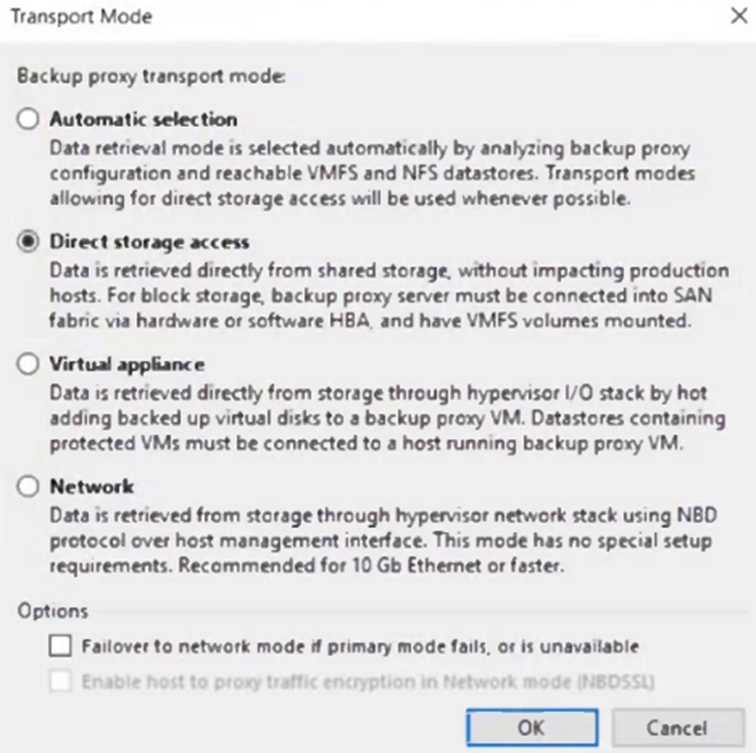
- A. CBT is enabled on the virtual disk.
- B. CBT is disabled on the virtual disk.
- C. The virtual disk is thin-provisioned.
- D. The virtual disk is thick-provisioned
Answer:
C
Explanation:
Given the provided transport modes and the fact that no modifications are allowed to these settings,
a possible cause for the restore of a VMware virtual disk to fail using this proxy server is C: The virtual
disk is thin-provisioned. In the transport modes shown, the Direct storage access and Virtual
appliance options would require the VM disk files to be accessible in a certain way that might not be
compatible with thin-provisioned disks depending on the storage configuration and the current state
of the VM. If the storage integration specifics or the snapshot handling do not support the thin-
provisioned format, the restore operation could fail. It's important to ensure that the transport mode
selected is compatible with the type of virtual disk being restored to prevent such issues.
Question 12
A company needs to ensure that, during a disaster, a group of VMs starts in a certain order with time
delays between starting each VM. How can this be accomplished?
- A. Perform a planned failover.
- B. Create a failover plan.
- C. Create a failover template file for the group of VMs.
- D. Create a replica chain in the Veeam Backup & Replication console.
Answer:
B
Explanation:
To ensure that a group of VMs starts in a specific order with time delays during a disaster scenario,
the solution is B: Create a failover plan. A failover plan in Veeam Backup & Replication is a feature
designed to manage the startup sequence of VMs within a DR site. The failover plan can be
customized to specify the order in which VMs should start and to include necessary delays between
the startups of each VM. This is especially useful for multi-tier applications where the order of
startup is essential for the application stack to become fully operational. By using a failover plan,
companies can control the recovery process, ensuring that VMs are brought online in an orderly and
coordinated fashion that respects their interdependencies.
Question 13
A number of VMs are running as interdependent applications. They need to fail over, one by one, as
a group. What method should be used to do this?
- A. Replica failover
- B. Replication plan
- C. Planned failover
- D. Failover plan
Answer:
D
Explanation:
To ensure VMs running interdependent applications fail over one by one, as a group, the method to
use is D: Failover plan. In Veeam Backup & Replication, a failover plan allows for the orchestration of
a group of replicas to fail over in a predefined sequence. This includes the capability to set up delays
between starting each VM, which is crucial for interdependent applications that must be started in a
specific order to function correctly. The failover plan ensures that dependencies among the group are
respected and that the startup sequence follows the correct order, enabling a smooth and organized
transition to the failover state.
Question 14
The administrator of a VMware environment backed up by Veeam Backup & Replication has a critical
server that has crashed and will not reboot. They were able to bring it back online quickly using
Instant VM Recovery so people could continue to work. What else is required to complete the
recovery?
- A. Migrate to production
- B. Commit failover
- C. Commit tailback
- D. Merge delta file
Answer:
A
Explanation:
After using Instant VM Recovery to bring a critical crashed server back online quickly, the final step
required to complete the recovery process is A: Migrate to production. Instant VM Recovery allows a
VM to run directly from the backup file in a temporary location, enabling rapid recovery and minimal
downtime. However, because the VM is running in this provisional state, it's essential to migrate it
back to the production environment to ensure long-term stability and performance. The "Migrate to
production" operation involves moving the running VM from the backup storage to the production
storage, typically involving a storage vMotion in VMware environments or a similar process in other
hypervisors. This step ensures that the VM is fully restored to its original or a new production
environment, solidifying the recovery and allowing the VM to operate as part of the normal
infrastructure once again.
Question 15
What feature is only available with the Veeam Agent for Linux?
- A. File-level backup
- B. Application-aware processing of
- C. Backup from native snapshots
- D. Volume backup
Answer:
C
Explanation:
The feature that is unique to Veeam Agent for Linux and not available in other Veeam Agent
configurations is C: Backup from native snapshots. Veeam Agent for Linux includes the ability to
leverage native snapshot capabilities of the Linux kernel, such as LVM (Logical Volume Manager)
snapshots or Btrfs subvolume snapshots, to create consistent point-in-time copies of data. This
capability allows for application-consistent backups even in complex Linux environments, ensuring
that data is captured in a consistent state without the need for custom scripting or downtime. Native
snapshot support in Veeam Agent for Linux enhances the flexibility and reliability of backups,
particularly in environments where Linux-based applications and databases are critical to business
operations.