SAP C-THR81-2505 Exam Questions
Questions for the C-THR81-2505 were updated on : Feb 18 ,2026
Page 1 out of 6. Viewing questions 1-15 out of 88
Question 1
The manager has the ability to change the salary during the workflow
Which of the following options do you need to select for a new workflow to be triggered when the
manager edits the salary?
- A. Edit without Route Change
- B. Edit Attachment Only
- C. No edit
- D. Edit with Route Change
Answer:
D
Explanation:
To trigger a new workflow when the manager edits the salary during the approval process, you must
select Edit with Route Change. This option ensures that when an edit is made, the workflow is
restarted or rerouted based on the updated information, allowing for revalidation and approvals to
reflect the changes.
This option is essential for ensuring data integrity and compliance during workflows involving edits.
Question 2
The employee is changing their marital status. Once the workflow is approved, the manager gets a
notification via e-mail that this change has been processed. The manager then goes into the system
and checks the workflow, but notices that they can see more fields than the ones for which they
should receive a notification (Name, Marital Status, and Nationality)
Why is that?
- A. The manager has transactions pending approval permission for Personal Information.
- B. There is a rule that sets up the visibility for the fields in Personal Information and this applies when checking the workflow.
- C. In the workflow, Respect Permissions was set to No for the notification line to the manager.
- D. The manager's approver context is set to Source
Answer:
C
Explanation:
When the manager can view more fields than they should, it is typically because in the workflow
configuration, the Respect Permissions setting for the notification line to the manager was set to No.
This means that the system does not enforce field-level permissions when the manager views the
workflow.
Scenario 2: Approvals for Self-Service
Question 3
An employee will be changing their nationality information on their own
How do you build the IF condition in the business rule so they can do this?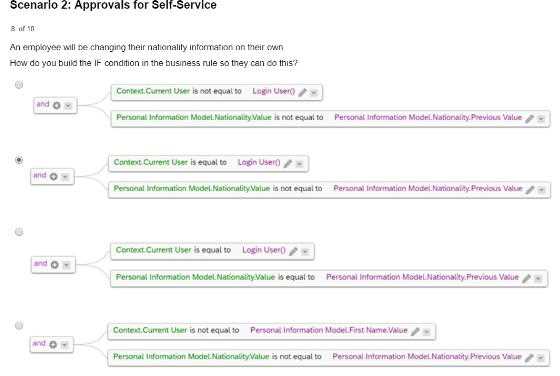
- A. Option A
- B. Option B
- C. Option C
- D. Option D
Answer:
B
Explanation:
In order for an employee to change their nationality information on their own, the IF condition must:
Validate that the Context.Current User is equal to Login User (ensures that the logged-in user is
making the changes).
Check if the Nationality.Value is not equal to the Nationality.Previous Value (ensures that a change is
being made).
Scenario 2: Approvals for Self-Service
Question 4
Due to confidentiality reasons, when the HR Business Partner (maintained in Job Relationship) is
creating a change in salary for an employee, this action will need to be approved by the manager of
the HR Business Partner creating the request.
How do you define this in the workflow when filling in the Approver Type, Approver Role, Context,
and Relationship to Approver? Refer to the screenshot to answer the question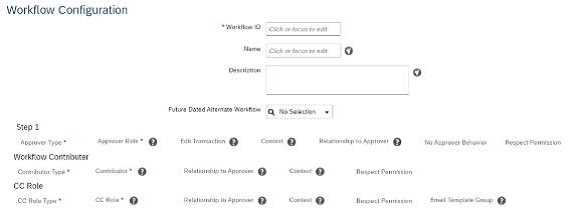
- A. By selecting in Step 1: Role - Self-Source - Initiator
- B. By selecting in Step 1: Role - Employee HR - Source - Employee
- C. By selecting in Step 1: Role - Employee HR-Source- Initiator
- D. By selecting in Step 1: Role - Manager - Source - Initiator
Answer:
D
Explanation:
To ensure that the salary change initiated by the HR Business Partner is approved by their manager,
you need to configure the workflow with the following details:
Approver Type: Manager
Approver Role: Manager
Context: Initiator (this ensures the approval request is routed to the manager of the person initiating
the workflow).
Relationship to Approver: From the initiator’s position, the system derives the relationship to their
manager.
Selecting Role: Manager - Source: Initiator in Step 1 aligns with these requirements.
Scenario 2: Approvals for Self-Service
Question 5
This is a global customer and HR admins will be assigned based on legal entity. The HR admins should
be getting approval workflows from their target population.
How can you define this in one workflow?
- A. Create dynamic groups per each legal entity and add the necessary approver steps.
- B. Create a dynamic role using the Legal Entity filter and assign the Resolver type as dynamic group
- C. Create permission groups for each legal entity and assign them to the HR admin role.
- D. Create a dynamic role for each legal entity and assign the Resolver as the head of the legal entity.
Answer:
B
Explanation:
For a global customer where HR admins are assigned based on legal entities and need to receive
approval workflows for their target population, you can configure the workflow as follows:
Create a Dynamic Role using the Legal Entity filter.
Assign the Resolver Type as a Dynamic Group to ensure the workflow automatically routes to the
correct HR admin based on the legal entity.
This configuration avoids creating multiple static workflows and simplifies management by
dynamically resolving approvers based on the legal entity.
Scenario 2: Approvals for Self-Service
Question 6
An HR admin/Global Mobility person must create a transfer for an employee. The employee will be
moving from Position A in Team A to Position B in Team B. Both managers will have to approve the
transfer.
How do you configure a two-step workflow so that the approval goes first to the current manager
and second to the future manager?
- A. By selecting in Step 1. Position Relationship - Parent Parent Position - Source • By selecting in Step 2: Position Relationship - Parent Position - Target
- B. By selecting in Step 1: Role - Manager - Source • By selecting in Slep 2. Role-Manager Manager - Target
- C. By selecting in Step 1. Role-Manager - Source • By selecting in Step 2: Role - Manager - Target
- D. By selecting in Step 1: Role - Self-Source • By selecting in Step 2. Role- Manager - Target
Answer:
C
Explanation:
Scenario 2: Approvals for Self-Service
To configure a two-step workflow where the approval first goes to the current manager and then to
the future manager, you must set the following in the workflow:
Step 1: Role - Manager - Source (current manager of the employee).
Step 2: Role - Manager - Target (future manager of the employee).
This setup ensures that the workflow sequentially routes approval to both the current and future
managers.
Question 7
When the manager updates the location of an employee, the HR admin must be the approver Note
that the HR admin, manager, and HR
Business Partner have access to change the location.
How do you create the IF condition for the workflow derivation rule lo meet the above
requirements?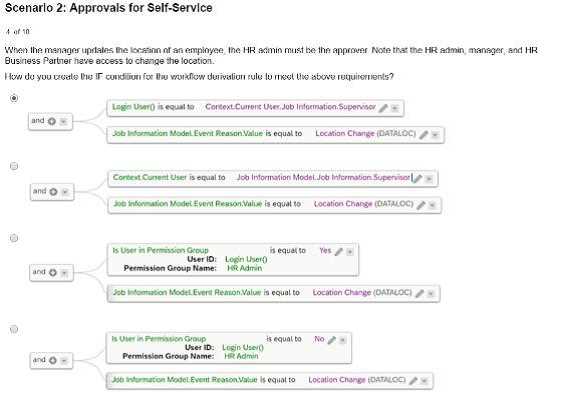
- A. Option A
- B. Option B
- C. Option C
- D. Option D
Answer:
A
Explanation:
To meet the requirement where the HR admin must approve the manager's updates to an
employee's location, the workflow derivation rule must include the following IF condition:
Option A: Ensures that the condition checks whether the user belongs to the permission group for HR
Admins, and the Event Reason value matches "Location Change".
This configuration aligns the workflow rule with the scenario requirements, where HR admins are
explicitly designated as approvers
Scenario 2: Approvals for Self-Service
Question 8
The HR admin has to change the salary of an employee, which will trigger a workflow for the
employee's manager. The employee's manager
should be able to edit the transaction if the proposed amount is NOT correct.
Where in the workflow do you need to define this?
Refer to the screenshot to answer the question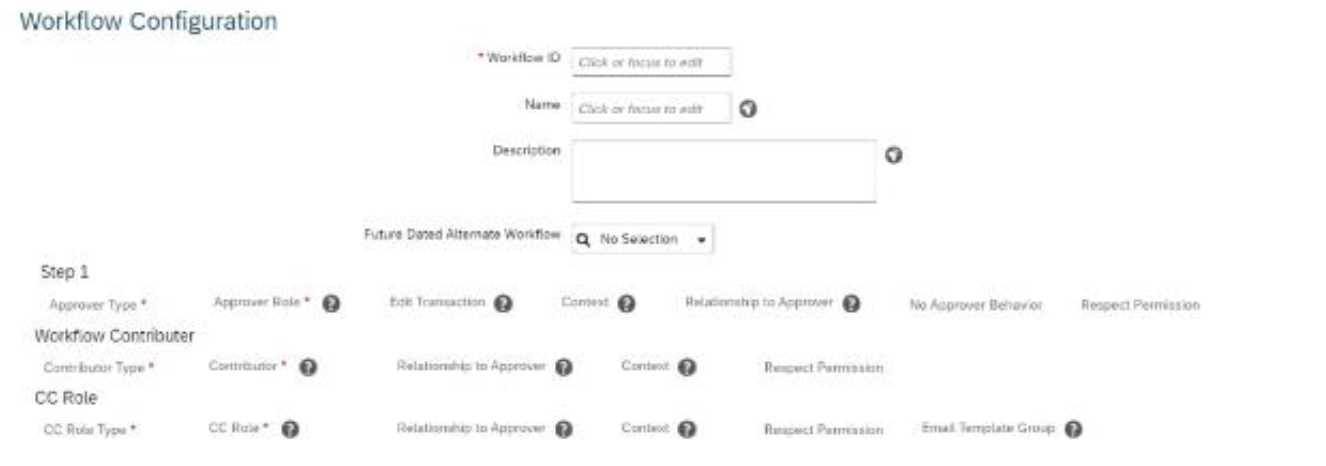
- A. Edit Transaction
- B. Respect Permission
- C. Context
- D. No Approver Behavior
Answer:
A
Explanation:
To allow the employee's manager to edit a transaction in a workflow if the proposed salary change is
incorrect, you must configure the "Edit Transaction" setting in the workflow.
The "Edit Transaction" option is part of the workflow configuration in Step 1 (as shown in the
screenshot).
When enabled, it allows the approver (in this case, the manager) to make adjustments to the
transaction before approving it.
Scenario 2: Approvals for Self-Service
Question 9
How should you build the IF condition to identity the user when the employee is updating their own
Personal Information?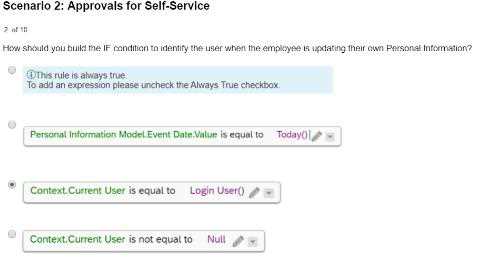
- A. Option A
- B. Option B
- C. Option C
- D. Option D
Answer:
C
Explanation:
To identify the user when the employee is updating their own personal information, the IF condition
in Option C is correct. This configuration:
Checks if the Context.Current User is equal to the Login User.
Ensures that the rule applies only when the employee is making changes to their own personal data.
This approach is aligned with SAP SuccessFactors logic for self-service scenarios, enabling accurate
identification of the user in such workflows.
Scenario 2: Approvals for Self-Service
Question 10
An employee is changing their Last Name, so a CC workflow notification should be sent to their
manager when is the CC workflow notification sent out?
- A. When the approvers decline the workflow
- B. When the employee initiates the workflow
- C. When the workflow is sent back by any approver
- D. When the workflow is approved by all approvers
Answer:
D
Explanation:
When an employee changes their last name and a workflow is triggered, the CC workflow
notification is sent to the manager once all approvers have approved the workflow. This ensures that
the notification is only sent after the change is confirmed and finalized, aligning with best practices
for workflow communication.
Scenario 2: Approvals for Self-Service
Question 11
To which Job information field will you assign the Default_JobClass rule?
- A. Employee Class
- B. Job Title
- C. Job Code
- D. Pay Grade
Answer:
C
Explanation:
The Default_JobClass rule should be assigned to the Job Code field in Job Information. This field
serves as the key reference for deriving other job-related attributes, such as Job Title, Pay Grade, and
Employee Class, ensuring that defaults are set when required.
Scenario 2: Approvals for Self-Service
Question 12
Which rule supports the Default_JobClass requirement?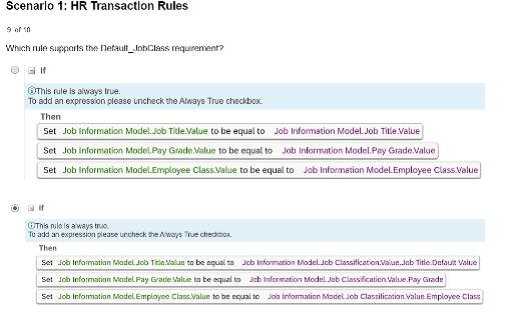
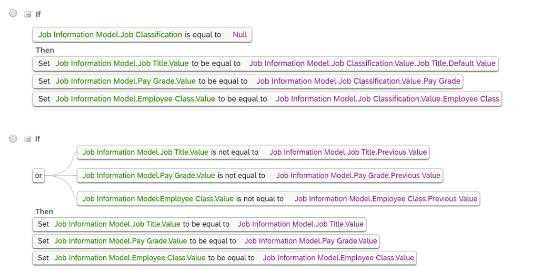
- A. Option A
- B. Option B
- C. Option C
- D. Option D
Answer:
B
Explanation:
The rule in Option B supports the Default_JobClass requirement by setting default values for fields
such as Job Title, Pay Grade, and Employee Class when the Job Classification field is NULL. This
ensures that appropriate default data is applied to job information records when certain fields are
not explicitly filled.
Scenario 1: HR Transaction Rules
Question 13
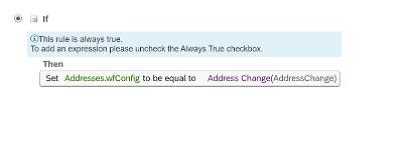
Which clause meets the WFD_Address rule requirement?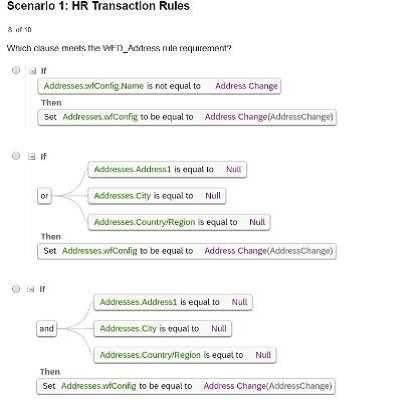
- A. Option A
- B. Option B
- C. Option C
- D. Option D
Answer:
D
Explanation:
The clause in Option D meets the WFD_Address rule requirement because it checks the following
conditions comprehensively:
Address is not equal to Null.
City and CountryRegion are equal to Null.
When these conditions are met, it sets the configuration for Address Change accordingly, ensuring
data completeness and accuracy for address-related transactions.
Scenario 1: HR Transaction Rules
Question 14
In which order must you assign the rules?
- A. ERD1, ERD2, ERD3, ERD-Catch, WFD
- B. ERD1, ERD2, ERD3, WFD, ERD-Catch
- C. WFD, ERD1, ERD2, ERD3, ERD-Catch
- D. ERD-Calch, ERD1, ERD2, ERD3, WFD
Answer:
A
Explanation:
The rules must be assigned in the order ERD1, ERD2, ERD3, ERD-Catch, WFD for the following
reasons:
ERD1, ERD2, ERD3: These are specific rules addressing distinct scenarios or conditions in a defined
sequence.
ERD-Catch: Acts as the fallback or catch-all rule to handle any conditions not addressed by the
specific ERD rules.
WFD (Workflow-Driven): This is placed last to ensure workflow-related logic is executed after all
event-related data has been validated and processed.
Scenario 1: HR Transaction Rules
Question 15
Which rule can effectively catch all unspecified events in a transaction?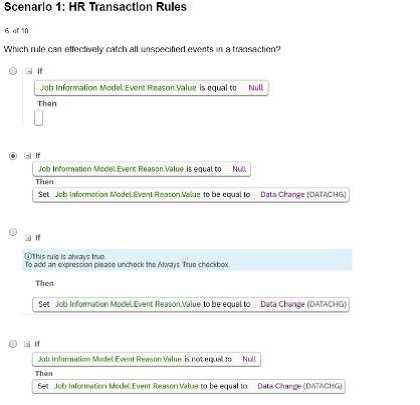
- A. Option A
- B. Option B
- C. Option C
- D. Option D
Answer:
B
Explanation:
The rule in Option B effectively captures all unspecified events in a transaction because:
It sets the Event Reason Value to "Data Change" whenever the Event Reason Value is null.
This ensures that all unplanned or unspecified events are assigned a default action, which is crucial
for maintaining data consistency and avoiding errors during transactions.
Scenario 1: HR Transaction Rules