SAP C-C4H56-2411 Exam Questions
Questions for the C-C4H56-2411 were updated on : Feb 18 ,2026
Page 1 out of 6. Viewing questions 1-15 out of 80
Question 1
What steps are required to determine the GOLD service level? Note: There are 2 correct answers to
this question.
- A. Create and activate a new service level called ‘GOLD’ in the Case Designer.
- B. Create and activate a service level determination rule where the condition is: WHEN Priority == ‘Immediate’ THEN Service Level is GOLD
- C. Create and activate a new service level called ‘GOLD’ for escalated cases.
- D. Create and activate a service level determination rule where the condition is: WHEN Escalation Status == ‘ESCALATED’ THEN Service Level is GOLD
Answer:
A, B
Explanation:
To determine the GOLD service level in SAP Service Cloud V2, administrators must create and
activate a new service level called ‘GOLD’ in the Case Designer to define the SLA parameters.
Additionally, a service level determination rule must be created and activated with the condition
WHEN Priority == ‘Immediate’ THEN Service Level is GOLD to assign the GOLD service level based on
case priority. According to SAP documentation, "Creating and activating a service level in the Case
Designer and defining determination rules with conditions like Priority are required to apply the
GOLD service level."
Creating a service level for escalated cases (C) is too specific and not a standard step. A rule based on
Escalation Status (D) is possible but not the primary condition described for GOLD service level
determination.
Reference:
SAP Help Portal: Service Level Configuration in SAP Service Cloud V2
SAP Community: SLA Determination Rules
Question 2
You want to assign employees, status, a service catalog, and a hierarchy to cases. Which of the
following configuration options is correct? Note: Scroll down to view all possible answer options.
A)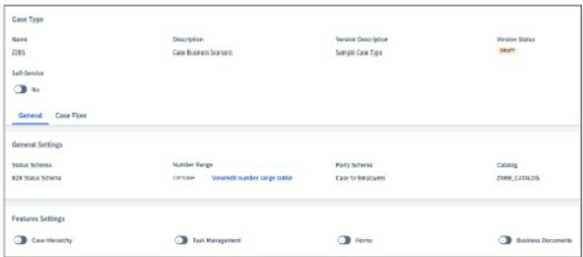
B)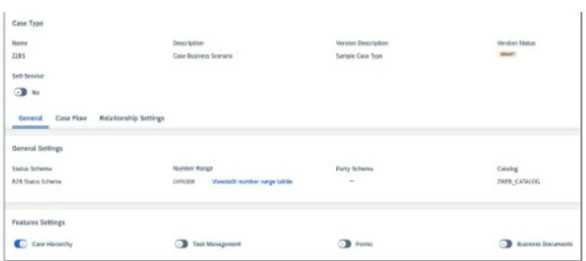
C)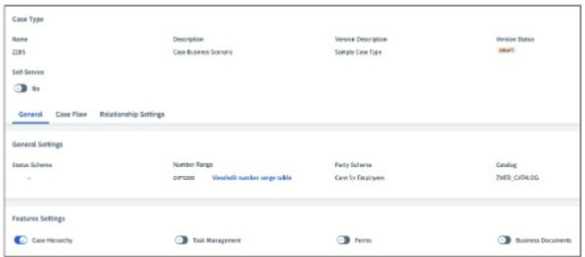
D)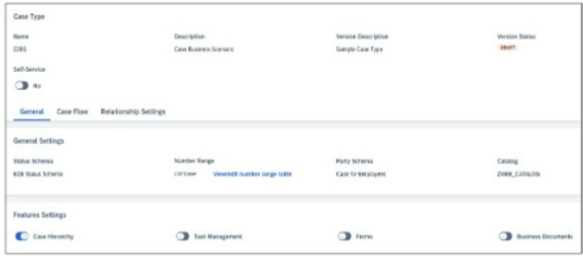
- A. Option A
- B. Option B
- C. Option C
- D. Option D
Answer:
A
Question 3
What steps are required to convert incoming emails into cases? Note: There are 2 correct answers to
this question.
- A. Enable the email channel within the CTI configuration.
- B. Create an email channel for the object type Cases and enter the default case type to be used.
- C. Define the default email template for incoming enquiries.
- D. Create and activate a case type.
Answer:
B, D
Explanation:
To convert incoming emails into cases in SAP Service Cloud V2, administrators must create an email
channel for the object type Cases and enter the default case type to be used, which defines how
emails are mapped to cases. Additionally, creating and activating a case type is required to ensure
the system recognizes the case structure for email conversions. According to SAP documentation,
"Setting up an email channel for Cases and activating a case type are mandatory steps for email-to-
case functionality."
Enabling the email channel within CTI configuration (A) is incorrect, as email channels are separate
from CTI. Defining the default email template (C) is optional for outbound responses, not inbound
conversions.
Reference:
SAP Help Portal: Email-to-Case Configuration in SAP Service Cloud V2
SAP Community: Email Channel Setup
Question 4
What basic steps are required to create the warranties as described?
- A. Create a Registered Product for a Customer Account. Maintain the Warranty field and then save.
- B. Create a Registered Product for an organization. Maintain the Warranty field and then save.
- C. Warranties are automatically generated when a Registered Product is created.
- D. Copy an existing Warranty to a new Individual Customer, alter the conditions and then save.
Answer:
C
Question 5
Which screenshots show the correct configuration activities to meet the requirements for incoming
service issues? Note: There are 2 correct answers to this question, scroll down to view all possible
answer options.
A)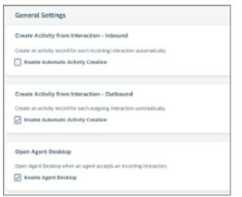
B)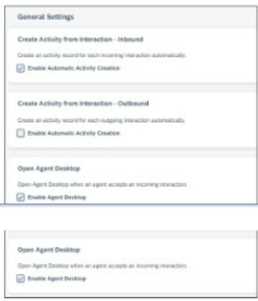
C)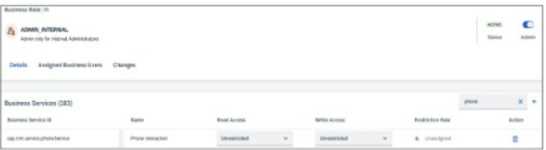
D)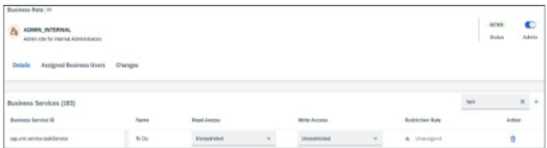
- A. Option A
- B. Option B
- C. Option C
- D. Option D
Answer:
AD
Question 6
Which of the following business services will all service agents need to have assigned?
- A. Case
- B. BuiltInSupportService
- C. Activity Manager
- D. Case Type
Answer:
A
Explanation:
All service agents in SAP Service Cloud V2 need the Case business service assigned to their business
role to access and manage cases, which is the core object for service processes. According to SAP
documentation, "The Case business service must be assigned to all service agents to enable case
management functionalities."
BuiltInSupportService (B) is for support interactions with SAP, not agent tasks. Activity Manager (C) is
for managing activities, not mandatory for all agents. Case Type (D) is a configuration object, not a
business service.
Reference:
SAP Help Portal: Business Services in SAP Service Cloud V2
SAP Learning: Service Agent Role Configuration
Question 7
Which of the following options is correct in the configuration, if you want to assign an escalated case
with priority urgent to a team? Note: Scroll down to view all possible answer options.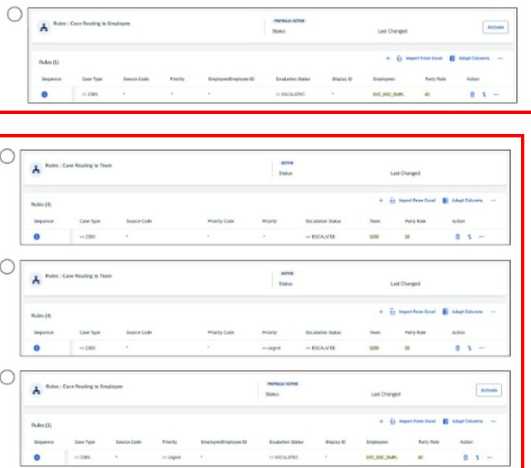
- A. Option A
- B. Option B
- C. Option C
- D. Option D
Answer:
B
Question 8
Which of the following actions do you need to grant access to the relevant service objects? Note:
There are 2 correct answers to this question.
- A. Assign a business role to a user
- B. Assign a business role to a service organization
- C. Assign a business role to an employee
- D. Set up the case designer with the assignment step employee
Answer:
A, C
Explanation:
To grant access to service objects (e.g., cases) in SAP Service Cloud V2, administrators must assign a
business role to a user to define their permissions for accessing specific objects. Similarly, assigning a
business role to an employee ensures the employee has the necessary access rights linked to their
user account. According to SAP documentation, "Access to service objects is granted by assigning
business roles to users or employees."
Assigning a business role to a service organization (B) is not a standard action, as roles are assigned
to individuals. Setting up the case designer with the assignment step employee (D) is for case
routing, not object access.
Reference:
SAP Help Portal: Business Role Assignment in SAP Service Cloud V2
SAP Learning: Access Management for Service Objects
Question 9
What steps are required to enable an extension field for cases that allow users to select more than
one option? Note: There are 2 correct answers to this question.
- A. Maintain the list of values and activate the Multi Value flag.
- B. Activate the Multi Value flag in the adaptation mode.
- C. Create an extension field with data type Object and data format Code.
- D. Create an extension field with data type String and data format Code.
Answer:
A, D
Explanation:
To enable an extension field for cases that allows multiple selections, administrators must create an
extension field with data type String and data format Code to define a field that supports a code list
(dropdown with multiple values). Additionally, they need to maintain the list of values and activate
the Multi Value flag to allow users to select multiple options from the code list. According to SAP
documentation, "For multi-select extension fields, create a field with data type String and format
Code, then maintain the code list and enable the Multi Value flag."
Activating the Multi Value flag in adaptation mode (B) is not a standard step, as it’s done during field
configuration. Data type Object (C) is used for relationships, not multi-select fields.
Reference:
SAP Help Portal: Extension Fields in SAP Service Cloud V2
SAP Community: Multi-Select Field Configuration
Question 10
Which of the following options are correct to display warning messages for escalated cases? Note:
Scroll down to view all possible answer options.
A)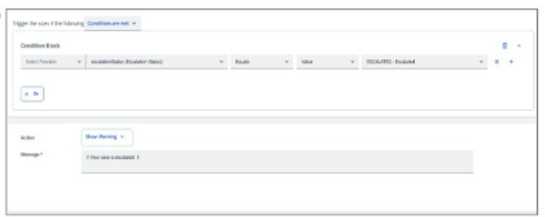
B)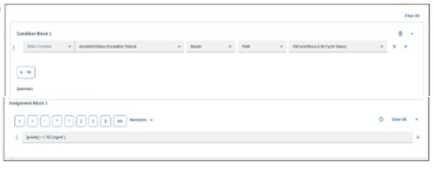
C)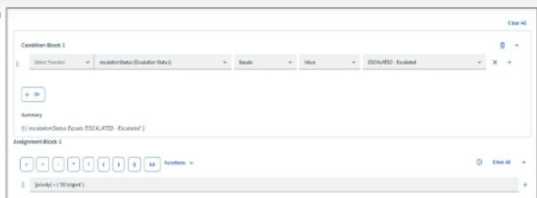
D)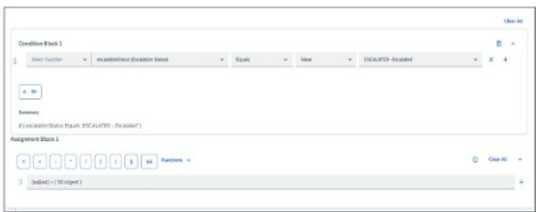
- A. Option A
- B. Option B
- C. Option C
- D. Option D
Answer:
C
Question 11
Which of the following activities are necessary for using cases in SAP Service Cloud Version 2? Note:
There are 2 correct answers to this question.
- A. Activate Scoping Items
- B. Maintain Business Users
- C. Set Up Product Lists
- D. Set Up Business Roles
Answer:
A, D
Question 12
What actions do you need to perform to create an incident for SAP Service Cloud Version 2? Note:
There are 2 correct answers to this question.
- A. Create an incident in the Built-In Support.
- B. Create a Support Case in SAP for Me.
- C. Create a case of case type Incident.
- D. Send an email to SAP Cloud Support.
Answer:
A, C
Question 13
You want to assign a value to a specific field based on another field value calculation. Which of the
following can you create to enable the field calculation?
- A. A workflow
- B. A field attribute
- C. A determination
- D. An autoflow
Answer:
C
Explanation:
To assign a value to a field based on another field’s value calculation in SAP Service Cloud V2, a
determination is used. Determinations are rules that automatically calculate and set field values
based on predefined conditions or calculations. According to SAP documentation, "Determinations
are used to calculate and assign field values dynamically based on other field values or conditions."
A workflow (A) manages process flows, not field calculations. A field attribute (B) defines field
properties, not calculations. An autoflow (D) automates actions but is not used for field value
calculations.
Reference:
SAP Help Portal: Determination Rules in SAP Service Cloud V2
SAP Community: Field Value Calculations
Question 14
How can you adapt the status schema of a case type? Note: There are 2 correct answers to this
question.
- A. The status schema cannot be adapted.
- B. Change the existing status schema.
- C. Add or remove statuses in the existing status schema.
- D. Use code list restrictions.
Answer:
B, C
Explanation:
In SAP Service Cloud V2, the status schema of a case type can be adapted by changing the existing
status schema to modify the sequence or behavior of statuses. Administrators can also add or
remove statuses in the existing status schema to tailor the case lifecycle to business needs. According
to SAP documentation, "The status schema of a case type can be adapted by modifying the existing
schema or adding/removing statuses as required."
The status schema cannot be adapted (A) is incorrect, as adaptations are supported. Code list
restrictions (D) limit dropdown values, not status schema changes.
Reference:
SAP Help Portal: Case Type Configuration in SAP Service Cloud V2
SAP Learning: Status Schema Management
Question 15
What features are available in the SAP CX AI Toolkit?
- A. Predict product availability
- B. Draft emails
- C. Create knowledge articles
- D. Analyze financial reliability
Answer:
B
Explanation:
The SAP CX AI Toolkit in SAP Service Cloud Version 2 includes features to enhance customer
experience processes. Draft emails is a key feature, allowing AI to generate email responses based on
case context, improving agent efficiency. According to SAP documentation, "The SAP CX AI Toolkit
provides capabilities such as drafting emails to streamline service interactions."
Predict product availability (A) is relevant to supply chain solutions, not the CX AI Toolkit. Create
knowledge articles (C) is a manual process, not AI-driven. Analyze financial reliability (D) is not a
feature of the CX AI Toolkit.
Reference:
SAP Help Portal: SAP CX AI Toolkit in SAP Service Cloud V2
SAP Community: AI Features in SAP CX