Salesforce PDII Exam Questions
Questions for the PDII were updated on : Feb 18 ,2026
Page 1 out of 14. Viewing questions 1-15 out of 202
Question 1
The head of recruiting at Universal Containers (UC) wants to provide all internal users the ability to
search for open positions by role, department, and location via a new recruiting app. In addition to
search, users of the app should be able to refer a friend, apply for a position, and review the status of
their current submissions.
The app will be surfaced to UC's existing iOS and Android users via the standard mobile app that
Salesforce provides. It has a custom user interface design and offline access is not required.
Given these requirements, what is the recommended approach to develop the app?
- A. Lightning Experience Builder
- B. Salesforce SDK
- C. Lightning Web Components
- D. Visualforce
Answer:
C
Question 2
A company uses an external system to manage its custom account territory assignments. Every
quarter, millions of Accounts may be updated in Salesforce with new Owners when the territory
assignments are completed in the external system.
What is the optimal way to update the Accounts from the external system?
- A. SOAP API
- B. Apex REST Web Service
- C. Composite REST API
- D. Bulk ApI
Answer:
B
Question 3
Consider the following code snippet:
Which two steps should the developer take to add flexibility to change the endpoint and credentials
without needing to modify code?
Choose 2 answers
- A. Use req. setindpoint ('callout:endFoint_NC'); within the callout request.
- B. Store the URL of the endpoint in a custom Label named endpointuRL.
- C. Create a Named Credential, endPcint_wc, ta store the endpoint and credentials.
- D. Use red. setEndpoint (Label.endPointURL) ;.
Answer:
A,B
Question 4
Part of a custom Lightning component displays the total number of Opportunities in the org, which
are in the millions. The Lightning
component uses an Apex method to get the data it needs.
What is the optimal way for a developer to get the total number of Opportunities for the Lightning
component?
- A. SOQL for loop that counts the number of Opportunities records
- B. Apex batch job that counts the number of Opportunity records
- C. SUM () SOQL aggregate query on the Opportunity object
- D. COUNT () SOQL aggregate query on the Opportunity object
Answer:
B
Question 5
A company recently deployed a Visualforce page with a custom controller that has a data grid of
information about Opportunities in
the org. Users report that they receive a "Maximum view state size limit" error message under
certain conditions.
According to Visualforce best practice, which three actions should the developer take to reduce the
view state?
Choose 3 answers
- A. Use the private keyword in the controller for variables,
- B. Use the final keyword in the controller for variables that will not change.
- C. Use the transient keyword in the Apex controller for variables that do not maintain state.
- D. Refine any SOQL queries to return only data relevant to the page.
- E. Use filters and pagination to reduce the amount of data.
Answer:
C,D,E
Question 6
A developer needs to send Account records to an external system for backup purposes. The process
must take a snapshot of Accounts as they are saved and then make a callout to a RESTful web
service. The web service can only receive, at most, one record per call.
What should a developer do to implement these requirements?
- A. Implement the Queveable interface.
- B. Implement platform events.
- C. Expose an Apex class as e web service.
- D. Create a future method.
Answer:
C
Question 7
A developer wrote an Apex class to make several callouts to an external system.
If the URLs used in these callouts will change often, which feature should the developer use to
minimize changes needed to the Apex class?
- A. Session Id
- B. Connected Apps
- C. Named Credentials
- D. Remote Site Settings
Answer:
C
Explanation:
The correct feature to use is C, Named Credentials. Named Credentials are a secure way of storing
the endpoint and authentication details for callouts to external services. When URLs change
frequently, using Named Credentials allows you to manage the endpoint URL in one place without
changing the Apex code.
Reference:
Named Credentials
Question 8
A developer creates a Lightning web component to allow a Contact to be quickly entered. However,
error messages are not displayed.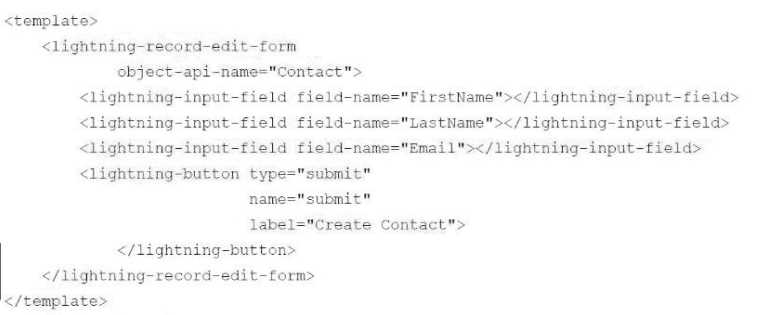
Which component should the developer add to the form to display error messages?
- A. apex:messages
- B. lightning-messages
- C. lightning-error
- D. aura:messages
Answer:
B
Explanation:
The correct answer is B, lightning-messages. This Lightning Web Components (LWC) service
component provides a way to display error messages that are generated during the processing of
lightning-input-field components within a lightning-record-edit-form.
Reference:
Display Error Messages
Question 9
A developer is building a Lightning web component that retrieves data from Salesforce and assigns it
to the record property.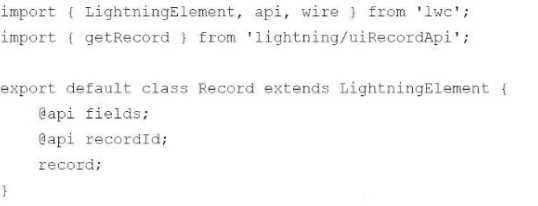
What must be done in the component to get the data from Salesforce?
A)
B)
C)
- A. Option A
- B. Option B
- C. Option C
Answer:
A
Explanation:
Option A is the correct answer. The @wire decorator is used in conjunction with getRecord from
lightning/uiRecordApi to retrieve a record from Salesforce. The syntax @wire(getRecord, { recordId:
'$recordId', fields: '$fields' }) sets up a reactive property, which means it will automatically rerun
whenever the recordId or fields property changes.
Reference:
Get Record Data
Question 10
Exhibit.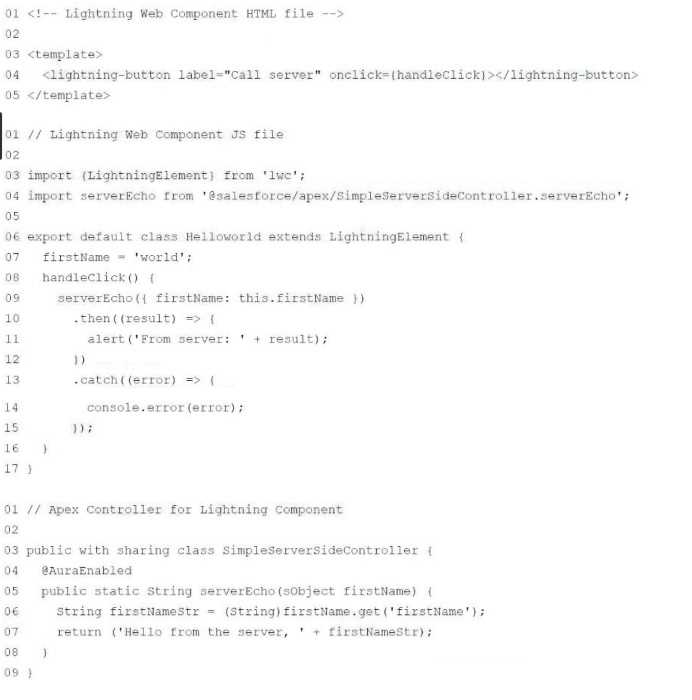
Given the code above, which two changes need to be made in the Apex Controller for the code to
work? Choose 2 answers
- A. Annotate the entire class as @AuraEnabled instead of just the single method.
- B. Change the argument in the Apex Controller line 05 from subject to string.
- C. Change the method signature to be global static, not public to String.
- D. Remove line 06 from the Apex Controller and instead use firstName in the return on line 07.
Answer:
B,D
Explanation:
Based on the code provided, here are the necessary changes:
Change B is required because the argument in the Apex controller's serverEcho method must match
the data type expected by the JavaScript calling the method. The Apex method expects an Object
named firstName, which is then cast to a String inside the method. The JavaScript is passing an object
with a property firstName, so no change is needed in the JavaScript.
Change D is correct because line 06 is redundant and unnecessary. We can directly use firstName in
the return statement as it is already a String type. The get() method is typically used when you have a
Map and you need to retrieve a value by its key. Since firstName is already being passed as a String,
there's no need to cast it or retrieve it using get().
Reference:
Apex Developer Guide
Question 11
An org has an existing process, built using Process Builder, on Opportunity that sets a custom field,
CommissionBaseAmount__c, when
an Opportunity is edited and the Opportunity's Amount changes.
A developer recently deployed an Opportunity before update trigger that uses the
CommissionBaseAmount__c and complex logic to calculate a
value for a custom field, CommissionAmount__c, when an Opportunity stage changes to
Closed/Won.
Users report that when they change the Opportunity to Closed/Won and also change the Amount
during the same save, the CommissionAmount__c is incorrect.
Which action should the developer take to correct this problem?
- A. A Replace the process with a Fast Field Update record-trigger flow.
- B. Call the trigger from the process.
- C. Call the process from the trigger.
Answer:
A
Explanation:
The issue described is likely due to the order of execution in Salesforce, where processes in Process
Builder run after all before triggers. If the Opportunity's Amount is changed and the
CommissionBaseAmount__c is set by Process Builder, the trigger that calculates
CommissionAmount__c may not see the updated value if it operates before the process.
Replacing the process with a before-save record-triggered flow (formerly known as Fast Field Update)
would ensure that CommissionBaseAmount__c is updated before the trigger runs. In a before-save
flow, field updates occur before any Apex before update triggers fire, which means the trigger would
have the updated value of CommissionBaseAmount__c to use in its calculation.
eferences:
Order of Execution in Salesforce
Before-Save Record-Triggered Flows
Question 12
Which code snippet processes records in the most memory efficient manner, avoiding governor
limits such as "Apex heap size too large"?
A)
B)
C)
D)
- A. Option A
- B. Option B
- C. Option C
- D. Option D
Answer:
D
Explanation:
Option D, which uses the Database.query() method in combination with a for loop, is the most
memory-efficient way to process records. This is known as the Query Locator pattern, which allows
you to work with a large number of records by querying them in batches. This approach helps to
avoid hitting the governor limit for "Apex heap size too large" as it processes one record at a time
from the database without storing the entire result set in memory.
Reference:
Working with Very Large SOQL Queries
Apex Governor Limits
Question 13
A developer is building a complex commission calculation engine in Apex that is called from an
Opportunity trigger. During QA it was reported that the calculations are incorrect.
The developer has representative test data and passing test methods in their developer sandbox.
Which three tools or techniques could the developer use to execute the code and pause it at key
lines to visually inspect values of various Apex variables?
Choose 3 answers
- A. Apex Interactive Debugger
- B. Workbench
- C. Developer Console
- D. Breakpoints
- E. Apex Replay Debugger
Answer:
A,C,E
Explanation:
To debug and troubleshoot the commission calculation engine, a developer can use several tools
provided by Salesforce to inspect and pause the execution of Apex code.
Apex Interactive Debugger: It allows real-time debugging of Apex code execution. With this tool, a
developer can set breakpoints, step through code, inspect variables, and evaluate expressions.
Developer Console: Although the Developer Console does not allow interactive debugging, it does
provide the ability to view logs that capture the execution of code. Debug logs can be inspected to
understand the flow of execution and values of variables at different points in time.
Apex Replay Debugger: This tool is part of Salesforce Extensions for Visual Studio Code. It allows a
developer to replay a debug log as if they are stepping through the code line by line, which can be
very useful to inspect the state of variables at specific points in the execution.
Reference:
Apex Interactive Debugger
Developer Console Debugging
Apex Replay Debugger
Question 14
Refer to the code snippet below:
A custom object called Credit_Memo__c exists in a Salesforce environment. As part of a new feature
development that retrieves and
manipulates this type of record, the developer needs to ensure race conditions are prevented when
a set of records are modified within an Apex
transaction.
In the preceding Apex code, how can the developer alter the query statement to use SOQL features
to prevent race conditions within a transaction?
A)
B)
C)
D)
- A. Option A
- B. Option B
- C. Option C
- D. Option D
Answer:
A
Explanation:
To prevent race conditions during an Apex transaction, the SOQL query can be modified to include
the "FOR UPDATE" keyword. This keyword locks the records that are returned by the query,
preventing other transactions from modifying them until the current transaction is complete. This
ensures that the retrieved records cannot be changed by another process before the current
transaction is completed, thus preventing race conditions. The correct option to use in the code
snippet provided is:
[SELECT Id, Name, Amount__c FROM Credit_Memo__c WHERE Customer_Id__c = :customerId LIMIT
50 FOR UPDATE]
This will lock up to 50 records of Credit_Memo__c with the specified Customer_Id__c for the
duration of the transaction.
Reference:
FOR UPDATE
Preventing Record Update Conflicts
Question 15
A developer sees test failures in the sandbox but not in production. No code or metadata changes
have been actively made to either environment since the sandbox was created.
Which consideration should be checked to resolve the issue?
- A. Ensure that Disable Parallel Apex Testing Is unchecked.
- B. Ensure test classes are using SeeAllData = true.
- C. Ensure the sandbox Is on the same release as production.
- D. Ensure the Apex classes are on the same API version.
Answer:
C
Explanation:
If test failures are occurring in a sandbox but not in production and there have been no active code or
metadata changes, it could be due to differences in the Salesforce release versions between the two
environments. Sandboxes can be on preview instances which get upgraded to new releases before
production instances. This can lead to differences in behavior and could affect test executions.
Ensuring that both the sandbox and production are on the same release can resolve such issues. API
version differences and parallel testing settings typically do not cause discrepancies if the code hasn't
changed, and while using SeeAllData=true is generally not recommended due to its dependence on
the organization's data, it's unlikely to be the cause if the issue is related to the environment rather
than the data.
Reference:
Sandbox Preview Instructions
Understand the Salesforce Release Process