RedHat EX300 Exam Questions
Questions for the EX300 were updated on : Feb 18 ,2026
Page 1 out of 6. Viewing questions 1-15 out of 88
Question 1
CORRECT TEXT
There were two systems:
system1, main system on which most of the configuration take place
system2, some configuration here
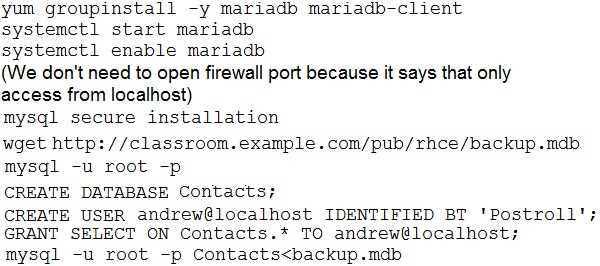
MariaDB
Restore a database on serverX from the backup file
classroom.com/pub/rhce/backup.m">
http://classroom.com/pub/rhce/backup.mdb
The database name should be Contacts. It should be access only within the localhost
Set a password for root user as “Postroll”. Other than the root user, the user Andrew
is able to read the query from the above mentioned database. The user should be
authenticated with the password as “Postroll”.
Answer:
Question 2
CORRECT TEXT
There were two systems:
system1, main system on which most of the configuration take place
system2, some configuration here
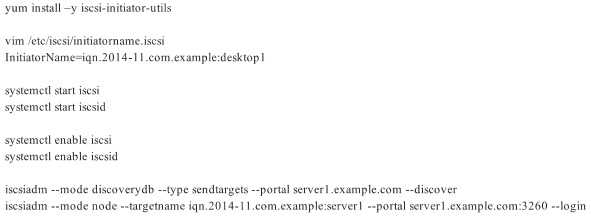
iSCSI Initiator
The serverX.example.com provides an iscsi port (3260). Connect the disk with
desktopX.example.com and configure filesystem with the following requirements.
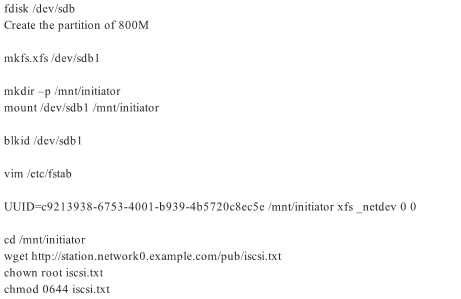
Create 800 MB partition on iSCSI block device and assign the filesystem as xfs
Mount the volume under /mnt/initiator at the system boot time
The filesystem should contain the copy of
http://station.network0.example.com/pub/iscsi.txt
The file should be owned by root with 0644 permission
NOTE: the content of the file should not be modified
Answer:

Question 3
CORRECT TEXT
There were two systems:
system1, main system on which most of the configuration take place
system2, some configuration here
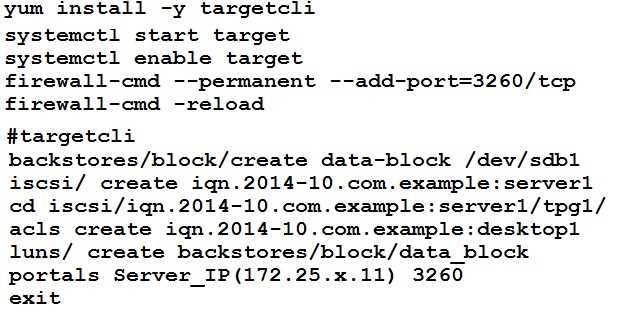
Configure SCSI storage.
Create a new 1 GB target on your serverX.example.com
The block device name should be data_block
The server should export an iscsi disk called iqn.2014-10.com.example:serverX
This target should only be allowed to desktop
.
Answer:
Question 4
CORRECT TEXT
There were two systems:
system1, main system on which most of the configuration take place
system2, some configuration here
Script2.
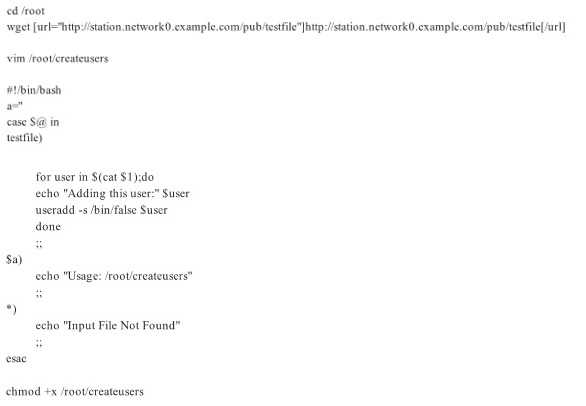
Create a script on serverX called /root/createusers
When this script is called with the argument, it should add all the users from the file
Download the file from
station.network0.example.c">
http://station.network0.example.com/pub/testfile
All users should have the login shell as /bin/false, password not required
When this script is called with any other argument, it should print the message as
“Input File Not Found”
When this script is run without any argument, it should display
“Usage:/root/createusers”
NOTE: if the users are added no need to delete
Answer:
Question 5
CORRECT TEXT
There were two systems:
system1, main system on which most of the configuration take place
system2, some configuration here
Script1.
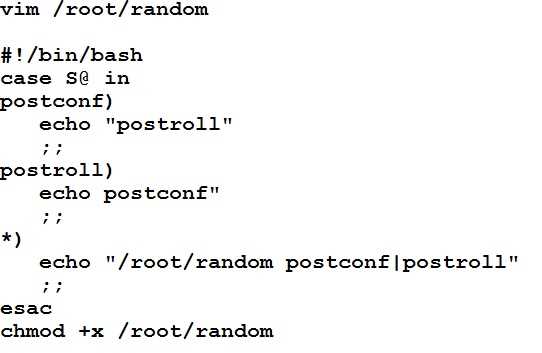
Create a script on serverX called /root/random with the following details
When run as /root/random postconf, should bring the output as “postroll”
When run as /root/random postroll, should bring the output as “postconf”
When run with any other argument or without argument, should bring any other
argument or without argument, should bring the stderr as “/root/random
postconf|postroll”
Answer:
Question 6
CORRECT TEXT
There were two systems:
system1, main system on which most of the configuration take place
system2, some configuration here
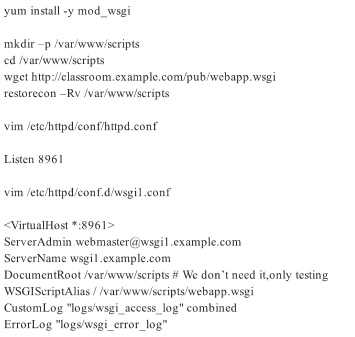
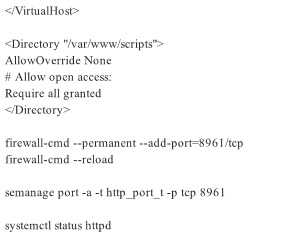
Dynamic Webpage Configuration.
Configure website wsgiX.example.com:8961">
http://wsgiX.example.com:8961
on
system1 with the documentroot /var/www/scripts
Site should execute webapp.wsgi
Page is already provided on
classroom.example.com/pub/webapp.wsgi">
http://classroom.example.com/pub/we
bapp.wsgi
Content of the script should not be modified
Answer:

Question 7
CORRECT TEXT
There were two systems:
system1, main system on which most of the configuration take place
system2, some configuration here
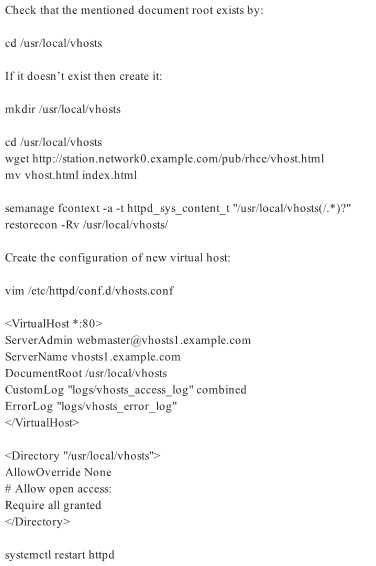
Virtual hosting.
Setup a virtual host with an alternate document root.
Extend your web to include a virtual for the site
vhostsX.example.com">
http://vhostsX.example.com
Set the document root as /usr/local/vhosts
Downloadstation.network0.example.com/pub/rhce/vhost/html">
http://station.netwo
rk0.example.com/pub/rhce/vhost/html
Rename it as index.html
Place this document root of the virtual host
Note: the other websites configures for your server must still accessible.
vhosts.networkX.example.com is already provided by the name server on
example.com
Answer:
Question 8
CORRECT TEXT
There were two systems:
system1, main system on which most of the configuration take place
system2, some configuration here
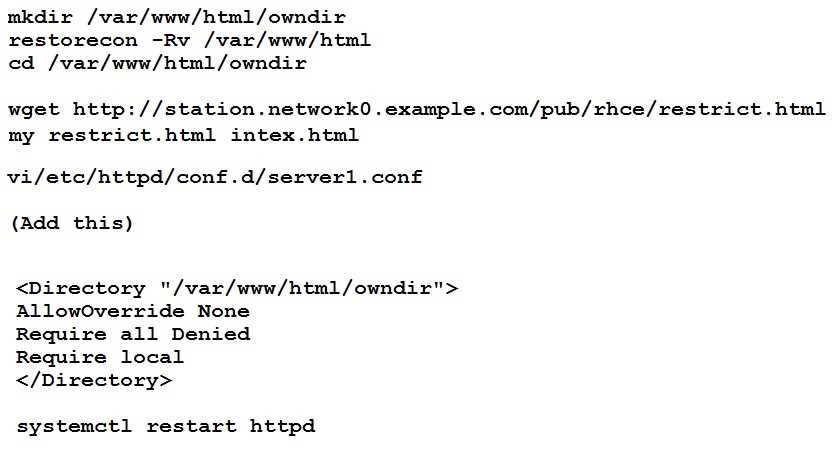
Webpage content modification.
Implement website for serverX.examp">
http://serverX.example.com/owndir
Create a directory named as “owndir” under the document root of webserver
Download
station.network0.example.com/pub">
http://station.network0.example.com/pub/rhce/restri
ct.html
Rename the file into ondex.html
The content of the owndir should be visible to everyone browsing from your local
system but should not be accessible from other location
Answer:
Question 9
CORRECT TEXT
There were two systems:
system1, main system on which most of the configuration take place
system2, some configuration here
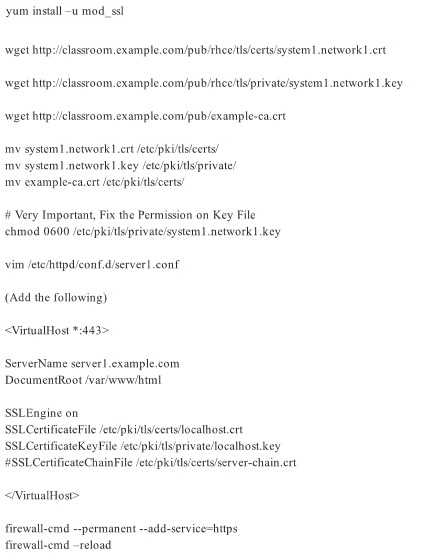
Secured webserver.
Configure the website https://serverX.example.com with TLS
SSLCertificate file
http://classroom.example.com/pub/rhce/tls/certs/system1.networkX.crt
SSLCertificatekeyfile
http://classroom.example.com/pub/rhce/tls/private/system1.netw
orkX.key
SSL CA certificate file
http://classroom.example.com/pub/example-ca.crt
Answer:
Question 10
CORRECT TEXT
There were two systems:
system1, main system on which most of the configuration take place
system2, some configuration here
Webserver.
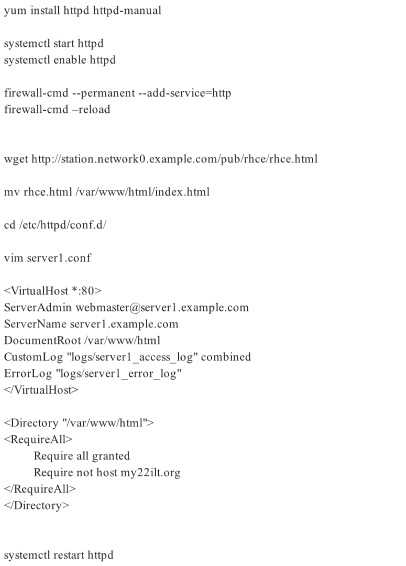
Implement a webserver for the site
http://server
X.example.com
Download the webpage from
http://station.network0.example.com/pub/rhce/rhce.html
Rename the downloaded file in to index.html
Copy the file into the document root
Do not make any modification with the content of the index.html
Clients within my22ilt.org should NOT access the webserver on your systems
Answer:
Question 11
CORRECT TEXT
There were two systems:
system1, main system on which most of the configuration take place
system2, some configuration here
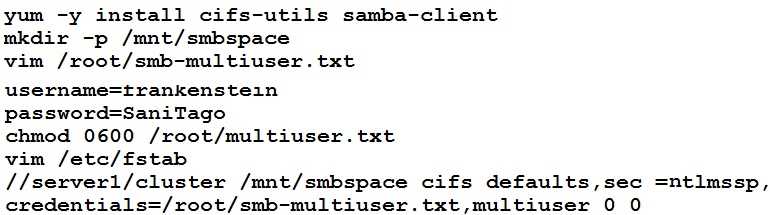
Smb multiuser mount
Mount the samba share /opstack permanently beneath /mnt/smbspace on desktopX as
a multiuser mount.
The samba share should be mounted with the credentials of frankenstein.
Answer:
Question 12
CORRECT TEXT
There were two systems:
system1, main system on which most of the configuration take place
system2, some configuration here
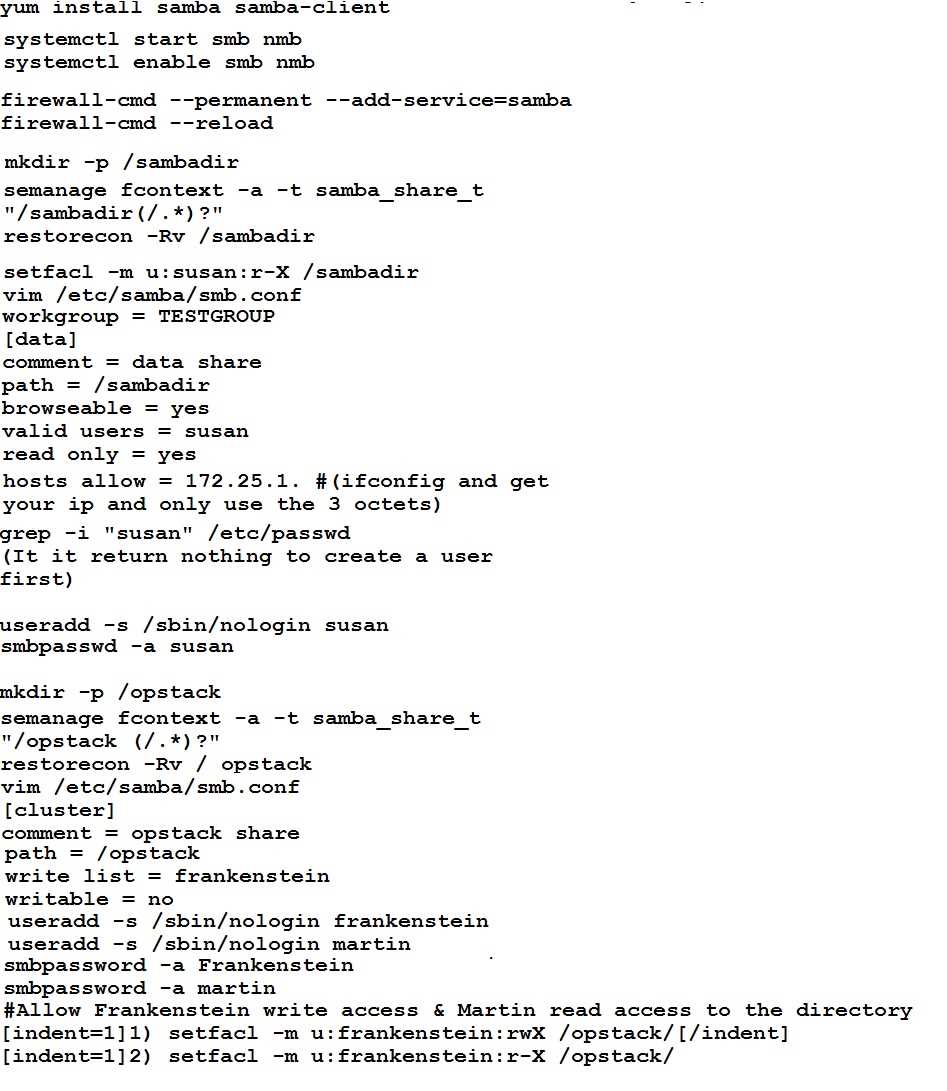
Configure smb access.
Share the /sambadir directory via SMB on serverX
Your SMB server must be a member of the TESTGROUP workgroup
The share name must be data
The data share must be available to example.com domain clients only
The data share must be browseable
susan must have read access to the share, authenticating with the same password
“password”, if necessary
Configure the serverX to share /opstack with SMB share name must be cluster
The user frankenstein has readable, writeable, accessable to the /opstack SMB share
Both users should have the SMB passwd “SaniTago”
Answer:
[/indent]
Question 13
CORRECT TEXT
There were two systems:
system1, main system on which most of the configuration take place
system2, some configuration here
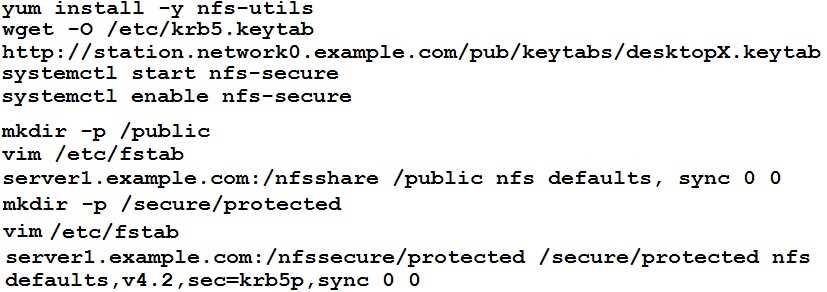
Configure NFS mount.
Mount /nfsshare directory on desktopX under /public directory persistently at system
boot time.
Mount /nfssecure/protected with krb5p secured share on desktopX beneath
/secure/protected provided with keytab
station.network0.example.com/pub/keytabs/desktopX.keytab">
http://station.networ
k0.example.com/pub/keytabs/desktopX.keytab
The user harry is able to write files on /secure directory
Answer:

Question 14
CORRECT TEXT
There were two systems:
system1, main system on which most of the configuration take place
system2, some configuration here
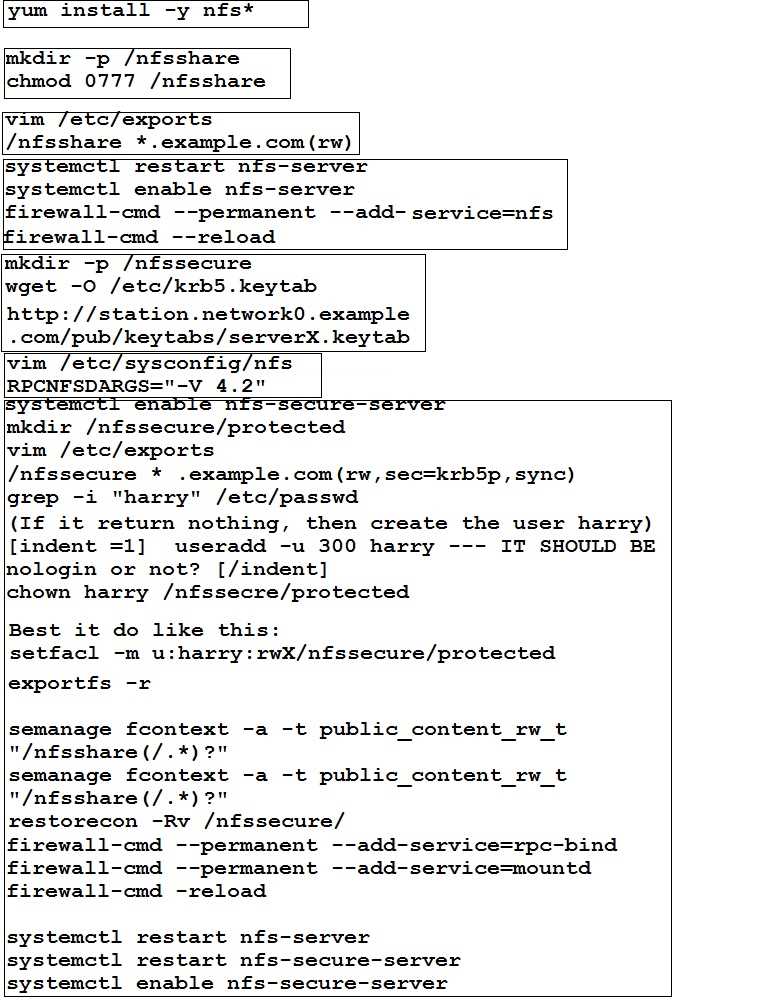
NFS server.
Configure serverX with the following requirements
Share the /nfsshare directory within the example.com domain clients only, share must
be writable
Share the /nfssecure, enable krb5p security to secure access to the NFS share from
URL
http://station.network0.example.com/pub/keytabs/serverX.keytab
Create a directory named as protected under /nfssecure
The exported directory should have read/write access from all subdomains of the
example.com domain
Ensure the directory /nfssecure/protected should be owned by the user harry with
read/write permission
Answer:
Question 15
CORRECT TEXT
There were two systems:
system1, main system on which most of the configuration take place
system2, some configuration here
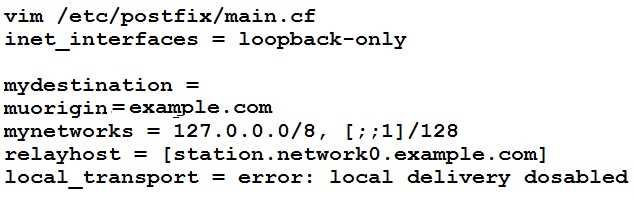
SMTP Configuration.
Configure the SMTP mail service on serverX and desktopX which relay the mail only
from local system through station.network0.example.com, all outgoing mail have
their sender domain as example.com. Ensure that mail should not store locally.
Verify the mail server is working by sending mail to a natasha user.
Check the mail on both serverX and desktopX with the below URL
http://station.network0.example.com/system1
http://station.network0.example.com/system2
Answer: