Pegasystems PEGACPBA88V1 Exam Questions
Questions for the PEGACPBA88V1 were updated on : Feb 18 ,2026
Page 1 out of 4. Viewing questions 1-15 out of 50
Question 1
….application grants 75 employees access to one of four personas: Admin, Author, User, and
Manager. A new analyst who joins the company requires all the .. of the Author persona, but only
some of the reporting features are available to the Manager persona.
o you satisfy this security requirement?
- A. Add the analyst to the Author persona.
- B. Add the analyst to both the Author persona and Manager persona.
- C. Create a new Analyst persona with the required access.
- D. Update the Author persona to include the required analyst reports.
Answer:
C
Explanation:
Create a new Analyst persona with the required access: To meet the specific security requirements of
the new analyst, it is best practice to create a new persona that combines the necessary permissions
from both the Author and Manager personas. This ensures that the analyst has tailored access to the
features they need without altering existing personas or adding overlapping roles.
Reference: Pega Academy, Role-Based Access Control, Persona Management.
Question 2
….wants to create a mobile app experience for users and CSRs for its Transaction Dispute application,
following requirements, which option requires you to configure distinct mobile app channels?
- A. The mobile app customizes currency units and date/time format according to the location of the users.
- B. Mobile app color palettes are different for users and CSRs.
- C. The mobile app supports all mobile phone operating systems.
- D. CSRs can create other case type instances on the mobile app.
Answer:
B
Explanation:
Mobile app color palettes are different for users and CSRs: Configuring distinct mobile app channels
is required when you need different UI elements, such as color palettes, for different user groups
(e.g., users and CSRs).
Reference: Pega Academy, Mobile Channel Configuration, Customizing the User Interface.
Question 3
Which two requirements can you support by configuring a mobile channel in App Studio? (Choose
Two)
- A. Lock the application after 20 minutes of inactivity.
- B. Configure a left swipe behavior to open a message.
- C. Grant access to the mobile app for a specific user.
- D. Set the dimensions of an application icon to 180x180 pixels.
Answer:
AB
Explanation:
Lock the application after 20 minutes of inactivity: You can configure security settings in a mobile
channel to automatically lock the application after a specified period of inactivity to enhance
security.
Reference: Pega Academy, Mobile Channel Configuration, Security Settings.
Configure a left swipe behavior to open a message: Mobile channels in App Studio allow configuring
custom swipe gestures to perform specific actions such as opening a message when the user swipes
left.
Reference: Pega Academy, Mobile Channel Configuration, Gesture Controls.
Question 4
Which of the following statements about responsive breakpoints is true?
- A. By default, tables have two responsive breakpoints.
- B. Responsive breakpoints rely on fixed widths.
- C. Custom responsive breakpoints are configured in App Studio.
- D. Responsive breakpoint behavior changes based on the device brand.
Answer:
C
Explanation:
The statement that is true about responsive breakpoints is:
C . Custom responsive breakpoints are configured in App Studio. This allows you to define how the UI
behaves at different screen sizes.
Explanation:
Responsive Breakpoints: These are used to adapt the UI layout for different screen sizes, ensuring a
good user experience on all devices.
Reference:
Pega Academy: Responsive UI Design
Pega Documentation: Configuring Responsive Breakpoints in App Studio
Question 5
Which two statements are true about insights? (Choose Two)
- A. You can transform sharable visualizations into data queries.
- B. You can search for and select the fields that you want to include in an insight.
- C. You can transform data queries into sharable visualizations.
- D. You can edit application data directly in an insight.
Answer:
BC
Explanation:
Two statements about insights are true:
B . You can search for and select the fields that you want to include in an insight. This allows for
customized data visualizations based on selected fields.
C . You can transform data queries into sharable visualizations, making it easy to share insights with
others in the organization.
Reference:
Pega Academy: Insights and Data Visualization
Pega Documentation: Creating and Sharing Insights
Question 6
You are asked to create a visualization that allows managers in the Customer Service division to track
the number and status of Customer Support Request cases submitted over the last 30 days.
What is the process that you follow to create this visualization?
- A. Open the Channels landing page, and then add a new portal.
- B. Open the Explore data landing page, and then create a new insight.
- C. Open the Explore data landing page, and then add a Reporting widget.
- D. Open the Data landing page, and then create a new insight.
Answer:
B
Explanation:
To create a visualization that allows managers to track the number and status of Customer Support
Request cases submitted over the last 30 days, follow these steps:
Open the Explore data landing page: This page allows you to create and explore data visualizations.
Create a new insight: Insights help you visualize and analyze data trends and metrics.
Reference:
Pega Academy: Data Exploration and Visualization
Pega Documentation: Creating Insights
Question 7
DRAG DROP
Drag each report from the left to the corresponding report type on the right.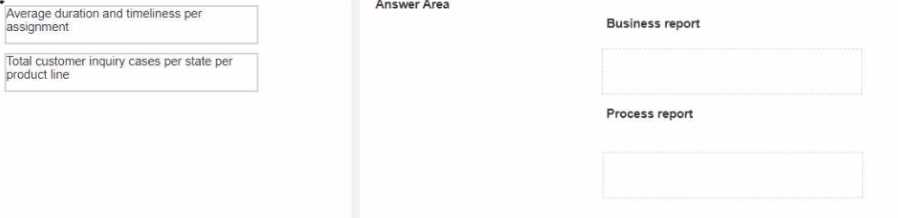
Answer:
None
Explanation:
To match the reports to the correct report types:
Average duration and timeliness per assignment:
Report Type: Process Report
Total customer inquiry cases per state per product line:
Report Type: Business Report
Explanation:
Process Reports: Focus on process metrics like the duration and timeliness of assignments.
Business Reports: Focus on business metrics like customer inquiries segmented by state and product
line.
Reference:
Pega Academy: Reporting and Analytics
Pega Documentation: Types of Reports
Question 8
A manager requests a report that contains the following columns: Create Date, Case ID, Create
Operator, and Work Status. You must sort the cases so the case with the most recent create date
appears at the top of the list and descends in order.
How do you design the report definition to support this requirement?
- A. Select Highest to Lowest sort type for Create Date.
- B. Make the Create Date the first column in the report.
- C. Select Lowest to Highest sort type for Create Date.
- D. Add a filter condition where Create Date is greater than the current date.
Answer:
A
Explanation:
To sort the cases so that the case with the most recent create date appears at the top, you need to
select the Highest to Lowest sort type for the Create Date column.
Select Highest to Lowest sort type: This ensures that the most recent date is listed first and the oldest
date is listed last.
Reference:
Pega Academy: Report Definitions
Pega Documentation: Sorting Data in Reports
Question 9
DRAG DROP
A Developer configures a button with the action set as shown in the following image: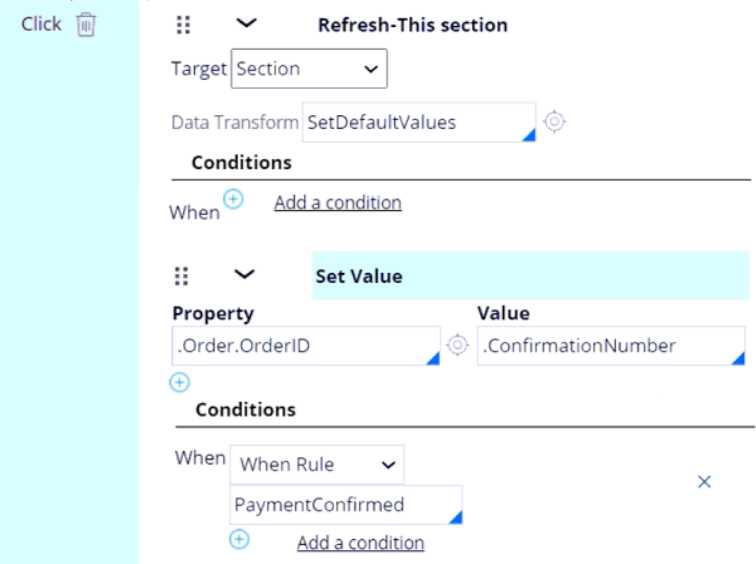
Place the events in the order they occur.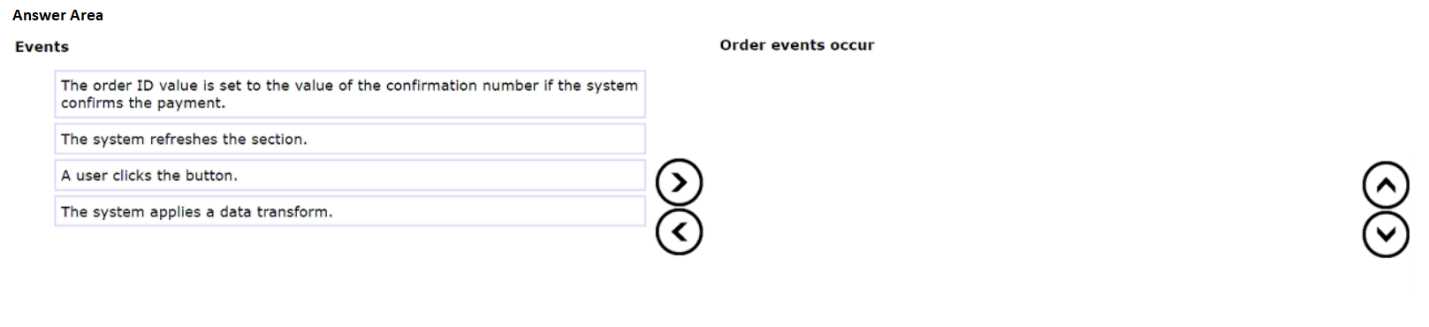
Answer:
None
Explanation:
Order of Events:
A user clicks the button.
The system applies a data transform.
The order ID value is set to the value of the confirmation number if the system confirms the
payment.
The system refreshes the section.
A user clicks the button.
Explanation: The event sequence starts when the user interacts with the button by clicking it. This is
the trigger for the subsequent actions.
Reference: Pega Platform Business Architect Essentials, Chapter on User Interface.
The system applies a data transform.
Explanation: After the button click, the specified data transform (SetDefaultValues) is executed. Data
transforms are used to manipulate data, such as setting default values or copying data from one
location to another.
Reference: Pega Platform Business Architect Essentials, Chapter on Data Transforms.
The order ID value is set to the value of the confirmation number if the system confirms the
payment.
Explanation: Following the data transform, the system checks the condition (When Rule:
PaymentConfirmed). If this condition is true, the system sets the .Order.OrderID property to the
.ConfirmationNumber value.
Reference: Pega Platform Business Architect Essentials, Chapter on Conditional Processing.
The system refreshes the section.
Explanation: Finally, the section is refreshed to reflect any changes made during the previous steps.
This ensures the user interface is updated with the latest data.
Reference: Pega Platform Business Architect Essentials, Chapter on User Interface and Dynamic UI
Updates.
Question 10
two statements about the Constellation design system are true? (Choose Two)
- A. Constellation design system is a section-based architecture.
- B. Constellation design system improves context switching or multitasking.
- C. Constellation design system components are not available in the Traditional UI architecture.
- D. Constellation design system uses a modular design.
Answer:
BD
Explanation:
Constellation design system improves context switching or multitasking: The Constellation design
system in Pega enhances user experience by providing a design that supports efficient context
switching and multitasking, making it easier for users to navigate and manage multiple tasks.
Reference: Pega Academy, User Interface Design, Constellation Design System.
Constellation design system uses a modular design: The Constellation design system is built on a
modular architecture, allowing for reusable and customizable components that can be easily
integrated and maintained.
Reference: Pega Academy, User Interface Design, Constellation Design System Components.
Question 11
Which one of the following statements about channel interfaces is true?
- A. A persona requires a unique channel interface.
- B. All users see the same channel interface.
- C. User interfaces are also known as channel interfaces.
- D. Seating a channel interface creates a default work queue.
Answer:
C
Explanation:
User interfaces are also known as channel interfaces: In Pega, user interfaces are referred to as
channel interfaces because they represent the different ways users interact with the application,
such as through web, mobile, or other channels.
Reference: Pega Academy, User Interface Design, Channel Interfaces.
Question 12
...Manager need to view the Employee vacation requests report in their Manager portal dashboards.
Only managers have access to this report.
…configuration do you perform to fulfill these requirements?
- A. Add a report widget to the Manager portal dashboard, and then click Publish.
- B. Add a report widget to the Manager portal dashboard, and then click Publish to default.
- C. Add the out-of-the-box Reports landing page to the Manager portal.
- D. Create a new landing page on the Manager portal with the new report saved in a public category.
Answer:
B
Explanation:
Add a report widget to the Manager portal dashboard, and then click Publish to default: To ensure
that only managers can view the Employee vacation requests report, you need to add the report
widget to the Manager portal dashboard and then publish it to the default dashboard. This makes
the report accessible only to users who have access to the Manager portal.
Reference: Pega Academy, Manager Dashboards and Reports, Configuring Dashboard Widgets.
Question 13
....can select a checkbox to subscribe to a text messaging service. Selecting the checkbox displays a
field to enter a mobile phone number. lo you configure the application to display the mobile phone
number field only after users select the checkbox?
- A. Use a visibility condition on the checkbox to determine whether to show the mobile phone number field.
- B. Use a visibility condition on the mobile phone number field to determine whether to show the field.
- C. Use a disable condition on the mobile phone number field to determine whether to show the field.
- D. Use a validation condition to determine whether to show the mobile phone number field.
Answer:
B
Explanation:
Use a visibility condition on the mobile phone number field to determine whether to show the field:
In Pega, visibility conditions are used to control the display of UI elements based on specific
conditions. In this case, you would configure the visibility condition on the mobile phone number
field to display it only when the checkbox for subscribing to the text messaging service is selected.
Reference: Pega Academy, User Interface Design, Visibility Conditions.
Question 14
Which project nears the end of the Prepare phase, you prepare the project plan for review with your
development team, two elements does the project plan include? (Choose Two)
- A. Governance structure
- B. Epic and user stories
- C. RAID log (Risks, Actions, Issues, and Decisions)
- D. Definition of Ready (DoR)
- E. Project team resourcing’s
Answer:
BC
Explanation:
As a project nears the end of the Prepare phase, the project plan should include:
B . Epics and user stories:
These are essential for defining the work to be done in future sprints. They provide detailed
descriptions of the functionality and requirements that need to be developed and tested.
C . RAID log (Risks, Actions, Issues, and Decisions):
This log is critical for tracking potential risks, ongoing actions, issues that need resolution, and
decisions made during the project. It helps in managing and mitigating risks and ensures that the
project stays on track.
Reference:
Pega Academy: Project Planning and Management
Pega Documentation: Prepare Phase Activities and Deliverables
Question 15
HOTSPOT
A business requires a service-level agreement (SLA) to ensure that expense reports are submitted
and reviewed on time. The initial urgency value is set to 10 and the following behavior is required:
SLA starts when the Expense report assignment is created
..goal elapses, the assignment urgency increases by 10
..deadline elapses the assignment urgency increases by 10
..passed deadline elapses, the assignment urgency increases by 20
Answer area select the urgency value that the system sets if the assignment is not yet completed by
the end of each milestone.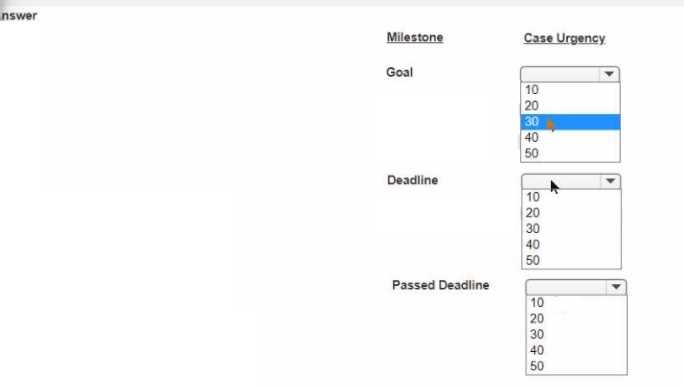
Answer:
None
Explanation:
To set the urgency values based on the described SLA behavior:
Initial urgency value: 10
When goal elapses: Urgency increases by 10 (Total: 20)
When deadline elapses: Urgency increases by 10 (Total: 30)
When passed deadline elapses: Urgency increases by 20 (Total: 50)
Thus, the urgency values at each milestone are:
Goal: 20
Deadline: 30
Passed Deadline: 50
Reference:
Pega Academy: Service Level Agreements (SLAs)
Pega Documentation: Configuring SLA Urgency and Escalation