palo alto networks NETSEC GENERALIST Exam Questions
Questions for the NETSEC GENERALIST were updated on : Feb 18 ,2026
Page 1 out of 4. Viewing questions 1-15 out of 60
Question 1
What is the primary role of Advanced DNS Security in protecting against DNS-based threats?
- A. It replaces traditional DNS servers with more reliable and secure ones.
- B. It centralizes all DNS management and simplifies policy creation.
- C. It automatically redirects all DNS traffic through encrypted tunnels.
- D. It uses machine learning (ML) to detect and block malicious domains in real-time.
Answer:
D
Explanation:
Advanced DNS Security in Palo Alto Networks provides real-time protection against DNS-based
threats using machine learning (ML) and threat intelligence.
Why Machine Learning-Based Detection is Critical?
Detects and Blocks Malicious Domains in Real-Time –
Identifies phishing, malware command-and-control (C2), and data exfiltration attempts using ML
models.
Prevents zero-day DNS attacks that traditional static methods fail to detect.
Analyzes DNS Traffic to Identify Malicious Patterns –
Monitors DNS queries for suspicious behaviors, such as algorithm-generated domain names (DGAs)
used by botnets.
Enhances Network Security Without Affecting Performance –
DNS Security operates inline to block threats before malicious domains can be accessed.
Works without disrupting legitimate DNS traffic.
Why Other Options Are Incorrect?
❌
A . It replaces traditional DNS servers with more reliable and secure ones.
Incorrect, because Advanced DNS Security does not replace DNS servers—it analyzes DNS traffic for
threats.
❌
B . It centralizes all DNS management and simplifies policy creation.
Incorrect, because Advanced DNS Security is not a DNS management solution, but a threat
prevention feature.
❌
C . It automatically redirects all DNS traffic through encrypted tunnels.
Incorrect, because it does not encrypt DNS traffic, but analyzes it for malicious activity.
Reference to Firewall Deployment and Security Features:
Firewall Deployment – Protects against DNS-based attacks via inline inspection.
Security Policies – Enforces malicious domain blocking.
VPN Configurations – Secures DNS queries even from remote users.
Threat Prevention – Blocks malicious DNS requests before they resolve.
WildFire Integration – Identifies DNS-based malware C2 communication.
Zero Trust Architectures – Prevents threat actors from leveraging DNS tunneling for data exfiltration.
Thus, the correct answer is:
✅
D. It uses machine learning (ML) to detect and block malicious domains in real-time.
Question 2
With Strata Cloud Manager (SCM), which action will efficiently manage Security policies across
multiple cloud providers and on-premises data centers?
- A. Use snippets and folders to define and enforce uniform Security policies across environments.
- B. Use the "Feature Adoption" visibility tab on a weekly basis to make adjustments across the network.
- C. Allow each cloud provider's native security tools to handle policy enforcement independently.
- D. Create and manage separate Security policies for each environment to address specific needs.
Answer:
A
Explanation:
With Strata Cloud Manager (SCM), efficiently managing Security Policies across multiple cloud
providers and on-premises data centers is achieved by using snippets and folders to ensure policy
uniformity.
Why Snippets and Folders Are the Correct Approach?
Enforce Consistent Security Policies Across Hybrid Environments –
SCM allows administrators to define security policy templates (snippets) and apply them uniformly
across all cloud and on-prem environments.
This prevents security gaps and misconfigurations when managing multiple deployments.
Improves Operational Efficiency –
Instead of manually creating policies for each deployment, folders and snippets allow reusable
configurations, saving time and reducing errors.
Maintains Compliance Across All Deployments –
Ensures consistent enforcement of security best practices across cloud providers (AWS, Azure, GCP)
and on-prem data centers.
Why Other Options Are Incorrect?
B . Use the "Feature Adoption" visibility tab on a weekly basis to make adjustments across the
❌
network.
Incorrect, because Feature Adoption is a monitoring tool, not a policy enforcement mechanism.
It helps track feature utilization, but does not actively manage security policies.
❌
C . Allow each cloud provider's native security tools to handle policy enforcement independently.
Incorrect, because this would create inconsistent security policies across environments.
SCM is designed to unify security policy management across all cloud providers.
❌
D . Create and manage separate Security policies for each environment to address specific needs.
Incorrect, because managing separate policies manually increases complexity and risk of
misconfigurations.
SCM’s snippets and folders allow centralized, consistent policy enforcement.
Reference to Firewall Deployment and Security Features:
Firewall Deployment – SCM applies uniform security policies across cloud and on-prem
environments.
Security Policies – Enforces consistent rule sets using snippets and folders.
VPN Configurations – Ensures secure communication between different environments.
Threat Prevention – Blocks threats across multi-cloud and hybrid deployments.
WildFire Integration – Ensures threat detection remains consistent across all environments.
Zero Trust Architectures – Maintains consistent security enforcement for Zero Trust segmentation.
Thus, the correct answer is:
✅
A. Use snippets and folders to define and enforce uniform Security policies across environments.
Question 3
Which network design for internet of things (loT) Security allows traffic mirroring from the switch to
a TAP interface on the firewall to monitor traffic not otherwise seen?
- A. DHCP server on firewall
- B. Firewall as DHCP relay
- C. Firewall in DHCP path
- D. Firewall outside DHCP path
Answer:
D
Explanation:
To monitor traffic for Internet of Things (IoT) devices that may not otherwise be visible, the network
design should place the firewall outside the DHCP path and use traffic mirroring from the switch to a
TAP (Test Access Point) interface on the firewall.
Traffic Mirroring: Switches mirror the traffic to the firewall's TAP interface, enabling the firewall to
inspect the traffic without directly interfering with the device communication.
IoT Monitoring: Many IoT devices use lightweight communication protocols or non-standard
methods, making direct interception difficult. Traffic mirroring allows passive monitoring for
behavioral analysis, anomaly detection, and threat prevention.
Firewall Placement: Keeping the firewall outside the DHCP path ensures that monitoring does not
disrupt IoT device communications while still providing visibility into their network activity.
Reference:
Palo Alto Networks IoT Security Best Practices
Traffic Mirroring and TAP Interfaces
Question 4
A security administrator is adding a new sanctioned cloud application to SaaS Data Security.
After authentication, how does the tool gain API access for monitoring?
- A. It transmits the configured SAML user profile to the cloud application for security event attribution.
- B. It establishes an encrypted key pair with the cloud application to safely transmit user data.
- C. It generates a certificate and sends it to the cloud application for TLS decryption and inspection.
- D. It receives a token from the cloud application for establishing and maintaining a secure connection.
Answer:
D
Explanation:
When adding a new sanctioned cloud application to SaaS Data Security, the tool establishes API
access by receiving an OAuth token or a similar type of token from the cloud application.
API Integration: The token allows the SaaS Data Security solution to authenticate itself with the cloud
application, enabling secure monitoring and management of user activity, data flow, and security
events.
Token Usage: The token maintains the connection between the SaaS application and the security
tool, ensuring seamless communication while enforcing access policies and monitoring for
anomalies.
Security: This method ensures that API access is secure and prevents unauthorized access to the
cloud application.
Reference:
Palo Alto Networks SaaS Security API Documentation
OAuth Authentication and API Access
Question 5
A firewall administrator wants to segment the network traffic and prevent noncritical assets from
being able to access critical assets on the network.
Which action should the administrator take to ensure the critical assets are in a separate zone from
the noncritical assets?
- A. Create a deny Security policy with "any" set for both the source and destination zones.
- B. Create an allow Security policy with "any" set for both the source and destination zones.
- C. Logically separate physical and virtual interfaces to control the traffic that passes across the interface.
- D. Assign a single interface to multiple security zones.
Answer:
C
Explanation:
To properly segment network traffic and prevent noncritical assets from accessing critical assets, the
best practice is to logically separate traffic using different physical or virtual interfaces.
Why Logical Separation of Interfaces is the Correct Answer?
Creates Secure Network Segmentation –
Firewalls can assign critical and noncritical assets to separate security zones.
Traffic between security zones is explicitly controlled via Security Policies.
Allows Granular Security Control –
Critical assets (e.g., databases, financial systems) can be placed in a high-security zone.
Noncritical assets (e.g., guest networks, IoT devices) can be placed in a lower-security zone.
Enhances Network Performance and Compliance –
Reduces attack surface by limiting access between critical and noncritical assets.
Ensures regulatory compliance (e.g., PCI-DSS, HIPAA) by isolating sensitive systems.
Why Other Options Are Incorrect?
❌
A . Create a deny Security policy with "any" set for both the source and destination zones.
Incorrect, because this would block all traffic, preventing even authorized communications.
❌
B . Create an allow Security policy with "any" set for both the source and destination zones.
Incorrect, because this would permit all traffic, violating network segmentation principles.
❌
D . Assign a single interface to multiple security zones.
Incorrect, because a single interface cannot belong to multiple zones—it must be logically separated
to enforce security policies effectively.
Reference to Firewall Deployment and Security Features:
Firewall Deployment – Ensures critical and noncritical assets are securely segmented.
Security Policies – Enforces access control between different security zones.
VPN Configurations – Ensures VPN access does not bypass network segmentation.
Threat Prevention – Prevents lateral movement between network segments.
WildFire Integration – Scans cross-zone traffic for malware threats.
Zero Trust Architectures – Implements strict access control between different security domains.
Thus, the correct answer is:
✅
C. Logically separate physical and virtual interfaces to control the traffic that passes across the
interface.
Question 6
Which type of traffic can a firewall use for proper classification and visibility of internet of things (loT)
devices?
- A. DHCP
- B. RTP
- C. RADIUS
- D. SSH
Answer:
A
Explanation:
To properly classify and gain visibility into Internet of Things (IoT) devices, a firewall can analyze
DHCP traffic, as IoT devices frequently use DHCP for network connectivity.
Why DHCP is the Correct Answer?
IoT Devices Often Use DHCP for IP Assignment –
Most IoT devices (smart cameras, sensors, medical devices, industrial controllers) dynamically obtain
IP addresses via DHCP.
Firewalls can inspect DHCP requests to identify device types based on DHCP Option 55 (Parameter
Request List) and Option 60 (Vendor Class Identifier).
Enhances IoT Security with Granular Policies –
Palo Alto Networks IoT Security uses DHCP data to assign risk scores, enforce access control policies,
and detect anomalies.
Does Not Require Deep Packet Inspection –
Unlike RTP, RADIUS, or SSH, which focus on specific protocols for media streaming, authentication,
and encryption, DHCP data is lightweight and easily analyzed.
Why Other Options Are Incorrect?
❌
B . RTP (Real-Time Transport Protocol)
Incorrect, because RTP is used for media streaming (VoIP, video conferencing), not device
classification.
❌
C . RADIUS (Remote Authentication Dial-In User Service)
Incorrect, because RADIUS is an authentication protocol, not a traffic type used for IoT device
classification.
❌
D . SSH (Secure Shell)
Incorrect, because SSH is an encrypted protocol used for remote device access, not identifying IoT
devices.
Reference to Firewall Deployment and Security Features:
Firewall Deployment – Firewalls use DHCP fingerprinting for IoT visibility.
Security Policies – DHCP data enables dynamic security policy enforcement for IoT devices.
VPN Configurations – Ensures IoT devices using VPN connections are correctly classified.
Threat Prevention – Detects malicious IoT devices based on DHCP metadata.
WildFire Integration – Prevents IoT devices from being used in botnet attacks.
Zero Trust Architectures – Ensures least-privilege access policies for IoT devices.
Question 7
Based on the image below, which source IP address will be seen in the data filtering logs of the Cloud
NGFW for AWS with the default rulestack settings?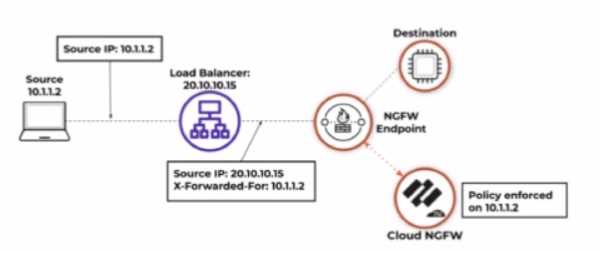
- A. 10.1.1.3
- B. 20.10.10.16
- C. 20.10.10.15
- D. 10.1.1.2
Answer:
C
Explanation:
Based on the image and default rulestack settings of the Cloud NGFW for AWS, the source IP address
seen in the data filtering logs will be 20.10.10.15, which is the IP address of the load balancer.
Default Rulestack Behavior: By default, the rulestack settings do not inspect or preserve the original
client IP (e.g., 10.1.1.2) in the "X-Forwarded-For" header. Instead, the load balancer's IP (20.10.10.15)
is recorded as the source IP.
Logging Mechanism: Unless explicitly configured to parse the "X-Forwarded-For" header, the
firewall's logs will reflect the IP address of the device directly sending the traffic to the NGFW (the
load balancer in this case).
Reference:
Cloud NGFW for AWS Documentation
Data Filtering Logs and Source IP Behavior
Question 8
What is the most efficient way in Strata Cloud Manager (SCM) to apply a Security policy to all ten
firewalls in one data center?
- A. Create the Security policy on each firewall individually.
- B. Set the configuration scope to "Global" and create the Security policy.
- C. Create the Security policy at any configuration scope, then clone it to the ten firewalls.
- D. Create a folder that groups the ten firewalls together, then create the Security policy at that configuration scope.
Answer:
D
Explanation:
In Strata Cloud Manager (SCM), the most efficient way to apply a Security policy to multiple firewalls
in a single data center is to group the firewalls together into a folder and create the Security policy at
that configuration scope.
Grouping Firewalls: By organizing the ten firewalls into a folder, administrators can manage them as a
single entity, reducing configuration time and ensuring consistency.
Configuration Scope: SCM allows you to create policies at different scopes, such as Global, Device
Group, or Folder level. By applying the policy at the folder scope, it is automatically propagated to all
firewalls within the group.
Efficiency: This approach eliminates the need to individually configure each firewall or manually
clone policies, which can be time-consuming and error-prone.
Reference:
Strata Cloud Manager Policy Management
Best Practices for Multi-Firewall Management
Question 9
A network security engineer wants to forward Strata Logging Service data to tools used by the
Security Operations Center (SOC) for further investigation.
In which best practice step of Palo Alto Networks Zero Trust does this fit?
- A. Implementation
- B. Report and Maintenance
- C. Map and Verify Transactions
- D. Standards and Designs
Answer:
B
Explanation:
Forwarding Strata Logging Service data to Security Operations Center (SOC) tools aligns with the
"Report and Maintenance" phase of Palo Alto Networks Zero Trust best practices.
Why Report and Maintenance?
Continuous Monitoring – Security teams analyze logs and alerts from Strata Logging Service to detect
threats.
Incident Response – SOC teams use log data for forensic investigations and attack mitigation.
Threat Intelligence Correlation – Strata logs integrate with SIEM/SOAR platforms for automated
threat detection.
Compliance & Auditing – Logs support regulatory compliance efforts by maintaining detailed activity
records.
Why Other Options Are Incorrect?
❌
A . Implementation
Incorrect, because Implementation focuses on configuring and deploying security controls, not
ongoing log analysis.
❌
C . Map and Verify Transactions
Incorrect, because this step involves identifying and mapping network transactions, rather than
reporting on security events.
❌
D . Standards and Designs
Incorrect, because this step involves setting security baselines, but does not include log monitoring
and reporting.
Referen
Question 10
Which two configurations are required when creating deployment profiles to migrate a perpetual
VM-Series firewall to a flexible VM? (Choose two.)
- A. Choose "Fixed vCPU Models" for configuration type.
- B. Allocate the same number of vCPUs as the perpetual VM.
- C. Deploy virtual Panorama for management.
- D. Allow only the same security services as the perpetual VM.
Answer:
AC
Explanation:
Migrating a perpetual VM-Series firewall license to a flexible VM-Series license involves specific
configurations to ensure a seamless transition. The process requires careful planning and execution
to align with Palo Alto Networks' licensing models and deployment strategies.
A. Choose "Fixed vCPU Models" for configuration type.
When creating a deployment profile for the migration, selecting the appropriate configuration type is
crucial. Palo Alto Networks offers two configuration types: Fixed vCPU Models and Flexible vCPU
Models.
Fixed vCPU Models:
This configuration aligns with traditional VM-Series models (e.g., VM-300, VM-500) and is suitable
for environments where the firewall's resource allocation remains consistent.
Choosing this option ensures that the migrated firewall retains a familiar resource profile, simplifying
the transition from a perpetual license.
Flexible vCPU Models:
This configuration allows for dynamic allocation of vCPUs, providing scalability based on varying
workload demands.
While offering flexibility, it requires careful planning to match resource allocation with licensing
entitlements.
For a straightforward migration that maintains existing resource allocations, selecting "Fixed vCPU
Models" is recommended. This choice ensures compatibility with the perpetual VM's configuration
and simplifies the licensing transition.
C . Deploy virtual Panorama for management.
Effective management of VM-Series firewalls, especially during a migration, necessitates a
centralized management platform. Panorama, Palo Alto Networks' centralized management solution,
provides comprehensive tools for configuration, monitoring, and licensing management.
Centralized Management:
Panorama offers a single interface to manage multiple firewalls, streamlining policy updates and
configuration changes.
Licensing Management:
During the migration to a flexible VM-Series license, Panorama facilitates the application of new
licenses and ensures compliance across all managed devices.
Visibility and Reporting:
With Panorama, administrators gain enhanced visibility into traffic patterns and security events,
which is crucial during transitional periods.
Deploying a virtual Panorama instance ensures that the migration process is managed efficiently,
reducing the risk of configuration errors and ensuring that all firewalls operate under the correct
licensing model.
Incorrect Options:
B . Allocate the same number of vCPUs as the perpetual VM.
While maintaining the same number of vCPUs might seem logical, the flexible licensing model allows
for dynamic allocation based on current needs. Strictly matching the perpetual VM's vCPU count may
not leverage the benefits of the flexible model.
D . Allow only the same security services as the perpetual VM.
The flexible licensing model provides an opportunity to reassess and potentially enhance the security
services in use. Restricting to the same services may limit the advantages offered by the new
licensing structure.
Reference:
Palo Alto Networks Documentation on Migrating to a Flexible VM-Series License:
docs.paloaltonetworks.com
Palo Alto Networks Knowledge Base Article on License Migration:
knowledgebase.paloaltonetworks.com
Palo Alto Networks Professional Services Flex Licensing Migration Lab:
github.com
By selecting the appropriate configuration type and utilizing Panorama for centralized management,
organizations can ensure a smooth and efficient migration from a perpetual VM-Series firewall
license to a flexible VM-Series license.
Question 11
Which zone is available for use in Prisma Access?
- A. DMZ
- B. Interzone
- C. Intrazone
- D. Clientless VPN
Answer:
D
Explanation:
Prisma Access, a cloud-delivered security platform by Palo Alto Networks, supports specific
predefined zones to streamline policy creation and enforcement. These zones are integral to how
traffic is managed and secured within the service.
Available Zones in Prisma Access:
Trust Zone:
This zone encompasses all trusted and onboarded IP addresses, service connections, or mobile users
within the corporate network. Traffic originating from these entities is considered trusted.
Untrust Zone:
This zone includes all untrusted IP addresses, service connections, or mobile users outside the
corporate network. By default, any IP address or mobile user that is not designated as trusted falls
into this category.
Clientless VPN Zone:
Designed to provide secure remote access to common enterprise web applications that utilize HTML,
HTML5, and JavaScript technologies. This feature allows users to securely access applications from
SSL-enabled web browsers without the need to install client software, which is particularly useful for
enabling partner or contractor access to applications and for safely accommodating unmanaged
assets, including personal devices. Notably, the Clientless VPN zone is mapped to the trust zone by
default, and this setting cannot be changed.
Analysis of Options:
A . DMZ:
A Demilitarized Zone (DMZ) is a physical or logical subnetwork that separates an internal local area
network (LAN) from other untrusted networks, typically the internet. While traditional network
architectures often employ a DMZ to add an extra layer of security, Prisma Access does not
specifically define or utilize a DMZ zone within its predefined zone structure.
B . Interzone:
In the context of Prisma Access, "interzone" is not a predefined zone available for user configuration.
However, it's worth noting that Prisma Access logs may display a zone labeled "inter-fw," which
pertains to internal communication within the Prisma Access infrastructure and is not intended for
user-defined policy application.
C . Intrazone:
Intrazone typically refers to traffic within the same zone. While security policies can be configured to
allow or deny intrazone traffic, "Intrazone" itself is not a standalone zone available for configuration
in Prisma Access.
D . Clientless VPN:
As detailed above, the Clientless VPN is a predefined zone in Prisma Access, designed to facilitate
secure, clientless access to web applications.
Conclusion:
Among the options provided, D. Clientless VPN is the correct answer, as it is an available predefined
zone in Prisma Access.
Reference:
Palo Alto Networks. "Prisma Access Zones."
https://docs.paloaltonetworks.com/prisma-
access/administration/prisma-access-setup/prisma-access-zones
Question 12
Infrastructure performance issues and resource constraints have prompted a firewall administrator to
monitor hardware NGFW resource statistics.
Which AlOps feature allows the administrator to review these statistics for each firewall in the
environment?
- A. Capacity Analyzer
- B. Host information profile (HIP)
- C. Policy Analyzer
- D. Security Posture Insights
Answer:
A
Explanation:
The Capacity Analyzer feature in Palo Alto Networks' AIOps for NGFW (Next-Generation Firewall)
provides administrators with insights into hardware resource statistics for each firewall in the
environment. It helps identify infrastructure performance issues and resource constraints, such as
CPU usage, session capacity, and throughput levels.
Capacity Monitoring: It enables real-time and historical monitoring of resource usage to ensure
optimal performance.
Proactive Issue Detection: Administrators can proactively address resource constraints before they
impact the network.
Unified Visibility: With AIOps, the Capacity Analyzer aggregates data from all managed firewalls,
providing centralized visibility into resource utilization across the environment.
Reference:
Palo Alto Networks AIOps Documentation
Capacity Analyzer Overview
Question 13
How many places will a firewall administrator need to create and configure a custom data loss
prevention (DLP) profile across Prisma Access and the NGFW?
- A. One
- B. Two
- C. Three
- D. Four
Answer:
A
Explanation:
With Prisma Access and NGFW, a firewall administrator only needs to create and configure a custom
Data Loss Prevention (DLP) profile in one place.
Why Only One Place?
Unified DLP Management –
Palo Alto Networks Enterprise DLP (E-DLP) service provides a single cloud-based policy engine for
both Prisma Access and NGFWs.
DLP profiles are centrally managed and enforced across all connected firewalls and cloud services.
Panorama Integration –
If managed via Panorama, the DLP profile is created once and applied to all firewalls and Prisma
Access deployments.
Consistency Across Deployments –
A single DLP policy ensures uniform enforcement across network, branch, remote users, and cloud
environments.
Why Other Options Are Incorrect?
❌
B . Two
Incorrect, because NGFW and Prisma Access share the same DLP policy, so there's no need to
configure separately.
❌
C . Three
Incorrect, because DLP profiles are centrally managed, reducing duplication.
❌
D . Four
Incorrect, because DLP configuration is streamlined into a single management location for simplicity.
Reference to Firewall Deployment and Security Features:
Firewall Deployment – Single DLP policy applied to NGFW and Prisma Access.
Security Policies – Enforces DLP rules across all traffic flows.
VPN Configurations – Ensures DLP protection extends to remote users.
Threat Prevention – Detects data exfiltration in emails, web uploads, and SaaS apps.
WildFire Integration – Analyzes suspicious files for data leakage risks.
Zero Trust Architectures – Enforces strict DLP policies on all network traffic.
Thus, the correct answer is:
✅
A. One
Question 14
Which step is necessary to ensure an organization is using the inline cloud analysis features in its
Advanced Threat Prevention subscription?
- A. Configure Advanced Threat Prevention profiles with default settings and only focus on high-risk traffic to avoid affecting network performance.
- B. Enable SSL decryption in Security policies to inspect and analyze encrypted traffic for threats.
- C. Update or create a new anti-spyware security profile and enable the appropriate local deep - learning models.
- D. Disable anti-spyware to avoid performance impacts and rely solely on external threat intelligence.
Answer:
B
Explanation:
The inline cloud analysis feature in the Advanced Threat Prevention subscription enables real-time
threat detection using machine learning (ML) and deep-learning models. However, for it to be
effective, the firewall must decrypt encrypted traffic to analyze potential threats hidden within
TLS/SSL connections.
Why SSL Decryption is Necessary?
Threat actors often hide malware and exploits in encrypted traffic.
Without SSL decryption, inline cloud analysis cannot inspect encrypted threats.
Decryption allows full visibility into traffic for inline deep-learning threat detection.
Why Other Options Are Incorrect?
A . Configure Advanced Threat Prevention profiles with default settings and only focus on high-risk
❌
traffic to avoid affecting network performance.
Incorrect, because default settings may not enable inline cloud analysis, and focusing only on high-
risk traffic reduces security effectiveness.
C . Update or create a new anti-spyware security profile and enable the appropriate local deep-
❌
learning models.
Incorrect, because Anti-Spyware profiles detect command-and-control (C2) traffic, but inline cloud
analysis requires inspecting full packet content, which requires SSL decryption.
D . Disable anti-spyware to avoid performance impacts and rely solely on external threat intelligence.
❌
Incorrect, because disabling anti-spyware would leave the network vulnerable. Inline cloud analysis
works in conjunction with threat intelligence and local prevention capabilities.
Reference to Firewall Deployment and Security Features:
Firewall Deployment – Ensures encrypted traffic is inspected for threats.
Security Policies – Requires SSL decryption policies to apply Advanced Threat Prevention.
VPN Configurations – Ensures decryption and inspection apply to VPN traffic.
Threat Prevention – Works alongside Advanced WildFire and inline ML models.
WildFire Integration – Inspects unknown threats in decrypted files.
Zero Trust Architectures – Enforces continuous inspection of all encrypted traffic.
Thus, the correct answer is:
✅
B. Enable SSL decryption in Security policies to inspect and analyze encrypted traffic for threats.
Question 15
Which action must a firewall administrator take to incorporate custom vulnerability signatures into
current Security policies?
- A. Create custom objects.
- B. Download WildFire updates.
- C. Download threat updates.
- D. Create custom policies.
Answer:
A
Explanation:
To incorporate custom vulnerability signatures into current Security policies, administrators must
create custom objects. These objects define the specific signature patterns for vulnerabilities, and
they can then be applied to security profiles or policies.
Custom Objects: Allow administrators to define and configure unique vulnerability signatures
tailored to the organization's specific needs.
Integration into Security Policies: Once created, these custom objects can be referenced in Security
policies to detect and mitigate the specified vulnerabilities effectively.
This approach ensures that custom threats not covered by default threat signatures are adequately
addressed, enhancing the firewall's threat prevention capabilities.
Reference:
Custom Vulnerability Signatures in Palo Alto Networks
Threat Prevention Customization