Nutanix NCP-US-6-5 Exam Questions
Questions for the NCP-US-6-5 were updated on : Feb 18 ,2026
Page 1 out of 6. Viewing questions 1-15 out of 76
Question 1
HOTSPOT
Within the Prism Central Entity > Services > Objects menu option, what is the correct task order for
creating an object storage?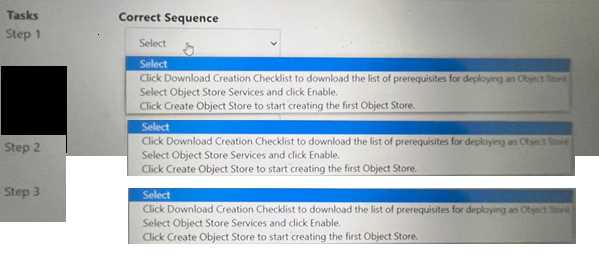
Answer:
None
Explanation:
The correct task order for creating an object store is:
Select ObjectStore Service and click Enable
Click Create Object Store to start creating the first Object store
Click Download Creation Checklist to download the list of prerequisites for deploying an Object store
The first step is to enable the ObjectStore Service, which is a service that allows users to create and
manage object storage clusters on a Nutanix cluster. The second step is to create an Object store,
which is an object storage cluster that provides S3-compatible access to buckets and objects for
various applications and users. The third step is to download the Creation Checklist, which is a
document that lists the prerequisites and configurations that are required for deploying an Object
store, such as cluster details, network details, storage details, etc. The administrator should review
and complete the Creation Checklist before proceeding with the deployment of the Object store.
Question 2
An administrator wants to provide security against ransomware attacks in Files. The administrator
wants to configure the environment to scan files for ransomware in real time and provide notification
in the event of a ransomware attack.
Which component should the administrator use to meet this requirement?
- A. File Analytics
- B. Syslog Server
- C. Files Console
- D. Protection Domain
Answer:
A
Explanation:
File Analytics is a feature that provides insights into the data stored in Files, such as file types, sizes,
owners, permissions, and access patterns. File Analytics also provides security against ransomware
attacks by scanning files for ransomware in real time and providing notification in the event of a
ransomware attack.
File Analytics can detect ransomware based on file extensions, file signatures, or
third-party solutions2. Reference: Nutanix File Analytics Administration Guide2
Question 3
An organization currently has a Files cluster for their office data including all department shares.
Most of the data is considered cold Data and they are looking to migrate to free up space for future
growth or newer data.
The organization has recently added an additional node with more storage. In addition, the
organization is using the Public Cloud for .. storage needs.
What will be the best way to achieve this requirement?
- A. Migrate cold data from the Files to tape storage.
- B. Backup the data using a third-party software and replicate to the cloud.
- C. Setup another cluster and replicate the data with Protection Domain.
- D. Enable Smart Tiering in Files within the File Console.
Answer:
D
Question 4
An administrator needs to protect a Files cluster unique policies for different shares.
How should the administrator meet this requirement?
- A. Create a protection domain in the Data Protection view in Prism Element.
- B. Configure data protection polices in File Server view in Prism Element
- C. Create a protection domain in the Data Protection view in Prism Central.
- D. Configure data protection polices in the Files view in Prism Central.
Answer:
D
Explanation:
The administrator can meet this requirement by configuring data protection policies in the Files view
in Prism Central. Data protection policies are policies that define how file data is protected by taking
snapshots, replicating them to another site, or tiering them to cloud storage. Data protection policies
can be configured for each share or export in a file server in the Files view in Prism Central. The
administrator can create different data protection policies for different shares or exports based on
their protection needs and requirements. Reference: Nutanix Files Administration Guide, page 79;
Nutanix Files Solution Guide, page 9
Question 5
Deploying Files instances require which two minimum resources? (Choose two)
- A. 12 GiB of memory per host
- B. 8 vCPUs per host
- C. 8 GiB of memory per host
- D. 4 vCPUs per host
Answer:
CD
Explanation:
The two minimum resources that are required for deploying Files instances are 8 GiB of memory per
host and 4 vCPUs per host. Memory and vCPUs are resources that are allocated to VMs (Virtual
Machines) to run applications and processes. Files instances are file server instances (FSIs) that run
on FSVMs (File Server VMs) on a Nutanix cluster. FSVMs require at least 8 GiB of memory and 4
vCPUs per host to function properly and provide SMB and NFS access to file shares and exports. The
administrator should ensure that there are enough memory and vCPUs available on each host before
deploying Files instances. Reference: Nutanix Files Administration Guide, page 27; Nutanix Files
Solution Guide, page 6
Question 6
An administrator has performed an upgrade to Files. After upgrading, the file server cannot reach the
given domain name with the specified DNS server list.
Which two steps should the administrator perform to resolve the connectivity issues with the
domain controller servers? (Choose two.)
- A. Verify the DNS settings in Prism Element.
- B. DNS entries for the given domain name.
- C. Verify the DNS settings in Prism Central.
- D. DNS server addresses of the domain controllers.
Answer:
AB
Explanation:
The two steps that the administrator should perform to resolve the connectivity issues with the
domain controller servers are:
Verify the DNS settings in Prism Element: DNS (Domain Name System) is a system that translates
domain names into IP addresses. DNS settings are configurations that specify which DNS servers to
use for resolving domain names. Verifying the DNS settings in Prism Element is a step that the
administrator should perform, because it can help identify and correct any incorrect or outdated DNS
server addresses or domain names that may cause connectivity issues with the domain controller
servers.
Verify the DNS entries for the given domain name: DNS entries are records that map domain names
to IP addresses or other information. Verifying the DNS entries for the given domain name is another
step that the administrator should perform, because it can help check and update any incorrect or
outdated IP addresses or other information that may cause connectivity issues with the domain
controller servers. Reference: Nutanix Files Administration Guide, page 32; Nutanix Files
Troubleshooting Guide
Question 7
Which confirmation is required for an Objects deployment?
- A. Configure Domain Controllers on both Prism Element and Prism Central.
- B. Configure VPC on both Prism Element and Prism Central.
- C. Configure a dedicated storage container on Prism Element or Prism Cent
- D. Configure NTP servers on both Prism Element and Prism Central.
Answer:
D
Explanation:
The configuration that is required for an Objects deployment is to configure NTP servers on both
Prism Element and Prism Central. NTP (Network Time Protocol) is a protocol that synchronizes the
clocks of devices on a network with a reliable time source. NTP servers are devices that provide
accurate time information to other devices on a network. Configuring NTP servers on both Prism
Element and Prism Central is required for an Objects deployment, because it ensures that the time
settings are consistent and accurate across the Nutanix cluster and the Objects cluster, which can
prevent any synchronization issues or errors. Reference: Nutanix Objects User Guide, page 9; Nutanix
Objects Deployment Guide
Question 8
A team of developers are working on a new processing application and requires a solution where
they can upload the … code for testing API calls. Older iterations should be retained as newer code is
developer and tested.
- A. Create an SMB Share with Files and enable Previous Version
- B. Provision a Volume Group and connect via iSCSI with MPIO.
- C. Create an NFS Share, mounted on a Linux Server with Files.
- D. Create a bucket in Objects with Versioning enabled.
Answer:
D
Explanation:
Nutanix Objects supports versioning, which is a feature that allows multiple versions of an object to
be preserved in the same bucket. Versioning can be useful for developers who need to upload their
code for testing API calls and retain older iterations as newer code is developed and tested.
Versioning can also provide protection against accidental deletion or overwrite of objects. Reference:
Nutanix Objects Administration Guide
Question 9
ionization deployed Files in multiple sites, including different geographical locations across the globe.
The organization has the following requirements to improves their data management lifecycle:
• Provide a centralized management solution.
• Automate archiving tier policies for compliance purposes.
• Protect the data against ransomware.
Which solution will satisfy the organization's requirements?
- A. Prims Central
- B. Data Lens
- C. Files Analytics
Answer:
B
Explanation:
Data Lens can provide a centralized management solution for Files deployments in multiple sites,
including different geographical locations. Data Lens can also automate archiving tier policies for
compliance purposes, by allowing administrators to create policies based on file attributes, such as
age, size, type, or owner, and move files to a lower-cost tier or delete them after a specified period.
Data Lens can also protect the data against ransomware, by allowing administrators to block
malicious file signatures from being written to the file system. Reference: Nutanix Data Lens
Administration Guide
Question 10
Which Nutanix Unified Storage capability allows for monitoring usage for all Files deployment
globally?
- A. File Analytics
- B. Nutanix Cloud Manager
- C. Files Manager
- D. Data Lens
Answer:
D
Explanation:
Data Lens is a feature that provides insights into the data stored in Files across multiple sites,
including different geographical locations. Data Lens allows administrators to monitor usage,
performance, capacity, and growth trends for all Files deployments globally.
Data Lens also provides
reports on file types, sizes, owners, permissions, and access patterns3. Reference: Nutanix Data Lens
Administration Guide3
Question 11
An administrator created a bucket for an upcoming project where internal users as well as an outside
consultant …. Object Browser. The administrator needs to provide both internal and consultant
access to the same bucket.
The organization would like to prevent internal access to the consultant, based on their security
policy.
Which two items are requires to fulfill this requirement (Choose two.)
- A. Configure Directory Services under the Access Keys section
- B. Generate access keys based on directory and email-based users.
- C. Install third-party software for bucket access to all users.
- D. Generate access keys using third-party software.
Answer:
AB
Explanation:
Nutanix Objects supports directory services integration, which allows administrators to configure
access keys based on directory and email-based users. This enables granular access control and
security for buckets and objects.
The administrator can configure directory services under the Access
Keys section in Prism Central, and then generate access keys for internal users from the directory
service and for the consultant from an email address2. Reference: Nutanix Objects Administration
Guide2
Question 12
Which two prerequisites are needed when deploying Objects to a Nutanix cluster? (Choose two.)
- A. Microsegmentation is enabled.
- B. Data Services IP is configured on the PI
- C. DNS is configured on the PE.
- D. AHV IPAM is disabled on the VLAN used for Objects.
Answer:
B
Explanation:
Nutanix Objects requires a Data Services IP to be configured on the Prism Infrastructure (PI) cluster,
which is used to expose the S3 API endpoint for accessing buckets and objects.
Nutanix Objects also
requires AHV IP Address Management (IPAM) to be disabled on the VLAN used for Objects, as
Objects uses its own DHCP service to assign IP addresses to the Objects VMs1. Reference: Nutanix
Objects Administration Guide1
Question 13
How many configure snapshots are supported for SSR in a file server?
- A. 25
- B. 50
- C. 100
- D. 200
Answer:
D
Explanation:
The number of configurable snapshots that are supported for SSR in a file server is 200. SSR
(Snapshot-based Replication) is a feature that allows administrators to replicate snapshots of shares
or exports from one file server to another file server on a different cluster or site for disaster
recovery purposes. SSR can be configured with various parameters, such as replication frequency,
replication status, replication mode, etc. SSR supports up to 200 configurable snapshots per share or
export in a file server. Reference: Nutanix Files Administration Guide, page 81; Nutanix Files Solution
Guide, page 9
Question 14
An administrator has deployed a new Files cluster within a Windows Environment.
After some days, he Files environment is not able to synchronize users with the Active Directory
server anymore. The administrator observes a large time difference between the Files environment
and the Active Directory Server that is responsible for the behavior.
How should the administrator prevent the Files environment and the AD Server from having such a
time difference in future?
- A. Use the same NTP Servers for the File environment and the AD Server.
- B. Use 0.pool.ntp.org as the NTP Server for the AD Server.
- C. Use 0.pool.ntp.org as the NTP Server for the Files environment.
- D. Connect to every FSVM and edit the time manually.
Answer:
A
Explanation:
The administrator should prevent the Files environment and the AD Server from having such a time
difference in future by using the same NTP Servers for the File environment and the AD Server. NTP
(Network Time Protocol) is a protocol that synchronizes the clocks of devices on a network with a
reliable time source. NTP Servers are devices that provide accurate time information to other devices
on a network. By using the same NTP Servers for the File environment and the AD Server, the
administrator can ensure that they have consistent and accurate time settings and avoid any
synchronization issues or errors. Reference: Nutanix Files Administration Guide, page 32; Nutanix
Files Troubleshooting Guide
Question 15
Which action is required to allow the deletion of file server audit data in Data Lens?
- A. Enable the File Server.
- B. Disable the File Server.
- C. Update the data retention period.
- D. Configure the audit trail target.
Answer:
C
Explanation:
The action that is required to allow the deletion of file server audit data in Data Lens is to update the
data retention period. Data retention period is a setting that defines how long Data Lens keeps the
file server audit data in its database. Data Lens collects and stores various metadata and statistics
from file servers, such as file name, file type, file size, file owner, file operation, file access time, etc.
Data Lens uses this data to generate reports and dashboards for file analytics and anomaly detection.
The administrator can update the data retention period for each file server in Data Lens to control
how long the audit data is kept before being deleted. Reference: Nutanix Files Administration Guide,
page 98; Nutanix Data Lens User Guide