Nutanix NCP-MCA Exam Questions
Questions for the NCP-MCA were updated on : Feb 18 ,2026
Page 1 out of 13. Viewing questions 1-15 out of 183
Question 1
An administrator is unable to launch a Calm blueprint (new and old). Launching an existing blueprint
under this condition fails with the error message:
The project for this blueprint does not have any associated Nutanix account.
Downloading and uploading the new blueprint also fails with
Launch with Variables' Profile expected to fall as Windows Server VWs attached with deleted
Account.
Please modify them to use different account and try again.
Why is the administrator seeing this issue?
- A. The account is in a failed state.
- B. The has not been created.
- C. The account is not verified.
- D. The account been deleted.
Answer:
D
Explanation:
The error messages indicate that the blueprint is trying to use a Nutanix account that no longer
exists. This could happen if the account was deleted by another administrator or by a playbook
action. The administrator should check the project settings and verify that the Nutanix account is still
available and associated with the project. If not, the administrator should create a new account or
use an existing one and update the blueprint accordingly. Reference:
Nutanix Certified Professional -
Multicloud Automation (NCP-MCA) 6.5 Exam Blueprint Guide
, page 9;
Nutanix Certified Professional
- Multicloud Automation (NCP-MCA)
, section 3;
Nutanix NCP-MCA Certification Exam Sample
Questions
, question 80.
Question 2
A task has failed in a Multi VM Blueprint deployment due to a typographical error. The error has been
fixed.
What action should the administrator take to launch the Blueprint again?
- A. Delete the failed application and relaunch the Blueprint.
- B. Clone the fixed Blueprint and move it to another project.
- C. Choose Skip task and let the Blueprint continue.
- D. Choose Retry task and let the Blueprint continue.
Answer:
D
Explanation:
When a task fails in a Multi VM Blueprint deployment within Nutanix Calm due to an issue such as a
typographical error, and the error has been corrected, the administrator has options to handle the
situation without needing to start the entire process from scratch.
According to Nutanix Calm documentation, the appropriate action after fixing the error is to choose
the "Retry task" option. This allows the deployment process to continue from the point of failure,
saving time and resources as opposed to deleting and relaunching the entire application or moving
the blueprint to another project.
Reference:
Nutanix Calm Administration Guide
Nutanix Calm Troubleshooting and Best Practices
Question 3
What action will be performed if the VM named ORACLE gets CPU constrained?
- A. The playbook will fall to add more vCPU and will send a Slack message.
- B. The playbook will add more vCPU and will send a Slack message.
- C. The playbook will add vCPU and send an email.
- D. The playbook will send an email.
Answer:
B
Explanation:
In Nutanix's Multicloud Automation (formerly known as Calm), playbooks can be configured to
respond to various conditions and events that occur within the infrastructure. If a VM, such as one
named ORACLE, becomes CPU constrained, a playbook can be triggered to automatically add more
virtual CPUs (vCPUs) to the VM. In addition, playbooks can integrate with various notification
services such as Slack, allowing administrators to be informed of the changes being made.
Based on the provided options and according to Nutanix documentation, the correct action is that
the playbook will add more vCPU and will send a Slack message. This ensures that the VM's
performance can be adjusted dynamically while keeping the relevant personnel informed via Slack.
Reference:
Nutanix Calm Documentation
Nutanix Multicloud Automation Playbooks Guide
Question 4
What is the default Connection timeout(sec) value, in seconds, for an HTTP endpoint?
- A. 60
- B. 90
- C. 120
- D. 150
Answer:
A
Explanation:
The default connection timeout value for an HTTP endpoint in Nutanix Calm is 60 seconds. This
timeout defines how long the system will wait for a connection to be established before timing out.
Reference:
Nutanix Calm documentation on HTTP Endpoints.
Nutanix Best Practices for Configuring Endpoints.
Question 5
An administrator wants to execute a package install task to create an application using NDB.
The following method is currently used to perform this task manually: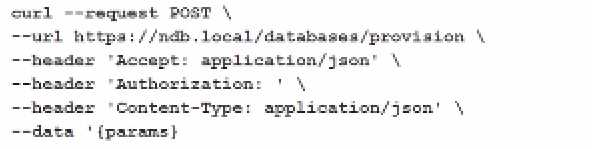
How can the administrator ensure that checks can be implemented in a single task?
- A. Run a playbook action
- B. Run a Pre-create task
- C. Run a create action
- D. Run a eScript task
Answer:
D
Explanation:
To ensure that checks can be implemented in a single task while creating an application using NDB
(Nutanix Database Service), the administrator should run an eScript task. eScript tasks allow for more
complex scripting and logic to be executed, including performing checks, handling conditions, and
interacting with APIs.
Reference:
Nutanix Calm documentation on eScript Tasks.
Nutanix Best Practices for Automating Database Management.
Question 6
What option is-included in the Macros Virtual Machine Common Properties?
- A. @@(address)@@
- B. @@{calm_runbook_name}@@
- C. @@{endpoint.index)@@
- D. @@(calm_runbook_uuid)@@
Answer:
B
Explanation:
The macro @@{calm_runbook_name}@@ is included in the Macros Virtual Machine Common
Properties. This macro provides the name of the runbook that is being executed, which is useful for
referencing and logging purposes within tasks and scripts.
Reference:
Nutanix Calm documentation on Macros.
Nutanix Best Practices for Using Macros in Calm.
Question 7
HOTSPOT
An administrator is creating a Single VM blueprint to deploy a windows 2019 Server.
As part of the package install phase of the deployment a task is needed to join the newly-provisioned
server to an Active Directory domain.
In which order should the administrator correctly complete this task?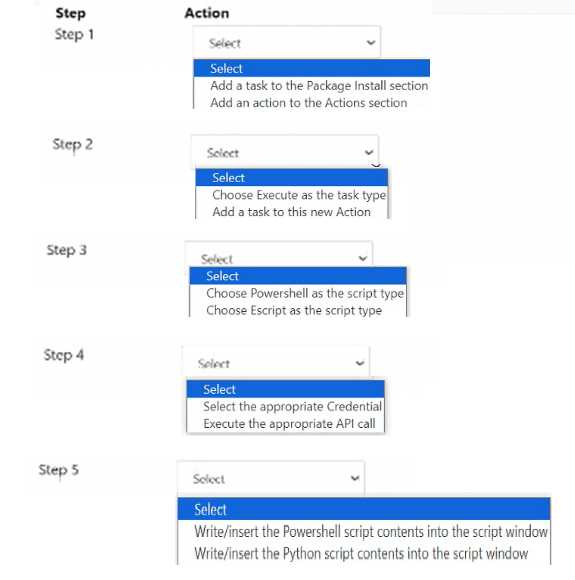
Answer:
None
Explanation:
To complete the task of joining a newly-provisioned Windows 2019 Server to an Active Directory
domain as part of the package install phase, follow these steps in the correct order:
Step 1: Add a task to the Package Install section.
Step 2: Choose Execute as the task type.
Step 3: Choose Powershell as the script type.
Step 4: Select the appropriate Credential.
Step 5: Write/insert the Powershell script contents into the script window.
Add a task to the Package Install section: This sets up the task within the phase where packages and
scripts are to be executed.
Choose Execute as the task type: This specifies that the task will run a script or command.
Choose Powershell as the script type: Since joining a Windows Server to a domain typically involves
running a PowerShell script, this is the appropriate script type.
Select the appropriate Credential: Use the credentials with the necessary permissions to join the
server to the Active Directory domain.
Write/insert the Powershell script contents into the script window: Enter the PowerShell script that
performs the domain join operation.
Add-Computer -DomainName "yourdomain.com" -Credential (Get-Credential) -Restart
Reference:
Nutanix Calm documentation on Script Execution in Blueprints.
Nutanix Best Practices for Joining a Domain.
Question 8
What is the prerequisite before a Single-VM Blueprint in Self-Service (formerly Calm) can be
published to the Marketplace?
- A. Creating Approval policies and Endpoint
- B. Creating a Project
- C. Creating a project and Environment
- D. Creating a Endpoint
Answer:
C
Explanation:
Before a Single-VM Blueprint in Self-Service (formerly Calm) can be published to the Marketplace, it
is necessary to create both a project and an environment. A project defines the scope and access
control for the blueprint, while the environment provides the necessary configurations and settings
for the deployment, such as network, credentials, and other resources.
Reference:
Nutanix Calm documentation on Project Creation.
Nutanix Calm documentation on Environment Setup.
Question 9
Which statement best describes Categories in Self-Service (formerly Calm)?
- A. Categories provide a way to access the values of variables that are set on entities.
- B. Categories are metadata labels that are assigned to cloud resources.
- C. Categories are part of a templating language for Self-Service scripts.
- D. Categories are the VM instances existing machines or bare-metal machines.
Answer:
B
Explanation:
Categories in Self-Service (formerly Calm) are metadata labels that are assigned to cloud resources.
These categories help organize and manage resources by tagging them with specific attributes,
making it easier to apply policies and manage the infrastructure.
Reference:
Nutanix Calm documentation on Using Categories.
Nutanix Best Practices for Category Management.
Question 10
What should an administrator do to enable Quotas?
- A. Enable Policy manager
- B. Enable Quota Engine
- C. Enable Quota Manager
- D. Enable Policy Engine
Answer:
D
Explanation:
To enable Quotas in Nutanix Self-Service (formerly Calm), the administrator should enable the Policy
Engine. The Policy Engine manages and enforces various policies, including quotas for resource
usage, to ensure that resource consumption stays within defined limits.
Reference:
Nutanix Calm documentation on Enabling Policy Engine.
Nutanix Best Practices for Setting Quotas.
Question 11
Which project enables a project administrator or user to view and manage VMs and applications of
other users in the same project?
- A. Allow Collaboration
- B. Project Environments
- C. Quota Policy
- D. Users and Groups
Answer:
A
Explanation:
The "Allow Collaboration" setting in a project enables a project administrator or user to view and
manage VMs and applications of other users within the same project. This setting fosters
collaboration and sharing of resources among users who are part of the same project.
Reference:
Nutanix Calm documentation on Project Collaboration.
Nutanix Best Practices for Managing Projects.
Question 12
Where would a Self-Service (formerly Calm) developer find detailed and downloadable logs for
analyzing a Blueprint deployment failure?
- A. In the Runbooks Execution History tab
- B. In the specific Application Audit tab
- C. In the Project Overview dashboard
- D. In the specific Service in the Blueprint Editor
Answer:
B
Explanation:
A Self-Service (formerly Calm) developer can find detailed and downloadable logs for analyzing a
Blueprint deployment failure in the specific Application Audit tab. This tab provides insights and logs
related to the deployment, helping to diagnose and resolve issues.
Reference:
Nutanix Calm documentation on Application Audit.
Nutanix Best Practices for Troubleshooting Deployments.
Question 13
What is a Category?
- A. A grouping of entities into a key value pair
- B. A grouping of clusters into a key value pair
- C. A grouping of hosts into a key value pair
- D. A grouping of VMs into a key value pair
Answer:
A
Explanation:
A Category in Nutanix is a grouping of entities (such as VMs, hosts, clusters, etc.) into a key-value
pair. Categories are used to organize and manage resources more effectively by tagging them with
meaningful identifiers.
Reference:
Nutanix documentation on Categories.
Nutanix Best Practices for Using Categories.
Question 14
What component of Approval Policies sets the criteria for an approval to be triggered?
- A. Alerts
- B. Jobs
- C. Actions
- D. Conditions
Answer:
D
Explanation:
In Approval Policies within Nutanix Calm, "Conditions" are used to set the criteria for an approval to
be triggered. Conditions define the specific circumstances under which an approval process should
be initiated, such as specific actions or threshold limits.
Reference:
Nutanix Calm documentation on Approval Policies.
Nutanix Best Practices for Defining Conditions.
Question 15
When can a variable be updated during a Runbook execution?
- A. Only if the variable is marked as a runtime editable
- B. Only during the Runbook execution
- C. Only during a Blueprint execution
- D. Only if the variable is marked as a runtime executable
Answer:
A
Explanation:
A variable can be updated during a Runbook execution only if it is marked as runtime editable. This
setting allows the variable to be modified during the execution of the Runbook, providing flexibility
and dynamic behavior based on runtime conditions.
Reference:
Nutanix Calm documentation on Runtime Editable Variables.
Nutanix Best Practices for Runbook Variables.