Nutanix NCP-CI-AWS Exam Questions
Questions for the NCP-CI-AWS were updated on : Feb 18 ,2026
Page 1 out of 5. Viewing questions 1-15 out of 75
Question 1
An administrator is planning an NC2 deployment and wants to connect to AWS Services privately
from the corporate VPC without going through the public internet.
Which connectivity solution should the administrator use?
- A. Point-to-Site VPN
- B. Gateway Endpoint
- C. VTEP Gateways
- D. Site-to-Site VPN
Answer:
B
Explanation:
Gateway Endpoint:
A Gateway Endpoint in AWS allows you to connect to supported AWS services privately without
going through the public internet. This setup provides secure and efficient connectivity directly from
the corporate VPC to the required AWS services.
Gateway Endpoints support services such as Amazon S3 and DynamoDB and are ideal for scenarios
where private connectivity to these services is needed.
Reference:
Refer to the AWS documentation on VPC endpoints, specifically Gateway Endpoints, and the Nutanix
documentation on configuring private connectivity for NC2 deployments.
Question 2
An administrator is experiencing problems with several operations, including VM IP address
assignment validations, VM power-on and VM power-off operations.
Whenever a related operation is performed, an alert is generated in the NC2 console indicating that
the Cloud API endpoints are unavailable.
The issue was further investigated and it was determined that NC2 is unable to make API calls to the
underlying cloud infrastructure due to network connectivity misconfigurations.
Which two connectivity misconfigurations could be causing this issue? (Choose two.)
- A. AWS VPC endpoints are used for connectivity to AWS services.
- B. Subnets are connected to the Internet via NAT gateways.
- C. Route tables for cloud subnets contain incorrect route entries.
- D. IAM roles and policies are incorrectly configured.
Answer:
CD
Explanation:
Route tables for cloud subnets contain incorrect route entries:
If the route tables associated with the cloud subnets contain incorrect route entries, the NC2 cluster
might not be able to reach the necessary AWS services or endpoints. Correct route entries are crucial
for ensuring proper communication between the NC2 cluster and the underlying AWS infrastructure.
IAM roles and policies are incorrectly configured:
Incorrectly configured IAM roles and policies can prevent NC2 from making API calls to AWS services.
These roles and policies must be properly set up to allow the necessary permissions for NC2 to
interact with AWS resources and perform required operations.
Reference:
Refer to the AWS documentation on route table configuration and IAM roles and policies, and
Nutanix documentation on NC2 cloud connectivity and permissions.
Question 3
An administrator is deploying an NC2 cluster into an existing AWS VPC.
The cluster deployment fails, with the following error message:
Why has the deployment failed?
- A. The administrator has not created the necessary Security Group.
- B. The administrator has not configured the Security Group to manage the shared subnet.
- C. Shared subnets are not supported for Nutanix clusters.
- D. Outbound Internet access is not configured on the VPC.
Answer:
A
Explanation:
The administrator has not created the necessary Security Group:
The error message indicates that the creation of network interfaces in a shared subnet requires
specifying a security group. This means that the necessary security group has not been created or
assigned to the network interfaces.
Creating the appropriate security group and ensuring it is associated with the network interfaces
during cluster deployment should resolve this issue.
Reference:
Refer to AWS documentation on security groups and network interface configuration and Nutanix
documentation on prerequisites for deploying NC2 clusters in an existing AWS VPC.
Question 4
An administrator is investigating reports of network congestion on their NC2 deployment.
As part of the investigation, a packet capture is taken from a group of user VMs. During the analysis
of the packet capture, it is observed that user VMs are receiving multicast traffic unexpectedly.
What action should the administrator take to resolve the issue?
- A. Disable DHCP snooping on the upstream network
- B. Enable IGMP snooping on the AHV hosts
- C. Enable DHCP snooping on the upstream network
- D. Disable IGMP snooping on the AHV hosts
Answer:
B
Explanation:
Enable IGMP snooping on the AHV hosts:
IGMP (Internet Group Management Protocol) snooping is a feature that listens to IGMP traffic
between hosts and routers. By enabling IGMP snooping on the AHV (Acropolis Hypervisor) hosts, the
switch can intelligently forward multicast traffic only to the ports that have requested it.
This reduces unnecessary multicast traffic on the network and prevents congestion by ensuring that
multicast packets are only delivered to the appropriate endpoints.
Reference:
Refer to the Nutanix documentation on network configuration and best practices for managing
multicast traffic.
Question 5
An administrator has deployed NC2 on AWS. The cluster deployment completed successfully.
After deployment, the administrator created a subnet in AWS, added it as a network in Prism
Element, deployed Prism Central using the newly-configured network, and registered the cloud
cluster with it.
The on-premises network and AWS are connected via a Site-to-Site VPN. Cluster nodes, CVM, and
Prism Central can communicate with each other, but cannot be accessed from the on-premises
network.
What two issues might be the cause of this problem? (Choose two.)
- A. AWS Direct Connect must be used to establish connection between AWS and on-premises
- B. Traffic from the on-premises network is not permitted by VM and Management security groups.
- C. The AHV firewall is blocking traffic from the on-premises network.
- D. The AWS VPC traffic is blocked by a firewall in the on-premises network.
Answer:
BD
Explanation:
Traffic from the on-premises network is not permitted by VM and Management security groups:
Ensure that the security groups assigned to the VMs and management interfaces in AWS allow
inbound traffic from the on-premises network. Without appropriate security group rules, the traffic
will be blocked.
The AWS VPC traffic is blocked by a firewall in the on-premises network:
Check if the firewall on the on-premises network is configured to allow traffic from the AWS VPC.
Firewalls may have restrictive rules that block incoming traffic, preventing communication.
Reference:
Refer to AWS documentation on security groups and firewalls and Nutanix documentation on
configuring networking for NC2 clusters.
Question 6
How many Amazon Elastic Block Store(EBS) volumes are attached to each node within an AWS NC2
cluster upon creation.
- A. 1
- B. 2
- C. 3
- D. 4
Answer:
C
Explanation:
Upon creation, each node within an AWS NC2 cluster has 3 Amazon Elastic Block Store (EBS) volumes
attached.
These volumes are used for different purposes, such as operating system storage, Nutanix services,
and user data storage.
The number of EBS volumes is designed to ensure adequate storage performance and capacity for
the NC2 cluster's operations and workload demands.
Reference:
Refer to the Nutanix documentation on NC2 cluster setup and AWS EBS volume configurations to
confirm the details on the number and purpose of EBS volumes attached to each node.
Question 7
An administrator has noticed the company’s NC2 free trial expired 60 days ago.
What should the administrator do to continue using all of the NC2 features on existing clusters?
- A. Switch to a paid subscription plan.
- B. Nothing. The clusters will have full feature support.
- C. Contact Nutanix support to redeploy the cluster.
- D. Contact the AWS cloud vendor.
Answer:
A
Explanation:
After the NC2 free trial expires, to continue using all features of NC2 on existing clusters, the
administrator needs to switch to a paid subscription plan.
A paid subscription ensures uninterrupted access to the full range of features and support for NC2
clusters.
Without switching to a paid plan, the features might be limited, and support may not be available,
impacting the cluster's operations and management.
Reference:
Refer to the Nutanix billing and subscription documentation for details on switching from a trial to a
paid plan and the benefits associated with paid subscriptions.
Question 8
Which address must AWS Directory Service be able to resolve when deploying a new NC2 cluster?
- A. gateway-internal-api.cloud.nutanix.com
- B. gateway-external-api. cloud, nutanix.com
- C. dovvnloads.cloud.nutanix.com
- D. apikeys.nutanix.com
Answer:
B
Explanation:
When deploying a new NC2 cluster, the AWS Directory Service must be able to resolve the address
gateway-external-api.cloud.nutanix.com.
This external API gateway is critical for the NC2 cluster to communicate with Nutanix services for
operations such as management, updates, and licensing.
Ensuring that this address can be resolved allows the cluster to interact properly with the Nutanix
cloud infrastructure and services.
Reference:
Refer to the Nutanix documentation on network and DNS requirements for NC2 deployments,
specifically the addresses that need to be resolvable for proper functionality.
Question 9
Which two options are prerequisites for deploying an NC2 on AWS cluster? (Choose two.)
- A. AWS Direct Connect
- B. A valid CIDR range
- C. A my.nutanix.com account
- D. An on-premises Prism Central environment
Answer:
BC
Explanation:
A valid CIDR range: A CIDR (Classless Inter-Domain Routing) range is necessary for creating the
subnets within the VPC. This range defines the IP address space for the cluster and its components.
A my.nutanix.com account: This account is required to access Nutanix services, including the NC2
console, manage licenses, and perform other administrative tasks.
AWS Direct Connect and an on-premises Prism Central environment are not prerequisites for
deploying an NC2 on AWS cluster. While Direct Connect can be used for enhanced network
performance and connectivity, it is not a requirement for deployment. Similarly, having an on-
premises Prism Central environment is not mandatory for NC2 deployment on AWS.
Reference:
Refer to the Nutanix documentation on NC2 prerequisites and setup guides, and AWS documentation
on VPC and subnet creation.
Question 10
An administrator has deployed an NC2 cluster in AWS.
The following configuration decisions were made:
Created a new VPC from the NC2 console as part of the deployment
Selected the Public option for prism access policy
Host type selected was i13en,metal
The administrator now has a goal of provision public internet access to a user VM (UVM),web-1, on
the Nutanix cluster. The admin can access Prism Element via the public DNS of the Auto-created load
balancer.
The administrator tries to create another network load balancer for the web server access. After
creating the load balancer and registering web-1’s IP address as a target, the administrator finds that
the health check for the VM target is failing and the DNS returns as NOT Found message in the
browser.
Why is the issue happening?
- A. The load balancer is still in a Provisioning state.
- B. The administrator has not modified the inbound rules under the UVM security group to a/low the network load balancer to access the UVM subnet.
- C. The administrator has not assigned a public IP to web-1.
- D. The administrator needs to provision an application load balancer instead of a network load balancer to allow Internet traffic to access the UVM subnet.
Answer:
C
Explanation:
For a VM to be accessible over the internet through a load balancer, the VM itself must have a public
IP address.
In this case, the health check for the VM target is failing and the DNS returns a "NOT Found" message
because web-1 does not have a public IP assigned.
Without a public IP, the load balancer cannot route traffic to web-1 from the internet.
Assigning a public IP to web-1 ensures that the VM can be accessed via the load balancer, resolving
the connectivity issue.
Reference:
Refer to the AWS documentation on network load balancers and public IP assignments, and Nutanix
documentation on VM network configurations.
Question 11
Administrator has recently deployed an NC2 cluster on AWS in the North Virginia region in
availability zone us-east-id. The consuming IPS from a 10.78.2.0/24 range.
The AWS VPC has two available CIDR ranges:
10.78.0.0/16
10.19.101.0/24
The following subnet have been configured in the NC2 AWS VPC: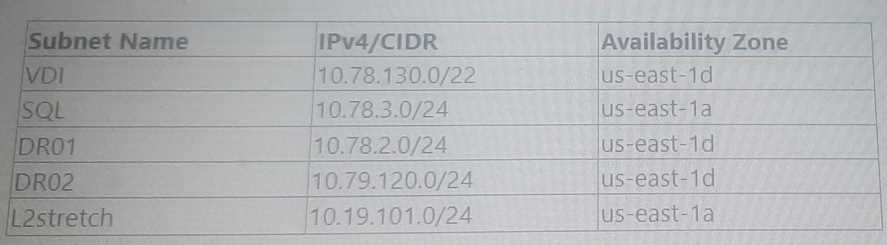
Which two subnet will show up in the Network configuration of the Prism Element Settings page?
(Choose two.)
- A. DR01
- B. L2stretch
- C. VDI
- D. DR02
Answer:
AB
Explanation:
For the NC2 cluster deployed in the North Virginia region (us-east-id), consuming IPs from the
10.78.2.0/24 range, the subnets configured within the same CIDR range of 10.78.0.0/16 will be
recognized.
The subnet DR01 (10.78.2.0/24) is directly within the range of the deployed cluster.
The subnet L2stretch (10.19.101.0/24) is also configured in the NC2 AWS VPC, although not in the
immediate range of the cluster, it may show up due to broader network configurations for stretched
L2 operations.
Subnets VDI (10.78.130.0/22) and DR02 (10.79.120.0/24), although part of the same VPC, are not
directly within the immediate CIDR range or may not be recognized in this specific configuration
scenario.
Reference:
Refer to the Nutanix documentation on NC2 AWS VPC subnet configurations and Prism Element
settings for detailed guidelines on network visibility and configuration.
Question 12
A company wants to start using Nutanix Cloud Clusters (NC2) in AWS. The company has large spend
commitments as part of an AWS Enterprise Discount Program (EDP) totaling $15 million.
What approach should the administrator take to ensure that Nutanix licensing costs to the EDP
commitment?
- A. Purchase Nutaniz licenses through the AWS Marketplace.
- B. Purchase Nutanix licenses directly from Nutanix and contact AWS support.
- C. Leverage existing Nutanix licenses.
- D. Request a trial license directly from Nutanix
Answer:
A
Explanation:
Given the company's large spend commitments as part of an AWS Enterprise Discount Program (EDP)
totaling $15 million, purchasing Nutanix licenses through the AWS Marketplace ensures that the
costs contribute to the EDP commitment.
This approach integrates the Nutanix license costs into the overall AWS spend, thereby maximizing
the benefits of the EDP.
Purchasing directly from Nutanix or leveraging existing licenses might not count towards the AWS
EDP commitment, and trial licenses are typically for evaluation purposes and do not contribute to
the committed spend.
Reference:
Refer to the Nutanix and AWS documentation on licensing and marketplace purchases, and EDP
program details.
Question 13
An administrator is deploying an NC2 cluster on AWS in the us-west-2 region. A VPC, management
subnet, and a VM subnet are already created in the target region.
The management subnet has a local route and a route to the internet. The subnet has a route and a
route to the NAT gateway. During the deployment, the management subnet appears in the drop-
down list in the Create Cluster wizard, but cannot be selected.
What is the cause of this problem?
- A. The subnet has both an IPv4 CIDR block and an IPv6 CIDR block.
- B. The subnet has an IPv4 CIDR block but does not have an IPv6 CIDR block.
- C. The subnet has a direct route to an Internet gateway.
- D. The subnet does not have route to a Site-to-Site VPN connection through a virtual private gateway.
Answer:
A
Explanation:
The Nutanix Create Cluster wizard may not support selecting subnets that have both IPv4 and IPv6
CIDR blocks due to compatibility or configuration constraints.
When a subnet with both CIDR blocks is present, it can cause issues in the selection process during
cluster creation, as the system might not be able to properly handle or recognize the dual-stack
configuration.
Ensuring that the management subnet has only an IPv4 CIDR block, without an IPv6 CIDR block,
could resolve this issue and allow for successful selection in the cluster creation wizard.
Reference:
Refer to the Nutanix and AWS documentation on subnet configuration and requirements for NC2
cluster deployments, specifically addressing IPv4 and IPv6 compatibility and constraints.
Question 14
An administrator is tasked with deploying a VM in an NC2 cluster on AWS that needs to by accessed
by resources within the on-premises datacenter.
The cluster has the following characteristics:
* 8 nodes
* Resides in the us-east-1a Availability Zone
* Contains 13 Subnets
* Has access to a Direct Connect connection
* Subnet that the User VM (UVM) is being deployed to:UserVM_subnet
There are multiple VMs within the cluster and the UserVM_subnet has access to the on-premises
resources.
The administrator deploys the machine, but communication is not possible.
What is the most likely resolution for this situation?
- A. The AWS User Management Security Group requires the new application's ports adding to and traffic
- B. The AWS Internal Management Security Group requires the new application's ports adding to outbound traffic.
- C. The AWS UVM Security Group requires the new application's ports adding to inbound traffic.
- D. The AWS IGW requires the new application's ports adding to inbound traffic.
Answer:
C
Explanation:
For a VM deployed in an NC2 cluster on AWS to be accessed by resources within the on-premises
datacenter, the security group associated with the User VM (UVM) subnet must allow inbound traffic
on the specific ports required by the application.
If the security group rules do not permit inbound traffic on these ports, the communication will fail,
even if other network configurations are correct.
The administrator should ensure that the UVM Security Group includes rules to allow inbound traffic
for the application's required ports, facilitating proper communication between the VM and on-
premises resources.
Reference:
Refer to the AWS documentation on security group configurations and Nutanix NC2 documentation
for details on configuring network access and security group rules.
Question 15
The cluster is configured as follows:
* 8 nodes
* Prism Central Deployed
* Files Deployed
Following the deployment, the administrator experiences network connectivity issues.
Which reason explains the connectivity issues?
- A. The 192.168.5.0/24 range is not a valid CIDR range.
- B. The 192.168.5.0/24 range is reserved for internal cluster usage.
- C. The 192.168.5.0/24 range does not have enough IP addresses available.
- D. The 192.168.5.0/24 range is reserved by IANA,
Answer:
B
Explanation:
The 192.168.5.0/24 range is often reserved for internal cluster communication within Nutanix
deployments.
Using this CIDR range for other purposes could lead to network conflicts and connectivity issues, as it
might interfere with the internal operations and communication channels of the Nutanix cluster.
Ensuring that the CIDR range is not overlapping with any reserved ranges is crucial for maintaining
proper network connectivity and cluster functionality.
Reference:
Refer to the Nutanix documentation on network configuration and best practices for NC2
deployments to confirm reserved IP ranges and their appropriate use.