NetApp NS0-593 Exam Questions
Questions for the NS0-593 were updated on : Feb 18 ,2026
Page 1 out of 4. Viewing questions 1-15 out of 60
Question 1
A customer reports that while Installing Windows updates on their external Vscan servers, clients
could not access any files on their CIF-S SVM. The problem disappeared after the update process was
completed. The customer wants to prevent this issue from happening during the next patch window.
In this scenario, what are two ways to accomplish this task? (Choose two.)
- A. Enable the -scan-mandatory flag in the Vscan policy.
- B. Update the Vscan servers one at a time.
- C. Modify the CIFS shares to be continuously available (CA) shares.
- D. Disable the -scan-mandatory flag in the Vscan policy.
Answer:
B, D
Explanation:
Updating the Vscan servers one at a time can prevent the clients from losing access to the files on
the CIFS SVM, as there will always be at least one Vscan server available for scanning. Disabling the -
scan-mandatory flag in the Vscan policy can also avoid the issue, as it allows the clients to access the
files even if there are no Vscan servers online, but this may compromise the security of the data.
Enabling the -scan-mandatory flag or modifying the CIFS shares to be CA shares will not help, as they
do not affect the availability of the Vscan servers or the scanning process. Reference =
Vscan server
installation and configuration
,
Update the Vscan On-Access policy configuration for an SVM
Question 2
Your customer is running a NetApp AFF A800 system with NetApp ONTAP 9.8 software and states
that their NS224 shelf is not showing with the correct shelf ID. You analyze the data and the shelf
shows an identification of “1.SHFHUXXXXXXXXXX."
What is the cause of the reported Issue?
- A. The shelf has been power cycled.
- B. A new shelf was added to the controller.
- C. The shelf had a disk replaced too quickly.
- D. The shelf was cabled Incorrectly.
Answer:
D
Explanation:
According to the NetApp Knowledge Base, adding a second NS224 shelf to an existing stack can
cause the first shelf ID to change to the serial number if the cables are not connected properly1
.
This
can also result in a Medium Impact error message: Shelves with both connections via the same SAS
path detected2
. This situation is not normal for a NetApp AFF A800 system and can affect
performance and availability.
The cables should be reconnected according to the SAS cabling rules
and concepts for shelves with IOM12/IOM12B modules3 and the controller-to-stack cabling
worksheet template for quad-pathed connectivity4
. Reference =
Shelves with both connections via
the same SAS path detected
,
Adding a second NS224 shelf, changes first shelf ID to the serial
number
,
SAS cabling rules and concepts - shelves with IOM12/IOM12B modules
,
Controller-to-stack
cabling worksheet template for quad-pathed connectivity
.
Question 3
A user reports that a colleague saved a file called Test.txt from a UNIX system to a multiprotocol
volume. When opening the file later from a Windows system, it was not the file that they wanted.
The file that they wanted was named TEST~1.TXT.
Which statement explains this behavior?
- A. UNIX name mapping updated the filename.
- B. A Snapshot copy preserved two versions of the file.
- C. Windows Volume Shadow Copy Service stored an older version of the file.
- D. Case Insensitivity of SMB clients caused the file to be displayed with a different name.
Answer:
D
Explanation:
= The multiprotocol volume allows clients to access files using both NFS and SMB protocols. The NFS
protocol is case-sensitive, meaning that Test.txt and TEST~1.TXT are two different files. The SMB
protocol is case-insensitive, meaning that it treats uppercase and lowercase letters as the same when
searching for a file. Therefore, when the user opened the file from a Windows system using SMB, the
system could not distinguish between Test.txt and TEST~1.TXT and displayed one of them arbitrarily.
This could lead to confusion and data loss if the user modified or deleted the wrong
file. Reference =
Client protocols
;
Multiprotocol NAS in NetApp ONTAP Overview and Best Practices
,
page 30-31.
Question 4
A customer wants to connect a NetApp AFF A700 system to a 40GbE switch. The controllers have a
10/40G Ethernet card in slot 4 for this purpose. The link comes up fine on node 2, but it will not come
up on node 1. You look at the AutoSupport data for the nodes in question and see the output shown
in the exhibit.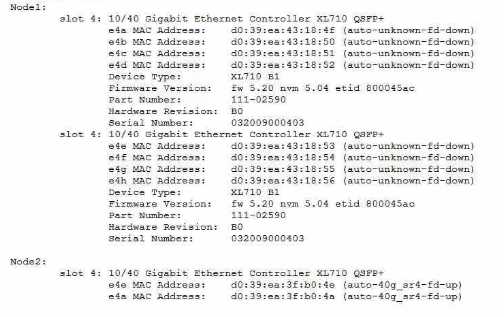
What is the cause of the customer's problem?
- A. The cable is plugged in upside down.
- B. The incorrect cable is used.
- C. The ports are configured for 4x10Gbit instead of 40Gbit.
- D. The port has an incorrect SFP inserted.
Answer:
D
Explanation:
= The cause of the customer’s problem is that the port has an incorrect SFP inserted.
According to
the AutoSupport data, the node 1 has a device type of XL710 BQ, which is a 40GbE adapter that
requires a QSFP+ transceiver1
.
However, the part number of the adapter is 111-02590, which is a
10GbE adapter that requires a SFP+ transceiver2
. This mismatch prevents the link from coming up on
node 1.
The customer should replace the adapter with the correct one or use a compatible
transceiver for the existing adapter. Reference = 1
:
NetApp Hardware Universe - X1144A 2
:
NetApp
Hardware Universe - X1147A
Question 5
Your customer complains about missing volume snapshot copies on a SnapMlrror destination. While
investigating this case, you notice an executed SnapMirror resync operation in the event logs of the
system.
In this scenario, what Is the cause of this problem?
- A. Newer Snapshot copies than the common snapshot that was chosen for resync were removed automatically at the destination.
- B. The autodelete option removed Snapshot copies before the resync.
- C. Snapshot copies were manually removed from the destination after the resync.
- D. NetApp ON TAP System Manager removed these snapshot copies due to a snapshot schedule.
Answer:
A
Explanation:
= When a SnapMirror resync operation is performed, the destination volume is reverted to the most
recent common snapshot copy with the source volume. Any newer snapshot copies that exist on the
destination volume are deleted automatically, unless they are marked as busy or locked. This is done
to ensure that the destination volume is consistent with the source volume and to avoid data loss or
corruption. Therefore, if the customer complains about missing snapshot copies on the destination
volume after a SnapMirror resync, the most likely cause is that those snapshot copies were newer
than the common snapshot that was chosen for resync and were removed automatically by the
system. Reference =
SnapMirror resync operation
,
SnapMirror resync or update failed No Snapshot
copies found on volume
,
Even though there is common snapshot, SnapMirror resync fails with error:
No common snapshot copy found between source and destination volume
Question 6
A customer calls you to troubleshoot a network issue. The customer wants to create a packet trace
for all clients on the 192.168.9.0/24 subnet.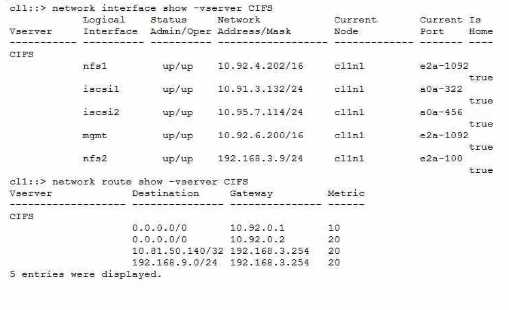
Referring to the exhibit, on which interface do you have to run the packet trace?
- A. a0a-322
- B. e2a-100
- C. e2a-1092
- D. a0a-456
Answer:
B
Explanation:
To create a packet trace for all clients on the 192.168.9.0/24 subnet, you have to run the packet trace
on the interface that has an IP address in the same subnet. According to the exhibit, the only
interface that matches this criterion is e2a-100, which has an IP address of 192.168.3.1/24. The other
interfaces have IP addresses in different subnets, such as 10.92.4.202/16, 10.91.3.132/24,
10.95.7.114/24, and 10.92.6.200/16. Therefore, the correct answer is B. e2a-100. Reference =
How to
capture packet traces on ONTAP 9.10+ systems
,
How to capture packet traces (tcpdump) on ONTAP
9.2 to 9.9 systems
,
How to download captured packet traces from ONTAP
Question 7
Your customer has deployed a two petabyte NetApp ONTAP FlexGroup volume across their 4-node
ONIAP 9.8 cluster. They plan to store over three billion files. They want to prevent file 10 conflicts
since files are placed into the FlexGroup volume.
In this scenario, which two NFS SVM parameters should be enabled? (Choose two.)
- A. -v3-64bit-identifiers
- B. -v4-fsid-change
- C. -v3-fsid-change
- D. -v4-64bit-idantifiers
Answer:
A, D
Explanation:
= To prevent file ID conflicts in a FlexGroup volume, you need to enable 64-bit NFSv3 and NFSv4
identifiers on the SVM that hosts the FlexGroup volume. This allows the SVM to use 64-bit file system
IDs (FSIDs) and file IDs, which are unique across the cluster and can accommodate a large number of
files. The -v3-64bit-identifiers and -v4-64bit-identifiers parameters enable this feature for NFSv3 and
NFSv4 protocols respectively. Reference =
Editing FlexGroup volumes
,
Enabling 64-bit NFSv3
identifiers on an SVM
,
NetApp ONTAP FlexGroup volumes — Best practices and implementation
guide
Question 8
A customer reports that some of their client computers are unable to access a FlexGroup over CIFS.
This problem involves only their older Windows XP clients and some printers and scanners.
In this scenario, which statement Is correct?
- A. FlexGroup requires CIFS shares to be located in qtrees, which these clients do not support.
- B. FlexGroup requires CIFS shares to use the Continuously Available Feature, which these clients do not support.
- C. These systems use the SMQI protocol which Is an unsupported feature in FlexGroup
- D. These systems use Offloaded Data Transfer, which is an unsupported feature in FlexGroup.
Answer:
B
Explanation:
FlexGroup requires CIFS shares to use the Continuously Available Feature, which enables transparent
failover and recovery of SMB sessions in the event of a node failure or takeover. This feature is only
supported by Windows 8 and later clients, and some printers and scanners may not support it either.
Therefore, these older Windows XP clients and some printers and scanners are unable to access a
FlexGroup over CIFS. Reference =
Supported and unsupported configurations for FlexGroup
volumes
,
NetApp ONTAP FlexGroup volumes — Best practices and implementation guide
(page 24)
Question 9
After a motherboard replacement on a NetApp AFF A300 in a SAN environment, the customer states
that ports 0e and 0f are unable to connect to the fabric. The ports report "offline".
What would you examine first to troubleshoot the issue?
- A. vserver fcp wwpn-alias show command output
- B. system node hardware unified-connect show command output
- C. storage port show command output
- D. vserver fcp interface show command output
Answer:
B
Explanation:
Here is my reasoning:
The system node hardware unified-connect show command displays the status and configuration of
the Unified Connect ports on a node1
. This command can help you identify if the ports are
configured correctly and if they have any errors or faults.
The ports 0e and 0f on the AFF A300 are 10GbE ports that support both Ethernet and Fibre Channel
over Ethernet (FCoE) protocols2
.
These ports are part of the Unified Connect feature, which enables
you to use the same physical port for different protocols without requiring additional hardware3
.
If the ports are offline, it could indicate a problem with the port configuration, the cable connection,
the switch configuration, or the protocol settings.
The system node hardware unified-connect
show command can help you troubleshoot these issues by showing you the port mode, speed,
duplex, state, and error count1
.
The other commands in the options are not as helpful for troubleshooting the port issue, because
they show different information that is not related to the Unified Connect feature or the port status.
For example:
The vserver fcp wwpn-alias show command displays the World Wide Port Name (WWPN) aliases for
the Fibre Channel Protocol (FCP) logical interfaces (LIFs) on a Vserver4
. This command can help you
manage the FCP LIFs, but it does not show the status of the physical ports or the Unified Connect
feature.
The storage port show command displays the status and configuration of the storage ports on a
node5
. This command can help you manage the storage ports, but it does not show the status of the
Unified Connect ports or the FCoE protocol.
The vserver fcp interface show command displays the status and configuration of the FCP LIFs on a
Vserver6
. This command can help you manage the FCP LIFs, but it does not show the status of the
physical ports or the Unified Connect feature.
Here are some references that might help you:
:
system node hardware unified-connect show - NetApp 2
:
AFF A300 system installation -
NetApp 3
:
Unified Connect - NetApp 4
:
vserver fcp wwpn-alias show - NetApp 5
:
storage port show -
NetApp 6
:
vserver fcp interface show - NetApp
Question 10
You notice poor performance on your FlexGroup and execute the system node run -node * flexgroup
show command for more Information. You notice the "Urge" column has non-zero values.
In this scenario, which statement is true?
- A. The aggregate is completely full.
- B. The constituent volumes are out of Inodes.
- C. The data placement is uneven.
- D. The constituent volumes are completely full.
Answer:
C
Explanation:
= The “Urge” column in the flexgroup show command indicates the urgency of data rebalancing for
each constituent volume. A non-zero value means that the data placement is uneven across the
volumes, which can affect the performance of the FlexGroup. The target value is the desired
percentage of data for each volume, and the difference value is the deviation from the target. The
FlexGroup tries to balance the data placement by moving data between the volumes, but this
process can be slow or interrupted by other factors. Therefore, it is recommended to monitor the
“Urge” column and take corrective actions if the values are high or persistent. Reference =
What do
“flexgroup show” target and urgency and other columns mean?
,
NetApp ONTAP FlexGroup volumes
— Best practices and implementation guide
Question 11
Your customer added a new DS4246 shelf to their FAS2750 single-node system and created a new
aggregate on the new shelf. Two weeks later, they log into Active IQ and discover the Medium
Impact error shown below.
Shelves with both connections via the same SAS path detected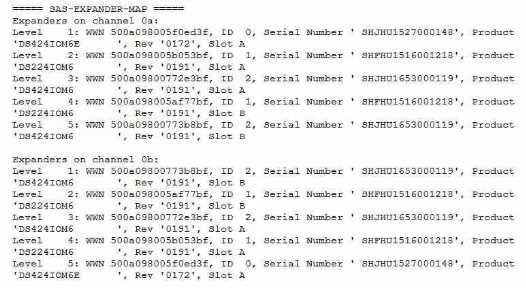
Referring to the exhibit, which statement is correct?
- A. In a FAS2750 system, the internal shelf is only seen on one path, and the external shelves are seen on two paths.
- B. The cables are cabled Incorrectly on the SAS stack.
- C. This situation is normal for a FA57750 single-node system.
- D. Active IQ Is not aware of the shelf configuration for a single-node system.
Answer:
B
Explanation:
According to the SAS cabling rules and concepts for shelves with IOM12/IOM12B modules1
, one of
the goals is to provide a single, easily understood universal algorithm for all SAS products and
configurations. One of the rules is that of the two paths to a single disk storage stack from a single
node, one should connect to the top and one to the bottom of the storage stack. This ensures
maximum possible resilience and minimizes the reliance on controller takeovers. The exhibit shows
that both SAS connections from one controller go to the same shelf, which violates this rule and
causes the error message. This situation is not normal for a FAS2750 single-node system and can
reduce reliability and availability.
The cables should be reconnected according to the SAS cabling
rules and the controller-to-stack cabling worksheet template for quad-pathed
connectivity2
. Reference =
SAS cabling rules and concepts - shelves with IOM12/IOM12B
modules
,
SAS cabling issue: Both SAS connections from one controller go to the same
shelf
,
Controller-to-stack cabling worksheet template for quad-pathed connectivity
.
Question 12
You are trying to deploy a Connector in the AWS cloud from NetApp Cloud Manager. The deployment
fails and shows the message 'Insufficient permissions to deploy Cloud Connector". You have verified
the AWS access key and the AWS secret key.
In this scenario, what Is the reason that the deployment failed?
- A. No AWS Marketplace subscription is associated with Cloud Manager.
- B. The required Identity and Access Management (IAM) policies were not Installed.
- C. The user lacks the permission to deploy within Cloud Manager.
- D. The Connector can be deployed only in AWS GovCloud (US).
Answer:
B
Explanation:
= The Connector is a software component that enables Cloud Manager to manage resources and
processes within your AWS environment. To deploy a Connector in AWS, you need to have the
correct IAM policies attached to your user account or role. These policies grant the Connector the
permissions to perform various actions on your behalf, such as creating and deleting EC2 instances,
VPCs, security groups, and so on. If you do not have the required IAM policies, the deployment will
fail with the message ‘Insufficient permissions to deploy Cloud Connector’. You can find the list of
required IAM policies in the
Connector deployment policy for AWS
. Reference =
Creating a Connector
in AWS from Cloud Manager
, page 3-4.
Question 13
You receive the panic message shown in the exhibit.
In this scenario, which component should you troubleshoot first?
- A. the PCI card in slot 3
- B. the MetroCluster FC-Vl card in slot 6
- C. the memory module in slot 1
- D. the CPU
Answer:
A
Explanation:
= The panic message indicates that the node encountered a fatal error while accessing the PCI card
in slot 31
. This could be due to a hardware failure, a firmware issue, or a driver problem. The first
component to troubleshoot is the PCI card in slot 3, as it is the most likely source of the error.
You can
use the system node hardware pci show command to check the status of the PCI card and the system
node hardware firmware update command to update the firmware if needed2
.
You can also use the
Panic Message Analyzer tool from the NetApp Support Site to determine whether your panic was
caused by a known software issue3. Reference = 1
:
REBOOT (panic) ALERT - AutoSupport message 2:
[system node hardware pci show] 3
: [Panic Message Analyzer tool]
Question 14
You are optimizing your Cloud Volumes ONTAP. For interoperability and consolidation purposes, you
need to know the storage limits.
In this scenario, which source should be reviewed?
- A. NetApp Cloud Volumes ONTAP Release Notes
- B. Hardware Universe
- C. Interoperability Matrix Tool (IMT)
- D. Cloud Central
Answer:
A
Explanation:
= The NetApp Cloud Volumes ONTAP Release Notes provide the most up-to-date and accurate
information about the storage limits for different cloud platforms, licenses, and configurations. The
release notes also include details about supported features, known issues, and limitations for each
version of Cloud Volumes ONTAP. Reference =
Storage limits - NetApp
,
Storage limits | NetApp
Documentation
,
Storage limits in AWS | NetApp Documentation
,
Storage limits in Azure | NetApp
Documentation
Question 15
A user mentions that their home drive, that Is an export within a volume, is no longer allowing them
to save files. The drive reports that it Is full, even though It shows that minimal data is written to it.
Which statement would explain this behavior?
- A. The mount is stale and uses a cached version of the volume.
- B. Other users wrote to this user's home drive.
- C. Other files within the volume are also owned by the user, exceeding the user quota.
- D. The client system needs to remount the export to show the proper space.
Answer:
C
Explanation:
= A user quota is a limit on the amount of disk space or the number of files that a user can consume
on a volume. A user can be represented by multiple IDs, such as UNIX user ID (UID), Windows user ID
(SID), or name mapping ID. A file owned by any of these IDs is subject to the restriction of the user
quota. If a user has files in different directories or qtrees within the same volume, all of those files
count towards the user’s quota limit. Therefore, if other files within the volume are also owned by
the user, they could exceed the user quota and prevent the user from saving more files to their home
drive, even if the home drive itself shows minimal data usage. Reference =
How quotas work with
users and groups overview
,
ONTAP - How quotas work with users and groups