HP HPE7-A02 Exam Questions
Questions for the HPE7-A02 were updated on : Feb 18 ,2026
Page 1 out of 9. Viewing questions 1-15 out of 130
Question 1
An AOS-CX switch has been configured to implement UBT to two HPE Aruba Networking gateways
that implement VRRP on the users' VLAN. What correctly describes how the switch tunnels UBT
users' traffic to those gateways?
- A. The switch always sends the users' traffic to the VRRP master.
- B. The switch always sends all users' traffic to the primary gateway configured in the UBT zone.
- C. The switch always load shares the users' traffic across both gateways.
- D. The switch always sends all users' traffic to the gateway assigned as the active device designed gateway.
Answer:
B
Explanation:
User-Based Tunneling (UBT) with VRRP:
UBT allows traffic from authenticated users to be tunneled to an HPE Aruba Networking gateway.
In the case of VRRP, where two gateways are configured for redundancy, the AOS-CX switch will
always send the traffic to the primary gateway defined in the UBT zone configuration.
The VRRP state (master/backup) does not impact the UBT decision; the UBT primary configuration
takes precedence.
Option Analysis:
Option A: Incorrect. UBT does not strictly follow the VRRP master; it adheres to the UBT primary
gateway configuration.
Option B: Correct. The switch tunnels all traffic to the primary gateway configured in the UBT zone.
Option C: Incorrect. UBT does not load-share traffic between gateways.
Option D: Incorrect. UBT uses the primary gateway configured in the UBT zone, not dynamically
determined active devices.
Question 2
HPE Aruba Networking Central displays an alert about an Infrastructure Attack that was detected.
You go to the Security > RAPIDS events and see that the attack was "Detect adhoc using Valid SSID."
What is one possible next step?
- A. Make sure that you have tuned the threshold for that check as false positives are common for it.
- B. Make sure that clients have updated drivers, as faulty drivers are a common explanation for this attack type.
- C. Use HPE Aruba Networking Central floorplans or the detecting AP identities to locate the general area for the threat.
- D. Look for the IP address associated with the offender and then check for that IP address among HPE Aruba Networking Central clients.
Answer:
C
Explanation:
RAPIDS Ad-Hoc Detection:
The alert "Detect ad-hoc using Valid SSID" indicates that a device is broadcasting an SSID that
matches a valid network SSID in ad-hoc mode. This can be an indication of an infrastructure attack or
misconfiguration.
Next Steps:
Use Aruba Central floorplans or AP location data to identify the physical area where the offending
device is detected.
Locate and investigate the device to determine if it is malicious or simply misconfigured.
Option Analysis:
Option A: Incorrect. While tuning thresholds is useful for reducing false positives, this step does not
directly address a potential threat.
Option B: Incorrect. Faulty drivers can cause similar behavior, but this step is not immediately
actionable without locating the device first.
Option C: Correct. Floorplans or AP identities help locate the threat's physical area for further
investigation.
Option D: Incorrect. RAPIDS focuses on detecting devices via SSID and MAC, not IP addresses, making
this approach less relevant.
Question 3
A company has HPE Aruba Networking infrastructure devices. The devices authenticate clients to
HPE Aruba Networking ClearPass Policy Manager (CPPM). You want CPPM to track information about
clients, such as their IP addresses and their network bandwidth utilization. What should you set up
on the network infrastructure devices to help that happen?
- A. Logging with CPPM configured as a Syslog server.
- B. Dynamic authorization enabled in the RADIUS settings for CPPM.
- C. RADIUS accounting to CPPM, including interim updates.
- D. An IF-MAP interface with CPPM as the destination.
Answer:
C
Explanation:
RADIUS Accounting:
RADIUS accounting enables network devices to report client session details (e.g., IP addresses,
session duration, bandwidth usage) to CPPM.
Interim updates ensure CPPM receives ongoing updates about the client’s session, enabling accurate
tracking.
Option Analysis:
Option A: Incorrect. Syslog logging sends general system logs, not client session details.
Option B: Incorrect. Dynamic authorization (CoA) handles session changes but does not provide
usage tracking.
Option C: Correct. RADIUS accounting with interim updates tracks client IP addresses and bandwidth
utilization.
Option D: Incorrect. IF-MAP interfaces are used for metadata sharing, not for RADIUS-based tracking.
Question 4
A company uses both HPE Aruba Networking ClearPass Policy Manager (CPPM) and HPE Aruba
Networking ClearPass Device Insight (CPDI). What is one way integrating the two solutions can help
the company implement Zero Trust Security?
- A. CPPM can inform CPDI that it has assigned a particular Aruba-User-Role to a client; CPDI can then use that information to reclassify the client.
- B. CPDI can use tags to inform CPPM that clients are using prohibited applications. CPPM can then tell the network infrastructure to quarantine those clients.
- C. CPPM can provide CPDI with custom device fingerprint definitions in order to enhance the company's total visibility.
- D. CPDI can provide CPPM with extra information about users' identity. CPPM can then use that information to apply the correct identity-based enforcement.
Answer:
B
Explanation:
Integration of CPDI and CPPM for Zero Trust:
CPDI (ClearPass Device Insight) identifies and profiles devices and applications on the network.
CPDI can tag devices based on their behavior or detected applications.
CPPM uses these tags to enforce policies, such as quarantining clients that violate security rules (e.g.,
using prohibited applications).
Option Analysis:
Option A: Incorrect. CPPM does not inform CPDI about role assignments; CPDI provides device
context to CPPM.
Option B: Correct. CPDI tags clients, and CPPM uses those tags to enforce quarantine or other Zero
Trust actions.
Option C: Incorrect. Custom fingerprint definitions are not part of this integration.
Option D: Incorrect. CPDI provides information about devices, not user identities.
Question 5
A company has AOS-CX switches and HPE Aruba Networking ClearPass Policy Manager (CPPM). The
company wants switches to implement 802.1X authentication to CPPM and download user roles.
What is one task that you must complete on CPPM to support this use case?
- A. Export roles on CPPM to a file that uses XML format.
- B. Create an admin account for the switch on CPPM with the HPE Aruba Networking User Role Download privilege level.
- C. Configure RADIUS enforcement profiles that specify the HPE-User-Role VSA.
- D. Upload the switch TPM certificate as a trusted CA certificate with the Others usage.
Answer:
C
Explanation:
802.1X and User Role Download:
AOS-CX switches use RADIUS attributes to dynamically download user roles from CPPM.
The HPE-User-Role VSA (Vendor-Specific Attribute) must be configured in the RADIUS enforcement
profiles to specify which role the switch should apply.
Option Analysis:
Option A: Incorrect. Exporting roles in XML is not needed for dynamic role download.
Option B: Incorrect. Switches authenticate via RADIUS, not admin accounts with specific privileges.
Option C: Correct. RADIUS enforcement profiles must include the HPE-User-Role VSA to implement
user role download.
Option D: Incorrect. TPM certificates are unrelated to RADIUS-based user role downloads.
Question 6
You have configured an AOS-CX switch to implement 802.1X on edge ports. Assume ports operate in
the default auth-mode. VoIP phones are assigned to the "voice" role and need to send traffic that is
tagged for VLAN 12. Where should you configure VLAN 12?
- A. As the trunk native VLAN on edge ports and the trunk native VLAN on the "voice" role.
- B. As the allowed trunk VLAN in the "voice" role (and not in the edge port settings).
- C. As a trunk allowed VLAN on edge ports and the trunk native VLAN in the "voice" role.
- D. As the trunk native VLAN in the "voice" role (and not in the edge port settings).
Answer:
B
Explanation:
Voice Role VLAN Configuration:
When VoIP phones are authenticated and assigned to the "voice" role, VLAN 12 should be explicitly
defined as an allowed trunk VLAN within the role configuration.
The VLAN configuration should be role-specific rather than on the edge port, as this ensures dynamic
VLAN assignment based on authentication results.
Option Analysis:
Option A: Incorrect. Native VLANs are for untagged traffic, but VoIP traffic is tagged.
Option B: Correct. VLAN 12 must be configured as the allowed trunk VLAN in the "voice" role to tag
VoIP traffic correctly.
Option C: Incorrect. Configuring VLAN 12 in both edge port and role settings is redundant and
unnecessary.
Option D: Incorrect. Native VLANs do not handle tagged traffic like VLAN 12 for VoIP phones.
Question 7
You have created a Web-based Health Check Service that references a posture policy. You want the
service to trigger a RADIUS change of authorization (CoA) when a client receives a Healthy or
Quarantine posture. Where do you configure those rules?
- A. In a RADIUS enforcement policy
- B. In the Agents and Software Updates > OnGuard Settings
- C. In the posture policy
- D. In a WEBAUTH enforcement policy
Answer:
A
Explanation:
RADIUS Change of Authorization (CoA):
CoA is triggered when ClearPass determines that a client’s posture status has changed (e.g., Healthy,
Quarantine).
The RADIUS enforcement policy is where you configure actions and enforcement profiles that
respond to these posture changes.
Option Analysis:
Option A: Correct. RADIUS enforcement policies are used to configure actions, including triggering
CoA.
Option B: Incorrect. OnGuard settings configure posture agent behavior, not enforcement rules.
Option C: Incorrect. The posture policy evaluates compliance but does not trigger CoA.
Option D: Incorrect. WEBAUTH enforcement policies are for web-based authentication, not posture-
related CoA.
Question 8
What is a benefit of Online Certificate Status Protocol (OCSP)?
- A. It lets a device determine whether to trust a certificate without needing any root certificates installed.
- B. It lets a device query whether a single certificate is revoked or not.
- C. It lets a device download all the serial numbers for certificates revoked by a CA at once.
- D. It lets a device dynamically renew its certificate before the certificate expires.
Answer:
B
Explanation:
OCSP (Online Certificate Status Protocol):
OCSP allows a device to check the revocation status of a specific certificate in real-time by querying
the Certificate Authority (CA).
This is more efficient than downloading an entire Certificate Revocation List (CRL), as it only checks
the status of one certificate.
Option Analysis:
Option A: Incorrect. Root certificates are still required to validate the CA issuing the certificate.
Option B: Correct. OCSP checks the status of a single certificate for revocation.
Option C: Incorrect. Downloading all serial numbers is a function of a CRL, not OCSP.
Option D: Incorrect. OCSP does not handle certificate renewal; it only checks for revocation.
Question 9
What is one benefit of integrating HPE Aruba Networking ClearPass Policy Manager (CPPM) with
third-party solutions such as Mobility Device Management (MDM) and firewalls?
- A. CPPM can exchange contextual information about clients with third-party solutions, which helps make better decisions.
- B. CPPM can make the third-party solutions more secure by adding signature-based threat detection capabilities.
- C. CPPM can offload policy decisions to the third-party solutions, enabling CPPM to respond to authentication requests more quickly.
- D. CPPM can take over filtering internal traffic so that the third-party solutions have more processing power to devote to filtering external traffic.
Answer:
A
Explanation:
Contextual Exchange for Better Decisions:
HPE Aruba ClearPass can integrate with third-party solutions like MDM and firewalls to exchange
contextual information about endpoints (e.g., device type, posture, location).
This integration allows ClearPass and the third-party solutions to make better access control and
security decisions.
For example:
An MDM can inform CPPM about device compliance, and CPPM can adjust enforcement policies
dynamically.
Firewalls can receive updated context about users and devices to enforce policies more effectively.
Option Analysis:
Option A: Correct. Exchanging contextual information improves access control decisions.
Option B: Incorrect. CPPM does not provide signature-based threat detection.
Option C: Incorrect. CPPM does not offload policy decisions; it integrates for collaboration.
Option D: Incorrect. CPPM does not replace third-party traffic filtering capabilities.
Question 10
You need to create a rule in an HPE Aruba Networking ClearPass Policy Manager (CPPM) role
mapping policy that references a ClearPass Device Insight Tag. Which Type (namespace) should you
specify for the rule?
- A. Endpoint
- B. TIPS
- C. Device
- D. Application
Answer:
A
Explanation:
ClearPass Role Mapping Policy:
The Endpoint namespace is used to reference attributes and tags related to endpoint devices.
Device Insight Tags are part of endpoint profiling information and are stored in the Endpoint
Repository.
Option Analysis:
Option A: Correct. The Endpoint namespace includes Device Insight Tags.
Option B: Incorrect. TIPS refers to system attributes and configuration data, not endpoint tags.
Option C: Incorrect. Device is not a valid namespace in this context.
Option D: Incorrect. Application relates to application-level attributes, not Device Insight Tags.
Question 11
A company has AOS-CX switches and HPE Aruba Networking APs, which run AOS-10 and bridge their
SSIDs. Company security policies require 802.1X on all edge ports, some of which connect to APs.
How should you configure the auth-mode on AOS-CX switches?
- A. Leave all edge ports in client auth-mode and configure device auth-mode in the AP role.
- B. Configure all edge ports in client auth-mode.
- C. Configure all edge ports in device auth-mode.
- D. Leave all edge ports in device auth-mode and configure client auth-mode in the AP role.
Answer:
A
Explanation:
802.1X Authentication Modes:
Client Auth-Mode: Requires each connected endpoint to authenticate individually using 802.1X.
Device Auth-Mode: Allows the port to authenticate a device, such as an AP, as a whole. This mode
works when the device bridges traffic (e.g., AP bridging SSID traffic).
AP Role Configuration:
Since the AP bridges traffic from multiple clients, you must configure the AP role to use device auth-
mode.
Meanwhile, the ports on edge switches can remain in client auth-mode to enforce 802.1X for
individual client connections.
Option Analysis:
Option A: Correct. This ensures the AP itself authenticates with device auth-mode, while edge ports
remain in client auth-mode.
Option B: Incorrect. APs require device auth-mode for bridging, not client auth-mode.
Option C: Incorrect. Device auth-mode on all ports would not meet the security policy for clients.
Option D: Incorrect. Leaving all ports in device auth-mode does not meet the policy for 802.1X on
edge ports.
Question 12
Refer to the exhibit.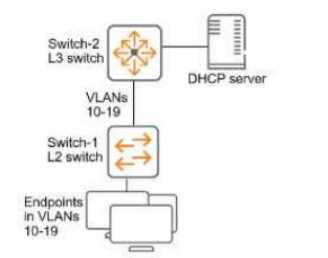
You have verified that AOS-CX Switch-1 has constructed an IP-to-MAC binding table in VLANs 10-19.
Now you need to enable ARP inspection for the endpoint connected to Switch-1. What must you do
first to prevent traffic disruption?
- A. Configure ARP inspection on VLANs 10-19 on Switch-2.
- B. Configure DHCP snooping on VLANs 10-19 on Switch-2.
- C. Configure Switch-1 uplinks as trusted ARP inspection ports.
- D. Create a static IP-to-MAC binding on Switch-1 for the DHCP server.
Answer:
C
Explanation:
Dynamic ARP Inspection (DAI):
ARP inspection verifies ARP packets against a trusted IP-to-MAC binding table to prevent ARP
spoofing attacks.
DHCP snooping is required to construct the IP-to-MAC binding table dynamically.
To avoid traffic disruption, uplink ports that connect to trusted switches, DHCP servers, or routers
must be explicitly configured as trusted ports for ARP inspection.
Steps to Prevent Traffic Disruption:
Trust the Uplinks: ARP inspection must treat uplink ports as trusted to allow ARP traffic from
legitimate DHCP servers and upstream switches.
Enable DHCP Snooping: DHCP snooping must be enabled on Switch-2 to ensure consistent IP-to-MAC
bindings upstream.
Why the Answer is Correct:
Option A: Incorrect. ARP inspection on Switch-2 is important but not required first to prevent
disruption on Switch-1.
Option B: Incorrect. DHCP snooping must be enabled upstream eventually, but this alone will not
stop immediate traffic disruption on Switch-1.
Option C: Correct. Switch-1 uplinks must be trusted ARP inspection ports first to allow legitimate
upstream traffic and prevent ARP disruption.
Option D: Incorrect. Static bindings are not required if DHCP snooping is enabled, and they are
manual, limiting scalability.
Conclusion:
To avoid traffic disruption, configure Switch-1 uplinks as trusted ARP inspection ports to ensure valid
ARP traffic can pass upstream and downstream.
Question 13
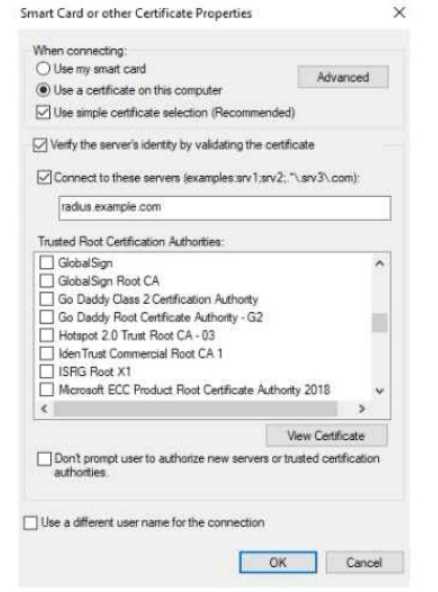
The exhibit shows the 802.1X-related settings for Windows domain clients. What should admins
change to make the settings follow best security practices?
- A. Specify at least two server names under the "Connect to these servers" field.
- B. Select the desired Trusted Root Certificate Authority and select the check box next to "Don't prompt users."
- C. Under the "Connect to these servers" field, use a wildcard in the server name.
- D. Clear the check box for using simple certificate selection and select the desired certificate manually.
Answer:
A
Explanation:
To follow best security practices for 802.1X authentication settings in Windows domain clients:
Specify at least two server names under "Connect to these servers":
Admins should explicitly list trusted RADIUS server names (e.g., radius.example.com) to prevent the
client from connecting to unauthorized or rogue servers.
This mitigates man-in-the-middle (MITM) attacks where an attacker attempts to present their own
RADIUS server.
Select the desired Trusted Root Certificate Authority and "Don't prompt users":
Select the Trusted Root CA that issued the RADIUS server's certificate. This ensures clients validate
the correct server certificate during the EAP-TLS/PEAP authentication process.
Enabling "Don't prompt users" ensures end users are not confused or tricked into accepting
certificates from untrusted servers.
Why the other options are incorrect:
Option C: Incorrect. Wildcards in server names (e.g., *.example.com) weaken security and allow
broader matching, increasing the risk of rogue servers.
Option D: Incorrect. Clearing "Use simple certificate selection" requires users to select certificates
manually, which can lead to errors and usability issues. Simple certificate selection is recommended
when properly configured.
Recommended Settings for Best Security Practices:
Server Validation: Specify the exact RADIUS server names in the "Connect to these servers" field.
Root CA Validation: Ensure only the correct Trusted Root Certificate Authority is selected.
User Prompts: Enable "Don't prompt users" to enforce automatic and secure authentication without
user intervention.
Question 14
You have enabled "rogue AP containment" in the Wireless IPS settings for a company’s HPE Aruba
Networking APs. What form of containment does HPE Aruba Networking recommend?
- A. Wireless deauthentication only
- B. Wireless tarpit and wired containment
- C. Wireless tarpit only
- D. Wired containment
Answer:
A
Explanation:
Rogue AP Containment Methods:
HPE Aruba Networking recommends using wireless deauthentication as the preferred method for
rogue AP containment.
Deauthentication sends deauth frames to clients connected to rogue APs, causing them to
disconnect. This method is effective without introducing unnecessary disruptions to the wired
infrastructure.
Key Points:
Wireless Deauthentication is simple, efficient, and widely supported across client devices.
Tarpit Containment is more aggressive and may cause unintentional disruptions to legitimate clients.
Wired Containment involves blocking traffic at the switch level but is complex and may impact
legitimate infrastructure traffic.
Option Analysis:
Option A: Correct. Wireless deauthentication is the recommended method as it targets rogue AP
clients without excessive network impact.
Option B: Incorrect. Combining wireless tarpit and wired containment is overkill and not typically
recommended.
Option C: Incorrect. Wireless tarpit can be effective but is generally not the first choice due to its
aggressive nature.
Option D: Incorrect. Wired containment is more complex and reserved for specific use cases, not
general recommendations.
Question 15
You are using Wireshark to view packets captured from HPE Aruba Networking infrastructure, but
you’re not sure that the packets are displaying correctly. In which circumstance does it make sense to
configure Wireshark to ignore protection bits with the IV for the 802.11 protocol?
- A. When the traffic was captured on the data plane of an HPE Aruba Networking gateway and sent to a remote IP.
- B. When the traffic was mirrored from an AOS-CX switch port connected to an AP.
- C. When the traffic was captured from an AP with HPE Aruba Networking Central.
- D. When the traffic was captured on the control plane of an HPE Aruba Networking MC and sent to a remote IP.
Answer:
C
Explanation:
802.11 Traffic and Protection Bits:
In the 802.11 protocol, protection bits and the Initialization Vector (IV) are used in encrypted wireless
traffic.
If the traffic is captured directly from an AP, the frames may include encrypted content.
Wireshark may misinterpret these protection bits or fail to display the frames correctly unless it is
configured to ignore protection bits and correctly parse the IV.
Key Scenario:
When traffic is captured directly from an AP managed by HPE Aruba Networking Central, the frames
are often captured before decryption occurs.
In such cases, you must configure Wireshark to ignore the protection bits and handle the IV properly
for correct frame interpretation.
Option Analysis:
Option A: Incorrect. Data plane traffic sent to a remote IP is usually decrypted, so Wireshark does not
require this adjustment.
Option B: Incorrect. Switch port mirroring captures traffic at Layer 2/3, not raw 802.11 frames.
Option C: Correct. Traffic captured directly from an AP via HPE Aruba Networking Central often
includes encrypted wireless frames, requiring Wireshark adjustments.
Option D: Incorrect. Control plane traffic is typically management data and not raw wireless frames
needing IV interpretation.