HP HPE6-A78 Exam Questions
Questions for the HPE6-A78 were updated on : Feb 18 ,2026
Page 1 out of 12. Viewing questions 1-15 out of 168
Question 1
Which is an accurate description of a type of malware?
- A. Worms are usually delivered in spear-phishing attacks and require users to open and run a file.
- B. Rootkits can help hackers gain elevated access to a system and often actively conceal themselves from detection.
- C. A Trojan is any type of malware that replicates itself and spreads to other systems automatically.
- D. Malvertising can only infect a system if the user encounters the malware on an untrustworthy site.
Answer:
B
Explanation:
Malware (malicious software) is a broad category of software designed to harm or exploit systems.
HPE Aruba Networking documentation often discusses malware in the context of network security
threats and mitigation strategies, such as those detected by the Wireless Intrusion Prevention (WIP)
system.
Option A, "Worms are usually delivered in spear-phishing attacks and require users to open and run a
file," is incorrect. Worms are a type of malware that replicate and spread automatically across
networks without user interaction (e.g., by exploiting vulnerabilities). They are not typically
delivered via spear-phishing, which is more associated with Trojans or ransomware. Worms do not
require users to open and run a file; that behavior is characteristic of Trojans.
Option B, "Rootkits can help hackers gain elevated access to a system and often actively conceal
themselves from detection," is correct. A rootkit is a type of malware that provides hackers with
privileged (elevated) access to a system, often by modifying the operating system or kernel. Rootkits
are designed to hide their presence (e.g., by concealing processes, files, or network connections) to
evade detection by antivirus software or system administrators, making them a stealthy and
dangerous type of malware.
Option C, "A Trojan is any type of malware that replicates itself and spreads to other systems
automatically," is incorrect. A Trojan is a type of malware that disguises itself as legitimate software
to trick users into installing it. Unlike worms, Trojans do not replicate or spread automatically; they
require user interaction (e.g., downloading and running a file) to infect a system.
Option D, "Malvertising can only infect a system if the user encounters the malware on an
untrustworthy site," is incorrect. Malvertising (malicious advertising) involves embedding malware in
online ads, which can appear on both trustworthy and untrustworthy sites. For example, a legitimate
website might unknowingly serve a malicious ad that exploits a browser vulnerability to infect the
user’s system, even without the user clicking the ad.
The HPE Aruba Networking Security Guide states:
"Rootkits are a type of malware that can help hackers gain elevated access to a system by modifying
the operating system or kernel. They often actively conceal themselves from detection by hiding
processes, files, or network connections, making them difficult to detect and remove. Rootkits are
commonly used to maintain persistent access to a compromised system." (Page 22, Malware Types
Section)
Additionally, the HPE Aruba Networking AOS-8 8.11 User Guide notes:
"The Wireless Intrusion Prevention (WIP) system can detect various types of malware. Rootkits, for
example, are designed to provide hackers with elevated access and often conceal themselves to
evade detection, allowing the hacker to maintain control over the infected system for extended
periods." (Page 421, Malware Threats Section)
:
HPE Aruba Networking Security Guide, Malware Types Section, Page 22.
HPE Aruba Networking AOS-8 8.11 User Guide, Malware Threats Section, Page 421.
Question 2
How can hackers implement a man-in-the-middle (MITM) attack against a wireless client?
- A. The hacker uses a combination of software and hardware to jam the RF band and prevent the client from connecting to any wireless networks.
- B. The hacker runs an NMap scan on the wireless client to find its MAC and IP address. The hacker then connects to another network and spoofs those addresses.
- C. The hacker uses spear-phishing to probe for the IP addresses that the client is attempting to reach. The hacker device then spoofs those IP addresses.
- D. The hacker connects a device to the same wireless network as the client and responds to the client's ARP requests with the hacker device's MAC address.
Answer:
D
Explanation:
A man-in-the-middle (MITM) attack involves an attacker positioning themselves between a wireless
client and the legitimate network to intercept or manipulate traffic. HPE Aruba Networking
documentation often discusses MITM attacks in the context of wireless security threats and
mitigation strategies.
Option D, "The hacker connects a device to the same wireless network as the client and responds to
the client's ARP requests with the hacker device's MAC address," is correct. This describes an ARP
poisoning (or ARP spoofing) attack, a common MITM technique in wireless networks. The hacker
joins the same wireless network as the client (e.g., by authenticating with the same SSID and
credentials). Once on the network, the hacker sends fake ARP responses to the client, associating the
hacker’s MAC address with the IP address of the default gateway (or another target device). This
causes the client to send traffic to the hacker’s device instead of the legitimate gateway, allowing the
hacker to intercept, modify, or forward the traffic, thus performing an MITM attack.
Option A, "The hacker uses a combination of software and hardware to jam the RF band and prevent
the client from connecting to any wireless networks," is incorrect. Jamming the RF band would
disrupt all wireless communication, including the hacker’s ability to intercept traffic. This is a denial-
of-service (DoS) attack, not an MITM attack.
Option B, "The hacker runs an NMap scan on the wireless client to find its MAC and IP address. The
hacker then connects to another network and spoofs those addresses," is incorrect. NMap scans are
used for network discovery and port scanning, not for implementing an MITM attack. Spoofing MAC
and IP addresses on another network does not position the hacker to intercept the client’s traffic on
the original network.
Option C, "The hacker uses spear-phishing to probe for the IP addresses that the client is attempting
to reach. The hacker device then spoofs those IP addresses," is incorrect. Spear-phishing is a delivery
method for malware or credentials theft, not a direct method for implementing an MITM attack.
Spoofing IP addresses alone does not allow the hacker to intercept traffic unless they are on the
same network and can manipulate routing (e.g., via ARP poisoning).
The HPE Aruba Networking AOS-8 8.11 User Guide states:
"A common man-in-the-middle (MITM) attack against wireless clients involves ARP poisoning. The
hacker connects a device to the same wireless network as the client and sends fake ARP responses to
the client, associating the hacker’s MAC address with the IP address of the default gateway. This
causes the client to send traffic to the hacker’s device, allowing the hacker to intercept and
manipulate the traffic." (Page 422, Wireless Threats Section)
Additionally, the HPE Aruba Networking Security Guide notes:
"ARP poisoning is a prevalent MITM attack in wireless networks. The attacker joins the same network
as the client and responds to the client’s ARP requests with the attacker’s MAC address, redirecting
traffic through the attacker’s device. This allows the attacker to intercept sensitive data or modify
traffic between the client and the legitimate destination." (Page 72, Wireless MITM Attacks Section)
:
HPE Aruba Networking AOS-8 8.11 User Guide, Wireless Threats Section, Page 422.
HPE Aruba Networking Security Guide, Wireless MITM Attacks Section, Page 72.
===========
Question 3
Refer to the exhibits.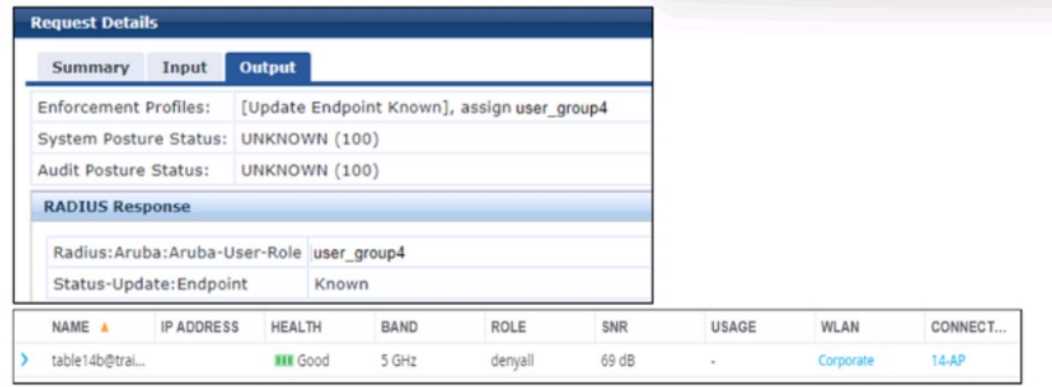
A company has added a new user group. Users in the group try to connect to the WLAN and receive
errors that the connection has no Internet access. The users cannot reach any resources. The first
exhibit shows the record for one of the users who cannot connect. The second exhibit shows the role
to which the AOS device assigned the user’s client.
What is a likely problem?
- A. The AOS device does not have the correct RADIUS dictionaries installed on it to understand the Aruba-User-Role VSA.
- B. The AOS device has a server derivation rule configured on it that has overridden the role sent by CPPM.
- C. The clients rejected the server authentication on their side because they do not have the root CA for CPPM’s RADIUS/EAP certificate.
- D. The role name that CPPM is sending does not match the role name configured on the AOS device.
Answer:
D
Explanation:
The scenario involves an AOS-8 Mobility Controller (MC) with a WLAN where a new user group has
been added. Users in this group cannot connect to the WLAN, receiving errors indicating no Internet
access and inability to reach resources. Exhibit 1 shows the ClearPass Policy Manager (CPPM) Access
Tracker record for one user:
CPPM sends an Access-Accept with the VSA Radius:Aruba:Aruba-User-Role user_group4.
The endpoint is classified as "Known," but the user cannot access resources. Exhibit 2 (not provided
but described) shows that the AOS device (MC) assigned the user’s client to the "denyall" role, which
likely denies all access, explaining the lack of Internet and resource access.
Analysis:
CPPM sends the Aruba-User-Role VSA with the value "user_group4," indicating that the user should
be assigned to the "user_group4" role on the MC.
However, the MC assigns the client to the "denyall" role, which typically denies all traffic, resulting in
no Internet or resource access.
The issue lies in why the MC did not apply the "user_group4" role sent by CPPM.
Option A, "The AOS device does not have the correct RADIUS dictionaries installed on it to
understand the Aruba-User-Role VSA," is incorrect. If the MC did not have the correct RADIUS
dictionaries to understand the Aruba-User-Role VSA, it would not process the VSA at all, and the
issue would likely affect all users, not just the new user group. Additionally, Aruba-User-Role is a
standard VSA in AOS-8, and the dictionaries are built into the system.
Option B, "The AOS device has a server derivation rule configured on it that has overridden the role
sent by CPPM," is incorrect. Server derivation rules on the MC can override roles sent by the RADIUS
server (e.g., based on attributes like username or NAS-IP), but there is no indication in the scenario
that such a rule is configured. If a derivation rule were overriding the role, it would likely affect more
users, and the issue would not be specific to the new user group.
Option C, "The clients rejected the server authentication on their side because they do not have the
root CA for CPPM’s RADIUS/EAP certificate," is incorrect. If the clients rejected the server
authentication (e.g., due to a missing root CA for CPPM’s certificate), the authentication would fail
entirely, and CPPM would not send an Access-Accept with the Aruba-User-Role VSA. The scenario
confirms that authentication succeeded (Access-Accept was sent), so this is not the issue.
Option D, "The role name that CPPM is sending does not match the role name configured on the AOS
device," is correct. CPPM sends the role "user_group4" in the Aruba-User-Role VSA, but the MC
assigns the client to the "denyall" role. This suggests that the role "user_group4" does not exist on
the MC, or there is a mismatch in the role name (e.g., due to case sensitivity, typos, or underscores
vs. hyphens). In AOS-8, if the role specified in the Aruba-User-Role VSA does not exist on the MC, the
MC falls back to a default role, which in this case appears to be "denyall," denying all access. The
likely problem is that the role name "user_group4" sent by CPPM does not match the role name
configured on the MC (e.g., it might be "user-group4" or a different name).
The HPE Aruba Networking AOS-8 8.11 User Guide states:
"When the Mobility Controller receives an Aruba-User-Role VSA in a RADIUS Access-Accept message,
it attempts to assign the specified role to the client. If the role name sent by the RADIUS server (e.g.,
‘user_group4’) does not match a role configured on the controller, the controller will fall back to a
default role, such as ‘denyall,’ which may deny all access. To resolve this, ensure that the role name
sent by the RADIUS server matches the role name configured on the controller, accounting for case
sensitivity and naming conventions (e.g., underscores vs. hyphens)." (Page 306, Role Assignment
Troubleshooting Section)
Additionally, the HPE Aruba Networking ClearPass Policy Manager 6.11 User Guide notes:
"A common issue when assigning roles via the Aruba-User-Role VSA is a mismatch between the role
name sent by ClearPass and the role name configured on the Aruba device. If the role name does not
match (e.g., ‘user_group4’ vs. ‘user-group4’), the device will not apply the intended role, and the
client may be assigned a default role like ‘denyall,’ resulting in access issues. Verify that the role
names match exactly in both ClearPass and the device configuration." (Page 290, RADIUS Role
Assignment Issues Section)
:
HPE Aruba Networking AOS-8 8.11 User Guide, Role Assignment Troubleshooting Section, Page 306.
HPE Aruba Networking ClearPass Policy Manager 6.11 User Guide, RADIUS Role Assignment Issues
Section, Page 290.
===========
Question 4
You have an HPE Aruba Networking Mobility Controller (MC) that is locked in a closet. What is
another step that HPE Aruba Networking recommends to protect the MC from unauthorized access?
- A. Set the local admin password to a long random value that is unknown or locked up securely.
- B. Disable local authentication of administrators entirely.
- C. Change the password recovery password.
- D. Use local authentication rather than external authentication to authenticate admins.
Answer:
A
Explanation:
The scenario involves an HPE Aruba Networking Mobility Controller (MC) that is physically secured in
a locked closet, which provides protection against physical tampering. However, additional steps are
needed to protect the MC from unauthorized access, particularly through administrative interfaces
(e.g., SSH, web UI, console).
Option A, "Set the local admin password to a long random value that is unknown or locked up
securely," is correct. HPE Aruba Networking recommends securing administrative access to the MC
by setting a strong, random password for the local admin account (e.g., the default "admin" user).
The password should be long (e.g., 16+ characters), random, and stored securely (e.g., in a password
manager or safe). This ensures that even if an attacker gains physical access to the MC (e.g., by
bypassing the locked closet) or attempts remote access, they cannot easily guess or brute-force the
password.
Option B, "Disable local authentication of administrators entirely," is incorrect. Disabling local
authentication entirely would prevent any fallback access to the MC if external authentication (e.g.,
RADIUS, TACACS+) fails. HPE Aruba Networking recommends maintaining a local admin account as a
backup, but securing it with a strong password.
Option C, "Change the password recovery password," is incorrect. AOS-8 Mobility Controllers do not
have a specific "password recovery password." Password recovery typically involves physical access
to the device (e.g., via the console port) and a factory reset, which would be mitigated by the locked
closet. This option is not a standard recommendation for securing the MC.
Option D, "Use local authentication rather than external authentication to authenticate admins," is
incorrect. HPE Aruba Networking recommends using external authentication (e.g., RADIUS or
TACACS+) for centralized management and stronger security (e.g., two-factor authentication). Local
authentication should be a fallback, not the primary method, and it must be secured with a strong
password.
The HPE Aruba Networking AOS-8 8.11 User Guide states:
"To protect the Mobility Controller from unauthorized access, even if it is physically secured in a
locked closet, set the local admin password to a long, random value that is unknown or locked up
securely. For example, use a password of at least 16 characters generated by a password manager,
and store it in a secure location (e.g., a safe). This ensures that the local admin account, which is used
as a fallback, is protected against unauthorized access attempts." (Page 385, Securing Administrative
Access Section)
Additionally, the HPE Aruba Networking Security Best Practices Guide notes:
"A recommended step to secure the Mobility Controller is to set a strong, random password for the
local admin account. The password should be long (e.g., 16+ characters), randomly generated, and
stored securely to prevent unauthorized access, even if the device is physically protected in a locked
closet." (Page 28, Administrative Security Section)
:
HPE Aruba Networking AOS-8 8.11 User Guide, Securing Administrative Access Section, Page 385.
HPE Aruba Networking Security Best Practices Guide, Administrative Security Section, Page 28.
===========
Question 5
Which is a correct description of a stage in the Lockheed Martin kill chain?
- A. In the weaponization stage, which occurs after malware has been delivered to a system, the malware executes its function.
- B. In the exploitation and installation phases, malware creates a backdoor into the infected system for the hacker.
- C. In the reconnaissance stage, the hacker assesses the impact of the attack and how much information was exfiltrated.
- D. In the delivery stage, malware collects valuable data and delivers or exfiltrates it to the hacker.
Answer:
B
Explanation:
The Lockheed Martin Cyber Kill Chain is a framework that outlines the stages of a cyber attack, from
initial reconnaissance to achieving the attacker’s objective. It is often referenced in HPE Aruba
Networking security documentation to help organizations understand and mitigate threats. The
stages are: Reconnaissance, Weaponization, Delivery, Exploitation, Installation, Command and
Control (C2), and Actions on Objectives.
Option A, "In the weaponization stage, which occurs after malware has been delivered to a system,
the malware executes its function," is incorrect. The weaponization stage occurs before delivery, not
after. In this stage, the attacker creates a deliverable payload (e.g., combining malware with an
exploit). The execution of the malware happens in the exploitation stage, not weaponization.
Option B, "In the exploitation and installation phases, malware creates a backdoor into the infected
system for the hacker," is correct. The exploitation phase involves the attacker exploiting a
vulnerability (e.g., a software flaw) to execute the malware on the target system. The installation
phase follows, where the malware installs itself to establish persistence, often by creating a backdoor
(e.g., a remote access tool) to allow the hacker to maintain access to the system. These two phases
are often linked in the kill chain as the malware gains a foothold and ensures continued access.
Option C, "In the reconnaissance stage, the hacker assesses the impact of the attack and how much
information was exfiltrated," is incorrect. The reconnaissance stage occurs at the beginning of the kill
chain, where the attacker gathers information about the target (e.g., network topology,
vulnerabilities). Assessing the impact and exfiltration occurs in the Actions on Objectives stage, the
final stage of the kill chain.
Option D, "In the delivery stage, malware collects valuable data and delivers or exfiltrates it to the
hacker," is incorrect. The delivery stage involves the attacker transmitting the weaponized payload to
the target (e.g., via a phishing email). Data collection and exfiltration occur later, in the Actions on
Objectives stage, not during delivery.
The HPE Aruba Networking Security Guide states:
"The Lockheed Martin Cyber Kill Chain outlines the stages of a cyber attack. In the exploitation
phase, the attacker exploits a vulnerability to execute the malware on the target system. In the
installation phase, the malware creates a backdoor or other persistence mechanism, such as a
remote access tool, to allow the hacker to maintain access to the infected system for future actions."
(Page 18, Cyber Kill Chain Overview Section)
Additionally, the HPE Aruba Networking AOS-8 8.11 User Guide notes:
"The exploitation and installation phases of the Lockheed Martin kill chain involve the malware
gaining a foothold on the target system. During exploitation, the malware is executed by exploiting a
vulnerability, and during installation, it creates a backdoor to ensure persistent access for the hacker,
enabling further stages like command and control." (Page 420, Threat Mitigation Section)
:
HPE Aruba Networking Security Guide, Cyber Kill Chain Overview Section, Page 18.
HPE Aruba Networking AOS-8 8.11 User Guide, Threat Mitigation Section, Page 420.
===========
Question 6
A customer has an AOS-10 network infrastructure. The customer is looking for a solution that can
classify many different types of devices, including IoT devices. Which solution should you explain can
provide these capabilities?
- A. HPE Aruba Networking EdgeConnect SD-WAN
- B. HPE Aruba Networking ClearPass OnGuard
- C. HPE Aruba Networking Central
- D. HPE Aruba Networking ClearPass Onboard
Answer:
B
Explanation:
HPE Aruba Networking ClearPass OnGuard: This is a component of the ClearPass Policy Manager
platform specifically designed for endpoint posture assessment and health checks. It can identify and
classify a wide range of devices connecting to the network, including traditional endpoints, mobile
devices, and importantly, IoT devices. It analyzes device attributes and behaviors to determine their
type and security posture.
Let's look at why the other options are less suitable for this specific requirement:
HPE Aruba Networking EdgeConnect SD-WAN: This solution focuses on optimizing wide area
network (WAN) connectivity, improving application performance, and providing secure branch-to-
branch and branch-to-cloud connections. While it can identify traffic from different devices, its
primary function isn't detailed device classification at the network access layer.
HPE Aruba Networking Central: This is a cloud-based network management platform that provides
visibility, configuration, and management for Aruba network devices (APs, switches, gateways).
While it offers insights into connected devices, its core function isn't the deep classification of diverse
endpoint types like IoT devices.
HPE Aruba Networking ClearPass Onboard: This component of ClearPass Policy Manager focuses on
simplifying the secure onboarding of personal or unmanaged devices (BYOD). While it involves
device identification during the onboarding process, its primary goal isn't continuous and
comprehensive classification of all device types, especially the detailed classification needed for
diverse IoT devices.
Therefore, HPE Aruba Networking ClearPass OnGuard is the most appropriate solution for classifying
a wide range of devices, including IoT devices, within an AOS-10 network infrastructure.
Question 7
You have been instructed to look in an AOS Security Dashboard’s client list. Your goal is to find clients
that belong to the company and have connected to devices that might belong to hackers.
Which client fits this description?
- A. MAC address: d8:50:e6:f3:6d:a4; Client Classification: Authorized; AP Classification: Suspected Rogue
- B. MAC address: d8:50:e6:f3:6e:c5; Client Classification: Interfering; AP Classification: Neighbor
- C. MAC address: d8:50:e6:f3:6e:60; Client Classification: Interfering; AP Classification: Interfering
- D. MAC address: d8:50:e6:f3:70:ab; Client Classification: Interfering; AP Classification: Suspected Rogue
Answer:
A
Explanation:
The AOS Security Dashboard in an AOS-8 solution (Mobility Controllers or Mobility Master) provides
a client list through its Wireless Intrusion Prevention (WIP) system, showing the classification of
clients and the APs they are connected to. The goal is to identify clients that belong to the company
(Authorized clients) and have connected to devices that might belong to hackers (rogue or suspected
rogue APs).
Client Classification:
Authorized: A client that has successfully authenticated to an authorized AP and is part of the
company’s network (e.g., an employee device).
Interfering: A client that is not authenticated to the company’s network and is considered external or
potentially malicious.
AP Classification:
Authorized: An AP that is part of the company’s network and managed by the MC.
Suspected Rogue: An AP that is not authorized and is suspected of being malicious, often because it
exhibits suspicious behavior (e.g., a BSSID close to an authorized AP, indicating potential spoofing).
Neighbor: An AP that is not part of the company’s network but is not connected to the wired
network (e.g., a nearby AP from another organization).
Interfering: An AP that is not part of the company’s network and may be causing interference, but is
not necessarily malicious.
The requirement is to find a client that is Authorized (belongs to the company) and connected to a
Suspected Rogue AP (might belong to hackers).
Option A: MAC address: d8:50:e6:f3:6d:a4; Client Classification: Authorized; AP Classification:
Suspected Rogue
This client is classified as "Authorized," meaning it belongs to the company, and it is connected to a
"Suspected Rogue" AP, which might belong to hackers. This matches the requirement perfectly.
Option B: MAC address: d8:50:e6:f3:6e:c5; Client Classification: Interfering; AP Classification:
Neighbor
This client is "Interfering" (not a company client) and connected to a "Neighbor" AP, which is not
considered a hacker’s device (it’s just a nearby AP).
Option C: MAC address: d8:50:e6:f3:6e:60; Client Classification: Interfering; AP Classification:
Interfering
This client is "Interfering" (not a company client) and connected to an "Interfering" AP, which is not
necessarily a hacker’s device (it may just be causing interference).
Option D: MAC address: d8:50:e6:f3:70:ab; Client Classification: Interfering; AP Classification:
Suspected Rogue
This client is "Interfering" (not a company client), although it is connected to a "Suspected Rogue" AP.
It does not meet the requirement of being a company client.
The HPE Aruba Networking AOS-8 8.11 User Guide states:
"The Security Dashboard’s client list in ArubaOS shows the classification of each client and the AP it is
connected to. An ‘Authorized’ client is one that has successfully authenticated to an authorized AP
and is part of the company’s network. A ‘Suspected Rogue’ AP is an unauthorized AP that exhibits
suspicious behavior, such as a BSSID close to an authorized AP, indicating potential spoofing by a
hacker. To identify security risks, look for authorized clients connected to suspected rogue APs, as
this may indicate a company device has connected to a malicious AP." (Page 415, Security Dashboard
Section)
Additionally, the HPE Aruba Networking Security Guide notes:
"WIP classifies clients as ‘Authorized’ if they have authenticated to an authorized AP managed by the
controller. A ‘Suspected Rogue’ AP is a potential threat, as it may be attempting to mimic a legitimate
AP to lure clients. Identifying authorized clients connected to suspected rogue APs is critical for
detecting potential attacks, such as man-in-the-middle attempts by hackers." (Page 78, WIP
Classifications Section)
:
HPE Aruba Networking AOS-8 8.11 User Guide, Security Dashboard Section, Page 415.
HPE Aruba Networking Security Guide, WIP Classifications Section, Page 78.
===========
Question 8
You have been asked to send RADIUS debug messages from an AOS-CX switch to a central SIEM
server at 10.5.15.6. The server is already defined on the switch with this command:
logging 10.5.15.6
You enter this command:
debug radius all
What is the correct debug destination?
- A. file
- B. console
- C. buffer
- D. syslog
Answer:
D
Explanation:
The scenario involves an AOS-CX switch that needs to send RADIUS debug messages to a central
SIEM server at 10.5.15.6. The switch has already been configured to send logs to the SIEM server
with the command logging 10.5.15.6, and the command debug radius all has been entered to enable
RADIUS debugging.
Debug Command: The debug radius all command enables debugging for all RADIUS-related events
on the AOS-CX switch, generating detailed debug messages for RADIUS authentication, accounting,
and other operations.
Debug Destination: Debug messages on AOS-CX switches can be sent to various destinations, such as
the console, a file, the debug buffer, or a Syslog server. The logging 10.5.15.6 command indicates that
the switch is configured to send logs to a Syslog server at 10.5.15.6 (using UDP port 514 by default,
unless specified otherwise).
Option D, "syslog," is correct. To send RADIUS debug messages to the SIEM server, the debug
destination must be set to "syslog," as the SIEM server is already defined as a Syslog destination with
logging 10.5.15.6. The command to set the debug destination to Syslog is debug destination syslog,
which ensures that the RADIUS debug messages are sent to the configured Syslog server (10.5.15.6).
Option A, "file," is incorrect. Sending debug messages to a file (e.g., using debug destination file)
stores the messages on the switch’s filesystem, not on the SIEM server.
Option B, "console," is incorrect. Sending debug messages to the console (e.g., using debug
destination console) displays them on the switch’s console session, not on the SIEM server.
Option C, "buffer," is incorrect. Sending debug messages to the buffer (e.g., using debug destination
buffer) stores them in the switch’s debug buffer, which can be viewed with show debug buffer, but
does not send them to the SIEM server.
The HPE Aruba Networking AOS-CX 10.12 System Management Guide states:
"To send debug messages, such as RADIUS debug messages, to a central SIEM server, first configure
the Syslog server with the logging <ip-address> command (e.g., logging 10.5.15.6). Then, enable the
desired debug with a command like debug radius all, and set the debug destination to Syslog using
debug destination syslog. This ensures that all debug messages are sent to the configured Syslog
server for centralized logging." (Page 92, Debug Logging Section)
Additionally, the HPE Aruba Networking AOS-CX 10.12 Security Guide notes:
"RADIUS debug messages can be sent to a Syslog server for centralized monitoring. After enabling
RADIUS debugging with debug radius all, use debug destination syslog to send the messages to the
Syslog server configured with the logging command, such as a SIEM server at 10.5.15.6." (Page 152,
RADIUS Debugging Section)
:
HPE Aruba Networking AOS-CX 10.12 System Management Guide, Debug Logging Section, Page 92.
HPE Aruba Networking AOS-CX 10.12 Security Guide, RADIUS Debugging Section, Page 152.
===========
Question 9
You are checking the Security Dashboard in the Web UI for your AOS solution and see that Wireless
Intrusion Prevention (WIP) has discovered a rogue radio operating in ad hoc mode with open
security. What correctly describes a threat that the radio could pose?
- A. It could be attempting to conceal itself from detection by changing its BSSID and SSID frequently.
- B. It could open a backdoor into the corporate LAN for unauthorized users.
- C. It is running in a non-standard 802.11 mode and could effectively jam the wireless signal.
- D. It is flooding the air with many wireless frames in a likely attempt at a DoS attack.
Answer:
B
Explanation:
The AOS Security Dashboard in an AOS-8 solution (Mobility Controllers or Mobility Master) provides
visibility into wireless threats detected by the Wireless Intrusion Prevention (WIP) system. The
scenario describes a rogue radio operating in ad hoc mode with open security. Ad hoc mode in
802.11 allows devices to communicate directly with each other without an access point (AP), forming
a peer-to-peer network. Open security means no encryption or authentication is required to connect.
Ad Hoc Mode Threat: An ad hoc network created by a rogue device can pose significant risks,
especially if a corporate client connects to it. Since ad hoc mode allows direct device-to-device
communication, a client that joins the ad hoc network might inadvertently bridge the corporate LAN
to the rogue network, especially if the client is also connected to the corporate network (e.g., via a
wired connection or another wireless interface).
Option B, "It could open a backdoor into the corporate LAN for unauthorized users," is correct. If a
corporate client connects to the rogue ad hoc network (e.g., due to a misconfiguration or auto-
connect setting), the client might bridge the ad hoc network to the corporate LAN, allowing
unauthorized users on the ad hoc network to access corporate resources. This is a common threat
with ad hoc networks, as they bypass the security controls of the corporate AP infrastructure.
Option A, "It could be attempting to conceal itself from detection by changing its BSSID and SSID
frequently," is incorrect. While changing BSSID and SSID can be a tactic to evade detection, this is not
a typical characteristic of ad hoc networks and is not implied by the scenario. Ad hoc networks are
generally visible to WIP unless explicitly hidden.
Option C, "It is running in a non-standard 802.11 mode and could effectively jam the wireless signal,"
is incorrect. Ad hoc mode is a standard 802.11 mode, not a non-standard one. While a rogue device
could potentially jam the wireless signal, this is not a direct threat posed by ad hoc mode with open
security.
Option D, "It is flooding the air with many wireless frames in a likely attempt at a DoS attack," is
incorrect. There is no indication in the scenario that the rogue radio is flooding the air with frames.
While ad hoc networks can be used in DoS attacks, the primary threat in this context is the potential
for unauthorized access to the corporate LAN.
The HPE Aruba Networking AOS-8 8.11 User Guide states:
"A rogue radio operating in ad hoc mode with open security poses a significant threat, as it can open
a backdoor into the corporate LAN. If a corporate client connects to the ad hoc network, it may
bridge the ad hoc network to the corporate LAN, allowing unauthorized users to access corporate
resources. This is particularly dangerous if the client is also connected to the corporate network via
another interface." (Page 422, Wireless Threats Section)
Additionally, the HPE Aruba Networking Security Guide notes:
"Ad hoc networks detected by WIP are a concern because they can act as a backdoor into the
corporate LAN. A client that joins an ad hoc network with open security may inadvertently allow
unauthorized users to access the corporate network, bypassing the security controls of authorized
APs." (Page 73, Ad Hoc Network Threats Section)
:
HPE Aruba Networking AOS-8 8.11 User Guide, Wireless Threats Section, Page 422.
HPE Aruba Networking Security Guide, Ad Hoc Network Threats Section, Page 73.
===========
Question 10
What is a benefit of deploying HPE Aruba Networking ClearPass Device Insight?
- A. Highly accurate endpoint classification for environments with many device types, including Internet of Things (IoT)
- B. Simpler troubleshooting of ClearPass solutions across an environment with multiple ClearPass Policy Managers
- C. Visibility into devices’ 802.1X supplicant settings and automated certificate deployment
- D. Agent-based analysis of devices’ security settings and health status, with the ability to implement quarantining
Answer:
A
Explanation:
HPE Aruba Networking ClearPass Device Insight is an advanced profiling solution integrated with
ClearPass Policy Manager (CPPM) to enhance endpoint classification. It uses a combination of
passive and active profiling techniques, along with machine learning, to identify and categorize
devices on the network.
Option A, "Highly accurate endpoint classification for environments with many device types,
including Internet of Things (IoT)," is correct. ClearPass Device Insight is designed to provide precise
device profiling, especially in complex environments with diverse device types, such as IoT devices
(e.g., smart cameras, thermostats). It leverages deep packet inspection (DPI), behavioral analysis,
and a vast fingerprint database to accurately classify devices, enabling granular policy enforcement
based on device type.
Option B, "Simpler troubleshooting of ClearPass solutions across an environment with multiple
ClearPass Policy Managers," is incorrect. ClearPass Device Insight focuses on device profiling, not on
troubleshooting ClearPass deployments. Troubleshooting across multiple CPPM instances would
involve tools like the Event Viewer or Access Tracker, not Device Insight.
Option C, "Visibility into devices’ 802.1X supplicant settings and automated certificate deployment,"
is incorrect. ClearPass Device Insight does not provide visibility into 802.1X supplicant settings or
automate certificate deployment. Those functions are handled by ClearPass Onboard (for certificate
deployment) or Access Tracker (for authentication details).
Option D, "Agent-based analysis of devices’ security settings and health status, with the ability to
implement quarantining," is incorrect. ClearPass Device Insight does not use agents for analysis; it
relies on network traffic and active/passive profiling. Agent-based analysis and health status checks
are features of ClearPass OnGuard, not Device Insight. Quarantining can be implemented by CPPM
policies, but it’s not a direct benefit of Device Insight.
The ClearPass Device Insight Data Sheet states:
"ClearPass Device Insight provides highly accurate endpoint classification for environments with
many device types, including Internet of Things (IoT) devices. It uses a combination of passive and
active profiling techniques, deep packet inspection (DPI), and machine learning to identify and
categorize devices with precision, enabling organizations to enforce granular access policies in
complex networks." (Page 2, Benefits Section)
Additionally, the HPE Aruba Networking ClearPass Policy Manager 6.11 User Guide notes:
"ClearPass Device Insight enhances device profiling by offering highly accurate classification,
especially for IoT and other non-traditional devices. It leverages a vast fingerprint database and
advanced analytics to identify device types, making it ideal for environments with diverse
endpoints." (Page 252, Device Insight Overview Section)
:
ClearPass Device Insight Data Sheet, Benefits Section, Page 2.
HPE Aruba Networking ClearPass Policy Manager 6.11 User Guide, Device Insight Overview Section,
Page 252.
===========
Question 11
What is an Authorized client, as defined by AOS Wireless Intrusion Prevention System (WIP)?
- A. A client that is on the WIP whitelist
- B. A client that has a certificate issued by a trusted Certification Authority (CA)
- C. A client that is NOT on the WIP blacklist
- D. A client that has successfully authenticated to an authorized AP and passed encrypted traffic
Answer:
D
Explanation:
The AOS Wireless Intrusion Prevention System (WIP) in an AOS-8 architecture (Mobility Controllers
or Mobility Master) is designed to detect and mitigate wireless threats, such as rogue APs and
unauthorized clients. WIP classifies clients and APs based on their behavior and status in the
network.
Authorized Client Definition: In the context of WIP, an "Authorized" client is one that has successfully
authenticated to an authorized AP (an AP managed by the MC and part of the company’s network)
and is actively passing encrypted traffic. This typically means the client has completed 802.1X
authentication (e.g., in a WPA3-Enterprise network) or PSK authentication (e.g., in a WPA3-Personal
network) and is communicating securely with the AP.
Option D, "A client that has successfully authenticated to an authorized AP and passed encrypted
traffic," is correct. This matches the WIP definition of an Authorized client: the client must
authenticate to an AP that is classified as "Authorized" (i.e., part of the company’s network) and
must be passing encrypted traffic, indicating a secure connection (e.g., using WPA3 encryption).
Option A, "A client that is on the WIP whitelist," is incorrect. WIP does not use a client whitelist for
classification. The AP whitelist is used to authorize APs, not clients. Client classification (e.g.,
Authorized, Interfering) is based on their authentication status and connection to authorized APs.
Option B, "A client that has a certificate issued by a trusted Certification Authority (CA)," is incorrect.
While a certificate might be used for 802.1X authentication (e.g., EAP-TLS), WIP does not classify
clients as Authorized based on their certificate status. The classification depends on successful
authentication to an authorized AP and encrypted traffic.
Option C, "A client that is NOT on the WIP blacklist," is incorrect. WIP does use blacklisting (e.g., for
clients that violate security policies), but being "not on the blacklist" does not make a client
Authorized. A client must actively authenticate to an authorized AP and pass encrypted traffic to be
classified as Authorized.
The HPE Aruba Networking AOS-8 8.11 User Guide states:
"In the Wireless Intrusion Prevention (WIP) system, an ‘Authorized’ client is defined as a client that
has successfully authenticated to an authorized AP and is passing encrypted traffic. An authorized AP
is one that is managed by the Mobility Controller and part of the company’s network. For example, a
client that completes 802.1X authentication to an authorized AP using WPA3-Enterprise and sends
encrypted traffic is classified as Authorized." (Page 414, WIP Client Classification Section)
Additionally, the HPE Aruba Networking Security Guide notes:
"WIP classifies clients as ‘Authorized’ if they have authenticated to an authorized AP and are passing
encrypted traffic, indicating a secure connection. Clients that are not authenticated or are connected
to rogue or neighbor APs are classified as ‘Interfering’ or other categories, depending on their
behavior." (Page 78, WIP Classifications Section)
:
HPE Aruba Networking AOS-8 8.11 User Guide, WIP Client Classification Section, Page 414.
HPE Aruba Networking Security Guide, WIP Classifications Section, Page 78.
Question 12
Refer to the exhibit.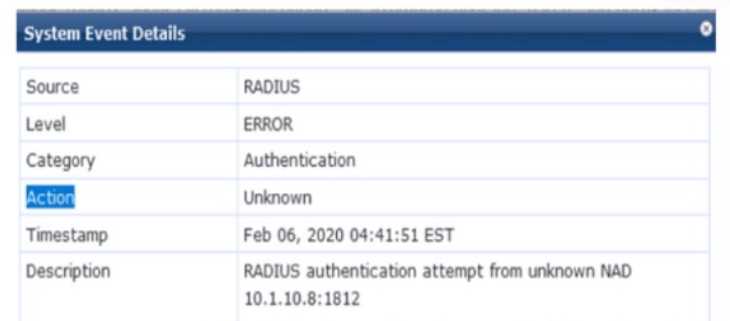
You are deploying a new HPE Aruba Networking Mobility Controller (MC), which is enforcing
authentication to HPE Aruba Networking ClearPass Policy Manager (CPPM). The authentication is
not working correctly, and you find the error shown in the exhibit in the CPPM Event Viewer.
What should you check?
- A. That the IP address that the MC is using to reach CPPM matches the one defined for the device on CPPM
- B. That the MC has valid admin credentials configured on it for logging into the CPPM
- C. That the MC has been added as a domain machine on the Active Directory domain with which CPPM is synchronized
- D. That the shared secret configured for the CPPM authentication server matches the one defined for the device on CPPM
Answer:
A
Explanation:
The exhibit shows an error in the CPPM Event Viewer: "RADIUS authentication attempt from
unknown NAD 10.1.10.8:1812." This indicates that a new HPE Aruba Networking Mobility Controller
(MC) is attempting to send RADIUS authentication requests to HPE Aruba Networking ClearPass
Policy Manager (CPPM), but CPPM does not recognize the MC as a Network Access Device (NAD),
resulting in the authentication failure.
Unknown NAD Error: In CPPM, a NAD is a device (e.g., an MC, switch, or AP) that sends RADIUS
requests to CPPM for authentication. Each NAD must be configured in CPPM with its IP address and a
shared secret. The error "unknown NAD 10.1.10.8:1812" means that the IP address 10.1.10.8 (the
source IP of the MC’s RADIUS request) is not listed as a NAD in CPPM’s configuration, so CPPM
rejects the request.
Option A, "That the IP address that the MC is using to reach CPPM matches the one defined for the
device on CPPM," is correct. You need to check that the MC’s IP address (10.1.10.8) is correctly
configured as a NAD in CPPM. In CPPM, go to Configuration > Network > Devices, and verify that a
NAD entry exists for 10.1.10.8. If the IP address does not match (e.g., due to NAT, a different
interface, or a misconfiguration), CPPM will reject the request as coming from an unknown NAD.
Option B, "That the MC has valid admin credentials configured on it for logging into the CPPM," is
incorrect. Admin credentials on the MC are used for management access (e.g., SSH, web UI), not for
RADIUS authentication. RADIUS communication between the MC and CPPM uses a shared secret,
not admin credentials.
Option C, "That the MC has been added as a domain machine on the Active Directory domain with
which CPPM is synchronized," is incorrect. Adding the MC as a domain machine in Active Directory
(AD) is relevant only if the MC itself is authenticating users against AD (e.g., for machine
authentication), but this is not required for the MC to act as a NAD sending RADIUS requests to
CPPM.
Option D, "That the shared secret configured for the CPPM authentication server matches the one
defined for the device on CPPM," is incorrect in this context. While a shared secret mismatch would
cause authentication failures, it would not result in an "unknown NAD" error. The "unknown NAD"
error occurs before the shared secret is checked, as CPPM does not recognize the IP address as a
valid NAD.
The HPE Aruba Networking ClearPass Policy Manager 6.11 User Guide states:
"The error ‘RADIUS authentication attempt from unknown NAD <IP-address>’ in the Event Viewer
indicates that the IP address of the device sending the RADIUS request (e.g., a Mobility Controller) is
not configured as a Network Access Device (NAD) in ClearPass. To resolve this, go to Configuration >
Network > Devices in the CPPM UI, and ensure that the IP address of the device (e.g., 10.1.10.8) is
added as a NAD with the correct shared secret. The IP address used by the device to reach CPPM
must match the one defined in the NAD configuration." (Page 302, Troubleshooting RADIUS Issues
Section)
Additionally, the HPE Aruba Networking AOS-8 8.11 User Guide notes:
"When configuring a Mobility Controller to use ClearPass as a RADIUS server, ensure that the MC’s IP
address is added as a NAD in ClearPass. If ClearPass logs an ‘unknown NAD’ error, verify that the IP
address the MC uses to send RADIUS requests (e.g., the source IP of the request) matches the IP
address configured in ClearPass under Configuration > Network > Devices." (Page 498, Configuring
RADIUS Authentication Section)
:
HPE Aruba Networking ClearPass Policy Manager 6.11 User Guide, Troubleshooting RADIUS Issues
Section, Page 302.
HPE Aruba Networking AOS-8 8.11 User Guide, Configuring RADIUS Authentication Section, Page
498.
===========
Question 13
A company has HPE Aruba Networking Mobility Controllers (MCs), HPE Aruba Networking campus
APs, and AOS-CX switches. The company plans to use HPE Aruba Networking ClearPass Policy
Manager (CPPM) to classify endpoints by type. The company is contemplating the use of ClearPass's
TCP fingerprinting capabilities.
What is a consideration for using those capabilities?
- A. You will need to mirror traffic to one of CPPM’s span ports from a device such as a core routing switch.
- B. ClearPass admins will need to provide the credentials of an API admin account to configure on HPE Aruba Networking devices.
- C. AOS-CX switches do not offer the support necessary for CPPM to use TCP fingerprinting on wired endpoints.
- D. TCP fingerprinting of wireless endpoints requires a third-party Mobility Device Management (MDM) solution.
Answer:
A
Explanation:
HPE Aruba Networking ClearPass Policy Manager (CPPM) uses TCP fingerprinting as a passive
profiling method to classify endpoints by analyzing TCP packet headers (e.g., TTL, window size) to
identify the operating system (e.g., Windows, Linux). The company in this scenario has Mobility
Controllers (MCs), campus APs, and AOS-CX switches, and wants to use CPPM’s TCP fingerprinting
capabilities for endpoint classification.
TCP Fingerprinting: This method requires CPPM to receive TCP traffic from endpoints. Since CPPM is
not typically inline with network traffic, the traffic must be mirrored to CPPM for analysis. This is
often done using a SPAN (Switched Port Analyzer) port or mirror port on a switch or controller.
Option A, "You will need to mirror traffic to one of CPPM’s span ports from a device such as a core
routing switch," is correct. For CPPM to perform TCP fingerprinting, it needs to see the TCP traffic
from endpoints. This is typically achieved by mirroring traffic from a core routing switch (or another
device like an MC) to a SPAN port on the CPPM server. For example, on an AOS-CX switch, you can
configure a mirror session with the command mirror session 1 destination interface <CPPM-port>
source vlan <vlan-id> to send traffic to CPPM. This is a key consideration for enabling TCP
fingerprinting.
Option B, "ClearPass admins will need to provide the credentials of an API admin account to
configure on HPE Aruba Networking devices," is incorrect. TCP fingerprinting does not require API
credentials. It is a passive profiling method that analyzes mirrored traffic, and no API interaction is
needed between CPPM and Aruba devices for this purpose.
Option C, "AOS-CX switches do not offer the support necessary for CPPM to use TCP fingerprinting on
wired endpoints," is incorrect. AOS-CX switches support mirroring traffic to CPPM (e.g., using a
mirror session), which enables CPPM to perform TCP fingerprinting on wired endpoints. The switch
does not need to perform the fingerprinting itself; it only needs to send the traffic to CPPM.
Option D, "TCP fingerprinting of wireless endpoints requires a third-party Mobility Device
Management (MDM) solution," is incorrect. TCP fingerprinting is a built-in capability of CPPM and
does not require an MDM solution. For wireless endpoints, the MC can mirror client traffic to CPPM
(e.g., using a datapath mirror), allowing CPPM to perform TCP fingerprinting.
The HPE Aruba Networking ClearPass Policy Manager 6.11 User Guide states:
"TCP fingerprinting requires ClearPass to receive TCP traffic from endpoints for analysis. A key
consideration is that you must mirror traffic to one of ClearPass’s SPAN ports from a device such as a
core routing switch or Mobility Controller. For example, on an AOS-CX switch, configure a mirror
session with mirror session 1 destination interface <CPPM-port> source vlan <vlan-id> to send traffic
to ClearPass for TCP fingerprinting." (Page 248, TCP Fingerprinting Section)
Additionally, the HPE Aruba Networking AOS-8 8.11 User Guide notes:
"For ClearPass to perform TCP fingerprinting on wireless endpoints, the Mobility Controller can
mirror client traffic to ClearPass using a datapath mirror. For wired endpoints, an AOS-CX switch can
mirror traffic to ClearPass’s SPAN port, enabling TCP fingerprinting without requiring additional
support on the switch itself." (Page 351, Device Profiling with CPPM Section)
:
HPE Aruba Networking ClearPass Policy Manager 6.11 User Guide, TCP Fingerprinting Section, Page
248.
HPE Aruba Networking AOS-8 8.11 User Guide, Device Profiling with CPPM Section, Page 351.
===========
Question 14
What is one practice that can help you to maintain a digital chain of custody in your network?
- A. Enable packet capturing on Instant AP or Mobility Controller (MC) datapath on an ongoing basis.
- B. Ensure that all network infrastructure devices use RADIUS rather than TACACS+ to authenticate managers.
- C. Ensure that all network infrastructure devices receive a valid clock using authenticated NTP.
- D. Enable packet capturing on Instant AP or Mobility Controller (MC) controlpath on an ongoing basis.
Answer:
C
Explanation:
A digital chain of custody ensures that evidence (e.g., logs, timestamps) collected from a network can
be reliably used in legal or forensic investigations. It requires maintaining the integrity and
authenticity of data, including accurate timestamps for events. HPE Aruba Networking devices, such
as Instant APs, Mobility Controllers (MCs), and AOS-CX switches, support features to help maintain a
digital chain of custody.
Option C, "Ensure that all network infrastructure devices receive a valid clock using authenticated
NTP," is correct. Accurate and synchronized time across all network devices is critical for maintaining
a digital chain of custody. Timestamps in logs (e.g., authentication events, traffic logs) must be
consistent and verifiable. Network Time Protocol (NTP) is used to synchronize device clocks, and
authenticated NTP ensures that the time source is trusted and not tampered with (e.g., using MD5 or
SHA authentication). This practice ensures that logs from different devices can be correlated
accurately during an investigation.
Option A, "Enable packet capturing on Instant AP or Mobility Controller (MC) datapath on an ongoing
basis," is incorrect. While packet capturing on the datapath (user traffic) can provide detailed traffic
data for analysis, enabling it on an ongoing basis is impractical due to storage and performance
constraints. Packet captures are typically used for specific troubleshooting or investigations, not for
maintaining a chain of custody.
Option B, "Ensure that all network infrastructure devices use RADIUS rather than TACACS+ to
authenticate managers," is incorrect. The choice of RADIUS or TACACS+ for manager authentication
does not directly impact the digital chain of custody. Both protocols can log authentication events,
but the protocol used does not ensure the integrity of timestamps or evidence.
Option D, "Enable packet capturing on Instant AP or Mobility Controller (MC) controlpath on an
ongoing basis," is incorrect for similar reasons as Option A. Control path (control plane) packet
captures include management traffic (e.g., between APs and MCs), but enabling them continuously is
not practical and does not directly contribute to maintaining a chain of custody. Accurate timestamps
in logs are more relevant.
The HPE Aruba Networking Security Guide states:
"Maintaining a digital chain of custody requires ensuring the integrity and authenticity of network
logs and events. A critical practice is to ensure that all network infrastructure devices, such as
Mobility Controllers and AOS-CX switches, receive a valid and synchronized clock using authenticated
NTP. Use the command ntp server <ip-address> key <key-id> to configure authenticated NTP,
ensuring that timestamps in logs are accurate and verifiable for forensic investigations." (Page 85,
Digital Chain of Custody Section)
Additionally, the HPE Aruba Networking AOS-8 8.11 User Guide notes:
"Accurate time synchronization is essential for maintaining a digital chain of custody. Configure all
devices to use authenticated NTP to synchronize their clocks with a trusted time source. This ensures
that event logs, such as authentication and traffic logs, have consistent and reliable timestamps,
which can be correlated across devices during an investigation." (Page 380, Time Synchronization
Section)
:
HPE Aruba Networking Security Guide, Digital Chain of Custody Section, Page 85.
HPE Aruba Networking AOS-8 8.11 User Guide, Time Synchronization Section, Page 380.
===========
Question 15
An AOS-CX switch currently has no device fingerprinting settings configured on it. You want the
switch to start collecting DHCP and LLDP information. You enter these commands:
Switch(config)# client device-fingerprint profile myprofile
Switch(myprofile)# dhcp
Switch(myprofile)# lldp
What else must you do to allow the switch to collect information from clients?
- A. Configure the switch as a DHCP relay
- B. Add at least one LLDP option to the policy
- C. Apply the policy to edge ports
- D. Add at least one DHCP option to the policy
Answer:
C
Explanation:
Device fingerprinting on an AOS-CX switch allows the switch to collect information about connected
clients to aid in profiling and policy enforcement, often in conjunction with a solution like ClearPass
Policy Manager (CPPM). The commands provided create a device fingerprinting profile named
"myprofile" and enable the collection of DHCP and LLDP information:
client device-fingerprint profile myprofile: Creates a fingerprinting profile.
dhcp: Enables the collection of DHCP information (e.g., DHCP options like Option 55 for
fingerprinting).
lldp: Enables the collection of LLDP (Link Layer Discovery Protocol) information (e.g., system name,
description).
However, creating the profile and enabling DHCP and LLDP collection is not enough for the switch to
start collecting this information from clients. The profile must be applied to the interfaces (ports)
where clients are connected.
Option C, "Apply the policy to edge ports," is correct. In AOS-CX, the device fingerprinting profile
must be applied to the edge ports (ports where clients connect) to enable the switch to collect DHCP
and LLDP information from those clients. This is done using the command client device-fingerprint
profile <profile-name> under the interface configuration. For example, on port 1/1/1, you would
enter:
text
CollapseWrapCopy
Switch(config)# interface 1/1/1
Switch(config-if)# client device-fingerprint profile myprofile
This ensures that the switch collects DHCP and LLDP data from clients connected to the specified
ports.
Option A, "Configure the switch as a DHCP relay," is incorrect. While a DHCP relay (using the ip
helper-address command) is needed if the DHCP server is on a different subnet, it is not a
requirement for the switch to collect DHCP information for fingerprinting. The switch can snoop
DHCP traffic on the local VLAN without being a relay, as long as the profile is applied to the ports.
Option B, "Add at least one LLDP option to the policy," is incorrect. The lldp command in the
fingerprinting profile already enables the collection of LLDP information. There is no need to specify
individual LLDP options (e.g., system name, description) in the profile; the switch collects all available
LLDP data by default.
Option D, "Add at least one DHCP option to the policy," is incorrect. The dhcp command in the
fingerprinting profile already enables the collection of DHCP information, including options like
Option 55 (Parameter Request List), which is commonly used for fingerprinting. There is no need to
specify individual DHCP options in the profile.
The HPE Aruba Networking AOS-CX 10.12 Security Guide states:
"To enable device fingerprinting on an AOS-CX switch, create a device fingerprinting profile using the
client device-fingerprint profile <name> command, and specify the protocols to collect, such as dhcp
for DHCP information and lldp for LLDP information. To start collecting data from clients, apply the
profile to edge ports where clients connect using the command client device-fingerprint profile
<name> under the interface configuration. For example, interface 1/1/1 followed by client device-
fingerprint profile myprofile enables fingerprinting on port 1/1/1." (Page 160, Device Fingerprinting
Configuration Section)
Additionally, the HPE Aruba Networking AOS-CX 10.12 System Management Guide notes:
"The device fingerprinting profile must be applied to the ports where clients are connected to collect
DHCP and LLDP information. The dhcp and lldp commands in the profile enable the collection of all
relevant data for those protocols, such as DHCP Option 55 for fingerprinting, without requiring
additional options to be specified." (Page 95, Device Fingerprinting Setup Section)
:
HPE Aruba Networking AOS-CX 10.12 Security Guide, Device Fingerprinting Configuration Section,
Page 160.
HPE Aruba Networking AOS-CX 10.12 System Management Guide, Device Fingerprinting Setup
Section, Page 95.
===========