HashiCorp VAULT ASSOCIATE Exam Questions
Questions for the VAULT ASSOCIATE were updated on : Feb 18 ,2026
Page 1 out of 4. Viewing questions 1-15 out of 57
Question 1
Running the second command in the GUI CLI will succeed.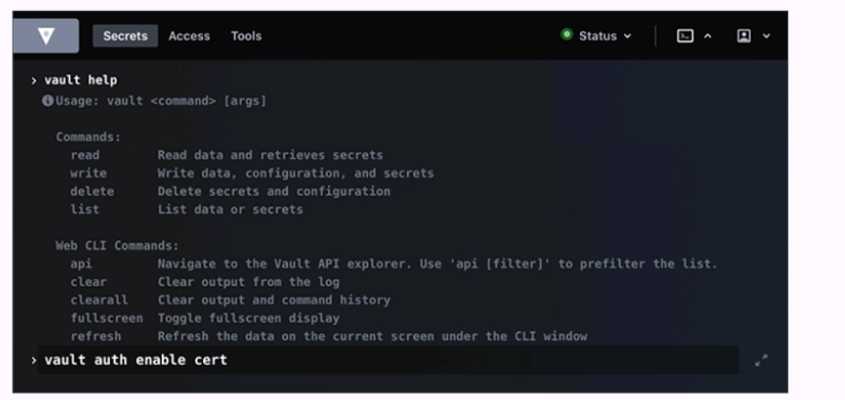
- A. True
- B. False
Answer:
B
Explanation:
Running the second command in the GUI CLI will fail. The second command is vault kv put
secret/creds passcode=my-long-passcode. This command attempts to write a secret named creds
with the value passcode=my-long-passcode to the secret path, which is the default path for the kv
secrets engine. However, the kv secrets engine is not enabled at the secret path, as shown by the
first command vault secrets list, which lists the enabled secrets engines and their paths. The only
enabled secrets engine is the transit secrets engine at the transit path. Therefore, the second
command will fail with an error message saying that no secrets engine is mounted at the path
secret/. To make the second command succeed, the kv secrets engine must be enabled at the secret
path or another path, using the vault secrets enable command. For example, vault secrets enable -
path=secret kv would enable the kv secrets engine at the secret path. Reference:
kv - Command |
Vault | HashiCorp Developer
,
vault secrets enable - Command | Vault | HashiCorp Developer
Question 2
Which statement describes the results of this command: $ vault secrets enable transit
- A. Enables the transit secrets engine at transit path
- B. Requires a root token to execute the command successfully
- C. Enables the transit secrets engine at secret path
- D. Fails due to missing -path parameter
- E. Fails because the transit secrets engine is enabled by default
Answer:
A
Explanation:
The command vault secrets enable transit enables the transit secrets engine at the transit path. The
transit secrets engine is a secrets engine that handles cryptographic functions on data in-transit, such
as encryption, decryption, signing, verification, hashing, and random bytes generation. The transit
secrets engine does not store the data sent to it, but only performs the requested operations and
returns the results. The transit secrets engine can also be viewed as “cryptography as a service” or
“encryption as a service”. The command vault secrets enable transit uses the default path of transit
for the secrets engine, but this can be changed by using the -path option. For example, vault secrets
enable -path=my-transit transit would enable the transit secrets engine at the my-transit
path. Reference:
Transit - Secrets Engines | Vault | HashiCorp Developer
,
vault secrets enable -
Command | Vault | HashiCorp Developer
Question 3
An organization would like to use a scheduler to track & revoke access granted to a job (by Vault) at
completion. What auth-associated Vault object should be tracked to enable this behavior?
- A. Token accessor
- B. Token ID
- C. Lease ID
- D. Authentication method
Answer:
C
Explanation:
A lease ID is a unique identifier that is assigned by Vault to every dynamic secret and service type
authentication token. A lease ID contains information such as the secret path, the secret version, the
secret type, etc. A lease ID can be used to track and revoke access granted to a job by Vault at
completion, as it allows the scheduler to perform the following operations:
Lookup the lease information by using the vault lease lookup command or the sys/leases/lookup API
endpoint. This will return the metadata of the lease, such as the expire time, the issue time, the
renewable status, and the TTL.
Renew the lease if needed by using the vault lease renew command or the sys/leases/renew API
endpoint. This will extend the validity of the secret or the token for a specified increment, or reset
the TTL to the original value if no increment is given.
Revoke the lease when the job is completed by using the vault lease revoke command or the
sys/leases/revoke API endpoint. This will invalidate the secret or the token immediately and prevent
any further renewals. For example, with the AWS secrets engine, the access keys will be deleted from
AWS the moment a lease is revoked.
A lease ID is different from a token ID or a token accessor. A token ID is the actual value of the token
that is used to authenticate to Vault and perform requests. A token ID should be treated as a secret
and protected from unauthorized access. A token accessor is a secondary identifier of the token that
is used for token management without revealing the token ID. A token accessor can be used to
lookup, renew, or revoke a token, but not to authenticate to Vault or access secrets. A token ID or a
token accessor can be used to revoke the token itself, but not the leases associated with the token.
To revoke the leases, a lease ID is required.
An authentication method is a way to verify the identity of a user or a machine and issue a token
with appropriate policies and metadata. An authentication method is not an object that can be
tracked or revoked, but a configuration that can be enabled, disabled, tuned, or customized by using
the vault auth commands or the sys/auth API endpoints.
Reference: (https://developer.hashicorp.com/vault/docs/commands/lease/lookup),
(https://developer.hashicorp.com/vault/docs/commands/lease/renew),
(https://developer.hashicorp.com/vault/docs/commands/lease/revoke),
(https://developer.hashicorp.com/vault/docs/concepts/tokens#token-accessors),
(https://developer.hashicorp.com/vault/docs/concepts/auth)
Question 4
Use this screenshot to answer the question below: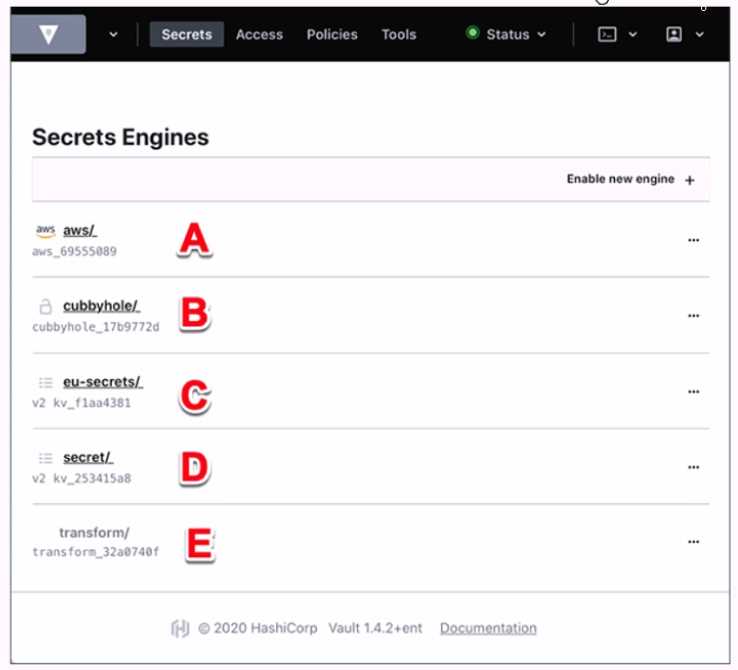
Where on this page would you click to view a secret located at secret/my-secret?
- A. A
- B. B
- C. C
- D. D
- E. E
Answer:
C
Explanation:
In the HashiCorp Vault UI, secrets are organized in a tree-like structure. To view a secret located at
secret/my-secret, you would click on the “secret/” folder in the tree, then click on the “my-secret”
file. In this screenshot, the “secret/” folder is located at option C. This folder contains the secrets that
are stored in the key/value secrets engine, which is the default secrets engine in Vault. The key/value
secrets engine allows you to store arbitrary secrets as key/value pairs. The key is the path of the
secret, and the value is the data of the secret. For example, the secret located at secret/my-secret
has a key of “my-secret” and a value of whatever data you stored there.
Reference:
[KV - Secrets Engines | Vault | HashiCorp Developer]
Question 5
Which of the following statements are true about Vault policies? Choose two correct answers.
- A. The default policy can not be modified
- B. You must use YAML to define policies
- C. Policies provide a declarative way to grant or forbid access to certain paths and operations in Vault
- D. Vault must be restarted in order for a policy change to take an effect
- E. Policies deny by default (empty policy grants no permission)
Answer:
CE
Explanation:
Vault policies are written in HCL or JSON format and are attached to tokens or roles by name. Policies
define the permissions and restrictions for accessing and performing operations on certain paths and
secrets in Vault.
Policies are deny by default, which means that an empty policy grants no permission
in the system, and any request that is not explicitly allowed by a policy is implicitly denied1
. Some of
the features and benefits of Vault policies are:
Policies are path-based, which means that they match the request path to a set of rules that specify
the allowed or denied capabilities, such as create, read, update, delete, list, sudo, etc2
.
Policies are additive, which means that if a token or a role has multiple policies attached, the
effective policy is the union of all the individual policies.
The most permissive capability is granted if
there is a conflict3
.
Policies can use glob patterns, such as * and +, to match multiple paths or segments with a single
rule.
For example, path “secret/*” matches any path starting with secret/, and path “secret/+/config”
matches any path with two segments after secret/ and ending with config4
.
Policies can use templating to interpolate certain values into the rules, such as identity information,
time, randomness, etc.
For example, path “secret/{{identity.entity.id}}/*” matches any path starting
with secret/ followed by the entity ID of the requester5
.
Policies can be managed by using the vault policy commands or the sys/policy API endpoints.
You can
write, read, list, and delete policies by using these interfaces6
.
The default policy is a built-in policy that is attached to all tokens by default and cannot be deleted.
However, the default policy can be modified by using the vault policy write command or the
sys/policy API endpoint.
The default policy provides common permissions for tokens, such as
renewing themselves, looking up their own information, creating and managing response-wrapping
tokens, etc7
.
You do not have to use YAML to define policies, as Vault supports both HCL and JSON formats.
HCL is
a human-friendly configuration language that is also JSON compatible, which means that JSON can
be used as a valid input for policies as well8
.
Vault does not need to be restarted in order for a policy change to take effect, as policies are stored
and evaluated in memory. Any change to a policy is immediately reflected in the system, and any
token or role that has that policy attached will be affected by the change.
Reference: 1(https://developer.hashicorp.com/vault/docs/concepts/policies), 2(https://developer.ha
shicorp.com/vault/docs/concepts/policies), 3(https://developer.hashicorp.com/vault/docs/concepts
/policies), 4(https://developer.hashicorp.com/vault/docs/concepts/policies), 5(https://developer.has
hicorp.com/vault/docs/concepts/policies), 6(https://developer.hashicorp.com/vault/docs/command
s/lease), 7(https://developer.hashicorp.com/vault/docs/concepts/policies), 8
(https://developer.hash
icorp.com/vault/docs/concepts/policies),
(https://developer.hashicorp.com/vault/docs/concepts/policies#policy-updates)
Question 6
Which Vault secret engine may be used to build your own internal certificate authority?
- A. Transit
- B. PKI
- C. PostgreSQL
- D. Generic
Answer:
B
Explanation:
The Vault secret engine that can be used to build your own internal certificate authority is the PKI
secret engine. The PKI secret engine generates dynamic X.509 certificates on-demand, without
requiring manual processes of generating private keys and CSRs, submitting to a CA, and waiting for
verification and signing. The PKI secret engine can act as a root CA or an intermediate CA, and can
issue certificates for various purposes, such as TLS, code signing, email encryption, etc. The PKI
secret engine can also manage the certificate lifecycle, such as rotation, revocation, renewal, and CRL
generation. The PKI secret engine can also integrate with external CAs, such as Venafi or Entrust, to
delegate the certificate issuance and management. Reference:
PKI - Secrets Engines | Vault |
HashiCorp Developer
,
Build Your Own Certificate Authority (CA) | Vault - HashiCorp Learn
Question 7
Which of the following describes the Vault's auth method component?
- A. It verifies a client against an internal or external system, and generates a token with the appropriate policies attached
- B. It verifies a client against an internal or external system, and generates a token with root policy
- C. It is responsible for durable storage of client tokens
- D. It dynamically generates a unique set of secrets with appropriate permissions attached
Answer:
A
Explanation:
The Vault’s auth method component is the component that performs authentication and assigns
identity and policies to a client. It verifies a client against an internal or external system, and
generates a token with the appropriate policies attached. The token can then be used to access the
secrets and resources that are authorized by the policies. Vault supports various auth methods, such
as userpass, ldap, aws, kubernetes, etc., that can integrate with different identity providers and
systems. The auth method component can also handle token renewal and revocation, as well as
identity grouping and aliasing. Reference:
Auth Methods | Vault | HashiCorp
Developer
,
Authentication - Concepts | Vault | HashiCorp Developer
Question 8
What is a benefit of response wrapping?
- A. Log every use of a secret
- B. Load balanc secret generation across a Vault cluster
- C. Provide error recovery to a secret so it is not corrupted in transit
- D. Ensure that only a single party can ever unwrap the token and see what's inside
Answer:
D
Explanation:
Response wrapping is a feature that allows Vault to take the response it would have sent to a client
and instead insert it into the cubbyhole of a single-use token, returning that token instead. The client
can then unwrap the token and retrieve the original response. Response wrapping has several
benefits, such as providing cover, malfeasance detection, and lifetime limitation for the secret data.
One of the benefits is to ensure that only a single party can ever unwrap the token and see what’s
inside, as the token can be used only once and cannot be unwrapped by anyone else, even the root
user or the creator of the token.
This provides a way to securely distribute secrets to the intended
recipients and detect any tampering or interception along the way5
.
The other options are not benefits of response wrapping:
Log every use of a secret: Response wrapping does not log every use of a secret, as the secret is not
directly exposed to the client or the network.
However, Vault does log the creation and deletion of
the response-wrapping token, and the client can use the audit device to log the unwrapping
operation6
.
Load balance secret generation across a Vault cluster: Response wrapping does not load balance
secret generation across a Vault cluster, as the secret is generated by the Vault server that receives
the request and the response-wrapping token is bound to that server.
However, Vault does support
high availability and replication modes that can distribute the load and improve the performance of
the cluster7
.
Provide error recovery to a secret so it is not corrupted in transit: Response wrapping does not
provide error recovery to a secret so it is not corrupted in transit, as the secret is encrypted and
stored in the cubbyhole of the token and cannot be modified or corrupted by anyone. However, if the
token is lost or expired, the secret cannot be recovered either, so the client should have a backup or
retry mechanism to handle such cases.
Reference: 5(https://developer.hashicorp.com/vault/docs/concepts/response-
wrapping), 6(https://developer.hashicorp.com/vault/docs/secrets), 7
(https://developer.hashicorp.co
m/vault/docs/secrets), (https://developer.hashicorp.com/vault/tutorials/secrets-
management/cubbyhole-response-wrapping)
Question 9
Which of the following statements describe the secrets engine in Vault? Choose three correct
answers.
- A. Some secrets engines simply store and read data
- B. Once enabled, you cannot disable the secrets engine
- C. You can build your own custom secrets engine
- D. Each secrets engine is isolated to its path
- E. A secrets engine cannot be enabled at multiple paths
Answer:
ACD
Explanation:
Secrets engines are components that store, generate, or encrypt data in Vault. They are enabled at a
specific path in Vault and have their own API and configuration. Some of the statements that
describe the secrets engines in Vault are:
Some secrets engines simply store and read data, such as the key/value secrets engine, which acts
like an encrypted Redis or Memcached.
Other secrets engines perform more complex operations,
such as generating dynamic credentials, encrypting data, issuing certificates, etc1
.
You can build your own custom secrets engine by using the plugin system, which allows you to write
and run your own secrets engine as a separate process that communicates with Vault over gRPC.
You
can also use the SDK to create your own secrets engine in Go and compile it into Vault2
.
Each secrets engine is isolated to its path, which means that the secrets engine cannot access or
interact with other secrets engines or data outside its path. The path where the secrets engine is
enabled can be customized and can have multiple segments.
For example, you can enable the AWS
secrets engine at aws/ or aws/prod/ or aws/dev/3
.
The statements that are not true about the secrets engines in Vault are:
You can disable an existing secrets engine by using the vault secrets disable command or the
sys/mounts API endpoint.
When a secrets engine is disabled, all of its secrets are revoked and all of
its data is deleted from the storage backend4
.
A secrets engine can be enabled at multiple paths, with a few exceptions, such as the system and
identity secrets engines. Each secrets engine enabled at a different path is independent and isolated
from others.
For example, you can enable the KV secrets engine at kv/ and secret/ and they will not
share any data3
.
Reference: 1(https://developer.hashicorp.com/vault/docs/secrets), 2(https://developer.hashicorp.co
m/vault/docs/secrets), 3(https://developer.hashicorp.com/vault/docs/secrets), 4
(https://developer.
hashicorp.com/vault/docs/secrets)
Question 10
The Vault encryption key is stored in Vault's backend storage.
- A. True
- B. False
Answer:
B
Explanation:
The statement is false. The Vault encryption key is not stored in Vault’s backend storage, but rather in
Vault’s memory. The Vault encryption key is the key that is used to encrypt and decrypt the data that
is stored in Vault’s backend storage, such as secrets, tokens, policies, etc. The Vault encryption key is
derived from the master key, which is generated when Vault is initialized. The master key is split into
unseal keys using Shamir’s secret sharing algorithm, and the unseal keys are distributed to trusted
operators. To start Vault, a quorum of unseal keys is required to reconstruct the master key and
derive the encryption key. The encryption key is then kept in memory and used to protect the data in
Vault’s backend storage. The encryption key is never written to disk or exposed via the
API. Reference:
Seal/Unseal | Vault | HashiCorp Developer
,
Key Rotation | Vault | HashiCorp
Developer
Question 11
A web application uses Vault's transit secrets engine to encrypt data in-transit. If an attacker
intercepts the data in transit which of the following statements are true? Choose two correct
answers.
- A. You can rotate the encryption key so that the attacker won’t be able to decrypt the data
- B. The keys can be rotated and min_decryption_version moved forward to ensure this data cannot be decrypted
- C. The Vault administrator would need to seal the Vault server immediately
- D. Even if the attacker was able to access the raw data, they would only have encrypted bits (TLS in transit)
Answer:
BD
Explanation:
A web application that uses Vault’s transit secrets engine to encrypt data in-transit can benefit from
the following security features:
Even if the attacker was able to access the raw data, they would only have encrypted bits (TLS in
transit). This means that the attacker would need to obtain the encryption key from Vault in order to
decrypt the data, which is protected by Vault’s authentication and authorization mechanisms. The
transit secrets engine does not store the data sent to it, so the attacker cannot access the data from
Vault either.
The keys can be rotated and min_decryption_version moved forward to ensure this data cannot be
decrypted. This means that the web application can periodically change the encryption key used to
encrypt the data, and set a minimum decryption version for the key, which prevents older versions of
the key from being used to decrypt the data. This way, even if the attacker somehow obtained an old
version of the key, they would not be able to decrypt the data that was encrypted with a newer
version of the key.
The other statements are not true, because:
You cannot rotate the encryption key so that the attacker won’t be able to decrypt the data. Rotating
the key alone does not prevent the attacker from decrypting the data, as they may still have access to
the old version of the key that was used to encrypt the data. You need to also move the
min_decryption_version forward to invalidate the old version of the key.
The Vault administrator would not need to seal the Vault server immediately. Sealing the Vault server
would make it inaccessible to both the attacker and the legitimate users, and would require
unsealing it with the unseal keys or the recovery keys. Sealing the Vault server is a last resort option
in case of a severe compromise or emergency, and is not necessary in this scenario, as the attacker
does not have access to the encryption key or the data in Vault. Reference:
Transit - Secrets Engines |
Vault | HashiCorp Developer
,
Encryption as a service: transit secrets engine | Vault | HashiCorp
Developer
Question 12
An authentication method should be selected for a use case based on:
- A. The auth method that best establishes the identity of the client
- B. The cloud provider for which the client is located on
- C. The strongest available cryptographic hash for the use case
- D. Compatibility with the secret engine which is to be used
Answer:
A
Explanation:
An authentication method should be selected for a use case based on the auth method that best
establishes the identity of the client. The identity of the client is the basis for assigning a set of
policies and permissions to the client in Vault. Different auth methods have different ways of
verifying the identity of the client, such as using passwords, tokens, certificates, cloud credentials,
etc. Depending on the use case, some auth methods may be more suitable or convenient than
others. For example, for human users, the userpass or ldap auth methods may be easy to use, while
for machines or applications, the approle or aws auth methods may be more secure and scalable.
The choice of the auth method should also consider the trade-offs between security, performance,
and usability. Reference:
Auth Methods | Vault | HashiCorp Developer
,
Authentication - Concepts |
Vault | HashiCorp Developer
Question 13
A user issues the following cURL command to encrypt data using the transit engine and the Vault AP:
Which payload.json file has the correct contents?
A.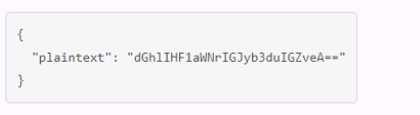
B.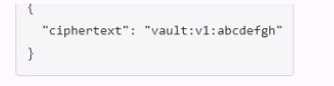
C.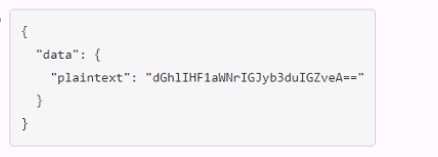
D.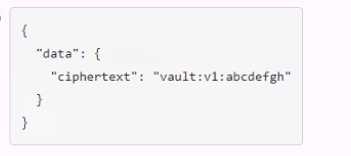
Answer:
C
Explanation:
The payload.json file that has the correct contents is C. This file contains a JSON object with a single
key, “plaintext”, and a value that is the base64-encoded string of the data to be encrypted.
This is the
format that the Vault API expects for the transit encrypt endpoint1
. The other files are not correct
because they either have the wrong key name, the wrong value format, or the wrong JSON syntax.
Reference:
Encrypt Data - Transit Secrets Engine | Vault | HashiCorp Developer
Question 14
When an auth method is disabled all users authenticated via that method lose access.
- A. True
- B. False
Answer:
A
Explanation:
The statement is true. When an auth method is disabled, all users authenticated via that method
lose access. This is because the tokens issued by the auth method are automatically revoked when
the auth method is disabled. This prevents the users from performing any operation in Vault using
the revoked tokens. To regain access, the users have to authenticate again using a different auth
method that is enabled and has the appropriate policies attached. Reference:
Auth Methods | Vault |
HashiCorp Developer
,
auth disable - Command | Vault | HashiCorp Developer
Question 15
A developer mistakenly committed code that contained AWS S3 credentials into a public repository.
You have been tasked with revoking the AWS S3 credential that was in the code. This credential was
created using Vault's AWS secrets engine and the developer received the following output when
requesting a credential from Vault.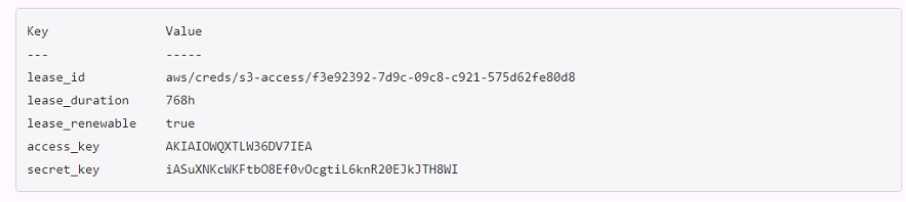
Which Vault command will revoke the lease and remove the credential from AWS?
- A. vault lease revoke aws/creds/s3-access/f3e92392-7d9c-99c8-c921-57Sd62fe89d8
- B. vault lease revoke AKIAI0WQXTLW36DV7IEA
- C. vault lease revoke f3e92392-7d9c-O9c8-c921-575d62fe80d8
- D. vault lease revoke access_key-AKIAI0WQXTLW36DV7IEA
Answer:
A
Explanation:
The correct answer is A because the lease ID is the unique identifier for the credential. The lease ID is
used to revoke the credential using the vault lease revoke command. This command will invalidate
the credential immediately and prevent any further renewals.
It will also delete the access key and
secret key from AWS, rendering them useless1
. The access key and secret key are not sufficient to
revoke the credential, as they are not recognized by Vault. The lease ID is composed of the path of
the secrets engine, the role name, and a random UUID. In this case, the path is aws/creds, the role
name is s3-access, and the UUID is f3e92392-7d9c-99c8-c921-57Sd62fe89d8.
Reference:
lease revoke - Command | Vault | HashiCorp Developer