CyberArk PAM-DEF Exam Questions
Questions for the PAM-DEF were updated on : Feb 18 ,2026
Page 1 out of 16. Viewing questions 1-15 out of 239
Question 1
Which change could CyberArk make to the REST API that could cause existing scripts to fail?
- A. adding optional parameters in the request
- B. adding additional REST methods
- C. removing parameters
- D. returning additional values in the response
Answer:
C
Explanation:
Changes to the REST API that could cause existing scripts to fail include removing parameters. When
parameters are removed from an API, scripts that rely on those parameters being present may no
longer function correctly because they expect certain data to be available.
This can lead to errors or
unexpected behavior in the scripts that use the API1
.
Reference:
CyberArk Docs: REST APIs1
Question 2
You created a new platform by duplicating the out-of-box Linux through the SSH platform.
Without any change, which Text Recorder Type(s) will the new platform support? (Choose two.)
- A. SSH Text Recorder
- B. Universal Keystrokes Text Recorder
- C. Events Text Recorder
- D. SQL Text Recorder
- E. Telnet Commands Text Recorder
Answer:
A, B
Explanation:
When a new platform is created by duplicating the out-of-the-box Linux through the SSH platform, it
will support the SSH Text Recorder and the Universal Keystrokes Text Recorder by default.
The SSH
Text Recorder is designed to record all the keystrokes that are typed during privileged sessions on
SSH connections1
.
The Universal Keystrokes Text Recorder can record all the keystrokes that are
typed during privileged sessions on all supported connections1
.
These text recorders are
automatically enabled at the Master Policy level and can be customized at the platform level1
.
Reference:
CyberArk Docs: Recordings and Audits
Question 3
Where can PTA be configured to send alerts? (Choose two.)
- A. SIEM
- B. Email
- C. Google Analytics
- D. EVD
- E. PAReplicate
Answer:
A, B
Explanation:
CyberArk’s Privileged Threat Analytics (PTA) can be configured to send alerts to a Security
Information and Event Management (SIEM) system and via Email.
SIEM systems are used for real-
time analysis of security alerts generated by applications and network hardware, while email alerts
can be sent to individual or group email addresses for immediate notification1
.
Reference:
CyberArk Docs: Send PTA Alerts to Email1
Question 4
Which command generates a full backup of the Vault?
- A. PAReplicate.exe Vault.ini /LogonFromFile user.ini /FullBackup
- B. PAPreBackup.exe C:\PrivateArk\Server\Conf\Vault.ini Backup/Asdf1234 /full
- C. PARestore.exe PADR ini /LogonFromFile vault.ini /FullBackup
- D. CAVaultManager.exe RecoverBackupFiles /BackupPoolName BkpSvr1
Answer:
A
Explanation:
The command PAReplicate.exe with the /FullBackup option is used to generate a full backup of the
CyberArk Vault. This command requires the Vault configuration file (typically Vault.ini) and a
credential file (specified with /LogonFromFile) that contains the user’s encrypted logon
credentials.
The /FullBackup option indicates that a full backup of the Vault is to be performed, as
opposed to an incremental backup1
.
Reference:
CyberArk Docs: Install the Vault Backup Utility2
CyberArk Knowledge Article: PAReplicate Configuration and Usage
Question 5
The Active Directory User configured for Windows Discovery needs which permission(s) or
membership?
- A. Member of Domain Admin Group
- B. Member of LDAP Admin Group
- C. Read and Write Permissions
- D. Read Only Permissions
Answer:
D
Explanation:
The Active Directory User configured for Windows Discovery requires Read Only Permissions. This
level of permission allows the user to query and discover objects within the Active Directory without
the ability to modify any objects or settings.
Having read-only access is sufficient for discovery
purposes, as it enables the user to retrieve necessary information without posing a risk of
unintended changes to the directory1
.
Reference:
Microsoft Learn: Configure discovery methods1
Question 6
How much disk space do you need on a server to run a full replication with PAReplicate?
- A. 500 GB
- B. 1 TB
- C. same as disk size on Satellite Vault
- D. at least the same disk size as the Primary Vault
Answer:
D
Explanation:
When running a full replication with PAReplicate, it is essential to have at least the same amount of
disk space on the server as the disk size of the Primary Vault. This ensures that there is sufficient
space to replicate all the data from the Primary Vault without any issues.
The disk space should be
equal to or larger than the total size of the data being replicated to accommodate the full backup1
.
Reference:
CyberArk Docs: Install the Vault Backup Utility
Question 7
You are configuring a Vault HA cluster.
Which file should you check to confirm the correct drives have been assigned for the location of the
Quorum and Safes data disks?
- A. ClusterVault.ini
- B. my.ini
- C. vault.ini
- D. DBParm.ini
Answer:
A
Explanation:
When configuring a Vault High Availability (HA) cluster, the ClusterVault.ini file is the one you should
check to confirm the correct drives have been assigned for the location of the Quorum and Safes data
disks.
This file contains the configuration settings for the cluster, including the drive assignments for
the Quorum disk and the Vault data1
.
Reference:
CyberArk Community: HA Cluster Vault - How do I configure multiple Storage Drives?
Question 8
DRAG DROP
Match each automatic remediation to the correct PTA security event.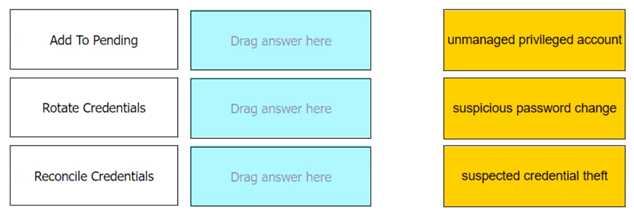
Answer:
None
Explanation:
Add To Pending: Unmanaged privileged account
Rotate Credentials: Suspected credential theft
Reconcile Credentials: Suspicious password change
Comprehensive In CyberArk’s Privileged Threat Analytics (PTA), automatic remediations are actions
that can be configured to respond to specific security events. For the event of an unmanaged
privileged account, the remediation “Add To Pending” is used to add the account to the pending
accounts queue. When there is a suspected credential theft, “Rotate Credentials” is the remediation
that initiates a password change.
Lastly, for a suspicious password change event, “Reconcile
Credentials” is the remediation that ensures the credentials are correct and valid1
.
Reference:
CyberArk Docs: Configure security events
Question 9
You have been asked to turn off the time access restrictions for a safe.
Where is this setting found?
- A. PrivateArk Client
- B. RestAPI
- C. PVWA
- D. Vault
Answer:
C
Explanation:
The setting to turn off the time access restrictions for a safe is found in the Password Vault Web
Access (PVWA). The PVWA provides a web interface through which users can manage safes,
including setting and modifying various safe properties such as access restrictions.
By accessing the
safe settings in the PVWA, you can adjust the time access restrictions as required1
.
Reference:
CyberArk Docs: Safe Settings1
Question 10
DRAG DROP
You have been asked to delegate the rights to unlock users to Tier 1 support. The Tier 1 support team
already has an LDAP group for its members.
Arrange the steps to do this in the correct sequence.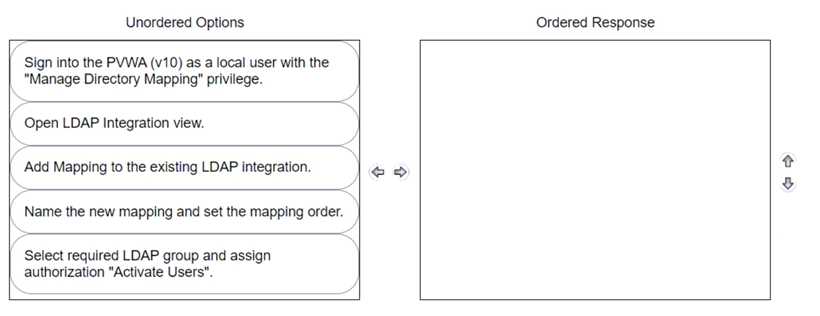
Answer:
None
Explanation:
The correct sequence to delegate the rights to unlock users to Tier 1 support with an existing LDAP
group is as follows:
Sign into the PWA (V10) as a local user with the “Manage Directory Mapping” privilege.
Open LDAP Integration view.
Add Mapping to the existing LDAP integration.
Name the new mapping and set the mapping order.
Select required LDAP group and assign authorization “Activate Users”.
Comprehensive To delegate the rights to unlock users, you must first access the Privileged Web
Access (PWA) with the appropriate privileges to manage directory mappings. Then, navigate to the
LDAP Integration view to add a new mapping to the existing LDAP integration. This mapping should
be named and ordered correctly.
Finally, select the LDAP group that represents Tier 1 support and
assign the specific authorization needed to unlock users, which is “Activate Users” in this context12
.
Reference:
CyberArk Docs: LDAP Integration in V102
CyberArk Knowledge Article: How to delegate permissions to unlock Active Directory accounts1
Question 11
Which master policy settings ensure non-repudiation?
- A. Require password verification every X days and enforce one-time password access.
- B. Enforce check-in/check-out exclusive access and enforce one-time password access.
- C. Allow EPV transparent connections ('Click to connect') and enforce check-in/check-out exclusive access.
- D. Allow EPV transparent connections ('Click to connect') and enforce one-time password access.
Answer:
B
Explanation:
Non-repudiation in the context of CyberArk Master Policy settings refers to the assurance that a user
cannot deny the validity of their actions. The settings that ensure non-repudiation are those that
enforce accountability and traceability of actions. Enforcing check-in/check-out exclusive
access
ensures that only one user can access an account at a time, and their actions can be traced
back to themEnforcing one-time password access means that passwords are used only once and then
changed, which prevents the reuse of credentials and ties actions to specific instances of access12
.
Reference:
CyberArk Docs: Master Policy Rules2
CyberArk Docs: The Master Policy1
Question 12
You have been given the requirement that certain accounts cannot have their passwords updated
during business hours.
How can you set up a configuration to meet this requirement?
- A. Change settings on the CPM configuration safe so that access is permitted after business hours only.
- B. Update the password change parameters of the platform to match the permitted time frame.
- C. Disable automatic CPM management for all accounts that are assigned to this platform.
- D. Add an exception to the Master Policy to allow the action for this platform during the permitted time.
Answer:
B
Explanation:
To ensure that certain accounts do not have their passwords updated during business hours, you can
configure the password change parameters within the platform settings to specify the permitted
time frame for updates.
This involves setting the FromHour and ToHour parameters to define a
window outside of business hours during which the CyberArk Central Policy Manager (CPM) will
perform automatic password changes1
. By doing so, you can control when password changes occur
and ensure compliance with the specified requirement.
Reference:
CyberArk Community: Discussion on configuring automatic password change parameters
Question 13
When the CPM connects to a database, which interface is most commonly used?
- A. Kerberos
- B. ODBC
- C. VBScript
- D. Sybase
Answer:
B
Explanation:
The Central Policy Manager (CPM) in CyberArk most commonly uses the ODBC (Open Database
Connectivity) interface when connecting to a database. ODBC is a standard API for accessing
database management systems (DBMS).
The CPM supports remote password management on all
databases that support ODBC connections, and the machine running the CPM must support ODBC,
version 2.7 and higher1
. Reference:
CyberArk Docs: Databases that support ODBC connections1
Question 14
A recently-hired colleague onboarded five new Local Accounts that are used for five standalone
Windows Servers. After attempting to connect to the servers from PVWA, the colleague noticed that
the "Connect" button was greyed out for all five new accounts.
What can you do to help your colleague resolve this issue? (Choose two.)
- A. Verify that the address field is populated with an IP or FQDN of each server.
- B. Verify that the correct PSM connection component appears within account platform settings.
- C. Verify that the address field is blank and that the correct PSM connection component appears within account platform settings.
- D. Notify the Windows Team that created the new accounts that the CyberArk PAM solution is not designed to manage local accounts on Windows Servers.
- E. Verify that the "Disable automatic management for this account" setting for each account is not enabled.
Answer:
A, B, E
Explanation:
Verify Server Address: Ensure that the address field is populated with the correct IP or FQDN for each
server (Option A).
Check PSM Settings: Confirm that the correct PSM connection component is specified within
the account platform settings (Option B).
Automatic Management: Check if the “Disable automatic management for this account” setting
is not enabled (Option E).
These steps should help in troubleshooting the connection issue in the CyberArk Privileged Access
Management (PAM) solution.
Question 15
Which statement about the Master Policy best describes the differences between one-time password
and exclusive access functionality?
- A. Exclusive access means that only a specific group of users may use the account. After an account on a one-time password platform is used, the account is deleted from the safe automatically.
- B. Exclusive access locks the account indefinitely. One-time password can be used replace invalid account passwords.
- C. Exclusive access is enabled by default in the Master Policy. One-time password should only be enabled for emergencies.
- D. Exclusive access allows only one person to check-out an account at a time. One-time password schedules an account for a password change after the MinValidityPeriod period expires.
Answer:
D
Explanation:
The Master Policy in CyberArk defines the behavior of one-time passwords and exclusive
accessExclusive access ensures that only one user can check out an account at any given time,
effectively locking the account during its use to prevent simultaneous access1
. On the other
hand, one-time password functionality is designed to change the account’s password after it is used,
based on a timer set by the MinValidityPeriod parameter in the policy file.
This means that once the
password is checked out and the timer expires, the Central Policy Manager (CPM) will change the
password2
. These settings are often used together to maintain accountability and security for the
usage of shared privileged accounts. Reference:
CyberArk Docs: One-time passwords and exclusive accounts1
CyberArk Knowledge Article: CPM: What is the difference between “One Time” and “Exclusive”
passwords?2