CyberArk CPC-SEN Exam Questions
Questions for the CPC-SEN were updated on : Feb 18 ,2026
Page 1 out of 4. Viewing questions 1-15 out of 50
Question 1
You have been tasked with deploying a Privilege Cloud PSM for SSH connector When the initial
installation has successfully completed, you create and permission several maintenance users to be
used for administering the connector.
Which configuration file must be updated to define these maintenance users?
- A. sshd.config
- B. basic_psmpserver.conf
- C. sshd_config
- D. psmpparms
Answer:
C
Explanation:
The sshd_config file is the correct configuration file that must be updated to define maintenance
users for administering the Privilege Cloud PSM for SSH connector. This file contains configurations
for the SSH daemon, including user permissions and group settings. When adding maintenance
users, their user accounts are created on the PSM server, and then they are added to
the AllowGroups parameter within the sshd_config file to grant them the necessary permissions.
Reference:
CyberArk documentation on the PSM for SSH environment1
.
CyberArk Sentry guide on how to add maintenance users for SSH PSM
When deploying a Privilege Cloud PSM for SSH connector, the configuration file that must be
updated to define maintenance users is "sshd_config". This file is used to configure options specific
to the SSH daemon, which includes user permissions, authentication methods, and other security-
related settings. To add and configure maintenance users for the PSM for SSH, you will need to
modify this file to specify allowed users and their respective privileges.
Reference: The configuration of SSH-related components typically involves the "sshd_config" file, as
outlined in SSH and PSM for SSH setup guides. This is a standard practice in systems that utilize SSH
for secure communications and management.
Question 2
What creating a new safe, what is the default number of password versions stored if using 'Save
latest account versions' within version management settings?
- A. 5
- B. 10
- C. 30
- D. 90
Answer:
B
Explanation:
When creating a new safe and configuring the 'Save latest account versions' within version
management settings, the default number of password versions stored is 10. This setting allows the
safe to maintain up to 10 past versions of each password managed within it. This capability is
essential for ensuring that previous password states can be accessed if needed, such as for audit
purposes or rollback scenarios in the event of an update error or compromise.
Question 3
When installing the PSM and CPM components on the same Privilege Cloud Connector, what should
you consider when hardening?
- A. PSM settings override the CPM settings when referring to the same parameter.
- B. CPM settings override the PSM settings when referring to the same parameter
- C. They can only be installed on the same Privilege Cloud Connector when installed 'in Domain'.
- D. They can only be installed on the same Privilege Cloud Connector when installed 'out of Domain'.
Answer:
A
Explanation:
When installing the PSM and CPM components on the same Privilege Cloud Connector and
considering the hardening process, it's important to note that PSM settings override the CPM
settings when referring to the same parameter. This hierarchy is crucial in ensuring that the more
stringent security settings required by PSM, which typically handles direct interaction with end-user
sessions, take precedence over CPM settings. This setup helps maintain robust security practices by
applying the most restrictive configuration where conflicts occur.
Question 4
How should you configure PSM for SSH to support load balancing?
- A. by using a network load balancer
- B. in PVWA > Options > PSM for SSH Proxy > Servers
- C. in PVWA > Options > PSM for SSH Proxy > Servers > VIP
- D. by editing sshd.config on the all the PSM for SSH servers
Answer:
A
Explanation:
To support load balancing for PSM for SSH, the configuration should be done by using a network load
balancer. This method involves placing a network load balancer in front of multiple PSM for SSH
servers to distribute incoming SSH traffic evenly among them. This setup enhances the availability
and scalability of PSM for SSH by ensuring that no single server becomes a bottleneck, thereby
improving performance and reliability during high usage scenarios.
Question 5
According to best practice, when considering the location of PSM Connector servers in Privilege
Cloud environments, where should the PSM be placed?
- A. near the CPM servers
- B. near the target devices
- C. near the Vault (closer to the external internet connection)
- D. near the Users
Answer:
B
Explanation:
According to best practice, when considering the location of PSM Connector servers in Privilege
Cloud environments, the PSM should be placed near the target devices. This placement minimizes
latency and maximizes performance by reducing the distance that data has to travel between the
PSM servers and the devices they are managing. This is particularly important for maintaining high
efficiency and response times during remote session management and operations, which are critical
for the overall effectiveness of the Privilege Cloud environment.
Question 6
'What is a default authentication profile to access CyberArk Identity?
- A. Default New User Login Profile
- B. Default New Device Login Profile
- C. Default New Authenticator Profile
- D. Default New Password Profile
Answer:
B
Explanation:
The default authentication profile to access CyberArk Identity is typically the Default New Device
Login Profile. This profile is used to manage the authentication settings and security measures for
devices accessing CyberArk services for the first time. It includes configurations such as
authentication methods, security checks, and compliance requirements, ensuring that new devices
meet the organization’s security standards before gaining access.
Question 7
You are creating a PSM Load Balanced Virtual Server Configuration.
What are the default service ports / protocols used for RDS and the PSM Health Check service?
- A. RDP/389 HTTP/443
- B. RDP/3389 HTTPS/443 C UDP/53 HTTPS/389
- D. RDP/636 HTTPS/443
Answer:
B
Explanation:
In a PSM Load Balanced Virtual Server Configuration, the default service ports/protocols used are
RDP/3389 and HTTPS/443. RDP (Remote Desktop Protocol) typically uses port 3389 for remote
desktop services, which is essential for PSM functionalities involving remote sessions. HTTPS, which
utilizes port 443, is used for the PSM Health Check service to ensure secure and encrypted
communication during the monitoring and health verification processes of the PSM services.
Question 8
DRAG DROP
You want to change the default PSM recordings folder path on the Privilege Cloud Connector Arrange
the steps to accomplish this in the correct sequence.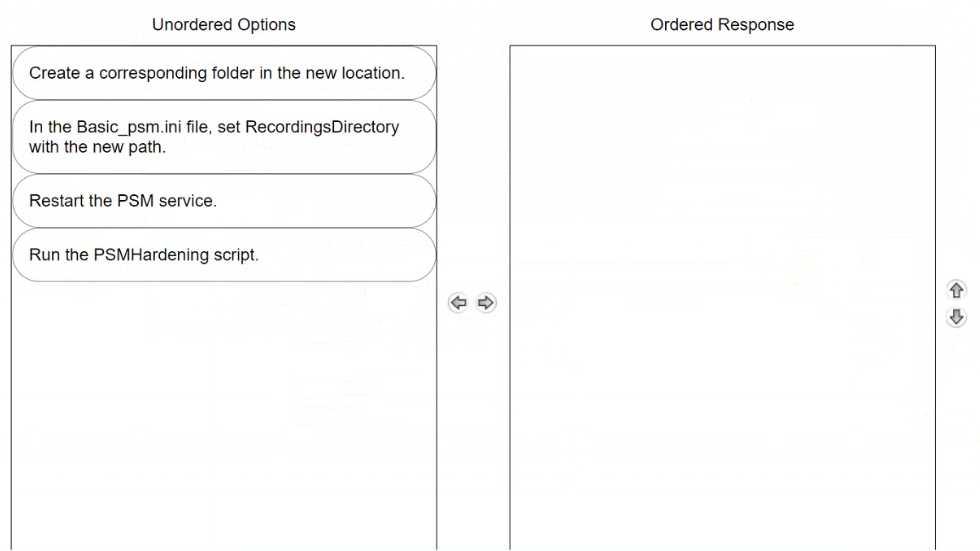
Answer:
None
Explanation: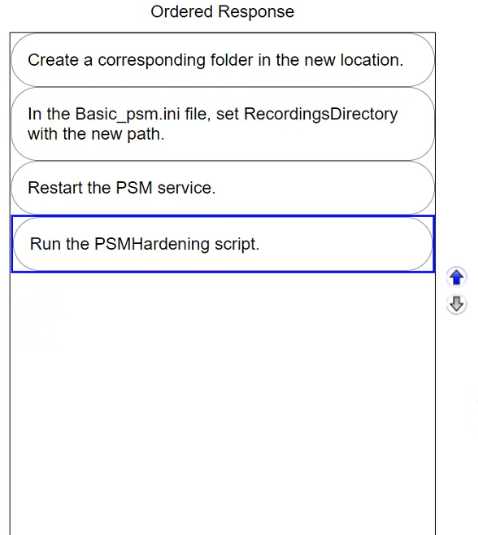
To correctly change the default PSM recordings folder path on the Privilege Cloud Connector, the
sequence of steps should be:
Create a corresponding folder in the new location.
Before making changes to configuration files, ensure the new directory for PSM recordings is created.
This is where all session recordings will be stored moving forward.
In the Basic_psm.ini file, set RecordingsDirectory with the new path.
Update the Basic_psm.ini file to reflect the new path for the recordings. This step is crucial as it
directs the PSM to start using the newly created directory for all future session recordings.
Restart the PSM service.
After updating the path in the configuration file, restart the PSM service to apply the changes. This
ensures that all new sessions are recorded in the new specified location.
Run the PSMHardening script.
Once the service is restarted and the new settings are in place, run the PSMHardening script. This
script ensures that all security measures are re-applied to the new recordings directory, maintaining
the security integrity of the session recordings.
Following these steps in the given order will successfully change the recording directory for PSM
sessions on the Privilege Cloud Connector, ensuring a smooth transition to the new storage location
with all necessary security measures intact.
Question 9
Following the installation of the PSM for SSH server, which additional tasks should be performed?
(Choose 2.)
- A. Delete the user.cred file used during installation.
- B. Delete the vault.ini you used during installation.
- C. Delete the psmpparms file you used during installation.
- D. Package all installation log files for upload to CyberArk.
Answer:
A, C
Explanation:
Following the installation of the PSM for SSH server, certain security and cleanup tasks are crucial to
secure the environment and eliminate potential vulnerabilities:
Delete the user.cred file used during installation (A): The user.cred file contains sensitive credential
information used during the installation process. Deleting this file post-installation ensures that this
sensitive data is not left accessible on the system, mitigating the risk of unauthorized access.
Delete the psmpparms file you used during installation (C): Similar to the user.cred file, the
psmpparms file often contains parameters that might include sensitive configuration details.
Removing this file after the installation process is completed helps in securing the server by
removing potential leakage points of sensitive information.
These actions are part of best practices to secure the installation environment and reduce the risk of
sensitive information exposure.
Question 10
What is the recommended method to enable load balancing and failover of the CyberArk Identity
Connector?
- A. Setup IIS based Application Request Routing on two or more CyberArk Identity Connector servers.
- B. Set up a network load balancer between two or more CyberArk Identity Connector servers.
- C. Set up two or more CyberArk Identity Connector servers only.
- D. Set up a Microsoft Failover Cluster on two or more CyberArk Identity Connector servers.
Answer:
B
Explanation:
The recommended method to enable load balancing and failover of the CyberArk Identity Connector
is to set up a network load balancer between two or more CyberArk Identity Connector servers. This
setup allows for the distribution of requests across multiple servers, enhancing the availability and
reliability of the service. Network load balancers efficiently manage traffic to ensure that no single
connector server becomes a bottleneck, thereby improving overall performance and fault tolerance.
Question 11
DRAG DROP
Arrange the steps to failover to the passive CPM in the correct sequence.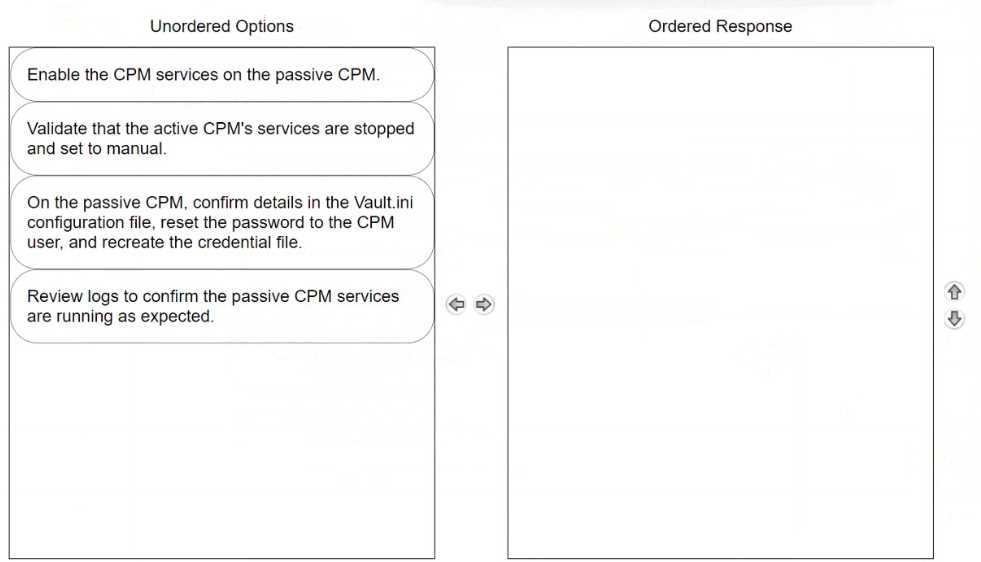
Answer:
None
Explanation:
To properly arrange the steps for failing over to a passive Central Policy Manager (CPM) in CyberArk,
the sequence should be as follows:
Validate that the active CPM's services are stopped and set to manual.
Before enabling the passive CPM, ensure that the services on the active CPM are stopped. This
prevents any conflicts or data corruption by making sure that only one CPM is active at a time.
Setting the services to manual ensures they do not restart automatically, which is crucial during a
failover scenario.
On the passive CPM, confirm details in the Vault.ini configuration file, reset the password to the CPM
user, and recreate the credential file.
This step involves making sure the passive CPM has the correct configuration to seamlessly take over
operations. Adjustments in the Vault.ini file may be necessary to ensure it is pointing to the correct
Vault and network settings. Resetting the password and recreating the credential file are critical to
secure the login and authentication process for the newly active CPM.
Enable the CPM services on the passive CPM.
Once the passive CPM is correctly configured and ready, enable its services to begin handling the
tasks and responsibilities of the primary CPM. This action effectively switches the role from passive
to active, enabling the passive CPM to function as the new operational manager.
Review logs to confirm the passive CPM services are running as expected.
Finally, review the system and application logs to confirm that the now-active CPM is operating
correctly and that all services have started without errors. This step is vital for verifying that the
failover process was successful and that the system is stable.
Following this ordered sequence ensures a smooth transition of roles from the active CPM to the
passive CPM, minimizing downtime and potential disruptions in the privileged access management
operations.
Question 12
Which authentication methods does PSM for SSH support? (Choose 2.)
- A. OIDC
- B. MFA Caching
- C. SAML
- D. RADIUS
- E. Client Authentication Certificate
Answer:
D, E
Explanation:
PSM for SSH supports various authentication methods, specifically focusing on secure and verified
access mechanisms. The supported methods include:
RADIUS (D): Remote Authentication Dial-In User Service (RADIUS) is a networking protocol that
provides centralized Authentication, Authorization, and Accounting management for users who
connect and use a network service. PSM for SSH utilizes RADIUS to authenticate SSH sessions, which
adds an additional layer of security by centralizing authentication requests to a RADIUS server.
Client Authentication Certificate (E): This method uses certificates for authentication, where a client
presents a certificate that the server verifies against known trusted certificates. This type of
authentication is highly secure as it ensures that both parties involved in the communication are
precisely who they claim to be, making it suitable for environments that require stringent security
measures.
These methods provide robust security options for SSH sessions managed through CyberArk's PSM,
ensuring that only authorized users can access critical systems.
Question 13
What must be done before configuring directory mappings in the CyberArk Privilege Cloud Standard
Portal for LDAP integration?
- A. Retrieve the LDAPS certificate and deliver it to CyberArk.
- B. Create a new domain in the Privilege Cloud Portal.
- C. Make sure HTTPS (443/tcp) is reachable over the Secure Tunnel.
- D. Ensure the user connecting to the domain has administrative privileges.
Answer:
C
Explanation:
Before configuring directory mappings in the CyberArk Privilege Cloud Standard Portal for LDAP
integration, it is crucial to make sure HTTPS (443/tcp) is reachable over the Secure Tunnel. This setup
ensures that the secure communication channel between the CyberArk Privilege Cloud and the LDAP
server is operational. Secure Tunnel facilitates the encrypted and safe transmission of data, including
LDAP queries and responses, essential for successful integration and ongoing operations.
Question 14
A support team has asked you to provide the previous password for an account that had its password
recently changed by the CPM. In which tab within the account's overview page can you retrieve this
information?
- A. Overview
- B. Activities
- C. Details
- D. Versions
Answer:
D
Explanation:
To retrieve the previous password for an account that had its password changed by the CPM, you
should look under the Versions tab within the account's overview page. This tab maintains a history
of password changes, including previous passwords, along with other historical data points that
allow for tracking changes over time. This feature is critical for auditing and rollback purposes in
environments where knowing past credentials is necessary for troubleshooting or compliance.
Question 15
What are dependencies to update or change the CPM credential? (Choose 2.)
- A. APIKeyManager.exe
- B. CreateCredFile.exe
- C. CPM/nDomain_Hardening.ps1
- D. CyberArk.TPC.exe
- E. Data Execution Prevention
Answer:
B, D
Explanation:
To update or change the Central Policy Manager (CPM) credentials, dependencies include:
CreateCredFile.exe (B): This utility is used to create or modify the encrypted file that stores the CPM's
credentials. It is essential for securely handling the credential updates.
CyberArk.TPC.exe (D): This executable is part of the CyberArk suite that manages trusted platform
module operations, which can include tasks related to credential security and management,
particularly when hardware security modules are involved.