cisco 500-220 Exam Questions
Questions for the 500-220 were updated on : Mar 23 ,2026
Page 1 out of 5. Viewing questions 1-15 out of 72
Question 1
A Cisco Meraki MX security appliance is trying to route a packet to the destination IP address of
172.18.24.12. Which routes contained in its routing table does it select?
- A. Auto VPN route 172.18.0.0/16
- B. static route 172.16.0.0/12
- C. non-Meraki VPN route 172.18.24.0/24
- D. directly connected 172.18.16.0/20
Answer:
C
Explanation:
Route Priority
Each type of route configured on the MX has a specific priority in comparison with other types of
routes. The priority is as follows:
Directly Connected
Client VPN
Static Routes
AutoVPN Routes
Non-Meraki VPN Peers
BGP learned Routes
NAT*
https://documentation.meraki.com/MX/Networks_and_Routing/MX_Routing_Behavior
Question 2
Refer to the exhibit.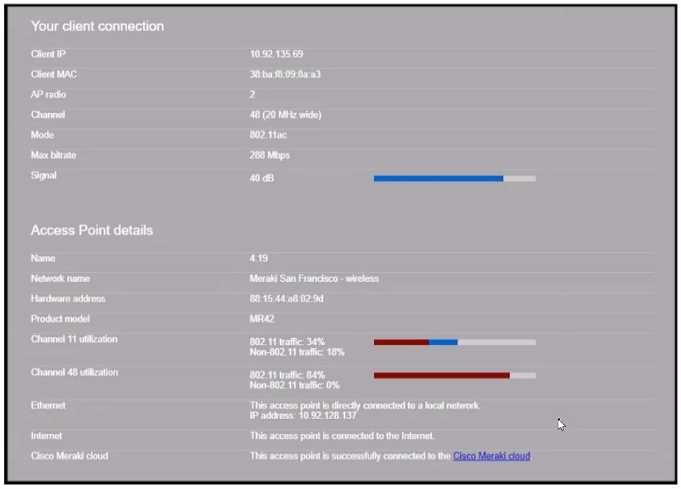
Why does the end user complain of poor wireless performance?
- A. Channel 48 utilization is at 84 percent.
- B. Non-802.11 traffic of 18 percent indicates poor AP placement.
- C. The client is connected to the secondary radio of the AP instead of the primary radio
- D. The client is using a 20 MHz channel width to connect.
Answer:
A
Question 3
What is out of scope when considering the Best practices for high-density wireless designs?
- A. maximum beamforming
- B. band selection
- C. minimum bitrate
- D. number of SSIDs
Answer:
A
Explanation:
https://documentation.meraki.com/Architectures_and_Best_Practices/Cisco_Meraki_Best_Practice_
Design/Best_Practice_Design_-_MR_Wireless/High_Density_Wi-Fi_Deployments
Question 4
Which enrollment method must be used when containerization is required on BYOD Android devices
managed by Systems Manager?
- A. Android Enterprise utilizing a Work Profile
- B. Systems Manager network ID
- C. Android Business utilizing a BYOD Profile
- D. Systems Manager container ID
Answer:
A
Explanation:
https://documentation.meraki.com/SM/Device_Enrollment/Containerization_with_Systems_Manag
er
Question 5
The WAN connection of a Cisco Meraki MX security appliance is congested, and the MX appliance is
buffering the traffic from LAN ports going to the WAN ports. High, normal, and low priority queue
buffers are all full. Which proportion of the normal traffic is forwarded compared to the other
queues?
- A. 4/10 packets
- B. 2/7 packets
- C. 2/10 packets
- D. 5/15 packets
Answer:
B
Explanation:
https://documentation.meraki.com/MX/Firewall_and_Traffic_Shaping/SD-
WAN_and_Traffic_Shaping
Question 6
What is the default frequency of SD-WAN probes sent between VPN peers in a Cisco Meraki MX SD-
WAN deployment?
- A. 10 milliseconds
- B. 100 milliseconds
- C. 1 second
- D. 10 seconds
Answer:
C
Explanation:
https://www.ciscolive.com/c/dam/r/ciscolive/latam/docs/2019/pdf/BRKCRS-1579.pdf
Question 7
There will be 100 concurrent users streaming video to their laptops. A 30/70 split between 2.4 Ghz
and 5 Ghz will be used. Roughly how many APs (rounded to the nearest whole number) are needed
based on client count?
- A. 2
- B. 3
- C. 4
- D. 5
Answer:
C
Explanation:
This is the approximate number of APs that are needed based on client count, assuming that each AP
can support up to 25 concurrent video streaming users. This can be calculated by using the formula:
Number of APs = (Number of Users x Percentage of Users on a Band) / Number of Users per AP on
that Band
Where Number of Users is 100, Percentage of Users on 2.4 Ghz is 30%, Percentage of Users on 5 Ghz
is 70%, Number of Users per AP on 2.4 Ghz is 15, and Number of Users per AP on 5 Ghz is 30.
Therefore,
Number of APs = (100 x 0.3 / 15) + (100 x 0.7 / 30) Number of APs = (3.33) + (2.33) Number of APs =
5.66
Rounding to the nearest whole number, the number of APs is 4.
This question is related to the topic of Wireless Capacity Planning in the Cisco Meraki
documentation. You can find more information about this topic in the [Wireless Capacity Planning]
article or the [Best Practice Design - MR Wireless] page.
Question 8
What are two methods of targeting and applying management profiles to System Manager clients?
(Choose two.)
- A. by using Wi-Fi tags
- B. by defining the scope
- C. by defining a range of serial numbers
- D. by using device tags
- E. by using dynamic IP tags
Answer:
B, D
Explanation:
The correct answer is B and D. These are the two methods of targeting and applying management
profiles to System Manager clients, according to the [System Manager: Getting Started] article. The
article explains that:
Defining the scope: This method allows you to target devices based on their network, tag, or owner.
You can define the scope of a profile from the Systems Manager > Manage > Settings page or from
the Systems Manager > Monitor > Overview page.
Using device tags: This method allows you to target devices based on their attributes, such as OS,
model, location, or user. You can use device tags to create dynamic groups of devices that share
common characteristics. You can apply device tags from the Systems Manager > Monitor > Devices
page or from the Systems Manager > Manage > Tags page.
Question 9
DRAG DROP
Drag and drop the descriptions from the left onto the permission types on the right.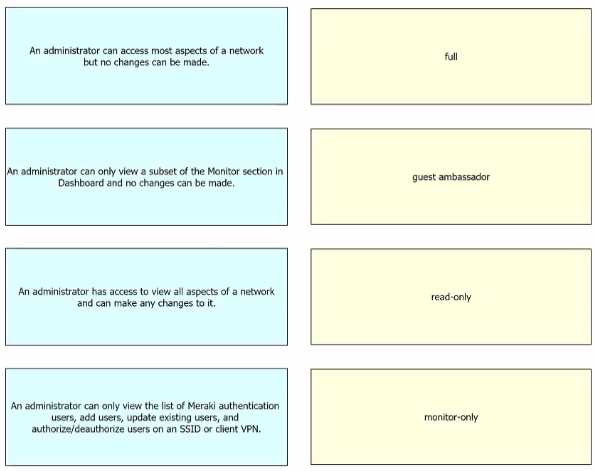
Answer:
None
Explanation: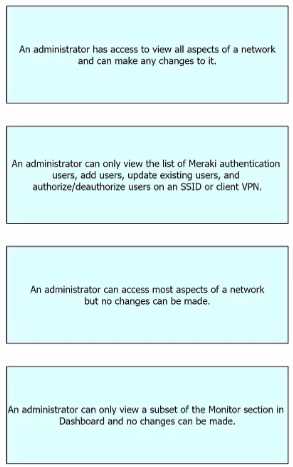
Question 10
Refer to the exhibit.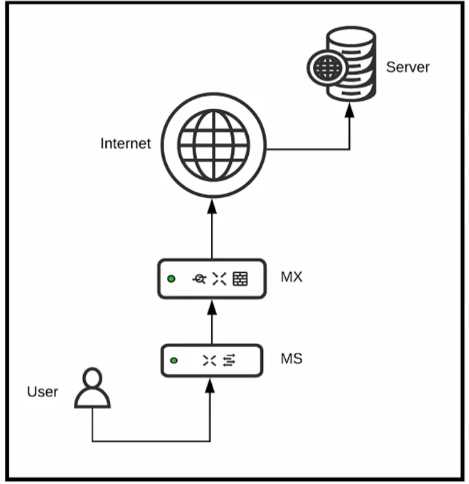
Which two configurations are needed to successfully monitor custom applications that a user is
accessing using Cisco Meraki Insight? (Choose two)
- A. The custom application uses TLS on any ports.
- B. The custom application uses HTTP on port 8080.
- C. The custom application uses HTTPS on TCP 443.
- D. The custom application uses SMB/CIFS.
- E. The custom application uses HTTPS on port 8080.
Answer:
BC
Explanation:
https://documentation.meraki.com/MI/MI_Web_App_Health/Overview#:~:text=On%20this%20pag
e%2C%20you%20can,that%20ports%20cannot%20be%20specified
.
Question 11
Refer to the exhibit.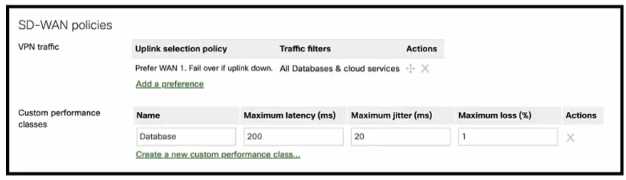
Which condition or conditions will cause the "All Databases & cloud services" SD-WAN traffic to be
routed via a VPN2 tunnel on WAN2?
- A. WAN1 tunnel latency is 20 ms or less, irrespective of WAN2 tunnel performance.
- B. WAN1 tunnel latency is 20 ms or more, and WAN2 tunnel meets the configured performance criteria.
- C. WAN1 tunnel latency is 20 ms or less, and WAN2 tunnel meets the configured performance criteria.
- D. WAN1 tunnel latency is 20 ms or more, irrespective of WAN2 tunnel performance.
Answer:
B
Explanation:
This is because the SD-WAN policy for “All Databases & cloud services” has the following settings:
Uplink selection policy: Prefer WAN1, Fail over if down
Traffic filters: Custom performance classes
Custom performance classes: Database
Database performance criteria: Maximum latency 200 ms, Maximum jitter 20 ms, Maximum loss 1%
This means that the SD-WAN traffic will be routed via WAN1 by default, unless WAN1 is down or fails
to meet the database performance criteria. In that case, the traffic will be routed via WAN2, if WAN2
meets the database performance criteria. Therefore, the condition that will cause the traffic to be
routed via WAN2 is when WAN1 tunnel latency is 20 ms or more (which exceeds the maximum jitter
of 20 ms), and WAN2 tunnel meets the configured performance criteria (maximum latency 200 ms,
maximum jitter 20 ms, maximum loss 1%).
Question 12
An organization requires that BYOD devices be enrolled in Systems Manager before they gain access
to the network. Part of the enrollment includes pushing out the corporate SSID preshared key,
corporate email settings, and some business-sensitive PDFs. When a user leaves the organization,
which Systems Manager feature allows the removal of only the MDM-delivered content from the
user's device?
- A. Erase Device
- B. Clear Pushed Data
- C. Unenroll Device
- D. Selective Wipe
Answer:
D
Explanation:
https://documentation.meraki.com/SM/Monitoring_and_Reporting/Selective_Wipe_and_Device_Q
uarantine_in_Systems_Manager
Question 13
Refer to the exhibit.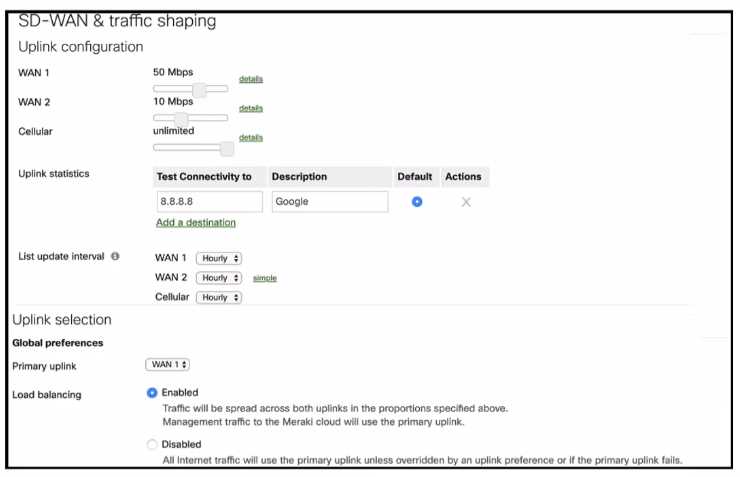
Refer to the exhibit. What Is the ratio of internet-bound flows that route via WAN 1 compared with
WAN 2?
- A. All flows alternate in a 5:1 ratio.
- B. All flows alternate in a 2:1 ratio.
- C. All flows agrees via WAN 1:1 ratio.
- D. All flows egress via WAN1.
Answer:
C
Explanation:
https://documentation.meraki.com/MX/Firewall_and_Traffic_Shaping/MX_Load_Balancing_and_Flo
w_Preferences#Load_Balancing
Question 14
DRAG DROP
Drag and drop the settings from the left onto the OS system or systems that support it on the right
Settings can be used more than once.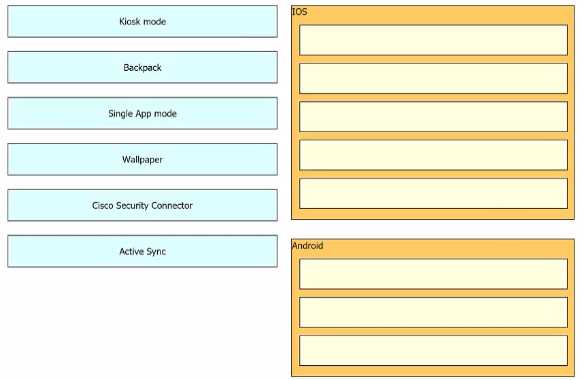
Answer:
None
Explanation:
IOS:
Kiosk mode
Single App mode
Wallpaper
Cisco Security Connector
Active Sync
Android:
Kiosk mode
Backpack
Wallpaper
Active Sync
This question is related to the topic of System Manager: Getting Started in the Cisco Meraki
documentation. You can find more information about this topic in the [System Manager: Getting
Started] article or the [System Manager Overview] page.
https://documentation.meraki.com/SM/Profiles_and_Settings/Configuration_Settings_Payloads
Question 15
DRAG DROP
Drag and drop the settings from the left onto the available or non-available methods of applying a
group policy to a Cisco Meraki MR access point on the right.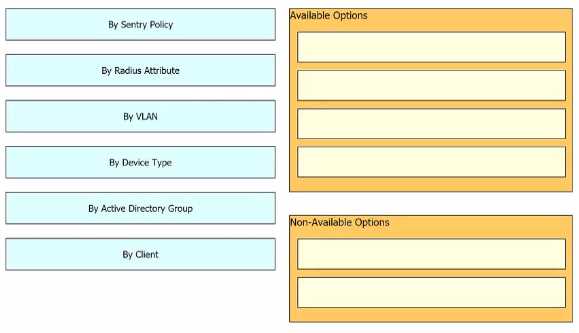
Answer:
None
Explanation: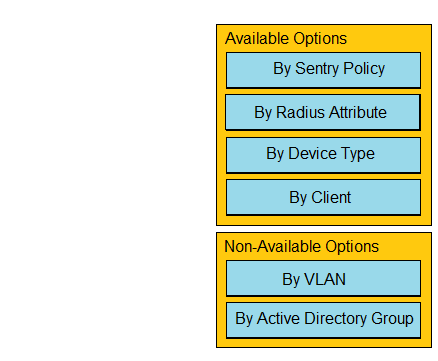
https://documentation.meraki.com/General_Administration/Cross-
Platform_Content/Creating_and_Applying_Group_Policies