cisco 300-810 Exam Questions
Questions for the 300-810 were updated on : Mar 07 ,2026
Page 1 out of 15. Viewing questions 1-15 out of 213
Question 1
An engineer is informed that high availability for a Cisco IM and Presence server fails While the
engineer examines the Cisco UCM presence redundancy group in the Ul. they discover that the first ..
is in the Idle state, and the second node is in the running in backup mode state Which action must
the engineer take to place both nodes back in the normal state?
- A. Click Failover in the Server Action field
- B. Restart the first node of the IM and Presence server
- C. Click Fallback in the Server Action field
- D. Reinstall the first node of the IM and Presence server.
Answer:
A
Explanation:
The scenario indicates a high availability failover condition for a Cisco IM and Presence server: one
node is idle, the other is running in backup mode. To restore both nodes to normal operation,
initiating a controlled failover is the best approach:
Failover Action: This will gracefully switch the active role to the idle node, making it primary and
restoring redundancy.
Question 2
An engineer in a company have access to voice calling and voicemail from desktop phones As the
company transitions to remote work, users are utilizing the Cisco Jabber client through Mobile and
Remote .. to access company phone services. Users cannot access voicemail through the Cisco Jabber
client, even though voicemail is functioning in the office on the desk phone. Cisco Jabber works IM
and Presence, including calling through Mobile and Remote Access What is the cause of the issue?
- A. Cisco Unity Connection is missing from the internal Cisco UCM mobility profiles
- B. Cisco Unity Connection is missing from the internal Expressway-C clusters.
- C. Cisco Unity Connection is missing from the internal Cisco UCM clusters.
- D. Cisco Unity Connection is missing from the Expressway-E clusters for external communication.
Answer:
C
Explanation:
The scenario indicates that Cisco Jabber clients used over Mobile and Remote Access (MRA) cannot
access voicemail, even though the feature works perfectly from desk phones. This strongly suggests a
missing integration between Cisco Unity Connection and internal Cisco UCM clusters. Here's why:
MRA and Cisco Unity Connection: Jabber clients using MRA often rely on integration with Cisco Unity
Connection on the internal network for voicemail access.
Question 3
Cisco Unity Connection system is integrated with two Cisco UCM clusters cluster A and duster B
Voicemail is working perfectly for users on cluster A Users on cluster B report Message Waiting factor
(MWI) lights are not working at all. however they can still send/receive messages. Which action
resolves the issue?
- A. Disable "Force AJI MWIs Off for This Phone System' under Telephony Integrations > Phone System > Phone System Basics
- B. Check and reseat the RS-232 serial cable connection on the master PIMG/TIMG
- C. Enable 'Message Count Totals" for cluster B users Playback Message Settings
- D. Select the 'Use Same Port for Enabling and Disabling MWIs' check box under Telephony Integrations > Phone System.
Answer:
D
Explanation:
The scenario describes a classic Message Waiting Indicator (MWI) issue specifically affecting users on
cluster B of a Cisco Unity Connection setup integrated with two UCM clusters. The most likely cause
is mismatched MWI ON/OFF ports between cluster B and Cisco Unity Connection. This option
addresses that:
'Use Same Port for Enabling and Disabling MWIs' Checkbox: This setting ensures that Cisco Unity
Connection utilizes a single port for both activating and deactivating MWIs, streamlining the process
and preventing port mismatches.
Question 4
Collaboration engineer is enabling interdomain federation for Cisco IM and Presence The engineer
has been asked to enable federation with Office 365 Which service must the engineer enable to
meet this requirement?
- A. Cisco XCP Test Conference Manager
- B. Cisco XCP XMPP Federation Connection Manager
- C. Cisco XCP Web Connection Manager
- D. Cisco XCP SIP Federation Connection Manager
Answer:
B
Explanation:
To enable interdomain federation with Office 365, which uses XMPP as its instant messaging
protocol, the Cisco XCP XMPP Federation Connection Manager service is essential. This service on
the Cisco IM & Presence node handles federation with external XMPP-compliant systems.
Question 5
Which benefit do administrative applications provide when SAML SSO is configured for Cisco Unified
Solutions?
- A. seamless synchronization of users
- B. open standard JSON format
- C. authentication toward one local Cisco Unified server for clients
- D. cross-domain and cross-product SSO
Answer:
D
Explanation:
The primary benefit of configuring SAML SSO for Cisco Unified solutions is the ability to enable cross-
domain and cross-product single sign-on. This means users can authenticate once and gain seamless
access to multiple applications and services across different domains and products within the Cisco
Unified ecosystem.
Question 6
What is a step when integrating Cisco UACA with Cisco UCM?
- A. create a SIP trunk between Cisco UACA and Cisco UCM
- B. create a CTI port template that will be used by Cisco UACA
- C. create a new end user account to be used by Cisco UACA
- D. create a CTI route point template that will be used by Cisco UACA
Answer:
D
Explanation:
Integrating Cisco Unified Attendant Console Advanced (UACA) with Cisco Unified Communications
Manager (UCM) involves creating a CTI route point template that acts as a logical representation of
the UACA within UCM. CTI route points control call routing, feature availability, and provide a logical
device for call control.
Question 7
An engineer must configure XMPP federation on a Cisco Instant Messaging and Presence Service
node, but the XCP XMPP Federation Connection Manager service fails to start. Which action must the
engineer take to resolve the issue?
- A. Activate XMPP federation service
- B. Enable TLS m the XMPP Federation settings.
- C. Restart the Cisco XCP Router service
- D. Restart the Cisco IM and Presence service.
Answer:
C
Explanation:
The Cisco XCP XMPP Federation Connection Manager service on the IM & Presence node depends on
the Cisco XCP Router service. If the XMPP Federation Connection Manager fails to start, a likely cause
is an issue with the XCP Router.
Question 8
Collaboration engineer is troubleshooting an issue with Cisco Jabber for Windows. Users report that
they are prompted to accept or decline an invalid certificate when they attempt to log in to the
client, r server certificates have been signed by a public C
- A. Trusted Publishers Certification store
- B. Intermediate Certification Authorities store
- C. Trusted Root Certification Authorities store
- D. Personal Certification store
Answer:
C
Explanation:
To resolve invalid certificate prompts in Cisco Jabber when using CA-signed certificates, you need to
import the root certificate of the Certificate Authority (CA) into the "Trusted Root Certification
Authorities" store on the Windows client machine. This store holds certificates from trusted CAs,
enabling the system to validate the certificate chain.
Question 9
A company is setting up B2B instant messaging capability using a secure client integrated into the on-
premises Cisco communication platform. During the setup, the engineer discovers that external
Usages from other businesses do not seem to reach the Cisco Expressway for instant messaging, but
B2B calling seems to be working Internal chat between clients and chat toward clients is king m
home offices using Mobile and Remote Access The engineer verified that the correct ports have been
configured on the Cisco ASA, and the firewall rules on the expressway show no cation of any traffic
What is the cause of the issue?
- A. The XMPP service is not activated on the Cisco Expressway
- B. The Cname record for XMPP is not configured or is misconfigured.
- C. The SRV record for XMPP is not configured or is misconfigured.
- D. The XMPP service is not running under services in Cisco IM and Presence Server
Answer:
C
Explanation:
In Business-to-Business (B2B) instant messaging using Cisco Expressway, SRV records are crucial for
external users to discover and connect to the correct XMPP service. The fact that B2B calling works
but not instant messaging points towards a service discovery issue specific to XMPP.
SRV records for XMPP: Typically, the domain would have an SRV record like "xmpp-client.[invalid URL
removed]" pointing to the Expressway.
Question 10
Which type of protocol is OAuth 2.0?
- A. single sign-on
- B. authorization
- C. accounting
- D. authentication
Answer:
B
Explanation:
OAuth 2.0 is an open-standard authorization framework. Its primary function is to allow users to
grant limited permissions to applications or third-party services to access their resources without
sharing their primary credentials (username and password).
Not Primarily for Authentication: While OAuth 2.0 can indirectly be involved in authentication by
indicating a user's identity, its core function is authorization.
Question 11
Collaboration engineer is troubleshooting a Cisco Jabber for Windows client issue The end user
reports that they cannot control their desk phone from the Cisco Jabber client. Which action must
the engineer take to verify the service connections of the Cisco Jabber client?
- A. Click Help and dick Show Connection Status
- B. Click Help and dick XML settings
- C. Click XML settings and click Help
- D. Click TFTP settings and click Help
Answer:
A
Explanation:
To troubleshoot desk phone control issues in Cisco Jabber for Windows, the "Show Connection
Status" option provides essential information about the Jabber client's connection to services like
Cisco UCM:
Displays status of services: Shows the status of CTI, TAPI, and other connections needed for desk
phone control.
Troubleshooting information: Can highlight if there are any connectivity issues or failures that would
explain the problem.
Reference:
Cisco Jabber for Windows Documentation: This should have a section on troubleshooting and may
mention the "Show Connection Status" feature.
Question 12
An administrator is implementing a Cisco Unity Connection call management plan for a company and
configured the transfer rules that specify how Unity Connection transfers the calls that reach the call
handler from the automated attendant. Which call handler setting must be configured to specify
whether callers can perform transfers?
- A. caller input settings
- B. call handler owners
- C. message settings
- D. transfer rules
Answer:
A
Explanation:
Within Cisco Unity Connection call handlers, the "caller input settings" section determines whether
callers can transfer out of the current call handler and potentially to other destinations. This section
allows you to configure:
Transfer Keys: Defines specific keys callers can press to initiate transfers
Transfer Destinations: Determines where calls can be transferred (extensions, other call handlers,
voicemail, etc.)
Reference:
Cisco Unity Connection Administration Guide: Look for the "caller input settings" and "call handler
configuration" sections, which should outline how to enable and configure caller-initiated transfers.
Question 13
DRAG DROP
An administrator configures the Cisco Unity Connection call routing table to ensure that Unity
Connection plays a legal disclaimer to all direct callers Drag and drop the steps from the left into
order on the right to start the process to ensure that callers hear the message entirely before
proceeding to the destination Not all steps will be used.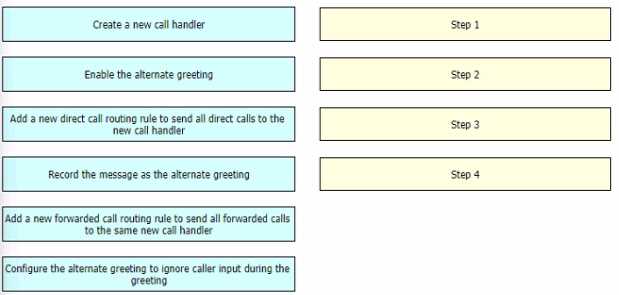
Answer:
None
Explanation:
Create a new call handler (Step 1 in the image). This call handler will be responsible for playing the
legal disclaimer message.
Record the message as the alternate greeting (Step 4 in the image). Here, you'll record the legal
disclaimer message that will be played by the call handler.
Enable the alternate greeting (Step 2 in the image). This activates the use of the pre-recorded legal
disclaimer message within the call handler.
Add a new direct call routing rule to send all direct calls to the new call handler (Step 3 in the image).
This step directs all calls coming directly to Unity Connection (not forwarded calls) to the call handler
you created in step 1.
Question 14
administrator is importing users into Cisco Unity Connection from Cisco UCM. Several user accounts
do not appear on the list after the Import Users process is selected Which situation causes this ..?
- A. The primary extension is not selected
- B. The extension in the telephone number field is missing
- C. The users are not members of any groups
- D. The users have multiple controlled devices.
Answer:
B
Explanation:
The primary reason Cisco Unity Connection's "Import Users" process might fail to display certain
users is a missing extension in the telephone number field within Cisco UCM. Cisco Unity Connection
uses this extension field to associate users with their Unity Connection mailboxes.
Question 15
Administrator added a group of new users to the organization. The administrator also just finished
configuring the Cisco Unified IM and Presence Service with calendar integration for Microsoft
change. Which two actions must be taken to ensure that these new users are configured to log in to
Osco Jabber and receive calendar presence? (Choose two.)
Select the "include meeting information in presence" check box
- A. Ensure that each user logs in to Jabber and selects' Microsoft Outlook" m the Calendar Integration section of the Jabber client settings
- B. Perform full sync of the LDAP directory
- C. Add the feature group template to LDAP sync.
- D. Select the "enable user for Cisco UCM IM and Presence" check box
Answer:
BD
Explanation:
To ensure new users are both configured for Cisco Jabber login and have calendar presence after
configuring IM & Presence with calendar integration:
B. Perform full sync of the LDAP directory: This will pull the new user information from your directory
service (e.g., Active Directory) into Cisco UCM and IM & Presence.
D. Select the "enable user for Cisco UCM IM and Presence" check box: In Cisco UCM, this enables the
IM & Presence functionality for specific users.