cisco 300-720 Exam Questions
Questions for the 300-720 were updated on : Mar 18 ,2026
Page 1 out of 10. Viewing questions 1-15 out of 147
Question 1
What is a category for classifying graymail?
- A. Malicious
- B. Marketing
- C. Spam
- D. Priority
Answer:
B
Explanation:
According to the [Cisco Secure Email User Guide], graymail is a category of email messages that are
not spam but may be unwanted by some recipients, such as newsletters, promotions, or social media
updates[5, p. 25]. Marketing is one of the subcategories of graymail that includes messages that
advertise products or services[5, p. 26].
The other options are not valid because:
A. Malicious is not a category for classifying graymail. It is a category for classifying email messages
that contain malicious content such as malware, phishing, or fraud[5, p. 25].
C. Spam is not a category for classifying graymail. It is a category for classifying email messages that
are unsolicited, unwanted, or harmful[5, p. 25].
D. Priority is not a category for classifying graymail. It is a category for classifying email messages
that are important, urgent, or relevant[5, p. 25].
Question 2
An engineer wants to utilize a digital signature in outgoing emails to validate to others that the email
they are receiving was indeed sent and authorized by the owner of that domain Which two
components should be configured on the Cisco Secure Email Gateway appliance to achieve this?
(Choose two.)
- A. DMARC verification profile
- B. SPF record
- C. Public/Private keypair
- D. Domain signing profile
- E. PKI certificate
Answer:
C, D
Explanation:
Public/Private keypair. A public/private keypair is a pair of cryptographic keys that are used to
generate and verify digital signatures. The private key is used to sign the email message, while the
public key is used to verify the signature. The public key is published in a DNS record, while the
private key is stored on the Cisco Secure Email Gateway appliance[1, p. 2].
Domain signing profile. A domain signing profile is a configuration that specifies the domain and
selector to use for signing outgoing messages, as well as the signing algorithm, canonicalization
method, and header fields to include in the signature. You can create multiple domain signing
profiles for different domains or subdomains[1, p. 3].
The other options are not valid because:
A. DMARC verification profile is not a component for utilizing a digital signature in outgoing emails. It
is a component for verifying the authenticity of incoming emails based on SPF and DKIM results[2, p.
1].
B. SPF record is not a component for utilizing a digital signature in outgoing emails. It is a component
for validating the sender IP address of incoming emails based on a list of authorized IP addresses
published in a DNS record[3, p. 1].
E. PKI certificate is not a component for utilizing a digital signature in outgoing emails. It is a
component for encrypting and decrypting email messages based on a certificate authority that issues
and validates certificates[4, p. 1].
Question 3
The company security policy requires that the finance department have an easy way to apply
encryption to their outbound messages that contain sensitive data Users must be able to flag the
messages that require encryption versus a Cisco Secure Email Gateway appliance scanning all
messages and automatically encrypting via detection Which action enables this capability?
- A. Create an encryption profile with [SECURE] in the Subject setting and enable encryption on the mail flow policy
- B. Create an outgoing content filter with no conditions and with the Encrypt and Deliver Now action configured with [SECURE] in the Subject setting
- C. Create an encryption profile and an outgoing content filter that includes \[SECURE\] within the Subject Header: Contains condition along with the Encrypt and Deliver Now action
- D. Create a DLP policy manager message action with encryption enabled and apply it to active DLP policies for outgoing mail.
Answer:
C
Explanation:
According to the [Cisco Secure Email Encryption Service Add-In User Guide], you can create an
encryption profile that defines the encryption settings and options for your encrypted messages[2, p.
11]. You can also create an outgoing content filter that applies the encryption profile to the messages
that match certain conditions, such as having [SECURE] in the subject header[2, p. 12]. This way, you
can allow users to flag the messages that require encryption by adding [SECURE] to the subject line.
The other options are not valid because:
A. Creating an encryption profile with [SECURE] in the Subject setting and enabling encryption on the
mail flow policy will not work, as the Subject setting in the encryption profile is used to specify the
subject line of the encrypted message envelope, not the original message[2, p. 11].
B. Creating an outgoing content filter with no conditions and with the Encrypt and Deliver Now
action configured with [SECURE] in the Subject setting will not work, as this will encrypt all outgoing
messages regardless of whether they have [SECURE] in the subject line or not[2, p. 12].
D. Creating a DLP policy manager message action with encryption enabled and applying it to active
DLP policies for outgoing mail will not work, as this will encrypt messages based on DLP rules that
detect sensitive data in the message content, not based on user flags in the subject line.
Question 4
A Cisco Secure Email Gateway administrator recently enabled the Outbreak Filters Global Service
Setting to detect Viral as well as Non-Viral threat detection, with no detection of Non-viral threats
after 24 hours of monitoring Outbreak Filters What is the reason that Non-Viral threat detection is
not detecting any positive verdicts?
- A. Non-Viral threat detection requires Antivirus or AMP enablement to properly function
- B. The Outbreak Filters option Graymail Header must be enabled
- C. Non-Viral threat detection requires AntiSpam or Intelligent Multi-Scan enablement to properly function.
- D. The Outbreak Filters option URL Rewriting must be enabled.
Answer:
C
Explanation:
According to the [Cisco Secure Email User Guide], Non-Viral threat detection is a feature of Outbreak
Filters that detects and blocks email messages that contain non-viral threats such as phishing, fraud,
or social engineering[1, p. 25]. To use this feature, you need to enable either AntiSpam or Intelligent
Multi-Scan on your Cisco Secure Email Gateway, as these features provide the necessary scanning
and filtering capabilities for Non-Viral threat detection[1, p. 26].
The other options are not valid because:
A. Non-Viral threat detection does not require Antivirus or AMP enablement to properly function.
Antivirus and AMP are features that detect and block email messages that contain viral threats such
as malware or ransomware[1, p. 27-28].
B. The Outbreak Filters option Graymail Header does not affect Non-Viral threat detection. Graymail
Header is an option that allows you to add a header to email messages that are classified as
graymail, which are messages that are not spam but may be unwanted by some recipients, such as
newsletters or promotions[1, p. 25].
D. The Outbreak Filters option URL Rewriting does not affect Non-Viral threat detection. URL
Rewriting is an option that allows you to rewrite the URLs in email messages to point to a Cisco proxy
server, which can scan the URLs for malicious content and redirect the users to a warning page if
needed[1, p. 25].
Question 5
Which type of DNS record would contain the following line, which references the DKIM public key
per RFC 6376?
v=DKIM1; p=76E629F05F709EF665853333EEC3F5ADE69A2362BECE406582670456943283BE
- A. CNAME
- B. AAAA
- C. TXT
- D. PTR
Answer:
C
Explanation:
A TXT record is a type of DNS record that contains arbitrary text data that can be used for various
purposes such as verification, configuration, or authentication. A TXT record can contain the DKIM
public key per RFC 6376, which is used to verify the digital signature of an email message generated
by the DKIM private key of the sender domain.
The other options are not valid because:
A. A CNAME record is a type of DNS record that maps an alias name to a canonical name or another
alias name. It does not contain any DKIM public key information.
B. An AAAA record is a type of DNS record that maps a hostname to an IPv6 address. It does not
contain any DKIM public key information.
D. A PTR record is a type of DNS record that maps an IP address to a hostname, which is the reverse
of an A or AAAA record. It does not contain any DKIM public key information.
Question 6
Which cloud service provides a reputation verdict for email messages based on the sender domain
and other attributes?
- A. Cisco AppDynamics
- B. Cisco Secure Email Threat Defense
- C. Cisco Secure Cloud Analytics
- D. Cisco Talos
Answer:
D
Explanation:
Cisco Talos is a cloud service that provides a reputation verdict for email messages based on the
sender domain and other attributes such as IP address, sender behavior, message content, and
attachment analysis. Cisco Talos is integrated with Cisco Secure Email Gateway and provides real-
time threat intelligence and protection against spam, phishing, malware, and other email-borne
threats.
The other options are not valid because:
A. Cisco AppDynamics is a cloud service that provides application performance monitoring and
optimization for enterprise applications. It does not provide reputation verdicts for email messages.
B. Cisco Secure Email Threat Defense is a cloud service that provides visibility and remediation
capabilities for email threats detected by Cisco Secure Email Gateway. It does not provide reputation
verdicts for email messages.
C. Cisco Secure Cloud Analytics is a cloud service that provides network visibility and threat detection
for cloud environments. It does not provide reputation verdicts for email messages.
Question 7
Which of the following two statements are correct about the large file attachments (greater than
25MB)
feature
in
Cisco
Secure
Email
Encryption
Service?
(Choose
two.)
- A. Large file attachments can only be sent using the websafe portal
- B. This feature allows users to send up to 50MB of attachments in a secure email.
- C. Large file attachments will be sent as a securedoc attachment
- D. Large file attachments can only be sent using the Cisco Secure Email Add-In.
- E. This feature can only be enabled if the Read from Message feature is enabled
Answer:
C, E
Explanation:Largefileattachmentswillbesentasasecuredocattachment.Thismeansthattherecipientwillreceiveanencryptedmessagewithasecuredoc.htmlattachmentthatcontainsalinktodownload
the large file from the Cisco Secure Email Encryption Service portal[2, p. 9].
This feature can only be enabled if the Read from Message feature is enabled. The Read from
Message feature allows you to encrypt messages based on keywords or phrases in the subject or
body of the message. You need to enable this feature before you can enable the large file
attachments feature[2, p. 8].
The other options are not valid because:
A. Large file attachments can be sent using both the websafe portal and the Cisco Secure Email Add-
In. The websafe portal allows you to compose and send encrypted messages from any web browser,
while the Cisco Secure Email Add-In allows you to encrypt messages from your email client such as
Outlook[2, p. 6-7].
B. This feature allows users to send up to 100MB of attachments in a secure email, not 50MB[2, p. 9].
D. Large file attachments can be sent using both the websafe portal and the Cisco Secure Email Add-
In. The websafe portal allows you to compose and send encrypted messages from any web browser,
while the Cisco Secure Email Add-In allows you to encrypt messages from your email client such as
Outlook[2, p. 6-7].
Question 8
Refer to the exhibit.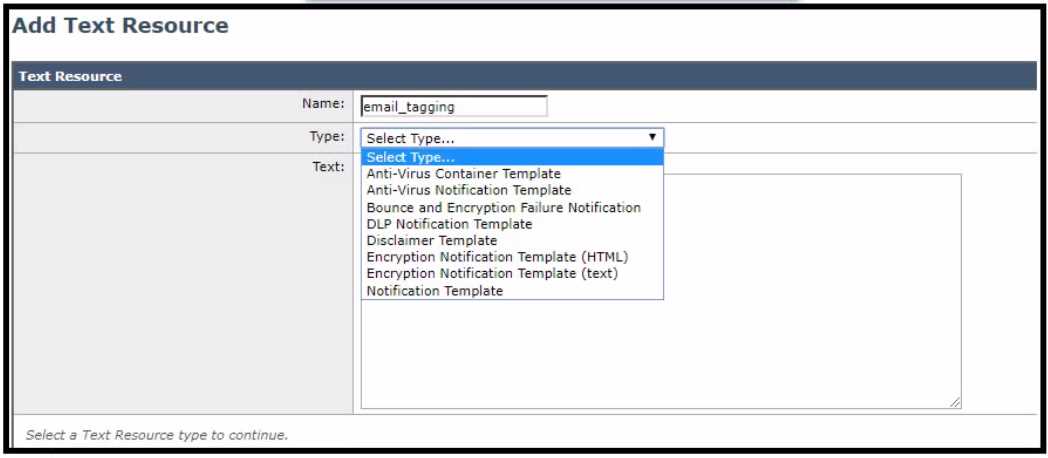
For improved security, an administrator wants to warn users about opening any links or attachments
within an email How must the administrator configure an HTML-coded message at the top of an
email body to create this warning?
- A. Create a text resource type of Disclaimer Template paste the HTML code into the text box. then use this text resource inside a content filter
- B. Create a text resource type of Disclaimer Template change to code view to paste the HTML code into the text box, then use this text resource inside a content filter
- C. Create a text resource type of Notification Template, paste the HTML code into the text box, then use this text resource inside a content filter.
- D. Create a text resource type of Notification Template, change to code view to paste the HTML code into the text box. then use this text resource inside a content filter.
Answer:
B
Explanation:
According to the [Cisco Secure Email User Guide], you can create a text resource of type Disclaimer
Template and use the code view option to insert HTML code into the text box. Then, you can use this
text resource in a content filter to prepend or append the HTML message to the email body[1, p. 15-
16].
The other options are not valid because:
A. Creating a text resource type of Disclaimer Template and pasting the HTML code into the text box
without changing to code view will not work, as the HTML code will be treated as plain text and not
rendered properly[1, p. 15].
C. Creating a text resource type of Notification Template and pasting the HTML code into the text box
will not work, as Notification Templates are used for sending notifications to senders or recipients,
not for modifying the email body[1, p. 17].
D. Creating a text resource type of Notification Template and changing to code view to paste the
HTML code into the text box will not work, as Notification Templates are used for sending
notifications to senders or recipients, not for modifying the email body[1, p. 17].
Question 9
An engineer tries to implement phishing simul-ations to test end users, but they are being blocked
by the Cisco Secure Email Gateway appliance. Which two components, when added to the allow list,
allow these simul-ations to bypass antispam scanning? (Choose two.)
- A. domains
- B. senders
- C. reputation score
- D. receivers
- E. spf check
Answer:
A, B
Explanation:
To allow phishing simul-ations to bypass antispam scanning, the administrator must add two
components to the allow list: domains and senders. Domains are the email domains that are used in
the phishing simulations, such as example.com or test.com. Senders are the email addresses that are
used to send the phishing simulations, such as [email protected] or [email protected]. By adding
these components to the allow list, the administrator can prevent them from being blocked by
antispam scanning and allow them to reach the end users for testing purposes. Reference: [Cisco
Secure Email Gateway Administrator Guide - Creating Allow Lists]
Question 10
Which Cisco Secure Email Threat Defense visibility and remediation mode is only available when
using Cisco Secure Email Gateway as the message source?
- A. Basic Authentication
- B. No Authentication
- C. Microsoft 365 Authentication
- D. Cisco Security Cloud Sign On
Answer:
B
Explanation:
According to the
Cisco Secure Email Threat Defense User Guide
, the No Authentication option is only
available if you are using a Cisco Secure Email Gateway (SEG) as your message source.
This option
allows visibility only, no remediation1
.
The other options are not valid because:
A. Basic Authentication is not a visibility and remediation mode for Cisco Secure Email Threat
Defense.
It is a method of authenticating users with a username and password2
.
C. Microsoft 365 Authentication is a visibility and remediation mode that allows you to use Microsoft
365 credentials to access Cisco Secure Email Threat Defense. It has two sub-options: Read/Write and
Read.
This mode is available for both Microsoft 365 and Gateway message sources1
.
D. Cisco Security Cloud Sign On is not a visibility and remediation mode for Cisco Secure Email Threat
Defense.
It is a service that manages user authentication for Cisco security products, including Cisco
Secure Email Threat Defense3
.
Question 11
Which feature must be activated on a Cisco Secure Email Gateway to combat backscatter?
- A. Graymail Detection
- B. Bounce Verification
- C. Forged Email Detection
- D. Bounce Profile
Answer:
B
Explanation:
To combat backscatter, which is a type of spam that consists of bounce messages sent to forged
sender addresses, the administrator must enable the Bounce Verification feature under Security
Settings. This feature allows the appliance to verify whether a bounce message is legitimate or not
by checking if the original message was sent from the appliance. If not, the bounce message is
considered as backscatter and can be dropped or quarantined. Reference: [Cisco Secure Email
Gateway Administrator Guide - Configuring Bounce Verification]
Question 12
An engineer wants to ensure that emails received by company users that contain URLs do not make
them susceptible to data loss from accessing malicious or undesired external content sources Which
two features must be configured on Cisco Secure Email Gateway to meet this requirement1? (Choose
two.)
- A. antispam scanning
- B. data loss prevention
- C. graymail detection
- D. URL filtering
- E. antivirus scanning
Answer:
A, D
Explanation:
To meet the requirement of ensuring that emails received by company users that contain URLs do
not make them susceptible to data loss from accessing malicious or undesired external content
sources, the administrator must configure two features on Cisco Secure Email Gateway: antispam
scanning and URL filtering. Antispam scanning can block or quarantine messages that are identified
as spam based on various criteria, such as sender reputation, message content, and message
headers. URL filtering can rewrite or defang URLs in messages that are associated with malicious or
undesirable websites, such as phishing, malware, adult, or gambling sites. Reference: [Cisco Secure
Email Gateway Administrator Guide - Configuring Antispam Scanning] and [Cisco Secure Email
Gateway Administrator Guide - Configuring URL Filtering]
Question 13
An administrator notices that the Cisco Secure Email Gateway delivery queue on an appliance is
consistently full. After further investigation, it is determined that the IP addresses currently in use by
appliance are being rate-limited by some destinations. The administrator creates a new interface
with an additional IP address using virtual gateway technology, but the issue is not solved Which
configuration change resolves the issue?
- A. Use the CLI command altsrchost to set the new interface as the source IP address for all mail.
- B. Use the CLI command loadbalance auto to enable mail delivery over all interfaces.
- C. Use the CLI command alt-src-host to set the new interface as a possible delivery candidate.
- D. Use the CLI command deliveryconfig to set the new interface as the primary interface for mail delivery
Answer:
D
Explanation:
Determining Which Interface is Used for Mail Delivery Unless you specify the output interface via the
deliveryconfig</code> command or via a message filter ( alt-src-host ), or through the use of a virtual
gateway,
the
output
interface
is
selected
by
the
AsyncOS
routing
table.
https://www.cisco.com/c/en/us/td/docs/security/esa/esa11-1/user_guide/b_ESA_Admin_Guide_11_1/b_ESA_Admin_Guide_chapter_011001.html?bookSearch
=true
Question 14
What is the default method of remotely accessing a newly deployed Cisco Secure Email Virtual
Gateway when a DHCP server is not available?
- A. Manual configuration of an IP address is required through the serial port before remote access
- B. DHCP is required for the initial IP address assignment
- C. Use the IP address of 192.168 42 42 via the Management port
- D. Manual configuration of an IP address is required through the hypervisor console before remote access
Answer:
C
Explanation:
The default method of remotely accessing a newly deployed Cisco Secure Email Virtual Gateway
when a DHCP server is not available is to use the IP address of 192.168.42.42 via the Management
port. This IP address is assigned by default to the Management port of the virtual gateway and can
be used to access the web user interface or the command-line interface of the appliance. Reference:
[Cisco Secure Email Gateway Installation and Upgrade Guide - Configuring Network Settings]
Question 15
Which action do Outbreak Filters take to stop small-scale and nonviral attacks, such as phishing
scams and malware distribution sites?
- A. Rewrite URLs to redirect traffic to potentially harmful websites through a web security proxy
- B. Block all emails from email domains associated with potentially harmful websites.
- C. Strip all attachments from email domains associated with potentially harmful websites.
- D. Quarantine messages that contain links to potentially harmful websites until the site is taken offline
Answer:
A
Explanation:
Outbreak Filters can take the action of rewriting URLs to redirect traffic to potentially harmful
websites through a web security proxy. This allows the Cisco Secure Email Gateway to scan the
content of the websites and block or warn the user if they are malicious or undesirable. This action
can stop small-scale and nonviral attacks, such as phishing scams and malware distribution sites, that
may not be detected by other filters. Reference: [Cisco Secure Email Gateway Administrator Guide -
Configuring Outbreak Filters]