avaya 71801X Exam Questions
Questions for the 71801X were updated on : Feb 18 ,2026
Page 1 out of 6. Viewing questions 1-15 out of 84
Question 1
Which three statements describe functions of Basic Unified Messaging (UM) via SMTP Forwarding?
(Choose three.)
- A. Voice and fax messages are deposited on the Messaging Server, and then forwarded to the Email server.
- B. Email messages can be retrieved through Avaya Messaging
- C. Messaging forwards received voice and fax messages to an SMTP compliant Email server.
- D. Voicemail messages appear in a separate Avaya Messaging inbox of the User's Email client.
- E. Voicemail messages appear in the regular inbox of the User's Email client.
Answer:
A, C, E
Explanation:
Basic Unified Messaging (UM) via SMTP Forwarding has the following functions:
Voice and fax messages are deposited on the Messaging Server, and then forwarded to the Email
server (A).
This process allows users to receive their voice and fax messages directly in their email
inbox1
.
Messaging forwards received voice and fax messages to an SMTP compliant Email server ©.
The
SMTP Forwarding feature is enabled on a system-wide basis and facilitates the forwarding of these
messages from the messaging server to email addresses1
.
Voicemail messages appear in the regular inbox of the User’s Email client (E).
When a user receives a
voice or fax message, a copy is forwarded to the specified email address, and for voice messages, the
email includes an audio file attachment that can be listened to on a PC or smartphone1
.
Reference: The functions of Basic Unified Messaging via SMTP Forwarding are described in the
documentation provided by Mitel, which outlines the features installed as part of the base package
in every NuPoint UM system1
.
Question 2
When adding a new Language to an Avaya Messaging High Availability (HA) system, which servers
need to have the Language Pack installed?
- A. Consolidated Server only
- B. Primary Voice Server only
- C. Primary and Secondary Voice Servers
- D. Primary, Secondary and Consolidated Servers
Answer:
C
Explanation:
When adding a new language to an Avaya Messaging High Availability (HA) system, the Primary and
Secondary Voice Servers need to have the Language Pack installed. These servers handle user
interactions, voicemail, and other messaging functions, so having the language pack ensures that the
system can support the newly added language for users.
Reference: The information is based on Avaya’s documentation and best practices for configuring
language support in Avaya Messaging HA deployments[3].
Question 3
Although other Anti-virus software has been used on Avaya Messaging, which Anti-virus software is
the only one to be 'validated' with Avaya Messaging?
- A. Norton Corporate Edition
- B. McAfee
- C. BitDefender
- D. Microsoft Defender
Answer:
C
Explanation:
BitDefender is the only anti-virus software that has been ‘validated’ with Avaya Messaging. While
other anti-virus software may be used, BitDefender has undergone specific testing and validation by
Avaya to ensure compatibility and effectiveness when used with Avaya Messaging systems.
Reference: The validation of BitDefender as the preferred anti-virus software for Avaya Messaging is
mentioned in Avaya’s support resources1
.
Question 4
Which two license levels are used in Avaya Messaging release 11? (Choose two.)
- A. Basic
- B. Primary
- C. Enhanced
- D. Advanced
Answer:
A, C
Explanation:
Avaya Messaging release 11 utilizes various license levels to cater to different business needs and
sizes. The Basic license level provides core messaging functionalities, while the Enhanced license
level offers additional features and capabilities for more complex communication requirements.
Reference: The licensing information for Avaya Messaging release 11 can be found in the official
Avaya documentation and release notes1
.
Question 5
In an Avaya Messaging High Availability installation, which requirement must be met?
- A. All Servers must be members of the same Windows Domain.
- B. All Servers must be running in Windows Compatibility mode.
- C. All Servers must have Dual NIC configuration for network redundancy.
- D. All Servers must have at least Intel i5 level CPU's.
Answer:
A
Explanation:
For an Avaya Messaging High Availability (HA) installation, it is essential that all servers are members
of the same Windows Domain. This requirement is crucial for ensuring proper communication and
synchronization between the servers involved in the HA setup. Being part of the same domain allows
for integrated security, centralized management, and easier resource sharing, which are all vital for
maintaining the high availability of the messaging system.
Reference: The requirement for servers to be members of the same Windows Domain in an Avaya
Messaging HA installation is based on Avaya’s standard guidelines for network and system
configuration to achieve high availability
.
Question 6
A High Availability Avaya Messaging system can be scaled up to how many users?
- A. 20,000
- B. 40,000
- C. 80,000
- D. 100,000
Answer:
B
Explanation:
A High Availability Avaya Messaging system is designed to support a large number of users. The
system can be scaled up to support 40,000 users, providing robust performance and reliability for
enterprises with extensive communication needs.
Reference: This information is based on Avaya’s official support documents and product
specifications, which detail the scalability options for Avaya Messaging in a High Availability
configuration1
.
Question 7
Which two components are supported on the Avaya Messaging Voice Server Node (VSN)
architecture? (Choose two.)
- A. Audio / FAX / ASR / TTS
- B. Transcription
- C. Carbonite Availability
- D. Message Networking
Answer:
A, D
Explanation:
The Avaya Messaging Voice Server Node (VSN) architecture supports a variety of components that
are essential for unified messaging and communication services. Two of the supported components
are:
Audio / FAX / ASR / TTS: This includes audio messaging, fax support, automatic speech recognition
(ASR), and text-to-speech (TTS) services.
Message Networking: This allows for the integration and networking of messages across different
systems and platforms.
These components are integral to providing a comprehensive unified messaging solution that can
cater to diverse communication needs within an organization.
Reference: The support for these components in the Avaya Messaging VSN architecture is detailed in
Avaya’s official support documentation and product descriptions12
.
Question 8
Refer to the exhibit.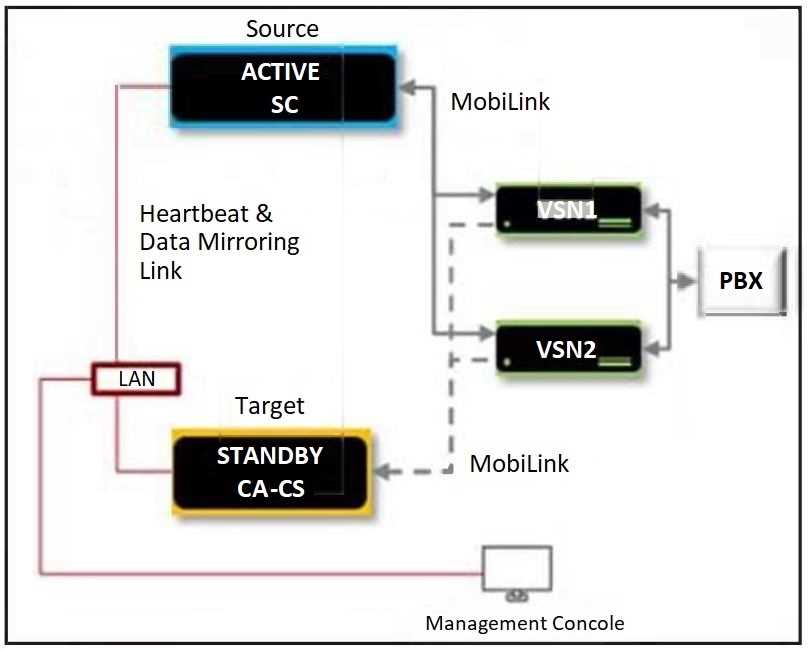
In a High Availability (HA) environment with both a Primary and a Secondary Consolidated server,
which statement about the Secondary Consolidated server is true?
- A. It means that both of the Consolidated servers are in active mode.
- B. It tells the Management Console to allow Avaya Messaging moves, adds, and changes.
- C. It will be used when the Primary Consolidated server becomes unavailable.
- D. It allows the VSN architecture to be set up for disaster recovery.
Answer:
C
Explanation:
In a High Availability (HA) environment, the Secondary Consolidated server acts as a standby system
that takes over when the Primary Consolidated server becomes unavailable. This ensures continuous
operation and availability of services, minimizing downtime and maintaining business continuity.
Reference: The role of the Secondary Consolidated server in an HA environment is outlined in
Avaya’s official documentation on High Availability configurations.
Question 9
When using distributed VSN configuration, how many advanced users can an entire Avaya Messaging
solution support?
- A. 4,800 advanced users
- B. 60.000 advanced users
- C. 80.000 advanced users
- D. 40.000 advanced users
Answer:
C
Explanation:
In a distributed Voice Server Node (VSN) configuration, an entire Avaya Messaging solution can
support up to 80,000 advanced users. This configuration allows for a scalable and robust messaging
system capable of handling a large number of users without compromising performance or
reliability.
Reference: The capacity of the Avaya Messaging solution in a distributed VSN configuration is
documented in Avaya’s technical resources and support materials1
.
Question 10
Which statement about the Avaya Messaging secondary/backup Consolidated Server is true?
- A. From Release 11, Carbonite software is no longer required to perform replication between the primary and secondary Consolidated Servers.
- B. Avaya Messaging Release 11 requires Carbonite software to perform replication between the primary and secondary Consolidated Servers.
- C. A secondary/backup Consolidated Server is no longer a supported option from Avaya Messaging release 11.
- D. The primary and secondary Consolidated Servers must be located on the same LAN.
Answer:
A
Explanation:
In Avaya Messaging, starting from Release 11, the need for Carbonite software to perform replication
between the primary and secondary Consolidated Servers has been eliminated. This change
simplifies the configuration and maintenance of the secondary/backup Consolidated Server, making
it easier to set up and manage high availability solutions.
Reference: This information is based on Avaya’s documentation and updates related to Avaya
Messaging.
Question 11
From which version of Avaya Messaging can you send SNMP alarms to an SAL gateway?
- A. 10.7
- B. 10.5
- C. 10.6
- D. 10.8
Answer:
A
Explanation:
Avaya Messaging version 10.7 is the version from which you can send SNMP alarms to an SAL
gateway. This functionality allows for the monitoring and management of system events and alarms
through the Simple Network Management Protocol (SNMP), providing administrators with the ability
to oversee and respond to system conditions effectively.
Reference: The capability of Avaya Messaging version 10.7 to send SNMP alarms to an SAL gateway is
documented in Avaya’s support resources1
.
Question 12
While doing a backup of the Avaya Messaging solution, which three folders must be chosen? (Choose
three.)
- A. UC\DBCom
- B. UC\Licenses
- C. UC\DB
- D. UC\Messages
- E. UC\Prompts
Answer:
ACE
Explanation:
When performing a backup of the Avaya Messaging solution, it is essential to choose the following
three folders:
UC\DBCom: This folder contains important configuration and communication data related to the
messaging system.
UC\DB: The database folder holds critical information about users, messages, and system settings.
Backing up this folder ensures that no data is lost during system recovery or migration.
UC\Prompts: The prompts folder contains voice prompts and greetings used by the messaging
system. Backing up this folder ensures that the system can continue to play the correct prompts to
users.
These folders collectively safeguard the functionality and integrity of the Avaya Messaging solution
during backup and restore operations.
Reference: The information is based on Avaya’s official documentation and guidelines for backing up
Avaya IX™ Messaging[1].
Question 13
Avaya Messaging stores the log files in which location?
- A. Avaya-Messaging stores the log files in which location?-Messaging Install drive > UC > IX > Logs
- B. Avaya-Messaging stores the log files in which location?-Messaging Install drive > UC > Logs
- C. Avaya-Messaging stores the log files in which location?-Messaging Install drive > UC > OL > Logs
- D. Avaya-Messaging stores the log files in which location?-Messaging Install drive > UC > Admin > Logs
Answer:
C
Explanation:
Avaya Messaging system stores its log files in a structured directory to facilitate easy access and
management. The logs are typically stored in the ‘OL’ directory, which stands for ‘Officelinx’, the
previous name for Avaya IX™ Messaging. This directory is located on the messaging install drive
under the ‘UC’ folder, which is the standard storage path for such files.
Reference: The storage location for log files in Avaya Messaging is detailed in the product’s support
documentation and related technical resources1
.
Question 14
In an Avaya Messaging HA solution, which tool can be used to monitor the database replication
between the Consolidated Server and Voice Server Nodes?
- A. UC Console
- B. traceSM
- C. Mobilink Profiler
- D. UM Monitor
Answer:
C
Explanation:
In an Avaya Messaging High Availability (HA) solution, the Mobilink Profiler tool is used to monitor
the database replication between the Consolidated Server (CS) and Voice Server Nodes (VSNs). It
provides insights into the synchronization process, ensuring data consistency and reliability across
the messaging system.
Reference: The Mobilink Profiler is a critical component for monitoring and maintaining database
replication in Avaya Messaging HA deployments.
Question 15
Which Self-Service action can be performed by an Avaya Messaging user?
- A. Mailbox Password Reset
- B. Test Message Waiting Indicator
- C. On-demand Cellular Phone outcall test
- D. Mailbox removal
Answer:
A
Explanation:
In Avaya IX™ Messaging, users have the ability to perform various self-service actions. One of the key
self-service actions that a user can perform is resetting their mailbox password. This feature allows
users to maintain the security of their messaging system by changing their password whenever
necessary, without the need for administrator intervention.
Reference: The self-service action of mailbox password reset is a standard feature in many messaging
systems, including Avaya IX™ Messaging, as indicated by the support documentation and user
guides1
.