Adobe AD0-E902 Exam Questions
Questions for the AD0-E902 were updated on : Mar 07 ,2026
Page 1 out of 4. Viewing questions 1-15 out of 51
Question 1
A Fusion scenario uses an HTTP module to create a new record.
Which response code indicates that the connection was successful?
- A. GREEN
- B. 200
- C. 402
- D. 500
Answer:
B
Explanation:
Understanding HTTP Response Codes:
HTTP response codes are standardized codes that indicate the result of a request made to a server:
2xx (Success): Indicates that the request was successfully received, understood, and processed by the
server.
200 OK: Specifically means that the request was successful, and the response contains the requested
data or confirms the operation's success.
Response Code for Creating a Record:
When using an HTTP module in Fusion to create a new record, a response code of 200 confirms that
the request to the server was successfully processed and the record creation was successful.
Why Not Other Options?
A . GREEN: This is not a valid HTTP response code. It might represent a status in some systems but is
unrelated to HTTP standards.
C . 402: This code indicates a payment required error, meaning the request cannot be fulfilled until
payment is made.
D . 500: This is a server-side error, indicating that something went wrong on the server during
processing.
Reference:
HTTP Status Code Documentation: 200 Success Response
Adobe Workfront Fusion Documentation: HTTP Module and Response Codes
Question 2
REST APIs commonly implement CRUD operations, including Create, Read, Update, and Delete.
Which two actions is an object ID generally required to be provided as an input? Choose two.
- A. Update
- B. Delete
- C. Respond
- D. Create
Answer:
A, B
Explanation:
Object ID in CRUD Operations:
REST APIs commonly use CRUD operations to interact with resources. The Object ID serves as a
unique identifier for the resource and is generally required for the following actions:
A . Update:
To update a specific resource, the API must know which resource to modify. The Object ID is used to
identify the exact resource that should be updated.
Example: A PUT or PATCH request typically requires the Object ID in the URL or body of the request.
URL Example:
PUT /tasks/{id}
B . Delete:
Similarly, when deleting a specific resource, the Object ID is needed to ensure the correct resource is
removed.
Example: A DELETE request requires the Object ID in the URL to target the specific resource.
URL Example:
DELETE /tasks/{id}
Why Not Other Options?
C . Respond: This is not a standard CRUD operation in REST APIs and does not involve an Object ID.
D . Create: The Create operation (typically POST) does not require an Object ID because the resource
does not yet exist. Instead, the API usually generates the Object ID after creation.
Reference:
REST API Documentation Best Practices: CRUD Operations
Experience League: Understanding CRUD in Workfront APIs
Question 3
A user needs to find a fields options within a custom form field. The details for the request are shown
in the image below: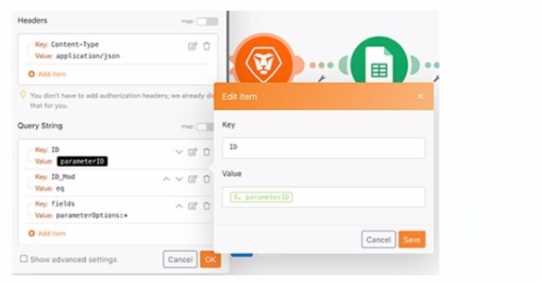
Which option is applicable for the URL text box?
A.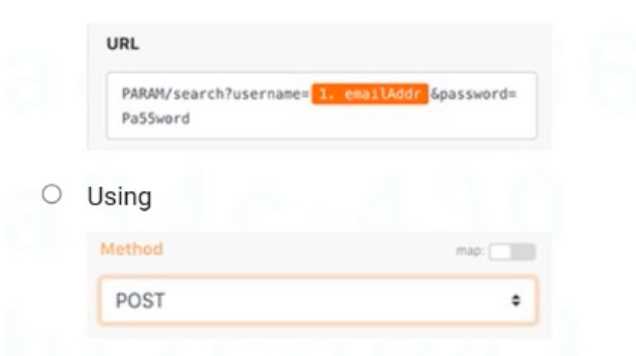
B.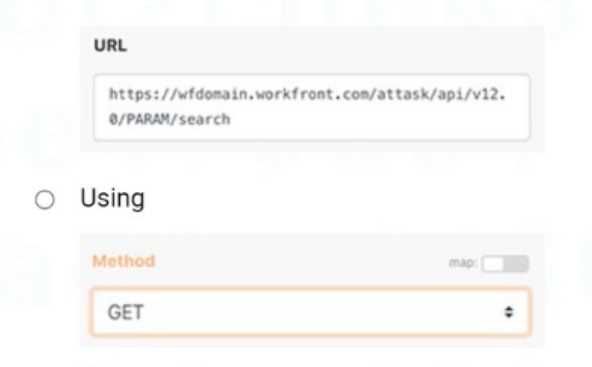
C.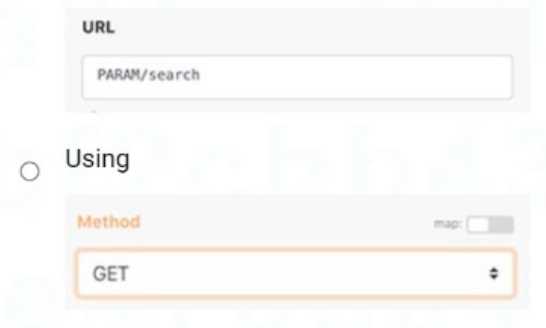
- A. Option A
- B. Option B
- C. Option C
Answer:
B
Explanation:
Step-by-Step Explanation
Purpose of the Query:
The task is to retrieve field options from a custom form field. This operation involves fetching data,
not creating or modifying it, which requires a GET method.
Correct API Structure:
The URL must follow Workfront's API structure:
ruby
Copy
https://{your-workfront-domain}/attask/api/{version}/{endpoint}
Option B follows this standard structure, where:
wfdomain.workfront.com is the placeholder for the Workfront instance.
/attask/api/v12.0 specifies the API version.
/PARAM/search is the endpoint to search for parameters or fields.
Why Not Other Options?
A: The use of POST is incorrect because it is meant for creating or updating resources, not retrieving
data. Additionally, the URL structure is incorrect and includes unnecessary query strings (username,
password) not relevant for this operation.
C: While the method GET is correct, the URL (PARAM/search) is incomplete and lacks the required
Workfront API structure, making it invalid.
Reference
Workfront API Documentation: Querying and Retrieving Custom Form Field Data
Experience League Community: Best Practices for Using GET Methods in Workfront API
Question 4
A Fusion user needs to connect Workfront with a third-party system that does not have a dedicated
app connector in Fusion.
What should the user do to build this integration?
- A. Determine the API structure and authentication protocols for the third-party system and then use the appropriate Universal Connector
- B. Create a new connection to the third-party system in the connections area and then the Universal Connectors will be available for use
- C. Use the Workfront Custom API module to set up the connection using API calls to the third-party system
Answer:
A
Explanation:
Understanding the Requirement:
If a third-party system does not have a dedicated app connector in Workfront Fusion, users can still
build an integration using Universal Connectors.
Universal Connectors in Fusion allow users to configure custom API calls, enabling communication
with systems that lack pre-built integrations.
Steps to Build the Integration:
Determine the API Structure: Review the third-party system's API documentation to understand the
available endpoints, data formats (e.g., JSON, XML), and request/response structure.
Identify Authentication Protocols: Determine how the third-party system handles authentication
(e.g., API keys, OAuth 2.0, Basic Auth).
Configure the Universal Connector: Use modules like HTTP Request or Webhook to make API calls to
the third-party system based on the documented structure.
Why Not Other Options?
B . Create a new connection to the third-party system in the connections area and then the Universal
Connectors will be available for use: Creating a new connection in the connections area is only
applicable for predefined connectors, not for Universal Connectors, which require manual
configuration for unsupported systems.
C . Use the Workfront Custom API module to set up the connection using API calls to the third-party
system: The Workfront Custom API module is specifically designed for Workfront’s own API, not for
connecting to third-party systems.
Reference:
Adobe Workfront Fusion Documentation: Using Universal Connectors for Custom Integrations
Experience League Community: Integrating Third-Party Systems Using Workfront Fusion Universal
Modules
Question 5
A custom API call to a web service is used inside of a high volume iteration. The module that calls the
web service sometimes returns an error - 429: Too many requests.
Which two actions may be used to address this error? (Choose two.)
- A. Add a sleep module just prior to the module generating the error
- B. Use an ignore directive on the module generating the error
- C. Add a module to test the service for errors
- D. Use a break directive on the module generating the error
Answer:
A, C
Explanation:
When encountering the error 429: Too many requests, which indicates the web service is being
overwhelmed by requests, the following actions can help:
A . Add a Sleep Module:
Adding a Sleep module introduces a delay between iterations, reducing the frequency of API calls.
By slowing down the rate of requests, you avoid hitting the rate limits of the web service, thus
reducing the chances of receiving a 429 error.
This approach is useful for managing high-volume iterations without overloading the external
service.
C . Add a Module to Test the Service for Errors:
Adding a module to test the service's response before making a call can help prevent the 429 error
by checking if the service is ready to handle requests.
This preemptive check allows the scenario to conditionally execute, ensuring that it doesn't
overwhelm the service and respects the API rate limits.
Why Not Other Options?
B . Use an Ignore Directive: Ignoring errors can be risky because it would cause the scenario to ignore
429 errors, possibly leading to failed API calls that are not addressed. Ignoring an error doesn’t solve
the issue of too many requests being sent to the service.
D . Use a Break Directive: The Break directive would stop the execution, which is counterproductive
when trying to resolve the issue by reducing the rate of requests. It would not address the root cause
of too many requests.
Reference:
Adobe Workfront Fusion Documentation: Handling API Rate Limiting with Sleep and Error Handling
Experience League Community: Managing Web Service Errors in High-Volume Iterations
Question 6
A source system should provide a Workfront task ID, but queries keep resulting in an error.
Which module helps determine if the task ID is valid?
- A. Read Record
- B. Read Related Record
- C. Search Record
Answer:
C
Explanation:
To determine if a task ID is valid in Workfront, you can use the Search Record module. This module
allows you to search for records, such as tasks, within Workfront based on a given ID.
Search Record Module:
This module can be used to search for a specific task in Workfront by its task ID.
If the task ID is valid, it will return the task details; if the task ID is invalid, it will return an error or no
results.
The Search Record module is designed to check if a specific record exists in Workfront, making it ideal
for verifying the validity of a task ID.
Why Not Other Options?
A . Read Record: This module reads a specific record by ID but does not search across multiple
records. It may not provide the flexibility needed to check if a task ID is valid without knowing the
exact task ID.
B . Read Related Record: This module is used to read a related record (e.g., reading the project
related to a task). It is not suitable for validating a task ID directly.
Reference:
Adobe Workfront Fusion Documentation: Search Record Module Usage
Experience League Community: Verifying Record IDs in Workfront Fusion
Question 7
What are two required elements of a test case? (Choose two.)
- A. Expected outcome of test
- B. Name of test owner
- C. Clear procedure for completing the test
- D. Source code being tested
Answer:
A, C
Explanation:
A . Expected Outcome of Test
A test case must clearly state what the expected outcome is, providing a standard against which the
results can be measured.
This ensures testers can validate whether the scenario behaves as intended.
C . Clear Procedure for Completing the Test
A well-defined procedure outlines the exact steps required to execute the test, ensuring consistent
and repeatable testing.
This reduces ambiguity and helps identify whether errors are due to the scenario configuration or
improper test execution.
Why Not Other Options?
B . Name of Test Owner: While helpful for accountability, the name of the test owner is not a
required component of the test case itself.
D . Source Code Being Tested: Fusion scenarios do not typically involve source code. Instead, the
focus is on workflow execution and configuration, making this element irrelevant.
Reference:
Workfront Training Materials: Test Case Design Best Practices
Adobe Workfront Fusion Documentation: Testing and Debugging Scenarios
Question 8
A user queried Salesforce for user information, and it returned a name, email address, and user ID.
The user would like to assign a task in Workfront.
Which steps are required to assign the task?
- A. Assign the task using the provided user ID > add the user ID to the assignment field
- B. Query Workfront for user based on email address > assign task using returned ID
- C. Query Workfront based on the user's name > assign task using returned email address
Answer:
B
Explanation:
Step 1: Query Workfront for User Based on Email Address
Salesforce provides the email address of the user. Since Workfront uses user IDs for task
assignments, the email address can be used as a unique identifier to query Workfront’s database.
A query module in Workfront Fusion retrieves the corresponding Workfront user ID using the
provided email address.
Step 2: Assign Task Using Returned ID
After retrieving the Workfront user ID, use it in the assignment field of the task module in Fusion.
The task assignment process requires a valid user ID, ensuring proper linkage and assignment within
Workfront.
Why Not Other Options?
A . Assign the task using the provided user ID > add the user ID to the assignment field: The
Salesforce user ID is not recognized by Workfront. It is necessary to query Workfront to convert the
email into a Workfront-compatible user ID.
C . Query Workfront based on the user's name > assign task using returned email address: Workfront
uses user IDs, not email addresses, for task assignments. Names are also not unique and could cause
assignment errors.
Reference:
Adobe Workfront Fusion Documentation: Task Assignments Using User IDs
Experience League Community: Mapping Salesforce Data to Workfront Tasks
Question 9
According to Workfront's training on scenario testing, what are three of the essential elements of a
test plan? (Choose three.)
- A. Roadmap requirements
- B. Description of expected behavior
- C. Specific event/trigger per scenario
- D. Description of testing steps
- E. Executive sponsor expectations
Answer:
BCD
Explanation:
Workfront's training on scenario testing emphasizes the importance of a well-structured test plan to
ensure scenario reliability and accuracy. The three essential elements include:
B . Description of Expected Behavior:
This provides clarity on what the scenario is supposed to achieve when executed successfully.
It serves as a benchmark for evaluating the outcome of test executions.
C . Specific Event/Trigger per Scenario:
Identifying and testing specific triggers ensures that the scenario starts under the correct conditions.
This is crucial for verifying the proper configuration of the scenario’s start point.
D . Description of Testing Steps:
Outlining step-by-step instructions for the testing process ensures that all aspects of the scenario are
tested systematically.
It helps identify potential bottlenecks or areas for improvement in the scenario’s configuration.
Why Not Other Options?
A . Roadmap requirements: This pertains to project planning and is not directly relevant to scenario
testing.
E. Executive sponsor expectations: While valuable for overall project alignment, it is not an essential
component of a technical test plan.
Reference:
Workfront Training Materials: Best Practices for Scenario Testing
Experience League Documentation: How to Design and Execute a Test Plan for Workfront Fusion
Scenarios
Question 10
A Fusion user notices that a third-party web service is sometimes returning a connection error -"
"service is not reachable". However, the module executes successfully a few minutes later in a new
execution.
Which action increases the success rate of the executions?
- A. Adding an error handler that will notify the system owner
- B. Making use of the default error handling
- C. Adding a Break directive to the module
Answer:
B
Explanation:
When dealing with intermittent errors, such as "service is not reachable," the default error handling
in Adobe Workfront Fusion is often sufficient to improve execution success rates.
Default Error Handling:
Fusion automatically retries operations when transient errors, such as network or connection issues,
occur.
By leveraging this built-in functionality, the system will attempt to re-execute the failing module after
a brief delay, which is often enough for the external service to become reachable again.
Why Not Other Options?
A . Adding an error handler that will notify the system owner: While notifying the owner can be
useful for monitoring purposes, it does not directly address improving the success rate of executions.
C . Adding a Break directive to the module: Adding a Break directive will stop the execution entirely,
which is counterproductive in this case, as the service typically becomes reachable again after a short
time.
Reference:
Adobe Workfront Fusion Documentation: Default Error Handling Mechanisms
Experience League Community: Managing Intermittent API Errors in Fusion
Question 11
Which two statements about working with incomplete executions are true? (Choose two.)
- A. When incomplete executions are togged, a user must review the History tab to understand the error and then manually run the entire scenario to resolve
- B. Incomplete executions are not stored by default. This option must be enabled in the scenario settings in each scenario
- C. Incomplete executions should be avoided because they only give visibility into better scenario design
- D. When resolving an incomplete execution, the scenario will process the bundle of data through the remainder of the scenario not yet executed
Answer:
B, D
Explanation:
B . Incomplete Executions Are Not Stored by Default:
By default, Workfront Fusion does not store incomplete executions unless this setting is explicitly
enabled in the scenario's settings.
This feature needs to be activated for troubleshooting and manually resolving incomplete executions
later.
D . Resolving Incomplete Executions:
When an incomplete execution is resumed, the scenario picks up from the point of failure and
processes the remaining steps with the data bundle that caused the error.
This ensures that the scenario completes its intended process without restarting entirely.
Why Not Other Options?
A . When incomplete executions are togged, a user must review the History tab to understand the
error and then manually run the entire scenario to resolve: This is incorrect because incomplete
executions do not require restarting the entire scenario; they continue from the point of failure.
C . Incomplete executions should be avoided because they only give visibility into better scenario
design: This statement is misleading. Incomplete executions are often inevitable and provide critical
insights into handling errors and improving scenarios.
Reference:
Adobe Workfront Fusion Documentation: Working with Incomplete Executions
Experience League Community: How to Enable and Manage Incomplete Executions in Fusion
Question 12
A Fusion Developer receives frequent notifications that a specific Scenario has been stopped. Upon
investigation, the developer notes that there is nothing wrong with the data or process in the
scenario, but that the error always occurs on a specific module that calls a third-party system. The
error recorded is consistently a service unavailable error, particularly during times of high network
traffic to the target system.
Which action should the Fusion Developer take to reduce the number of times the scenario is
automatically stopped by Fusion?
- A. Update the Scenario settings to automatically retry failed executions.
- B. Update the Module settings to automatically ignore failed executions.
- C. Add an error handler to the Module and select a Break directive.
- D. Add an additional route after the failing module with a repeater to retry errors.
Answer:
A
Explanation:
In this scenario, the error consistently arises due to the unavailability of a third-party service during
high traffic times. This is a temporary issue and does not indicate a problem with the data or process.
The recommended approach in such cases is to configure the scenario to retry failed executions:
Update Scenario Settings:
In Workfront Fusion, you can configure scenarios to automatically retry a failed execution.
This option ensures that temporary issues, like service unavailability, are retried after a delay,
reducing the chances of the scenario being stopped permanently.
This is particularly useful when dealing with network traffic spikes or third-party API throttling.
Why Not Other Options?
B . Update the Module settings to automatically ignore failed executions: Ignoring failed executions
would cause incomplete or incorrect data to flow through the scenario, leading to potential
downstream issues.
C . Add an error handler to the Module and select a Break directive: While error handlers are useful,
the Break directive stops the scenario from processing further, which is not ideal for a temporary
issue.
D . Add an additional route after the failing module with a repeater: Adding a repeater increases
complexity and is unnecessary when the retry option is already available in scenario settings.
Reference:
Adobe Workfront Fusion Documentation: Scenario Settings and Error Handling
Experience League Community: Handling API Rate Limits and Errors in Workfront Fusion
Question 13
Which two features or modules can be used to create conditional or nested error handling when
using Error Handling Directives? (Choose two.)
- A. Text Parser
- B. Filters
- C. Workfront app
- D. Routers
Answer:
BD
Explanation:
In Adobe Workfront Fusion, error handling directives are used to manage and respond to errors
during scenario execution. These directives allow the implementation of conditional or nested error
handling mechanisms, ensuring workflows can adapt and recover from unexpected issues efficiently.
Among the features and modules provided by Fusion:
Filters:
Filters are essential components in Workfront Fusion. They allow you to define specific conditions to
control the flow of data between modules.
They enable conditional processing by allowing or restricting the passage of data based on defined
criteria, which is fundamental for creating dynamic and conditional workflows.
When used with error handling, filters can evaluate whether certain data meets criteria to determine
alternative pathways, thus enabling conditional error handling.
Routers:
Routers split the execution of a scenario into multiple branches based on specific conditions.
Each branch can be configured to handle different error types or conditions, allowing nested error
handling and custom error recovery paths.
They are particularly useful when you need to define distinct responses for various error cases within
a single scenario.
Eliminated Options:
A . Text Parser: While text parsers process and extract data from strings, they are not directly involved
in error handling within scenarios.
C . Workfront App: The Workfront app is primarily for interacting with Workfront features and
functionalities, not directly related to error handling within Fusion scenarios.
Reference:
Adobe Workfront Fusion Documentation: Error Handling Directives Overview
Adobe Workfront Community: Filters and Routers in Conditional Logic Workflows
Experience League Documentation:
https://experienceleague.adobe.com
Question 14
A Fusion user must archive the last five versions of a scenario for one year.
What should the user do?
- A. Save the scenario frequently
- B. Download the scenario blueprints
- C. Clone the scenario anytime the design changes
- D. Find previous versions using the History tab
Answer:
B
Explanation:
Step by Step Comprehensive Detailed Explanation:
Understanding the Requirement:
The user needs to archive the last five versions of a scenario for one year.
Archiving ensures there is a record of previous versions in case rollback or review is needed.
Option Analysis:
A . Save the scenario frequently:
Incorrect. While frequent saving ensures changes are not lost, it does not provide an archival
mechanism for version history.
B . Download the scenario blueprints:
Correct. Downloading blueprints of the scenario allows the user to store version snapshots
externally. Blueprints include the complete design and settings of the scenario, making them ideal
for archival purposes.
C . Clone the scenario anytime the design changes:
Incorrect. Cloning creates duplicates of the scenario but does not inherently manage or track version
history for archival purposes.
D . Find previous versions using the History tab:
Incorrect. The History tab only shows recent edits and logs but does not provide a long-term
archiving solution.
Why Downloading Blueprints is Best:
External Storage: Blueprints can be downloaded and stored securely for long-term use.
Restoration: A saved blueprint can be re-imported into Fusion to restore a scenario exactly as it was.
Version Control: Allows the user to manually manage and organize multiple scenario versions over
time.
Implementation Steps:
Go to the scenario in Workfront Fusion.
Use the Download Blueprint option to save a copy of the scenario.
Label and organize the blueprints by version and date for easy retrieval later.
Question 15
A series of queries return several JSON packets that include a combination of nested arrays
representing objects and their fields.
How should that information be arranged if each object needs to be processed through a portion of
the scenario?
- A. Define the data structure > then run the Iterator to Parse each JSON packet
- B. Concatenate the JSON > Define the data structures > Parse the JSON > then run the Iterator
- C. Define the data structure > Parse the JSON > then process arrays in the Iterator
- D. Merge the JSON > Parse the JSON > then use the Iterator
Answer:
C
Explanation:
Step by Step Comprehensive Detailed Explanation:
Understanding the Problem:
Multiple JSON packets with nested arrays are being returned by queries.
The goal is to process each object within these JSON arrays through the scenario.
Option Analysis:
A . Define the data structure > then run the Iterator to Parse each JSON packet:
Incorrect. While defining a data structure is necessary, running the Iterator first would fail to process
the JSON properly if it is not parsed.
B . Concatenate the JSON > Define the data structures > Parse the JSON > then run the Iterator:
Incorrect. Concatenation is unnecessary for this scenario since each JSON packet can be parsed and
processed independently.
C . Define the data structure > Parse the JSON > then process arrays in the Iterator:
Correct. The correct approach involves defining a data structure to map the JSON, parsing it to extract
the data into usable fields, and then using an Iterator module to process each object in the nested
arrays.
D . Merge the JSON > Parse the JSON > then use the Iterator:
Incorrect. Merging JSON packets is not required unless you explicitly need to combine data from
multiple packets into a single structure, which is not mentioned in this scenario.
Why This Workflow Works:
Defining the Data Structure: Helps Fusion understand and map the JSON fields for processing.
Parsing the JSON: Extracts the data into fields and arrays that can be further processed.
Using the Iterator: Breaks down the nested arrays into individual objects for sequential processing
through the scenario.
Implementation Steps:
Use a Define Data Structure module to define the JSON schema (fields, arrays, and objects).
Add a Parse JSON module to convert raw JSON packets into mapped data fields.
Add an Iterator module to process individual objects in the nested arrays.