Adobe AD0-E718 Exam Questions
Questions for the AD0-E718 were updated on : Mar 07 ,2026
Page 1 out of 4. Viewing questions 1-15 out of 50
Question 1
An Adobe Commerce Architect is working on a scanner that will pull prices from multiple external
product feeds. The Architect has a list of vendors and decides to create new config file
marketplacejeeds.xml.
Which three steps can the Architect take to ensure validation of the configuration files with unique
validation rules for the individual and merged files? (Choose three.)
- A. Implement validation rules in the Converter class for the Config Reader
- B. Add the Uniform Resource Name to the XSD file in the config XML file.
- C. Provide schema to validate a merged file.
- D. Provide schema to validate an individual file.
- E. Create a class that implements \Magento\Framework\Config\Datalnterface.
- F. Create validation rules in marketplace.schema.xsd.
Answer:
BCD
Explanation:
To ensure validation of the configuration files with unique validation rules for the individual and
merged files, you need to do the following steps:
Add the Uniform Resource Name (URN) to the XSD file in the config XML file. The URN is a unique
identifier for a resource that follows a specific syntax. For example:
<config
xmlns:xsi="http://www.w3.org/2001/XMLSchema-instance"
xsi:noNamespaceSchemaLocation="urn:magento:module:Vendor_Module:etc/marketplacefeeds.xsd
">
Provide schema to validate a merged file. The schema defines the structure and constraints of the
XML document that represents the merged configuration from all modules. The schema file should
be named as <config_file_name>.xsd and placed in the etc directory of the module. For example:
marketplacefeeds.xsd
Provide schema to validate an individual file. The schema defines the structure and constraints of the
XML document that represents the configuration from a single module. The schema file should be
named as <config_file_name>_merged.xsd and placed in the etc directory of the module. For
example:
marketplacefeeds_merged.xsd
Reference:
https://devdocs.magento.com/guides/v2.4/extension-dev-guide/build/XSD-XML-validation.html
Question 2
An Architect is investigating a merchant's Adobe Commerce production environment where all
customer session data is randomly being lost. Customer session data has been configured to be
persisted using Redis, as are all caches (except full page cache, which is handled via Varnish).
After an initial review, the Architect is able to replicate the loss of customer session data by flushing
the Magento cache storage, either via the Adobe Commerce Admin Panel or running bin/iuagento
cache: flush on the command line. Refreshing all the caches in the Adobe Commerce Admin Panel or
running bin/magento cache: clean on the command line does not cause session data to be lost.
What should be the next step?
- A. Educate the merchant to not flush cache storage and only refresh the caches in future.
- B. Set the 'Stores > Configuration' option for "Store Session Data Separately' to 'Yes' in the Adobe Commerce Admin Panel.
- C. Check app/etc/evn.php and make sure that the Redis configuration for caches and session data use different database numbers.
Answer:
C
Explanation:
Checking app/etc/env.php and making sure that the Redis configuration for caches and session data
use different database numbers is the next step. This is because using the same database number for
both caches and session data can cause session data to be lost when flushing the cache storage. By
using different database numbers, the session data can be isolated from the cache data and avoid
being overwritten.
See Use Redis for session storage in the Adobe Commerce Help Center1.
Reference:
https://experienceleague.adobe.com/docs/commerce-operations/configuration-guide/cache/redis/redis-session.html?lang=en1
Question 3
An Adobe Commerce Architect is setting up a Development environment for an on-premises project
that will be used for developers to specifically test functionality, not performance, before being
passed to the Testing team.
The Magento application must run with the following requirements:
1. Errors should be logged and hidden from the user
2. Cache mode can only be changed from Command Line
3. Static files should be created dynamically and then cached
Which Application Mode is required to achieve this?
- A. Default Mode
- B. Production Mode
- C. Developer Mode
Answer:
C
Explanation:
Developer Mode is the mode best suited to achieve the requirements set out by the Adobe
Commerce Architect. In Developer Mode, errors are logged and hidden from the user, and the cache
mode can only be changed from the command line. Additionally, static files are created dynamically
and then cached, which is the desired behavior for this project.
Developer Mode is required to achieve the requirements. This is because developer mode enables
the following features: Errors are logged and hidden from the user; cache mode can only be changed
from command line; static files are created dynamically and then cached. See Application modes in
the
Adobe
Commerce
Help
Center
.
Reference:
https://experienceleague.adobe.com/docs/commerce-operations/configuration-guide/setup/application-modes.html?lang=en
Question 4
An Adobe Commerce Architect is supporting deployment and building tools for on-premises Adobe
Commerce projects. The tool is executing build scripts on a centralized server and using an SSH
connection to deploy to project servers.
A client reports that users cannot work with Admin Panel because the site breaks every time they
change interface locale.
Considering maintainability, which solution should the Architect implement?
- A. Edit project env.php file, configure 'admin_locales_for.build' value, and specify all required locales
- B. Adjust the tool's build script and specify required locales during 'setup:static-content:deploy' command
- C. Modify project config.php file, configure 'admin_locales_for_deploy' value, and specify all required locales
Answer:
B
Explanation:
The ‘setup:static-content:deploy’ command allows you to generate static view files for specific
locales. If you do not specify any locales, the command uses the default locale that is set in the
configuration. To avoid breaking the site when changing interface locale in the Admin Panel, you
need to generate static view files for all the locales that you want to use. You can do this by adjusting
the tool’s build script and adding the locales as arguments to the ‘setup:static-content:deploy’
command. For example:
bin/magento setup:static-content:deploy en_US fr_FR de_DE
This will generate static view files for English, French, and German locales. Reference:
https://experienceleague.adobe.com/docs/commerce-operations/configuration-guide/setup/static-view.html?lang=en#generate-static-view-files
Question 5
An Architect is configuring the preload.keys for Redis on an Adobe Commerce on-premise instance.
The Architect discovers that the following cache keys are loaded on each frontend request:
eav_entity_types,
GLOBAL_PLUGIN_LIST, DB_IS_UP_TO_DATE , SYSTEM_DEFAULT.
• The id_prefix of the frontend =>page_cache is set to 061_.
• The id_prefix of frontend => default: is not set.
• The Architect has enabled and configured Redis L2 caching.
How should the preload.keys be configured?
A)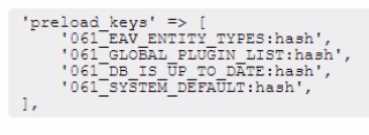
B)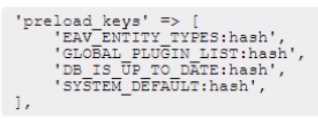
C)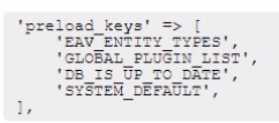
D)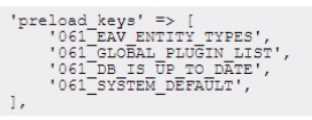
- A. Option A
- B. Option B
- C. Option C
- D. Option D
Answer:
A
Explanation:
The preload.keys should be configured as shown in option A. This will allow Redis to preload the
cache keys that are loaded on every page request, such as eav_entity_types, GLOBAL_PLUGIN_LIST,
DB_IS_UP_TO_DATE , SYSTEM_DEFAULT. The keys should include the database prefix (061_) and the
:hash suffix for L2 caching. The :hash suffix tells Redis to load only the hashes from Redis and the data
from local storage. This will reduce the pressure on Redis and improve the performance of Magento.
Question 6
An Adobe Commerce Architect needs to set up two websites on a single Adobe Commerce instance
with base URLs: example.com and website2.example.com.
How should the Architect configure this project so that both websites can use the same customer
base?
- A. Change Session Cookie attribute to "SameSite=None"
- B. Disable Session Validation for "HTTP_X_FORWARDED_FOR" header
- C. Set Cookie Domain for both websites to ".example.com"
Answer:
C
Explanation:
By setting the same cookie domain for both websites, the customer base can be shared between
both websites, as the customer will be authenticated by the same cookie across both sites. This will
ensure that customers don't have to log in twice when switching between the two sites.
Setting Cookie Domain for both websites to “.example.com” will allow both websites to use the same
customer base. This is because the cookie domain determines which websites can access the
customer information stored in the cookie. By using a common domain, both websites can share the
same customer cookie. See Multiple websites or stores in the Adobe Commerce Help Center
.
Reference:
https://experienceleague.adobe.com/docs/commerce-operations/configuration-guide/multi-sites/ms-overview.html?lang=en
Question 7
An Architect needs to create an additional regional UK website with its own website currency set to
GBP in Adobe Commerce. An existing US website is using USD as a default base and website
currency.
After the first week of sales in the new UK website, an administrator notices that all sales totals in
Sales Orders report show £0.00.
How should this issue be resolved?
- A. Make sure that orders are shipped and not left in processing state.
- B. Configure currency rates for GBP and USD, so they are not empty.
- C. Refresh Lifetime Statistics for "Total Invoiced".
Answer:
B
Explanation:
To do this, the Architect needs to configure the currency rates for both GBP and USD in the Admin
Panel, so that the correct exchange rates are applied to each currency. This will ensure that the
correct amounts are shown in the sales orders report, and will also make sure that the correct
amount is charged to customers in the new UK website.
Configuring currency rates for GBP and USD, so they are not empty, will resolve the issue of sales
totals showing £0.00 in Sales Orders report. This is because Commerce uses currency rates to
calculate sales totals for different currencies. See Currency Setup in the Adobe Commerce User
Guide
3. Reference: https://experienceleague.adobe.com/docs/commerce-operations/configuration-guide/cache/configure-varnish-commerce.html?lang=en
https://docs.magento.com/user-guide/stores/currency-configuration.html3
Question 8
An Adobe Commerce Architect notices that queue consumers close TCP connections too often on
Adobe Commerce Cloud server leading to delays in processing messages.
The Architect needs to make sure that consumers do not terminate after processing available
messages in the queue when CRON job is running these consumers.
How should the Architect meet this requirement?
- A. Increase multiple_process limit to spawn more processes for each consumer.
- B. Set CONSUMER_WAIT_FOR_MAX_MESSAGES variable true in deployment stage.
- C. Change max_messages from 10,000 to 1,000 for CRON_CONSUMER_RUNNERvariable.
Answer:
B
Explanation:
The best way to meet this requirement is to set the CONSUMERWAITFORMAXMESSAGES variable to
true in the deployment stage. This variable will ensure that the consumer will not terminate when
there are no more messages in the queue and will instead wait until a new message is available,
preventing it from closing the connection prematurely. Additionally, the multiple_processes limit can
be increased to spawn more processes for each consumer, which will help ensure that messages can
be processed faster.
Setting CONSUMER_WAIT_FOR_MAX_MESSAGES variable true in deployment stage will make sure
that consumers do not terminate after processing available messages in the queue when CRON job is
running these consumers. This will prevent consumers from closing TCP connections too often and
improve performance. See Start message queue consumers in the Adobe Commerce Help Center
.
Reference:
https://experienceleague.adobe.com/docs/commerce-operations/configuration-guide/message-queues/consumers.html?lang=en
https://experienceleague.adobe.com/docs/commerce-
operations/configuration-guide/cli/start-message-queues.html
Question 9
An Adobe Commerce Architect is troubleshooting an issue on an Adobe Commerce Cloud project
that is not yet live.
The developers migrate the Staging Database to Production in readiness to Go Live. However, when
the developers test their Product Import feature, the new products do not appear on the frontend.
The developers suspect the Varnish Cache is not being cleared. Staging seems to work as expected.
Production was working before the database migration.
What is the likely cause?
- A. The Fastly credentials in the Production Database are incorrect.
- B. A deployment should have been done on Production to initialize Fastly caching.
- C. The site URLs in the Production Database are the URLs of the Staging Instance and must be updated.
Answer:
A
Explanation:
The Fastly credentials in the Production Database are incorrect. This means that the Varnish cache
cannot be cleared by Commerce when new products are imported. The Fastly credentials should be
updated to match the Production environment. See Configure Fastly credentials in the Adobe
Commerce Help Center. Reference: https://experienceleague.adobe.com/docs/commerce-operations/configuration-guide/cache/use-varnish-cache.html?lang=en
https://support.magento.com/hc/en-us/articles/360006008192-Configure-
Fastly-credentials
Question 10
A client is migrating to Adobe Commerce Cloud and has approximately 800 existing redirects that
must be implemented. The number of redirects cannot be reduced because all redirects are specific,
and do not match any pattern.
How should the redirects be configured to ensure performance?
- A. Use VCL snippets to offload the redirect to Fastly.
- B. Add each redirect in the .magento/routes.yaml file.
- C. Add each redirect as a URL rewrite via the admin Ul.
Answer:
A
Explanation:
The best option for configuring the redirects is to use VCL snippets to offload the redirects to Fastly.
This is a Content Delivery Network (CDN) that can handle large numbers of requests quickly and
efficiently, ensuring that your redirects will be processed quickly and reliably. Furthermore, VCL
snippets are easy to set up and can be reused for other redirects, making them an efficient and cost-
effective solution for managing large numbers of redirects.
For Adobe Commerce on cloud infrastructure projects, configuring numerous non-regex redirects and
rewrites in the routes.yaml file can cause performance issues. If your routes.yaml file is 32 KB or
larger, offload your non-regex redirects and rewrites to Fastly.
See Offload non-regex redirects to
Fastly instead of Nginx (routes) in the Adobe Commerce Help Center1. Reference:
https://experienceleague.adobe.com/docs/commerce-cloud-service/user-guide/configure/routes/redirects.html?lang=en21
Question 11
An Adobe Commerce Architect needs to ensure zero downtime during the deployment process of
Adobe Commerce on-premises. Which two steps should the Architect follow? (Choose two.)
- A. Run bin/magento setup:upgrade --keep-generated to Upgrade database
- B. Run bin/magento setup:upgrade —dry-run=true to upgrade database
- C. Rim bin/magento setup:upgrade --convert-old-scripts=true to Upgrade database
- D. Enable config flag under developer/zere _down_time/enabled
- E. Enable config flag under deployment/blue_ green/enabled
Answer:
AE
Explanation:
To ensure zero downtime during the deployment process of Magento 2 on-premises, the Architect
should follow two steps:
Run bin/magento setup:upgrade --keep-generated to upgrade database. This will skip the
regeneration of static content and code files during the upgrade process, which can take a long time
and cause downtime. The static content and code files should be generated separately before or
after the upgrade process.
Enable config flag under deployment/blue_green/enabled. This will enable the blue-green
deployment strategy, which creates a copy of the current production environment (blue) and deploys
the new code to it (green). Then, it switches the traffic from the blue environment to the green
environment without any downtime. This option can be enabled by adding a line like
deployment/blue_green/enabled: true to the .magento.env.yaml file.
Question 12
An Architect needs to review a custom product feed export module that a developer created for a
merchant. During final testing before the solution is deployed, the product feed output is verified as
correct. All unit and integration tests for code pass.
However, once the solution is deployed to production, the product price values in the feed are
incorrect for several products. The products with incorrect data are all currently part of a content
staging campaign where their prices have been reduced.
What did the developer do incorrectly that caused the feed output to be incorrect for products in the
content staging campaign?
- A. The developer forgot to use the getContentStagingValue() method to retrieve the active campaign value of the product data
- B. The developer retrieved product data directly from the database using the entity_id column rather than a collection or repository.
- C. The developer did not check for an active content staging campaign and emulates the campaign state when retrieving product data.
Answer:
C
Explanation:
Based on the given scenario, it is likely that option C - "The developer did not check for an active
content staging campaign and emulates the campaign state when retrieving product data" - is the
correct answer. It appears that the developer did not take into account the active content staging
campaign and did not properly adjust the product data when generating the product feed. As a
result, the feed output is incorrect for products that are part of the staging campaign and have their
prices reduced. The correct solution would be to check for an active content staging campaign and
properly adjust the product data to reflect the campaign state.
Question 13
An Adobe Commerce Architect runs the PHP Mess Detector from the command-line interface using
the coding standard provided with Adobe Commerce. The following output appears:
The Architect looks at the class and notices that the constructor has 15 parameters. Five of these
parameters are scalars configuring the behavior of Kyservice.
How should the Architect fix the code so that it complies with the coding standard rule?
- A. Introduce a new class accepting those five scalars and use it in the constructor and the remaining logic of Myservice
- B. Modify the code of Myservice so the number of different classes, interfaces, and scalar types used as parameters in the constructor and other methods is less than 13
- C. Modify the code of Myservice so that the number of different classes and interfaces referenced anywhere inside the class is less than 13
Answer:
A
Explanation:
The best way to fix the code so that it complies with the coding standard rule is to introduce a new
class accepting those five scalars and use it in the constructor and the remaining logic of Myservice.
This will reduce the number of different classes, interfaces, and scalar types used as parameters in
the constructor and other methods to less than 13, which is the limit set by the coding standard.
Additionally, any extra code that is not necessary can be removed to reduce the general complexity
of the class and improve readability.
The coding standard rule that is violated by the code is the Coupling Between Objects (CBO) metric.
This metric measures the number of different classes and interfaces that a class depends on. A high
CBO value indicates that the class is tightly coupled with other classes and interfaces, which makes it
harder to maintain and test. The recommended CBO value for Adobe Commerce classes is less than
13. To reduce the CBO value of Myservice, the Architect should introduce a new class that
encapsulates the five scalar parameters that configure the behavior of Myservice. This way, the
constructor of Myservice will only depend on one additional class instead of five scalars, and the CBO
value will be reduced by four. Reference:
https://devdocs.magento.com/guides/v2.4/coding-standards/code-standard-php.html#coupling-between-objects
Question 14
The development of an Adobe Commerce website is complete. The website is ready to be rolled out
on the production environment.
An Architect designed the system to run in a distributed architecture made up of multiple backend
webservers that process requests behind a Load Balancer.
After deploying the system and accessing the website for the first time, users cannot access the
Customer Dashboard after logging in. The website keeps redirecting users to the sign-in page even
though the users have successfully logged in. The Architect determines that the session is not being
saved properly.
In the napp/etc/env.php\ the session is configured as follows: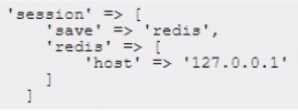
What should the Architect do to correct this issue?
- A. Utilize the Remote Storage module to synchronize sessions between the servers
- B. Update the session host value to a shared Redis instance
- C. Increase the session size with the command config:set system/security/max_session_size_admin
Answer:
B
Explanation:
When using multiple backend servers behind a load balancer, the session data must be stored in a
shared location that is accessible by all servers. Otherwise, the session data will be inconsistent and
users may experience issues such as being logged out unexpectedly. Redis is a recommended option
for storing session data in a distributed architecture, as it provides fast and reliable access to the
data. The session host value in the env.php file must point to the Redis instance that is used for
session storage. Reference: https://devdocs.magento.com/guides/v2.4/config-guide/redis/redis-session.html
Question 15
A developer needs to uninstall two custom modules as well as the database data and schemas. The
developer uses the following command:
bin/magento module:uninstall Vendor_SampleMinimal Vendor_SampleModifyContent
When the command is run from CLI, the developer fails to remove the database schema and data
defined in the module Uninstall class.
Which three requirements should the Architect recommend be checked to troubleshoot this issue?
(Choose three.)
- A. remove-schema and --remove-data options are specified as arguments for the CLI command
- B. bin/magento maintenance: enable command should be run in CLI before
- C. composer.json file is present and defines the module as a composer package
- D. Invoke uninstallData() and uninstallSchema () are defined in the Uninstall class
- E. --remove-data option is specified as an argument for the CLI command
- F. invoked uninstall () method is implemented in the Uninstall class
Answer:
CEF
Explanation:
To troubleshoot this issue, the Architect should check three requirements:
The composer.json file is present and defines the module as a composer package. This is necessary
for the module:uninstall command to work properly, as it only applies to modules installed via
composer.
The --remove-data option is specified as an argument for the CLI command. This will trigger the
uninstallData() method in the Uninstall class and remove any database data related to the module.
The uninstall() method is implemented in the Uninstall class. This will trigger the uninstallSchema()
method and remove any database schema related to the module. Alternatively, the
uninstallSchema() method can be invoked directly in the Uninstall class.