Adobe AD0-E208 Exam Questions
Questions for the AD0-E208 were updated on : Mar 07 ,2026
Page 1 out of 4. Viewing questions 1-15 out of 50
Question 1
In which order are these data components processed?
- A. Page code > VISTA Rules > Marketing Channel Rules > Processing Rules
- B. Page code > Processing Rules > VISTA Rules > Marketing Channel Rules
- C. Marketing Channel Rules > Page code > Processing Rules >VISTA Rules
Answer:
A
Explanation:
The order in which these data components are processed is page code > VISTA Rules > Marketing
Channel Rules > Processing Rules. This means that page code is processed first, then VISTA Rules are
applied on top of page code data, then Marketing Channel Rules are applied on top of VISTA Rules
data, and finally Processing Rules are applied on top of Marketing Channel Rules data.
References:
https://experienceleague.adobe.com/docs/analytics/admin/admin-tools/channel-manager/marketing-channels-overview.html?lang=en#data-processing-order
https://experienceleague.adobe.com/docs/analytics/admin/admin-tools/channel-manager/marketing-channels-overview.html?lang=en#data-processing-order
Question 2
Two single condition Segments are set up for creating a Virtual Report Suite. Both Segments are visit
scoped and have the following rule using default Dimensions:
Segment A: Marketing Channel equals 'Social Networks' Segment B: Countries equals 'United
Kingdom'
Which data subset of the source Report Suite will be available when using this Virtual Report Suite?
- A. Visit data for visits coming from a Social Network OR from the United Kingdom
- B. Visit data for visits coming from a Social Network AND from the United Kingdom
- C. All Visitor data for visits coming from a Social Network AND from the United Kingdom
Answer:
B
Explanation:
The data subset of the source report suite that will be available when using this virtual report suite is
visit data for visits coming from a Social Network AND from the United Kingdom. This is because
when two single condition segments are set up for creating a virtual report suite, they are combined
with an AND logic. This means that only the visits that match both segments will be included in the
virtual report suite.
References:
https://experienceleague.adobe.com/docs/analytics/components/virtual-report-suites/vrs-overview.html?lang=en
https://experienceleague.adobe.com/docs/analytics/components/virtual-report-suites/vrs-overview.html?lang=en#creating-a-virtual-report-suite
Question 3
What column options can an analyst choose to manage data feeds?
- A. Feed Name, Data Columns, Interval and Job history
- B. Feed Name, Data Dimensions, Start Date and End Date
- C. Report Suite, Destination Type, Destination Host and Interval
Answer:
C
Explanation:
The column options that an analyst can choose to manage data feeds are Report Suite, Destination
Type, Destination Host and Interval. These columns show information about each data feed
configuration, such as which report suite it belongs to, what type of destination it uses (FTP or SFTP),
what host name it connects to, and what interval it runs on (hourly or daily). Feed Name, Data
Columns, Data Dimensions, Start Date and End Date are not column options for managing data feeds.
References:
https://experienceleague.adobe.com/docs/analytics/export/data-feeds/data-feeds-
ui.html?lang=en https://experienceleague.adobe.com/docs/analytics/export/data-feeds/data-feeds-ui.html?lang=en#manage-data-feeds
Question 4
Several end users have complained that Analysis Workspace is too cluttered with infrequently used
variables.
How would the Report Suite Admin Console be used to improve their user experience?
- A. Suggest the team use Data Feeds
- B. Suggest the team use Customize Menus
- C. Suggest the team use Data Warehouse
Answer:
B
Explanation:
The best way to improve the user experience of Analysis Workspace for end users who complain that
it is too cluttered with infrequently used variables is to suggest the team use Customize Menus.
Customize Menus is a feature that allows users to hide or show dimensions, metrics, segments, or
date ranges in Analysis Workspace based on their preferences. This can help reduce clutter and
improve efficiency. Suggesting the team use Data Feeds or Data Warehouse will not help with this
issue, as they are different tools that are used for exporting or importing data.
References:
https://experienceleague.adobe.com/docs/analytics/analyze/analysis-workspace/customize-menus.html?lang=en
https://experienceleague.adobe.com/docs/analytics/analyze/analysis-workspace/customize-menus.html?lang=en#customize-menus-overview
Question 5
A key is matched to multiple rules and it sets the same classification column shown in the Set
Classification column.
How can a user control the order?
- A. Rank the most important first in the rule set.
- B. Rank both rules using Linear in the rule set.
- C. Rank the most important rule last in the rule set.
Answer:
C
Explanation:
If a key is matched to multiple rules and it sets the same classification column, the user can control
the order by ranking the most important rule last in the rule set. This is because classification rules
are applied from bottom to top, so the last rule that matches a key will overwrite any previous rules
that also matched the same key. Ranking the most important rule first or using linear ranking will not
work, as they will not ensure that the most important rule takes precedence over the others.
References:
https://experienceleague.adobe.com/docs/analytics/components/classifications/classifications-ruleset.html?lang=en
https://experienceleague.adobe.com/docs/analytics/components/classifications/classifications-ruleset.html?lang=en#rule-order
Question 6
Various reports show None, Unspecified, Other, or Unknown, depending on the specific report
viewed. Generally, this breakdown means that the variable was not defined or otherwise
unavailable.
Which statement explains the possible behavior of the data?
- A. When viewing classification data, any value that does not have data associated with that particular classification returns "OTHER". To resolve this issue, create a classification export file and classify the appropriate columns.
- B. Similarly to non-mobile hits in mobile reports, mobile hits in all Visitor Profile I Technology reports are listed as 'UNSPECIFIED'.
- C. This happens when a user comes to a site for the first time and makes a purchase without firing eVar1. If orders are viewed in the eVar1 report, there is no value to attribute this order to, so it will appear as "NONE".
Answer:
C
Explanation:
The statement that explains the possible behavior of the data is that this happens when a user comes
to a site for the first time and makes a purchase without firing eVar1. If orders are viewed in the
eVar1 report, there is no value to attribute this order to, so it will appear as “NONE”. This means that
eVar1 was not set on any page or hit during the visit where the order occurred, so there is no way to
associate the order with any value of eVar1. The other statements are not correct explanations of
why None, Unspecified, Other, or Unknown may appear in various reports.
References: https://experienceleague.adobe.com/docs/analytics/components/variables/conversion-variables/conversion-var-overview.html?lang=en
https://experienceleague.adobe.com/docs/analytics/components/variables/conversion-variables/conversion-var-overview.html?lang=en#unspecified-values
Question 7
The Product team wants to upload product pricing data from an offline database to the Transaction
ID in Adobe Analytics.
Which data import tool should be used for this task?
- A. Classification Importer
- B. Data Sources
- C. Data Connector
Answer:
B
Explanation:
The data import tool that should be used for this task is Data Sources. Data Sources is a feature that
allows you to upload offline data from external sources and match it with online data in Adobe
Analytics. It can also support transaction ID as a key variable to join offline and online data.
References: https://experienceleague.adobe.com/docs/analytics/import/data-sources/data-sources-overview.html?lang=en
https://experienceleague.adobe.com/docs/analytics/import/data-sources/data-sources-overview.html?lang=en#data-sources-types
Question 8
An analyst has been given a list of dimensions available to conduct an analysis on their hospital's
doctor site.
The Solution Design Reference (SDR) contains:
eventl - Start Appointment Booking - Set on: Appointment Booking Start
event2 - Booking Complete - Set on: Appointment Booking Complete
eVarl - Doctor Type - Set on: event2
eVar2 - Number of Available Appointments - Set on eventl
propl -Appointment Pathing
Given the SDR, which report can be generated?
- A. Booking Completion Rate
- B. Time to Book an Appointment
- C. Length of Appointments
Answer:
A
Explanation:
Given the SDR, the report that can be generated is Booking Completion Rate. This is a measure of
how many visitors who started an appointment booking completed it. It can be calculated by dividing
event2 (Booking Complete) by event1 (Start Appointment Booking). The other reports, Time to Book
an Appointment and Length of Appointments, cannot be generated with the given SDR, as they
require additional variables or data sources.
References: https://experienceleague.adobe.com/docs/analytics/components/metrics/calculated-metrics.html?lang=en
https://experienceleague.adobe.com/docs/analytics/components/metrics/calculated-metrics.html?lang=en#calculated-metric-examples
Question 9
The web analyst for a beauty products company wants to create a report to analyze the number of
sample requests for one of their product pages.
The following items are available from the default configuration:
• prop3, which registers the product page name and is fired in the first page load
• eVar4, which registers the product page name and is fired in the first page load
• event1 2, which fires when a visitor clicks on "Request a sample'' call to action
How can the analyst accomplish the creation of this report?
- A. Use either prop3 or eVar4 in combination with event1 2 as a metric.
- B. Use prop3 in combination with event1 2 as a metric.
- C. Use eVar4 in combination with event1 2 as a metric.
Answer:
C
Explanation:
The best way to create a report to analyze the number of sample requests for one of their product
pages is to use eVar4 in combination with event12 as a metric. eVar4 registers the product page
name and is fired in the first page load, so it will capture and persist the value for each visit. event12
fires when a visitor clicks on “Request a sample” call to action, so it will measure the number of
sample requests. Using eVar4 as a dimension and event12 as a metric will show how many sample
requests were made for each product page. Using prop3 instead of eVar4 will not work, as prop3
does not persist across hits or visits.
References: https://experienceleague.adobe.com/docs/analytics/components/variables/conversion-variables/conversion-var-overview.html?lang=en
https://experienceleague.adobe.com/docs/analytics/components/variables/traffic-variables/traffic-var-overview.html?lang=en
Question 10
A media agency is running a Display campaign, but none of the data is credited to the Display
marketing channel in Adobe Analytics.
Here are some example tracking codes provided by the media agency:
?cid=disp_lifestyle_summer2019.088653
?cid=disp_summer2019_branding_647821
?cid=disp_671244_hero_summer2019
The Marketing Channel Processing Rule for the Display channel is configured as follows: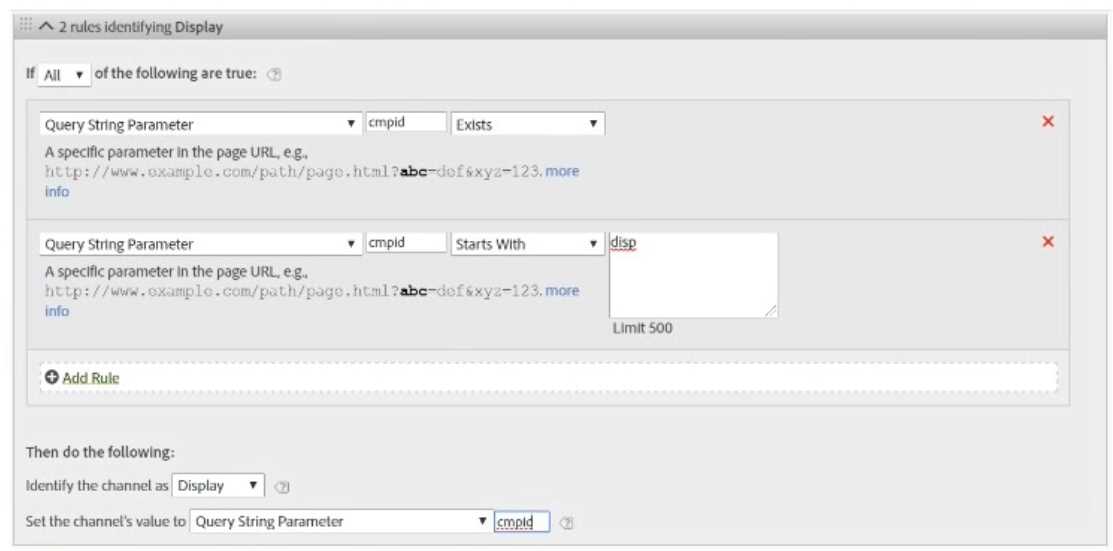
What is causing the loss of data in Adobe Analytics?
- A. The Marketing Channel processing rule is not set up to collect data for the summer2019 campaign.
- B. The Marketing Channel processing rule is using a different query string parameter.
- C. The variables in the tracking code are not following a consistent taxonomy.
Answer:
B
Explanation:
The reason why none of the data is credited to the Display marketing channel in Adobe Analytics is
that the Marketing Channel processing rule is using a different query string parameter. The tracking
codes provided by the media agency use the parameter “cid”, but the processing rule is looking for
the parameter “cmpid”. Therefore, the rule will not match any of the tracking codes and will not
assign them to the Display channel.
References:
https://experienceleague.adobe.com/docs/analytics/admin/admin-tools/channel-manager/marketing-channels-overview.html?lang=en
https://experienceleague.adobe.com/docs/analytics/admin/admin-tools/channel-manager/marketing-channels-overview.html?lang=en#marketing-channel-processing-rules
Question 11
Consider the following eVar settings:
eVar #: 3
Name: Model Name
Allocation: Most Recent (Last)
Expire After: Visit
Type: Text String
Status: Enabled
An automotive company uses eVar3 to capture "Model Name" on certain model-specific pages of
their website. The VP of Marketing expresses a concern about data quality after seeing a report of
eVar3 paired with the Visits metric. The report shows a significant number of visits with a Model
Name of "Unspecified".
What is causing this issue?
- A. eVar3 is never set due to a tagging error in the page code.
- B. The visits began on a page where eVar3 was not set.
- C. There are too many unique values in eVar3.
Answer:
B
Explanation:
The reason why the report shows a significant number of visits with a Model Name of “Unspecified”
is that the visits began on a page where eVar3 was not set. Since eVar3 is set to expire after visit and
has an allocation of most recent (last), it means that it will capture and persist the last value that was
set for that variable in a visit. If eVar3 was not set on any page during a visit, it will show up as
“Unspecified” in the report. eVar3 being never set due to a tagging error in the page code or having
too many unique values are not likely causes of this issue.
References: https://experienceleague.adobe.com/docs/analytics/components/variables/conversion-variables/conversion-var-overview.html?lang=en
https://experienceleague.adobe.com/docs/analytics/components/variables/conversion-variables/conversion-var-overview.html?lang=en#expiration
Question 12
A user needs to share an important segment with a group of users in a Product Profile Group. Why
can't a member of his Product Profile Group view the segment?
- A. The user forgot to select "Make this segment public".
- B. The user forgot to curate the Segment.
- C. The user only selected "Make this segment public-.
Answer:
A
Explanation:
The reason why a member of his Product Profile Group cannot view the segment is that the user
forgot to select “Make this segment public”. When a segment is created or edited, there is an option
to make it public or private under the Share With section. If the segment is private, only the creator
can use it. If the segment is public, it can be shared with all users, product profile groups, or
individual users who have access to the same report suite. The user did not need to curate or
duplicate the segment.
References: https://experienceleague.adobe.com/docs/analytics/components/segments/segment-sharing.html?lang=en
https://experienceleague.adobe.com/docs/analytics/components/segments/segment-sharing.html?lang=en#sharing-a-segment
Question 13
A bank client wants to understand usage of their mobile website by geographical region. The
analytics team is tasked with creating segments to provide this data.
Why would the analytics team decide to use segment stacking in the Segment Builder?
- A. It breaks a consolidated segment down into multiple granular segments.
- B. It provides the ability to consolidate more granular segments into one combined segment.
- C. It bypasses the limit on the number of segments per report.
Answer:
B
Explanation:
Segment stacking is a feature that allows you to combine multiple segments into one by using
containers within containers. It provides the ability to consolidate more granular segments into one
combined segment, which can help simplify complex segment logic or reuse existing segments. It
does not break a consolidated segment down into multiple granular segments, nor does it bypass
the limit on the number of segments per report.
References: https://experienceleague.adobe.com/docs/analytics/components/segments/segment-stacking.html?lang=en
https://experienceleague.adobe.com/docs/analytics/components/segments/segment-stacking.html?lang=en#segment-stacking-overview
Question 14
An analyst wants to exclude visits where a page with the name "Shopping Checkout" was viewed.
How would these visits be excluded from a report?
- A. A visit-based segment with one include condition: Page does not equal "Shopping Checkout"
- B. A hit-based segment with one exclude condition: Page equals "Shopping Checkout"
- C. A visit-based segment with one exclude condition: Page equals "Shopping Checkout"
Answer:
C
Explanation:
The best way to exclude visits where a page with the name “Shopping Checkout” was viewed is to
use a visit-based segment with one exclude condition: Page equals “Shopping Checkout”. This will
ensure that only the visits that did not include any hit where Page equals “Shopping Checkout” are
included in the report. A hit-based segment with one exclude condition: Page equals “Shopping
Checkout” will not work, as it will only exclude the hits where Page equals “Shopping Checkout”, but
not the entire visits. A visit-based segment with one include condition: Page does not equal
“Shopping Checkout” will not work either, as it will include any visit that had at least one hit where
Page does not equal “Shopping Checkout”, even if it also had a hit where Page equals “Shopping
Checkout”.
References: https://experienceleague.adobe.com/docs/analytics/components/segments/segment-tips.html?lang=en
https://experienceleague.adobe.com/docs/analytics/components/segments/segment-tips.html?lang=en#exclude-visits-with-a-specific-page
Question 15
A data analyst wants to create a segment of traffic that started on the page "Facebook App Home"
and accessed the "Home Page" in Analysis Workspace.
Based on the project presented below: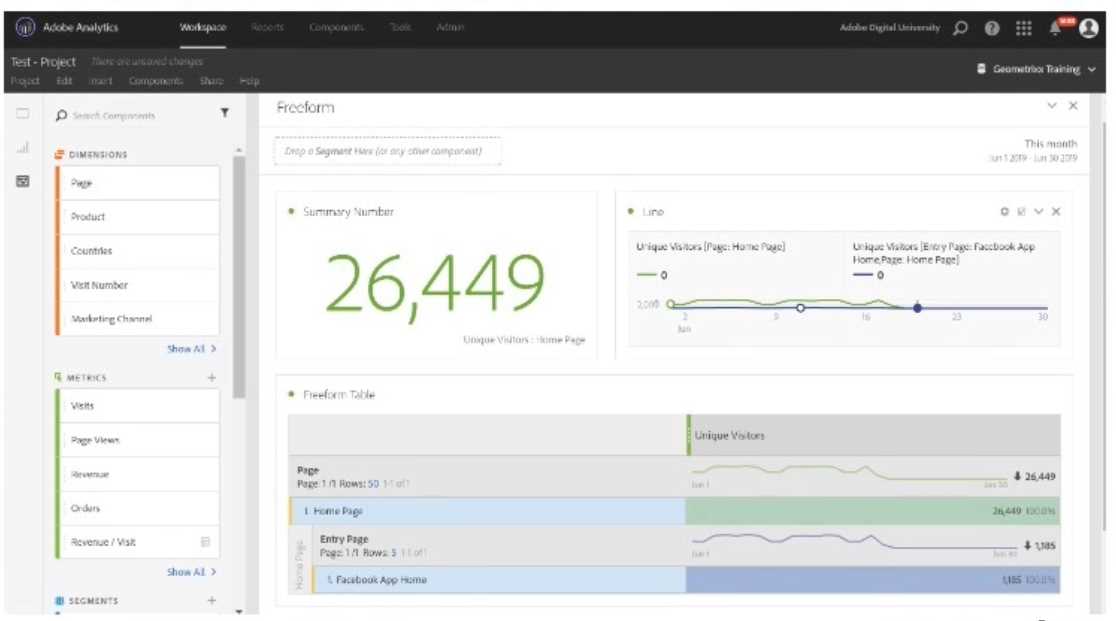
What is the proper way to create this segment and continue working on the project without loss of
data?
- A. Click and select "Home Page" and "Facebook App Home" in the table. Then right click on the selection and choose to Create a Segment from Selection, and save the segment with the exact configuration that has been automatically defined.
- B. Click on the Main Menu Components, then on segments, and create a new segment of a VISITOR container with entry page equals "Facebook App Home" AND page equals "Home Page".
- C. Click on the Internal Menu of the Components project, then on New Segment, and create a segment of a VISIT container with entry page equals "Facebook App Home" AND page equals "Home Page".
Answer:
C
Explanation:
The proper way to create a segment of traffic that started on the page “Facebook App Home” and
accessed the “Home Page” in Analysis Workspace is to click on the Internal Menu of the Components
project, then on New Segment, and create a segment of a VISIT container with entry page equals
“Facebook App Home” AND page equals “Home Page”. This will ensure that the segment captures
only the visits that meet both criteria within the same visit. Clicking and selecting “Home Page” and
“Facebook App Home” in the table and creating a segment from selection will not work, as it will
create a segment of a HIT container with page equals “Home Page” OR page equals “Facebook App
Home”, which is not what is required. Clicking on the Main Menu Components and creating a new
segment of a VISITOR container with entry page equals “Facebook App Home” AND page equals
“Home Page” will not work either, as it will capture visitors who met both criteria across different
visits, which is also not what is required.
References:
https://experienceleague.adobe.com/docs/analytics/components/segments/create-segments-in-analysis-workspace.html?lang=en
https://experienceleague.adobe.com/docs/analytics/components/segments/create-segments-in-analysis-workspace.html?lang=en#creating-a-segment-from-a-table